1. المقدمة
This manual provides detailed instructions for the installation, operation, and maintenance of your 10.25 Inch Car Touchscreen Wireless CarPlay Android Auto multimedia receiver. This unit is designed to enhance your driving experience with advanced navigation, communication, and entertainment features.
2. التوافق
This multimedia player is specifically designed for BMW X1 F48 models from 2017-2020 with an EVO ID6 system and a 6-pin LVDS plug. Before installation, it is crucial to confirm your vehicle's original system type to ensure proper compatibility.
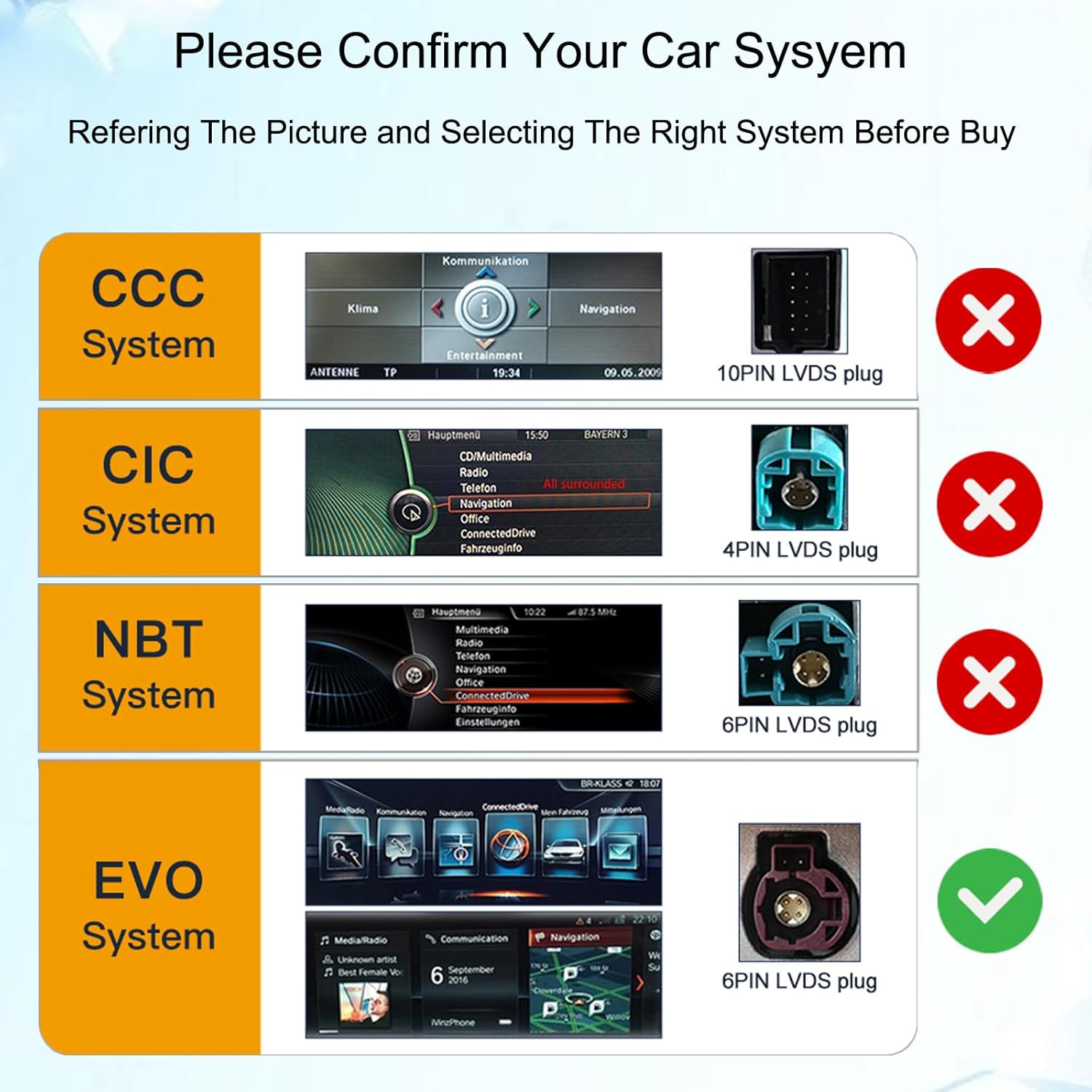
Image: Confirm your car's system type by referring to the provided diagram and LVDS plug configurations. Ensure your vehicle has an EVO system with a 6-pin LVDS plug.
3. الميزات الرئيسية
- 10.25 Inch HD Touchscreen: Replaces the factory OEM screen with a high-definition capacitive full touch screen (1920x720 resolution).
- Apple CarPlay اللاسلكي وAndroid Auto: تكامل سلس مع هاتفك الذكي للملاحة والمكالمات والرسائل والموسيقى.
- نظام التشغيل Android 14: Provides access to a wide range of applications via Google Play.
- Built-in GPS Navigation: Supports online and offline maps (e.g., Google Maps, Waze, iGO).
- الاتصال عبر البلوتوث: For hands-free calls and wireless music streaming.
- HD Video Player: Supports various video formats for clear playback.
- Built-in DSP Processor: Enhances audio quality with multi-dimensional surround sound.
- Original System Functionality Retention: Maintains original car radio, amplifier, joystick control, and camera functions.
- وظيفة تقسيم الشاشة: Allows simultaneous display of two applications.

الصورة: أكثر منview of the product's main features, including wireless connectivity and core system specifications.

Image: Demonstrates advanced features such as split-screen display and compatibility with existing vehicle controls and cameras.
4. محتويات العبوة
تأكد من تضمين جميع العناصر المدرجة أدناه في الحزمة الخاصة بك:
- 1 x Car Multimedia Player
- 1 × ميكروفون (MIC)
- 1 × كابل الطاقة
- 1 × هوائي 4G
- 1 × هوائي GPS
- 1 × كابل يو اس بي
- شنومكس x أوكس كابل
- 1 x Plastic Base
- 2 × مسامير
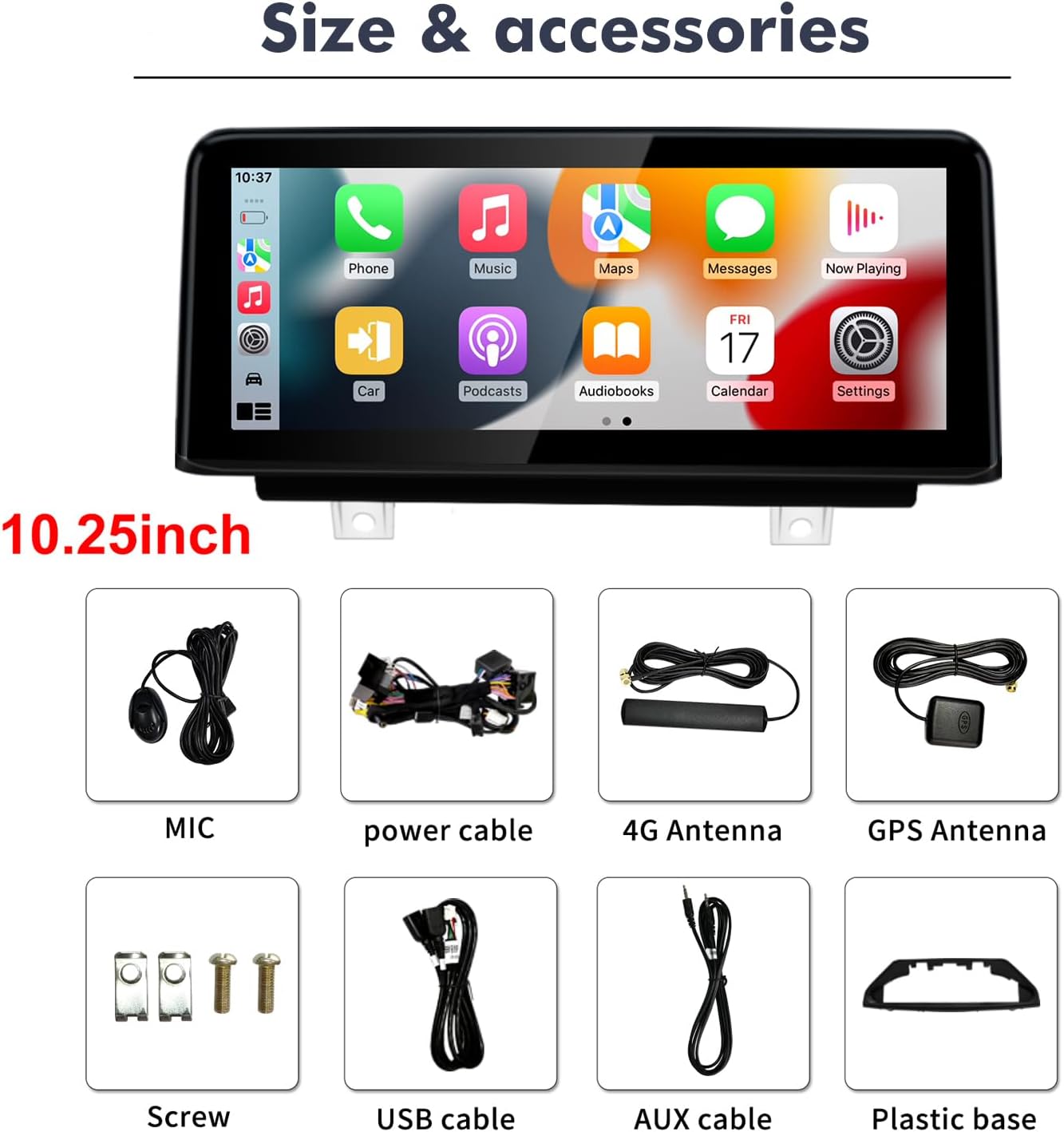
صورة: جميع المكونات المضمنة في عبوة المنتج.
5. الإعداد والتثبيت
Installation of this car multimedia player requires technical knowledge. It is recommended to seek professional installation to avoid damage to the unit or your vehicle. Ensure the vehicle's ignition is off and the battery is disconnected before beginning installation.
- تحضير: Confirm your car's system (EVO ID6 with 6-pin LVDS) matches the unit's compatibility. Gather necessary tools.
- Remove Original Screen: Carefully remove the existing car screen and trim panels as per your vehicle's service manual.
- توصيل الأسلاك: Connect the provided power cable, LVDS cable, USB cable, AUX cable, 4G antenna, and GPS antenna to the new multimedia player and the vehicle's wiring harness. Ensure all connections are secure and correct.
- جبل الوحدة الجديدة: Install the new 10.25-inch touchscreen unit into the dashboard opening, securing it with the provided screws and plastic base.
- وظيفة الاختبار: Before reassembling all trim panels, reconnect the battery and test all functions of the new unit, including power, touch response, audio, CarPlay/Android Auto, GPS, and original system functions.
- إعادة التجميع: Once all functions are confirmed, carefully reassemble all removed trim panels.

Image: Visual comparison of the dashboard before and after the multimedia player installation.
6. تعليمات التشغيل
6.1. نظام كاربلاي اللاسلكي / نظام أندرويد أوتو
- تأكد من تفعيل خاصية البلوتوث والواي فاي في هاتفك الذكي.
- On the car unit, navigate to the CarPlay or Android Auto application.
- Follow the on-screen prompts to pair your phone. Once paired, your phone's interface will be mirrored on the car screen, allowing access to navigation, calls, messages, and music.
6.2. نظام الملاحة GPS
- Access the Navigation app from the main menu.
- You can use pre-installed maps or download additional navigation apps from the Google Play Store.
- For offline navigation, download map data to the unit's storage in advance.
6.3. Bluetooth Calls and Music
- Go to the Bluetooth settings on the unit.
- قم بتمكين البلوتوث وابحث عن الأجهزة المتاحة.
- اختر هاتفك من القائمة وقم بإقرانه.
- Once connected, you can make/receive calls using the external microphone and stream audio from your phone.
6.4. تشغيل الوسائط المتعددة
- تدعم الوحدة العديد من تنسيقات الصوت والفيديو.
- Play media from USB drives, internal storage, or streaming apps.
- Use the built-in DSP for audio adjustments to optimize sound quality.
7. المواصفات
| ميزة | مواصفة |
|---|---|
| نظام التشغيل | أندرويد 14 |
| حجم الشاشة | 10.25 بوصة |
| دقة الشاشة | 1920*720 |
| الذاكرة (RAM + ROM) | 8 جيجا بايت رام + 64 جيجا بايت روم |
| الاتصال | Bluetooth, Wi-Fi, 4G (via antenna) |
| المميزات الخاصة | Built-In Bluetooth, Touchscreen, Wireless CarPlay, Android Auto, GPS, DSP |
| الأجهزة المتوافقة | الهاتف الذكي |
| طريقة التحكم | يلمس |
| رقم الموديل | 8581 8+64GB |
8. استكشاف الأخطاء وإصلاحها
- لا يوجد طاقة: Check all power cable connections. Ensure the vehicle's ignition is on. Verify the fuse.
- لا يوجد صوت: Check speaker connections. Ensure the volume is not muted or set too low. Verify audio output settings. If using original amplifier, ensure it's properly integrated.
- عدم اتصال CarPlay/Android Auto: Ensure Bluetooth and Wi-Fi are enabled on your phone and the unit. Try restarting both devices. Confirm your phone's operating system is up to date.
- فقدان إشارة GPS: تأكد من تثبيت هوائي نظام تحديد المواقع العالمي (GPS) بشكل صحيح وأن له صورة واضحة view of the sky. Check GPS settings on the unit.
- شاشة اللمس لا تستجيب: حاول إعادة تشغيل الجهاز. إذا استمرت المشكلة، فاتصل بالدعم الفني.
- Original Functions Not Working: Double-check all LVDS and CANBUS connections. Ensure the unit is correctly configured to retain original car functions.
9. الصيانة
- تنظيف: استخدم قطعة قماش ناعمة وجافة لتنظيف الشاشة والوحدة. تجنب استخدام المنظفات أو المذيبات الكاشطة.
- تحديثات البرامج: قم بالتحقق دوريًا من وجود تحديثات للبرامج لضمان الأداء الأمثل والوصول إلى الميزات الجديدة.
- الظروف البيئية: تجنب تعريض الوحدة لدرجات حرارة عالية، أو أشعة الشمس المباشرة لفترات طويلة، أو الرطوبة الزائدة.
10. الضمان والدعم
This product comes with a 30-day Money-Back guarantee, 12-month Replacement warranty, and Lifetime Technical Support. Most issues can be resolved through correct cable connection and settings. If you encounter any problems during installation or use, please contact customer support for assistance. We aim to respond within 24 hours to help resolve your issue.


