
1. المقدمة
This manual provides detailed instructions for assembling and operating your DONGKER Owl LED Soldering Kit. This kit is designed for beginners and enthusiasts to learn and practice soldering skills while creating a functional and decorative LED owl light with touch control.
2. محتويات العبوة
Before beginning assembly, please verify that all components listed below are present in your kit.
- Owl-shaped PCB (Printed Circuit Board)
- مصابيح LED (الثنائيات الباعثة للضوء)
- المقاومات
- المكثفات
- الدوائر المتكاملة (ICs)
- كابل الطاقة USB
- براغي التثبيت والفواصل

3. الإعداد والتجميع
This section guides you through the soldering process. Basic soldering tools (soldering iron, solder, desoldering wick/pump, safety glasses) are required and not included.
3.1 تحديد المكون
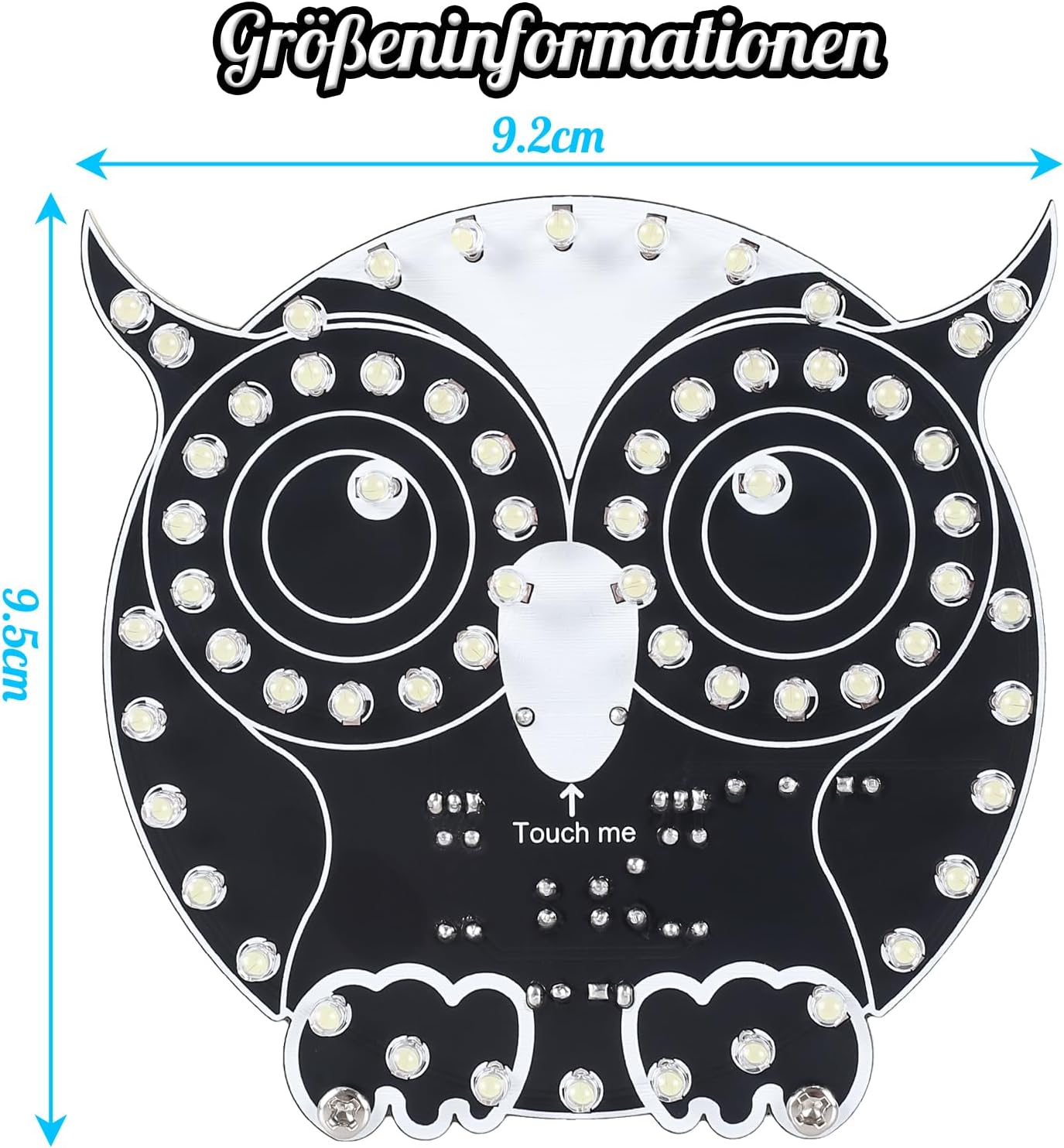
Familiarize yourself with the different electronic components. The PCB is clearly marked to indicate where each component should be placed. Pay close attention to the markings for correct orientation.

3.2 عملية اللحام
- قم بإعداد مكان عملك: Ensure a well-ventilated area, clear of flammable materials. Wear safety glasses to protect your eyes.
- تحديد المكونات: Match each component to its designated spot on the PCB using the silkscreen markings. Pay attention to polarity for LEDs, diodes, and electrolytic capacitors. The longer leg of an LED is typically positive (+).
- قم بلحام أصغر المكونات أولاً: Begin with resistors, then diodes, smaller capacitors, and finally the integrated circuits. This approach makes soldering easier by preventing larger components from obstructing access.
- لحام مصابيح LED: Carefully solder each LED into its position. Ensure correct polarity.
- Solder USB Port: Attach the USB power port to the PCB.
- فحص وصلات اللحام: After soldering each component, visually inspect the joints for proper connection. Look for shiny, cone-shaped joints. Avoid cold joints (dull, lumpy) or solder bridges (solder connecting two adjacent pads).

3.3 التجميع النهائي
Once all components are soldered and inspected, attach the included standoffs and screws to secure the PCB and provide stability for the finished owl light.
4. تعليمات التشغيل
The DONGKER Owl LED light features touch control for mode selection and brightness adjustment.
4.1 التشغيل
Connect the provided USB power cable to the USB port on the owl light and to a 5V DC power source (e.g., USB wall adapter, computer USB port).

4.2 Changing LED Modes
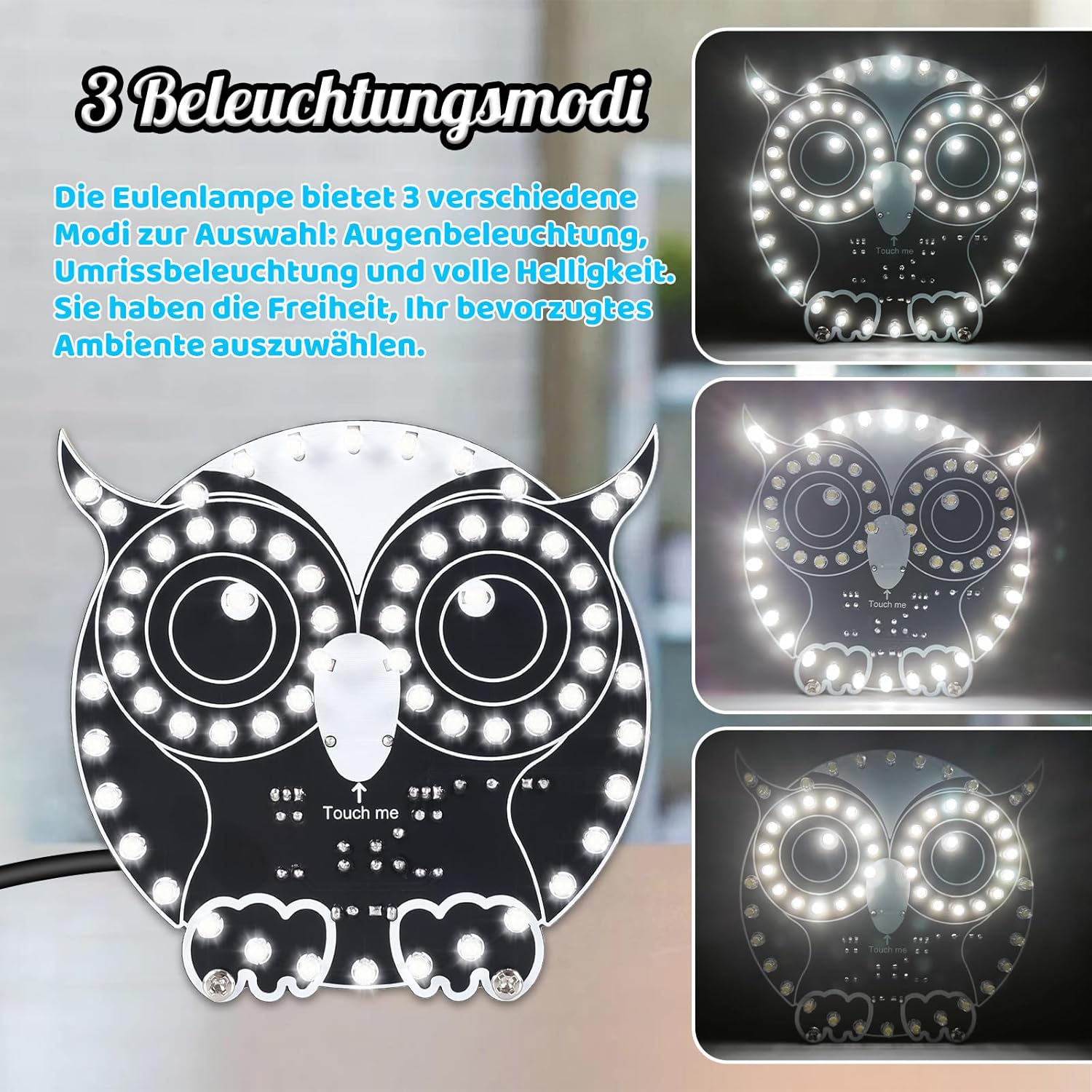
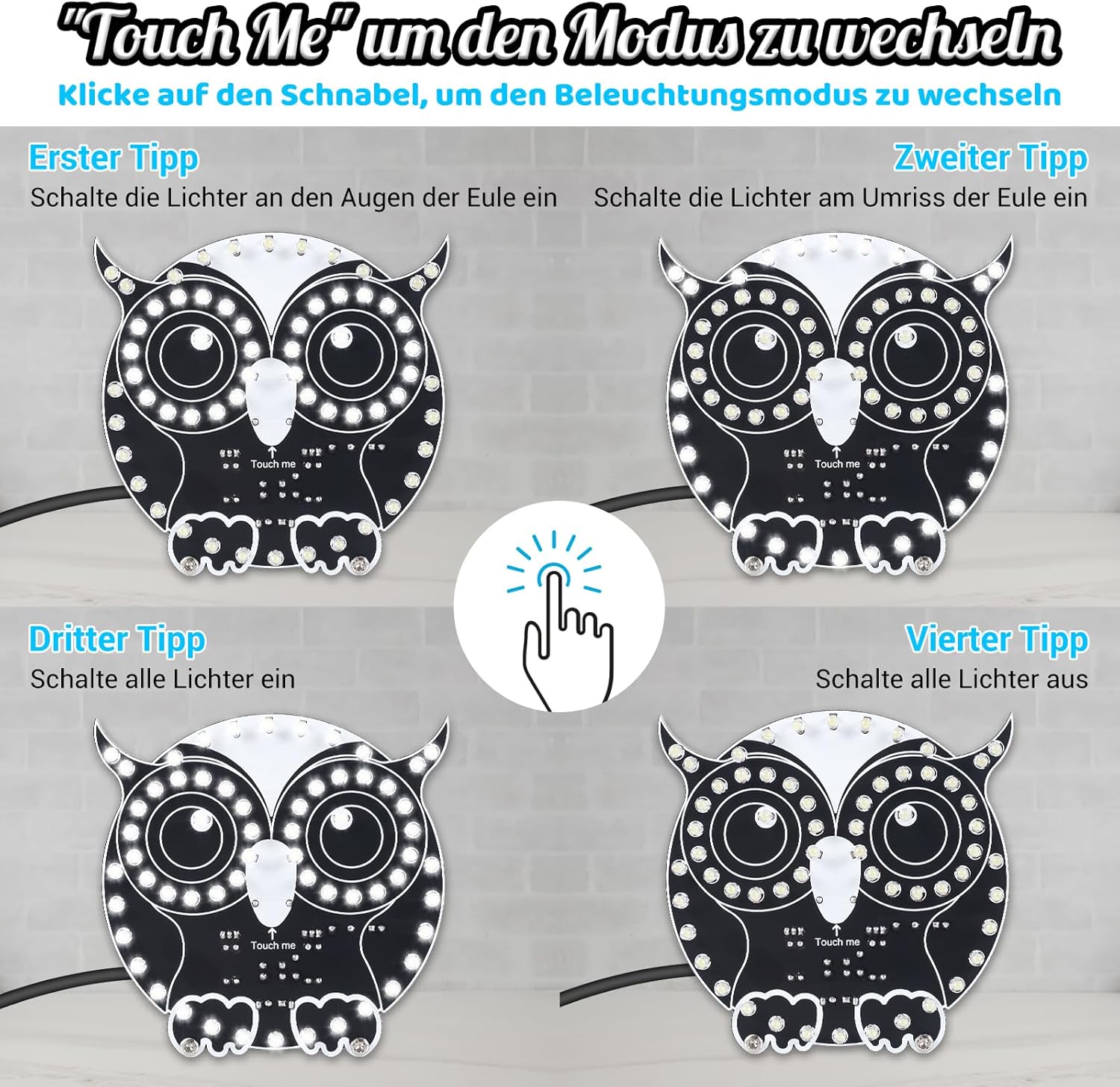
The owl light offers three distinct LED modes. To cycle through these modes, lightly tap the "Touch me" area located on the owl's beak.
- First Tap: Activates the eye lights only.
- Second Tap: Activates the outline lights.
- Third Tap: Activates all lights for full brightness.
- Fourth Tap: Turns off all lights.

4.3 ضبط السطوع
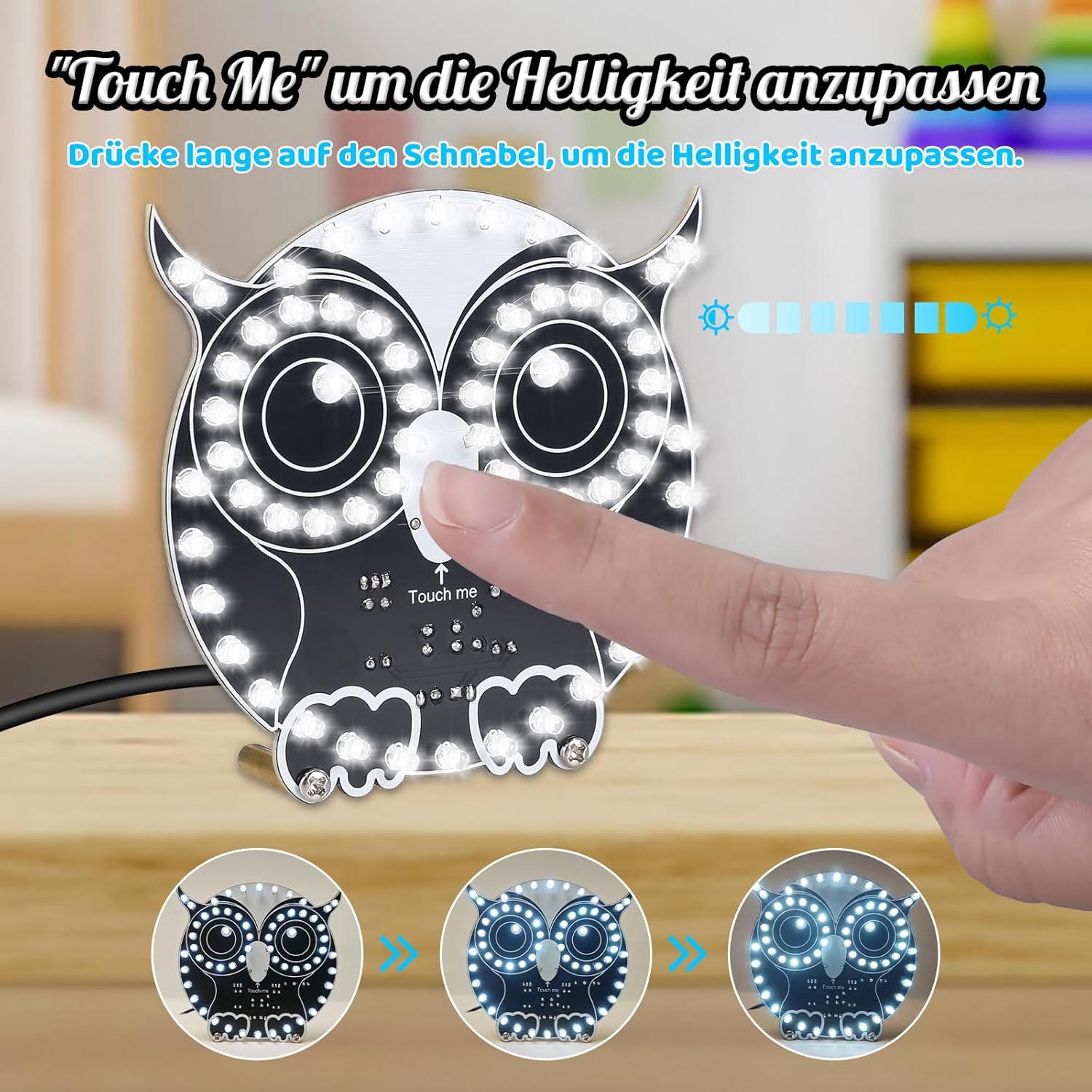
To adjust the brightness, press and hold your finger on the "Touch me" area. The brightness will gradually increase or decrease. Release your finger when the desired brightness level is reached.

5. الصيانة
To ensure the longevity and proper functioning of your DONGKER Owl LED light, follow these simple maintenance guidelines:
- تنظيف: Gently wipe the PCB and LEDs with a soft, dry cloth. Avoid using liquids or abrasive cleaners, which can damage electronic components.
- تخزين: Store the assembled kit in a dry, dust-free environment when not in use to prevent component degradation.
- التعامل: Handle the circuit board with care to avoid bending or damaging components and solder joints.
6. استكشاف الأخطاء وإصلاحها
If you encounter issues with your DONGKER Owl LED light, refer to the following common problems and solutions:
- مصابيح LED لا تضيء:
- Check power connection: Ensure the USB cable is securely connected to a working 5V power source.
- Inspect solder joints: Look for any cold joints (dull, lumpy) or solder bridges that might prevent electrical contact. Re-solder as necessary.
- Verify LED polarity: Ensure all LEDs are soldered with the correct polarity. Incorrect polarity will prevent LEDs from lighting.
- Check for short circuits: Examine the PCB for any accidental solder bridges between traces or component leads.
- Inconsistent Touch Response:
- Ensure the "Touch me" area is clean and dry. Moisture or dirt can interfere with touch detection.
- Verify the touch sensor components are correctly soldered and not damaged.
- Only Some LEDs Light Up:
- This often indicates a faulty solder joint or incorrect polarity for the unlit LEDs. Re-inspect and correct the affected LEDs.
If problems persist after attempting these solutions, please contact DONGKER customer support for further assistance.
7. المواصفات
| ميزة | التفاصيل |
|---|---|
| رقم الموديل | GY21488-1-KTH |
| الشركة المصنعة | DONGKER |
| نوع الطاقة | تيار مستمر 5 فولت (عبر منفذ USB) |
| أبعاد الحزمة | 14.1 × 11.4 × 1.6 سم |
| وزن | 60 جرام |
| المكونات المضمنة | PCB, LEDs, Resistors, Capacitors, ICs, USB Cable |
| البطاريات المطلوبة | لا |
| توافر قطع الغيار | 1 سنة |

8. الضمان والدعم
DONGKER is committed to providing quality products. While this is a DIY kit, we offer support for any questions you may have during assembly or operation.
- يدعم: If you have questions or require assistance, please contact DONGKER customer service through the retailer where you purchased the product.
- قطع غيار: تتوفر قطع الغيار لمدة عام واحد من تاريخ الشراء.