
1. المقدمة
Thank you for choosing the Tesvor S8Pro Robot Vacuum Cleaner. This manual provides essential information for setting up, operating, and maintaining your robot vacuum to ensure optimal performance and longevity. Please read this manual thoroughly before using the product and keep it for future reference.
2. تعليمات السلامة
To reduce the risk of injury or damage, read these safety instructions carefully. This appliance is for indoor household use only.
- لا تستخدم الروبوت في البيئات الرطبة أو على الأسطح التي تحتوي على مياه راكدة.
- Keep the robot away from open flames or fragile objects.
- Ensure the charging dock is placed against a wall on a level surface, with no obstacles within 1 meter (3 feet) in front and 0.5 meters (1.5 feet) on either side.
- لا تسمح للأطفال بتشغيل الروبوت. راقب الأطفال والحيوانات الأليفة أثناء تشغيل الروبوت.
- Before cleaning, remove power cords, small objects, and any items that could entangle the brushes.
- لا تستخدم الروبوت لالتقاط الحطام الكبير أو السوائل أو الأجسام المحترقة.
- Only use the original power adapter and charging dock provided by Tesvor.
- في حالة تلف سلك الطاقة، يجب استبداله من قبل الشركة المصنعة أو وكيل خدمة مؤهل لتجنب المخاطر.
3. محتويات العبوة
تأكد من وجود جميع المكونات في العبوة:
- روبوت المكنسة الكهربائية
- محول الطاقة
- وسادة الممسحة
- محطة شحن
- خزان مياه وحاوية نفايات 2 في 1
- فرش جانبية (زوجان)
- فلتر HEPA (مثبت مسبقًا)
- دليل المستخدم
- أدوات التنظيف
- جهاز التحكم عن بعد
- فرشاة دوارة (مثبتة مسبقًا)

الصورة 3.1: محتويات العبوة. The package includes the robot vacuum, power adapter, mop pad, charging station, 2-in-1 water tank and dustbin, side brushes, HEPA filter, user manual, cleaning tools, remote control, and roller brush.
4. انتهى المنتجview
The Tesvor S8Pro is a 2-in-1 robot vacuum cleaner featuring powerful suction and intelligent navigation for efficient home cleaning.
المميزات الرئيسية:
- شفط قوي: Up to 6000 Pa (adjustable up to 8000 Pa) for deep cleaning.
- 2-in-1 Vacuum & Mop: Simultaneous vacuuming and mopping with a 350 ml electronic water tank and 250 ml dustbin.
- نظام الملاحة بتقنية الليدار: Precise mapping and optimal route planning for comprehensive coverage.
- عمر بطارية طويل: 5200 mAh lithium-ion battery, providing up to 180 minutes of runtime at low suction.
- Automatic Charging & Resume: Returns to the charging dock when battery is low and resumes cleaning.
- Sensor-Controlled Obstacle Avoidance: Detects and avoids obstacles to prevent collisions.
- تعزيز السجاد: Automatically increases suction power on carpets.
- التحكم الذكي: Control via smartphone app, compatible with Amazon Alexa and Google Home.

Image 4.1: 2-in-1 Water Tank and Dustbin. The Tesvor S8Pro features a versatile 2-in-1 design, allowing it to vacuum and mop simultaneously. It includes a 350 ml water tank and a 250 ml dustbin.

Image 4.2: Powerful Suction. The Tesvor S8Pro offers powerful suction, adjustable up to 8000Pa, to effectively clean various types of debris from hard floors and carpets. The image shows different suction levels from quiet to max.
5. الإعداد
5.1 موضع قاعدة الشحن
Place the charging dock against a wall on a hard, level surface. Ensure there are no obstacles within 1 meter (3 feet) in front and 0.5 meters (1.5 feet) on either side of the dock to allow the robot to return and charge successfully.
5.2 الشحن الأولي
Connect the power adapter to the charging dock and plug it into a wall outlet. Place the robot on the charging dock. The robot will automatically begin charging. For first-time use, fully charge the robot (approximately 5-6 hours).

Image 5.1: Automatic Charging. The robot vacuum automatically returns to its charging dock when the battery is low (below 20%) and resumes cleaning from where it left off once charged (above 80%).
5.3 تركيب الفرش الجانبية
قم بتثبيت الفرش الجانبية على الأعمدة المقابلة لها في الجزء السفلي من الروبوت حتى تستقر في مكانها.
5.4 Installing 2-in-1 Water Tank/Dustbin
Fill the water tank with clean water (for mopping) and ensure the dustbin is empty. Slide the 2-in-1 module into the back of the robot until it locks securely.
5.5 الاتصال بالتطبيق
Download the Tesvor app from your smartphone's app store. Follow the in-app instructions to connect your robot vacuum to your home Wi-Fi network. This enables advanced features like scheduling, cleaning mode selection, and real-time mapping.
6. التشغيل
6.1 بدء/إيقاف التنظيف مؤقتًا
- يبدأ: Press the power button on the robot or the 'Clean' button in the app/remote control to start automatic cleaning.
- يوقف: Press the power button or 'Clean' button again to pause cleaning.
6.2 أوضاع التنظيف
Select cleaning modes via the Tesvor app or remote control:
- التنظيف التلقائي: The robot intelligently plans an S-shaped path for comprehensive coverage.
- تنظيف البقعة: ينظف منطقة محددة بشكل مكثف.
- تنظيف الحواف: تنظيف على طول الجدران وحواف الأثاث.
- وضع المسح: For wet cleaning, ensure the water tank is filled and the mop pad is attached.

Image 6.1: Smart Cleaning Features. This intelligent robot vacuum supports various cleaning modes including S-shaped path, specific area cleaning, and scheduled cleaning. It generates real-time room maps and can be controlled via Amazon Alexa or Google Home.
6.3 تعزيز السجاد
The robot automatically detects carpets and increases its suction power for a more thorough clean. It can also navigate over obstacles up to 20mm high.

Image 6.2: Carpet Boost. The robot vacuum automatically detects carpets and increases suction power for a deeper clean. It can climb obstacles up to 20mm.
6.4 التحكم الصوتي
The Tesvor S8Pro is compatible with Amazon Alexa and Google Home. Follow the instructions in the Tesvor app to link your robot with your voice assistant for convenient control.

Image 6.3: LDS LiDAR Navigation. The robot vacuum uses advanced LDS LiDAR navigation to efficiently map its surroundings, ensuring comprehensive coverage and optimized cleaning paths.
7. الصيانة
Regular maintenance ensures your Tesvor S8Pro operates efficiently. Always turn off the robot before performing any maintenance.
7.1 Emptying Dustbin & Cleaning Water Tank
- Press the release button to remove the 2-in-1 module.
- Open the dustbin compartment and empty debris.
- اشطف حاوية الغبار وخزان الماء بالماء النظيف. اتركهما يجفان تماماً في الهواء قبل إعادة تركيبهما.
- Remove and clean the mop pad after each use.
7.2 تنظيف الفرشاة الرئيسية
Open the main brush cover on the bottom of the robot. Remove the main brush and use the cleaning tool to cut and remove any hair or debris tangled around it. Reinstall the brush.
7.3 تنظيف الفرش الجانبية
Periodically check the side brushes for tangled hair or debris. Pull them off their posts, clean them, and reattach. Replace worn brushes as needed.
7.4 تنظيف المرشحات
Remove the HEPA filter from the dustbin. Tap it gently to remove dust. Do not wash the HEPA filter with water. Replace the HEPA filter every 3-6 months, depending on usage.
7.5 تنظيف أجهزة الاستشعار ونقاط اتصال الشحن
Wipe the cliff sensors, wall sensors, and charging contacts on both the robot and the charging dock with a clean, dry cloth to ensure proper function.
8. استكشاف الأخطاء وإصلاحها
إذا واجهت مشاكل مع مكنسة الروبوت الخاصة بك، فراجع المشاكل والحلول الشائعة التالية:
| مشكلة | السبب المحتمل | حل |
|---|---|---|
| الروبوت لا يعمل | انخفاض مستوى البطارية؛ لم يتم الضغط على زر التشغيل | اشحن الروبوت؛ اضغط مع الاستمرار على زر الطاقة لمدة 3 ثوانٍ |
| لا يمكن للروبوت الشحن | نقاط التلامس الخاصة بالشحن متسخة؛ قاعدة الشحن غير موصولة بالكهرباء | نظّف نقاط التلامس الخاصة بالشحن؛ وتأكد من توصيل قاعدة الشحن بالكهرباء. |
| الروبوت يتعطل بشكل متكرر | عوائق كثيرة؛ أجهزة استشعار المنحدرات متسخة | Clear the cleaning area; Clean cliff sensors |
| أداء التنظيف الضعيف | سلة المهملات ممتلئة؛ الفرش متشابكة؛ الفلتر مسدود | أفرغ سلة المهملات؛ نظف الفرش الرئيسية والجانبية؛ نظف/استبدل الفلتر |
| وظيفة المسح لا تعمل | Water tank empty; Mop pad not attached | Fill water tank; Attach mop pad correctly |
For further assistance, please contact Tesvor customer support.
9. المواصفات
| ميزة | التفاصيل |
|---|---|
| ماركة | تيسفور |
| اسم الموديل | YC-S8 Pro |
| رقم الموديل | M2-NLT |
| قوة الشفط | 6000 Pa (adjustable up to 8000 Pa) |
| نوع التنقل | نظام الملاحة LiDAR |
| نوع البطارية | ليثيوم أيون |
| سعة البطارية | 5200 مللي أمبير |
| أقصى وقت تشغيل | 180 minutes (at lowest suction) |
| سعة خزان المياه | 350 مل |
| سعة سلة المهملات | 250 مل |
| نوع الفلتر | مرشح هواء عالي الكفاءة |
| طريقة التحكم | تطبيق، التحكم عن بعد |
| الأجهزة المتوافقة | أمازون إيكو، جوجل هوم، الهاتف الذكي، الجهاز اللوحي |
| أبعاد المنتج (الروبوت) | 33 لترًا × 33 عرضًا × 10 ارتفاعًا سم |
| Charging Dock Dimensions | 17.5 لترًا × 9 عرضًا × 11.5 ارتفاعًا سم |
| لون | أبيض |
| الاستخدامات الموصى بها | Home cleaning, floors, carpets, pet hair removal |
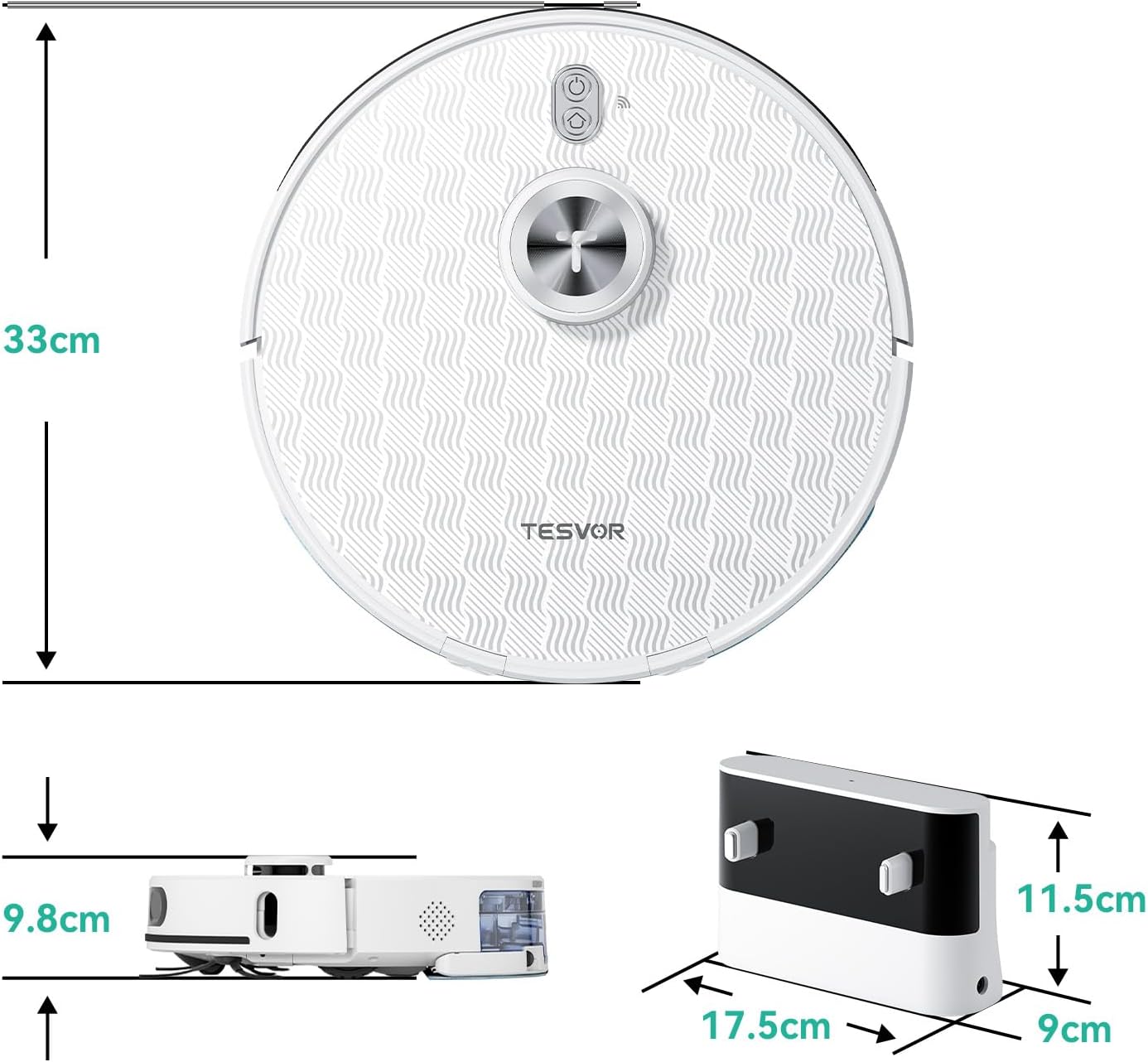
الصورة 9.1: أبعاد المنتج. The robot vacuum measures 33cm in diameter and 9.8cm in height. The charging dock measures 17.5cm in width, 9cm in depth, and 11.5cm in height.
10. الضمان والدعم
The Tesvor S8Pro Robot Vacuum Cleaner comes with a ضمان لمدة 2 سنوات. For warranty claims, technical support, or any questions regarding your product, please contact Tesvor customer service through the official website or your purchase platform. Please have your model number (M2-NLT) and proof of purchase ready.