
1. المقدمة
Thank you for choosing the TREBLEET 13-in-1 Professional Docking Station. This manual provides detailed instructions for setting up, operating, and maintaining your docking station to ensure optimal performance. This versatile docking station is designed to expand the connectivity of your Thunderbolt 3/4 or USB4 enabled Mac or Windows computer, offering a wide array of ports and features for enhanced productivity.
2. محتويات العبوة
يرجى التأكد من وجود جميع العناصر في الحزمة الخاصة بك:
- 1x TREBLEET 13-in-1 Professional Docking Station
- 1x Thunderbolt 3/USB4 40Gbps Cable
- 1x 120W Power Supply (24V/5A)
- دليل البدء السريع شنومكس
- 1 × حامل كابل
3. انتهى المنتجview
The TREBLEET 13-in-1 Docking Station features a robust aluminum chassis designed for efficient heat dissipation and durability. It offers a comprehensive set of ports for various peripherals and display configurations.

الشكل 1: الجانب الأمامي view of the TREBLEET 13-in-1 Professional Docking Station, showcasing its sleek design and various ports.
منافذ اللوحة الأمامية:
- 3.5mm Audio Headset/Mic Jack: For connecting headphones or a microphone.
- SD 4.0 Card Slot: Supports UHS-II theoretical bus speed up to 312MB/s, compatible with SDXC, SDHC, and standard SD cards.
- USB 3.1 Gen2 Type-A Port (10Gbps): لنقل البيانات بسرعة عالية.
- Thunderbolt 4 Upstream Port (Max 98W PD): Connects to your host laptop and provides up to 98W power delivery.
- زر الطاقة: لتشغيل/إيقاف محطة الإرساء.
منافذ اللوحة الخلفية:
- DC في 20V: مدخل الطاقة لمحول الطاقة بقدرة 120 واط.
- 3x Thunderbolt 4 Downstream Ports (15W PD each): For connecting additional Thunderbolt devices or displays.
- 2x USB 2.0 Type-A Ports (5Gbps): لتوصيل الأجهزة الطرفية القياسية عبر منفذ USB.
- منفذ إيثرنت 2.5 جيجابت: Provides high-speed wired network connectivity.
- منفذ العرض 1.4: لتوصيل الشاشات الخارجية.
- HDMI: لتوصيل الشاشات الخارجية.
المميزات الداخلية:
- 4x Modular Expansion Interface Slots: Allows for customization with various expansion cards (sold separately), such as CFexpress Type-A/B, XQD, CFast2.0, SD&TF card readers.
- M.2 Socket for NVMe SSD (PCIe Gen.3 x2): Supports high-speed storage expansion up to 2800 MB/s.
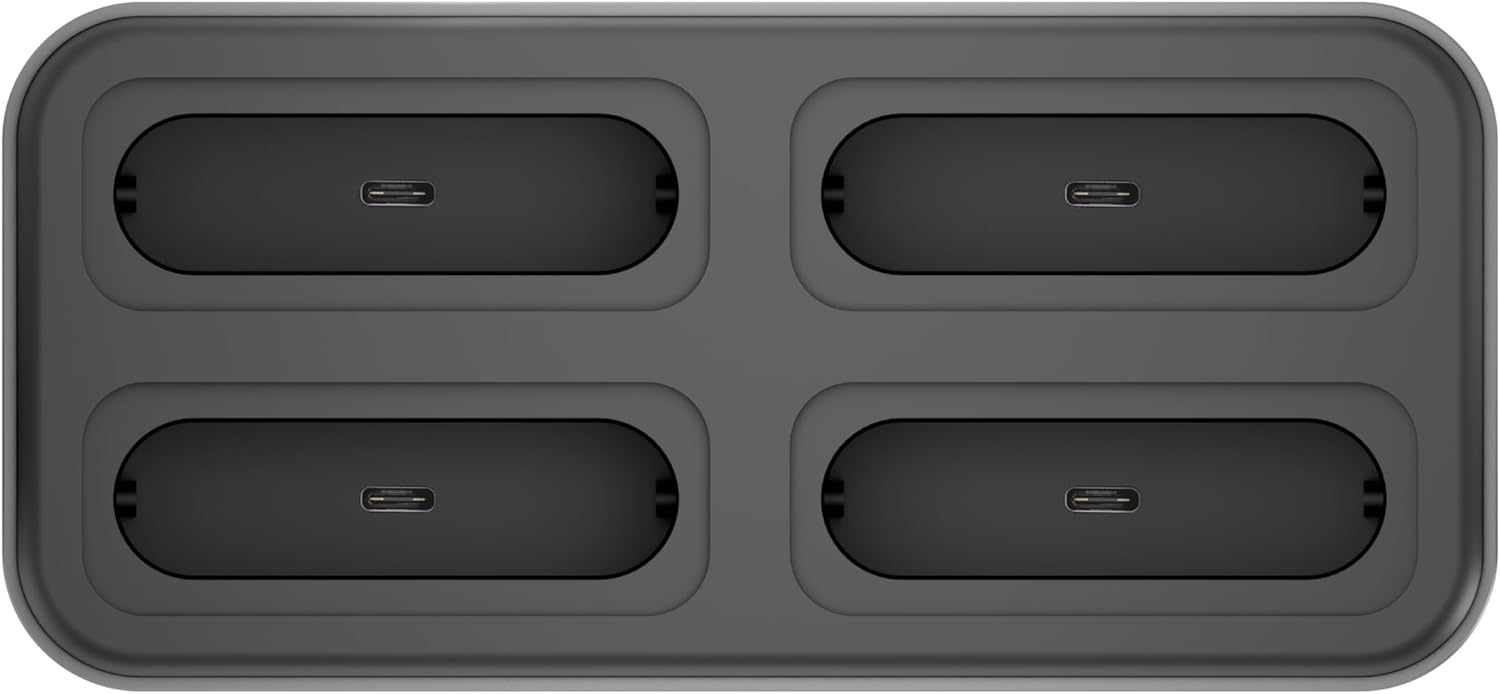
الشكل 2: الجزء العلوي view of the docking station, highlighting the four modular expansion slots for customizable connectivity.

Figure 3: The docking station shown with different expansion modules, such as card readers and USB drives, inserted into its modular slots.

الشكل 4: انفجرت view illustrating the process of installing an NVMe SSD into the dedicated M.2 socket within the docking station.
4. دليل الإعداد
Follow these steps to set up your TREBLEET Docking Station:
- توصيل الطاقة: Plug the included 120W power adapter into the 'DC IN 20V' port on the rear of the docking station, then connect the adapter to a power outlet.
- الاتصال بجهاز الكمبيوتر المضيف: Use the provided Thunderbolt 3/USB4 40Gbps cable to connect the docking station's 'Thunderbolt 4 Upstream' port (Max 98W PD) on the front panel to a Thunderbolt 3/4 or USB4 port on your laptop.
- تشغيل الطاقة: اضغط على زر الطاقة الموجود في الجزء الأمامي من محطة الإرساء.
- تثبيت برامج التشغيل (إذا لزم الأمر): For full functionality, especially for DisplayLink features or specific operating systems, you may need to install drivers. Refer to the 'Driver Download Links' pamphlet included in your package or visit the TREBLEET support webموقع.
- توصيل الأجهزة الطرفية: Connect your external monitors, USB devices, Ethernet cable, and audio devices to the respective ports on the docking station.

Figure 5: A typical setup showing the docking station connected to a laptop, powering and extending its display to multiple external monitors, and connecting various peripherals.
5. تعليمات التشغيل
تكوين العرض:
تدعم محطة الإرساء تكوينات عرض متنوعة:
- عرض واحد: Up to 8K @ 60Hz (7680x4320) via DisplayPort 1.4.
- شاشات مزدوجة: Up to 4K @ 60Hz for each display.
- Quad Displays: Achievable through a combination of Thunderbolt 4, DisplayPort, and HDMI ports, potentially requiring DisplayLink drivers for certain setups.
Ensure your computer's graphics card and operating system support the desired display configuration.
تسليم الطاقة:
The upstream Thunderbolt 4 port provides up to 98W of power delivery to charge your connected laptop. Downstream Thunderbolt 4 ports provide 15W each for connected devices.
نقل البيانات:
Utilize the various USB and Thunderbolt ports for high-speed data transfer:
- منافذ الصاعقة 4: تصل إلى 40 جيجابايت في الثانية.
- USB 3.1 Gen2 Type-C Ports: تصل إلى 10 جيجابايت في الثانية.
- منافذ USB 2.0 من النوع A: Up to 5Gbps (Note: Due to bandwidth limitations, the 2x USB-A ports only provide the transfer rate of USB 2.0).
- NVMe Slot: Supports PCI-e Gen.3 x2 for speeds up to 2,800 MB/s.
التوسع المعياري:
The four modular expansion slots allow you to customize your docking station with specific card readers or other modules (sold separately) to suit your workflow. Simply insert the desired module into an available slot.
سلسلة ديزي:
The Thunderbolt 4 downstream ports support daisy-chaining, allowing you to connect up to 6 additional Thunderbolt 3 compatible devices, including other Thunderbolt docks and displays.
6. الصيانة
- تنظيف: استخدم قطعة قماش ناعمة وجافة لتنظيف الجزء الخارجي من قاعدة الشحن. تجنب استخدام المنظفات السائلة أو المواد الكاشطة.
- تهوية: Ensure the ventilation slots on the sides and bottom of the device are not obstructed to prevent overheating.
- تخزين: Store the docking station in a cool, dry place when not in use.
- إدارة الكابلات: Use the included cable holder to keep your workspace tidy and prevent cable damage.
7. استكشاف الأخطاء وإصلاحها
- لا يوجد إخراج للعرض:
- Ensure the docking station is powered on and correctly connected to your laptop's Thunderbolt/USB4 port.
- Verify that your external monitors are powered on and set to the correct input source.
- Check all display cables (DisplayPort, HDMI) for secure connections.
- Install or update the latest DisplayLink drivers from the TREBLEET support website, especially for multi-display setups on certain operating systems.
- Ensure your laptop's Thunderbolt/USB4 port supports video output.
- الكمبيوتر المحمول لا يشحن:
- Confirm the 120W power adapter is securely connected to both the docking station and a working power outlet.
- Ensure your laptop is connected to the 'Thunderbolt 4 Upstream' port on the docking station.
- Verify your laptop supports charging via its Thunderbolt/USB4 port and that the port is functioning correctly.
- أجهزة USB غير معترف بها:
- Try connecting the USB device to a different port on the docking station or directly to your computer to isolate the issue.
- Ensure the docking station has power.
- قم بتحديث برامج تشغيل USB الخاصة بجهاز الكمبيوتر الخاص بك.
- مشاكل اتصال الإيثرنت:
- تحقق من اتصال كابل Ethernet بين محطة الإرساء وجهاز التوجيه/المودم الخاص بك.
- Verify your network settings on your computer.
- Ensure the Ethernet port on the docking station is active (check indicator lights if present).
- Modular Expansion Slots Not Working:
- Ensure the expansion module is correctly and fully inserted into the slot.
- Verify the expansion module itself is functional.
- Check for any specific drivers required for the expansion module.
8. المواصفات
| ميزة | التفاصيل |
|---|---|
| ماركة | ثلاثي |
| نموذج | B0DHH41P8L |
| الواجهة | Thunderbolt 3/USB4 (x2), DisplayPort 1.4 (x1), USB 2.0 USB-A (x2), USB 3.1 Gen2 USB-C (x2), M.2 socket for NVMe SSD (x1), 2.5Gb Ethernet (x1), 3.5mm audio headset/mic jack (x1), Modular expansion interface (x4) |
| عرض الناتج | Single 8K@60Hz (7680x4320), Dual 4K@60Hz |
| Power Delivery (Upstream) | Max 98W to host |
| Power Delivery (Downstream) | 15W per Thunderbolt 4 port |
| مخرج USB-A 2.0 | 5V @ 3A |
| USB 3.1 Gen2 USB-C Speed | 10Gbps (5V@3A) |
| مقبس M.2 | PCI-e Gen.3 x2 (Up to 2,800 MB/s) |
| إيثرنت | 2.5 جيجابت في الثانية |
| التوافق | Mac OS 10.X or above, Windows 10 or later, Computer with Thunderbolt 3/USB4 port |
| أبعاد | 5.67"x3.11"x0.76" (144.2x79.2x19.4mm) |
| وزن العنصر | 1.5 رطل |
9. معلومات الضمان
This TREBLEET product comes with a ضمان لمدة سنة واحدة from the date of purchase. Please retain your proof of purchase for warranty claims. The warranty covers manufacturing defects and malfunctions under normal use. It does not cover damage caused by misuse, accidents, unauthorized modifications, or natural disasters.
10. دعم العملاء
For technical support, driver downloads, or further assistance, please visit the official TREBLEET support webالموقع أو الاتصال بفريق خدمة العملاء.
- Official News & Press: Wavelink Official
- الدعم الفني: Wavelink Tech Support