
1. انتهى المنتجview
The Riokko YM119 OBD2 Scanner is a diagnostic tool designed for car owners to easily read and clear engine fault codes. It provides real-time data, freeze frame information, and supports various diagnostic functions for OBDII/EOBD compliant vehicles manufactured since 1996. Its intuitive interface and compact design make it suitable for both professional technicians and home users.

Figure 1.1: Riokko YM119 OBD2 Scanner. This image shows the main diagnostic tool with its color screen, control buttons, and the attached OBDII connector cable.
2. الإعداد والاستخدام الأولي
2.1 محتويات العبوة
- Riokko YM119 OBD2 Scanner Unit
- دليل المستخدم (هذا المستند)
2.2 توصيل الماسح الضوئي
- Locate the vehicle's Data Link Connector (DLC). This is typically located under the dashboard on the driver's side.
- تأكد من تشغيل مفتاح تشغيل السيارة ON (engine can be off or running, depending on the test).
- Plug the OBDII connector of the YM119 scanner firmly into the vehicle's DLC. The scanner will power on automatically.
2.3 اختيار اللغة
The YM119 supports 13 national languages. To change the language:
- From the main menu, navigate to "Setting" using the arrow keys.
- اضغط على OK button to enter the Setting menu.
- Select "Language" and choose your preferred language from the list.
- يضعط OK لتأكيد اختيارك.
3. تشغيل الماسح الضوئي
3.1 أزرار التنقل
- EXIT: Returns to the previous screen or main menu.
- الأسهم لأعلى/لأسفل: التنقل عبر خيارات القائمة.
- أسهم يسار/يمين: Navigate through data screens or adjust settings.
- OK: يؤكد الاختيار أو يدخل إلى قائمة فرعية.
- الخفاش: Initiates the battery voltagالاختبار الإلكتروني.

Figure 3.1: Main Menu and Professional Functions. This image illustrates the scanner's main menu interface and highlights its key diagnostic capabilities such as Engine Fault Diagnostics, Quick Clear Fault Code, Real-time Data Stream, and Battery Life Test.
3.2 وظائف التشخيص
From the main menu, select "Diagnosis" to access the primary diagnostic functions.

Figure 3.2: OBD II Diagnostic Test Items. This image shows the comprehensive list of diagnostic tests available on the scanner, from reading and erasing codes to advanced sensor and component tests.
3.2.1 قراءة الرموز
This function retrieves Diagnostic Trouble Codes (DTCs) from the vehicle's computer. These codes indicate specific issues detected by the vehicle's onboard diagnostic system.
- Select "Read Codes" from the Diagnosis menu.
- سيعرض الماسح الضوئي أي رموز أعطال تشخيصية مخزنة أو معلقة أو دائمة.
- استخدم أعلى/أسفل arrows to scroll through the codes.
- For detailed information on a specific code, use the "DTC Lib" function or refer to a reliable automotive repair database.
3.2.2 مسح الرموز
This function erases DTCs from the vehicle's computer and turns off the Malfunction Indicator Lamp (MIL)، والمعروف أيضًا باسم ضوء فحص المحرك. Note: Clearing codes does not fix the underlying problem. The MIL will illuminate again if the fault persists.

Figure 3.3: Check and Turn Off Engine Light. This image demonstrates the scanner's ability to diagnose and clear engine fault codes, effectively turning off the Check Engine Light on the vehicle's dashboard.
- Select "Erase Codes" from the Diagnosis menu.
- قم بتأكيد الإجراء عند مطالبتك بذلك.
- The MIL should turn off.
3.2.3 Real-time Data (Live Data Stream)
View real-time sensor data from the vehicle's engine control unit (ECU). This data can be displayed in text or graphical format, allowing for dynamic monitoring of vehicle performance.
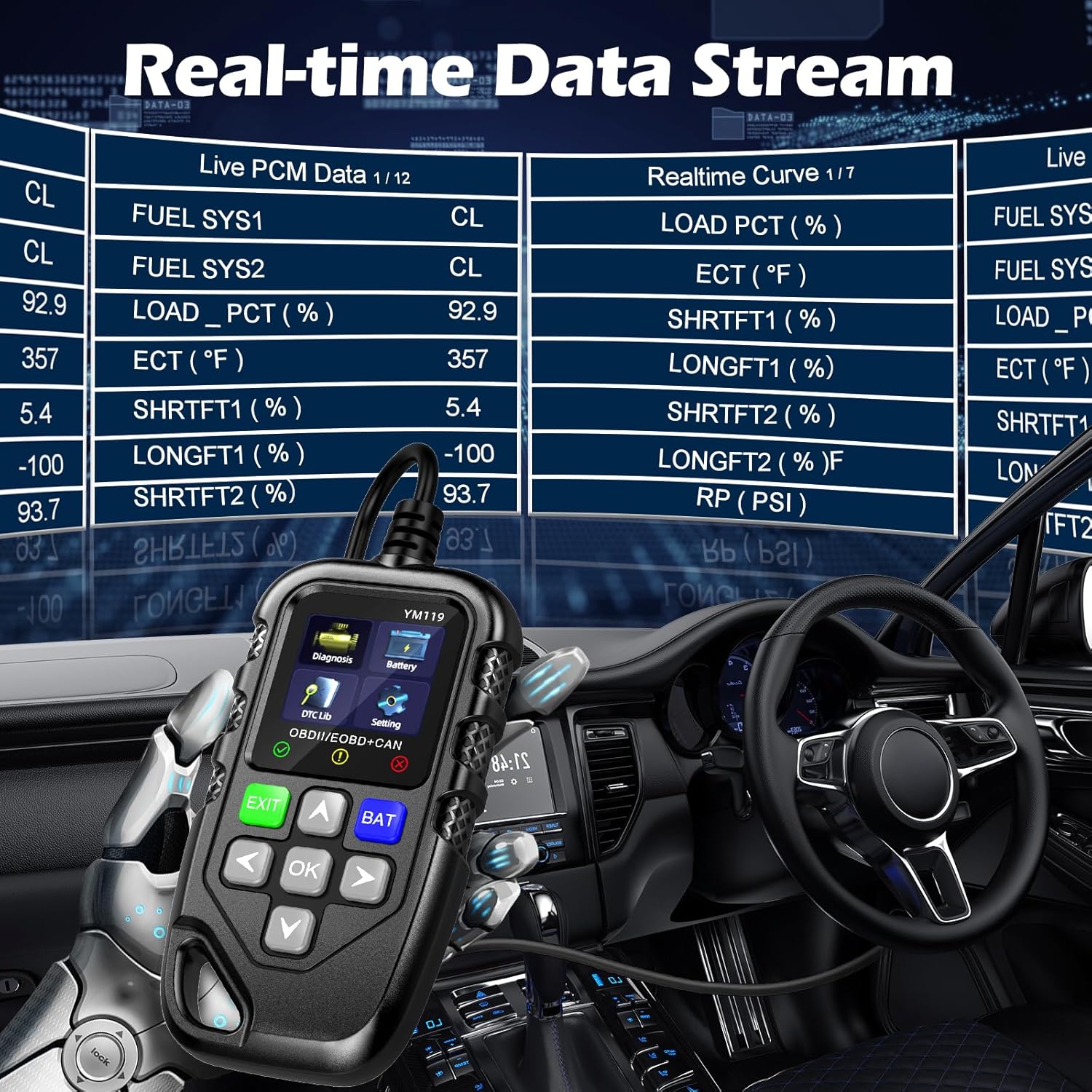
Figure 3.4: Real-time Data Stream. This image shows the scanner's capability to display live engine data, including various sensor readings and their corresponding real-time curves, aiding in dynamic vehicle diagnostics.
- Select "Live Data" or "Realtime Curve" from the Diagnosis menu.
- استخدم أعلى/أسفل arrows to scroll through different data parameters.
- استخدم يسار/يمين arrows to switch between text and graph views (if available for the parameter).
3.2.4 بيانات الإطار الثابت
When an emission-related fault occurs, the vehicle's computer records a snapshot of operating conditions at the time of the fault. This "freeze frame" data helps in diagnosing intermittent problems.
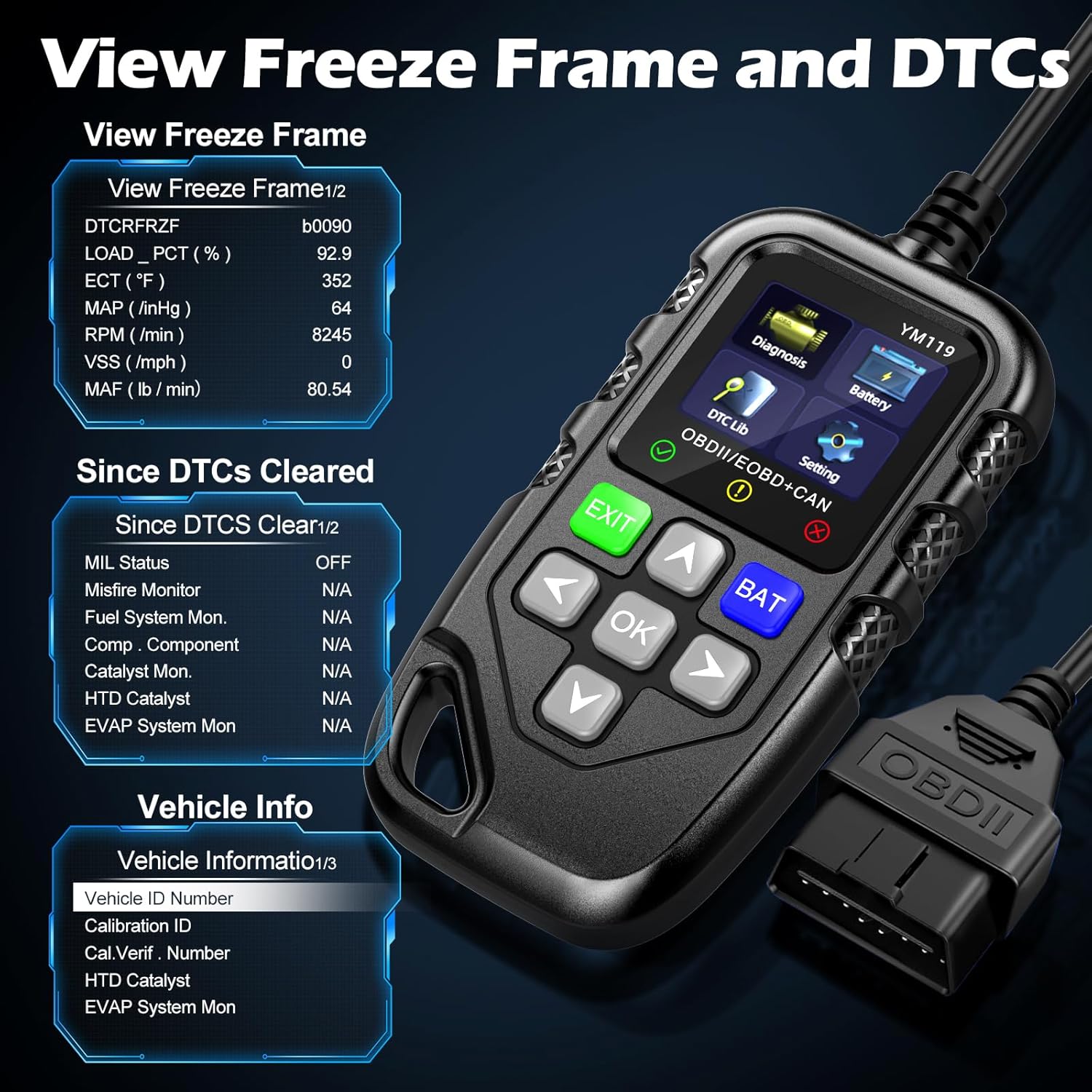
الشكل 3.5: View Freeze Frame and DTCs. This image displays the scanner's ability to capture and show freeze frame data, which provides a snapshot of engine conditions at the moment a fault code was set, aiding in diagnosis.
- يختار "View Freeze Frame" from the Diagnosis menu.
- Review the recorded parameters.
3.2.5 DTC Query (DTC Lib)
The built-in DTC Library allows you to look up definitions for generic (P0, P2, P34, B0, C0, U0) and manufacturer-specific (P1, P30-P33, B1, C1, U1) codes.
- From the main menu, select "DTC Lib".
- Enter the DTC code using the arrow keys and OK زر.
- سيعرض الماسح الضوئي تعريف الرمز.
3.2.6 I / M الجاهزية
This function checks the readiness of the emission-related monitoring systems on the vehicle. It's useful for determining if the vehicle is ready for an emissions test.
- Select "I/M Readiness" from the Diagnosis menu.
- The scanner will display the status of various monitors (e.g., Misfire Monitor, Fuel System Monitor). "OK" indicates the monitor has completed its test, "INC" indicates incomplete, and "N/A" indicates not applicable.
3.2.7 حجم البطاريةtagالاختبار الإلكتروني
The YM119 can perform a basic battery voltage test to assess the vehicle's battery health.

Figure 3.6: Estimate Battery Life Test. This image shows the scanner's dedicated function for monitoring and assessing the vehicle's battery voltage and overall health.
- From the main menu, select "Battery" or press the الخفاش زر.
- سيعرض الماسح الضوئي مستوى شحن البطارية الحاليtage.
3.2.8 معلومات السيارة
تسترجع هذه الوظيفة رقم تعريف المركبة (VIN) ومعرف المعايرة (CALID) ورقم التحقق من المعايرة (CVN) للمركبة.
- Select "Vehicle Info" from the Diagnosis menu.
- The scanner will display the available vehicle information.
4. الصيانة
4.1 تنظيف الجهاز
للحفاظ على أداء الماسح الضوئي ومظهره:
- امسح الوحدة بقطعة قماش ناعمة ، دamp قطعة قماش.
- لا تستخدم المنظفات أو المذيبات الكاشطة.
- تأكد من جفاف الجهاز قبل تخزينه.
4.2 التخزين
Store the scanner in a clean, dry environment away from extreme temperatures and direct sunlight. Keep the OBDII connector free from dust and debris.
5. استكشاف الأخطاء وإصلاحها
| مشكلة | السبب المحتمل | حل |
|---|---|---|
| الماسح الضوئي لا يعمل. |
|
|
| رسالة "خطأ في الربط" أو "خطأ في الاتصال". |
|
|
| Engine light reappears after clearing codes. | Underlying fault has not been repaired. | Clearing codes only turns off the light; it does not fix the problem. Diagnose and repair the underlying issue before clearing codes again. |
| Inaccurate or missing data readings. |
|
|
6. المواصفات
| ميزة | التفاصيل |
|---|---|
| رقم الموديل | AE0004L (YM119) |
| ماركة | Riokko |
| حجم الشاشة | 2.8 بوصة |
| البروتوكولات المدعومة | Nine standard OBDII/EOBD protocols |
| اللغات المدعومة | 13 لغة وطنية |
| وزن العنصر | 7.8 أونصة (حوالي 221 جرامًا) |
| أبعاد الحزمة | 8.11 × 5.35 × 1.14 بوصة (حوالي 20.6 × 13.6 × 2.9 سم) |
| أول تاريخ متاح | 16 أكتوبر 2024 |
7. الضمان والدعم
7.1 معلومات الضمان
The Riokko YM119 OBD2 Scanner comes with a ضمان لمدة 3 سنوات من تاريخ الشراء. يغطي هذا الضمان عيوب المواد والصناعة في ظل الاستخدام العادي.
7.2 سياسة الإرجاع
A 30-day no-questions-asked return policy is offered for your purchase. Please refer to your retailer's specific return instructions.
7.3 دعم العملاء
For technical assistance, warranty claims, or any other inquiries, please contact Riokko customer service. خدمة العملاء على مدار الساعة طوال أيام الأسبوع متاح لمساعدتك.
Please visit the official Riokko webللحصول على أحدث معلومات الاتصال، يرجى زيارة الموقع الإلكتروني أو الرجوع إلى عبوة المنتج.