
1. المقدمة
This manual provides essential information for the proper installation, operation, and maintenance of your SEQURE SQESC 2670 70A Brushless Electronic Speed Controller. The SQESC 2670 is designed for RC car, climbing car, and ship models, featuring ESCape32 firmware and a robust design for reliable performance.
ماذا يوجد في الصندوق:
- 1 x SEQURE SQESC 2670 70A Brushless ESC with BEC
- 1 x WiFi-Link Parameter Configuration Tool

الصورة 1: انتهىview of the SEQURE SQESC 2670 70A Brushless ESC, highlighting its key features and specifications.
2. المواصفات الفنية
The following table details the technical parameters of the SEQURE SQESC 2670:

Image 2: Detailed technical parameters for the SQESC 2670, including model, processor, input voltage, current ratings, and supported features.
| المعلمة | قيمة |
|---|---|
| اسم الموديل | SQESC 2670 |
| المعالج | إس تي إم 32 جي 071 |
| البرامج الثابتة | ESCape32 |
| حجم الإدخالtage | DC 7V-25.2V (2-6S Lipo) |
| تيار مستمر | 70 أمبير |
| الحد الأقصى للتيار | 110 أمبير |
| مخرج BEC | 5V/4A, 6V/4A, 7.2V/4A, 8.2V/4A, 12V/3A (Adjustable) |
| Signal Protocols | Dshot (All), PWM, Oneshot, Multishot, etc. |
| Programmable Parameter Adjustments | نعم |
| Motor Steering Setting | نعم |
| معايرة المسرع | نعم |
| Boost Timing Setting | نعم |
| الكشف الحالي | نعم |
| Telemetry Signal | نعم |
| إضاءة LED RGB | نعم |
| أبعاد | 4.5 × 3 × 0.45 بوصة |
| وزن | 1.44 أونصات |
3. المميزات
- ESCape32 Firmware: Utilizes advanced ESCape32 firmware for precise control.
- حجم واسعtagالنطاق الإلكتروني: Supports DC 7V-25.2V (2-6S Lipo) input.
- القدرة الحالية العالية: Provides 70A constant current and 110A peak current.
- Adjustable BEC Output: Built-in BEC with adjustable output options: 5V/4A, 6V/4A, 7.2V/4A, 8.2V/4A, 12V/3A. This allows direct power supply to external devices like receivers and servos. Note: BEC voltage adjustment requires soldering specific joints.
- معالج متطور: Equipped with a 32-bit high-performance STM32G071 processor, operating up to 64MHz, supporting 128KHz PWM frequency.
- Multiple Signal Protocols: Automatically detects and supports Dshot (All), PWM, Oneshot, and Multishot signal protocols.
- Comprehensive Programming: Supports motor timing, throttle calibration, current detection, motor steering, and telemetry signal settings.
- WiFi-Link Parameter Configuration: Compatible with the SEQURE WiFi linker programmer for wireless parameter adjustment and firmware updates via mobile phone.
- مصباح LED ثلاثي الألوان (RGB): Onboard RGB LED with customizable color settings.
- تصميم قوي: PCB features an 8-layer 3OZ immersion gold process and high-power MOS with a metal heat sink for effective heat dissipation under high current loads.
4. الإعداد والتثبيت
Proper installation is crucial for the performance and longevity of your ESC. Always ensure your power source is disconnected before making any connections.
4.1 توصيلات الأسلاك
Connect the ESC to your motor, battery, and receiver according to the diagram below. Ensure all connections are secure and correctly polarized.

Image 3: Wiring connections for the SQESC 2670, illustrating the XT60 battery connector, 14AWG power wires, 2.54mm 3-pin signal connector, and 3.5mm female motor connectors.
- توصيل البطارية: Use the XT60 connector for your 2-6S Lipo battery. Ensure correct polarity (red to positive, black to negative).
- اتصال المحرك: Connect the three motor wires to the 3.5mm female connectors on the ESC. The order of these wires may affect motor rotation direction, which can be adjusted via programming.
- اتصال جهاز الاستقبال: Connect the 2.54mm 3-pin signal cable to the appropriate channel on your RC receiver.
4.2 BEC المجلدtagهـ التعديل
The BEC output voltage is adjustable. To change the voltage from the default setting, you must solder the corresponding joints on the ESC board. Refer to the diagram below for the specific soldering points for each voltagالخيار الإلكتروني.
WARNING: Soldering is required for BEC voltage adjustment. Incorrect soldering can damage the ESC. If you are not proficient in soldering, seek professional assistance.

Image 4: BEC voltage adjustment points. Solder the appropriate pads to select 5V, 6V, 7.2V, 8.2V, or 12V output.
- حدد الحجم المطلوبtage setting (5V, 6V, 7.2V, 8.2V, 12V).
- Carefully solder the corresponding pads as indicated in the diagram. Ensure no solder bridges other pads.
- After soldering, verify the output voltage with a multimeter before connecting sensitive components.
5. التشغيل والبرمجة
The SQESC 2670 supports various signal protocols and offers extensive programming options via the ESCape32 firmware.
5.1 Initial Setup and Throttle Calibration
- Ensure your transmitter is powered on and the throttle stick is at its lowest position.
- Connect the ESC to the battery. The ESC will emit a series of beeps.
- Move the throttle stick to its highest position when prompted (refer to ESCape32 firmware documentation for exact sequence).
- Move the throttle stick back to its lowest position to complete calibration.
- The ESC is now calibrated and ready for operation.
5.2 Parameter Configuration with WiFi-Link
The SEQURE WiFi-Link tool allows for convenient wireless parameter adjustment and firmware updates using a mobile device.
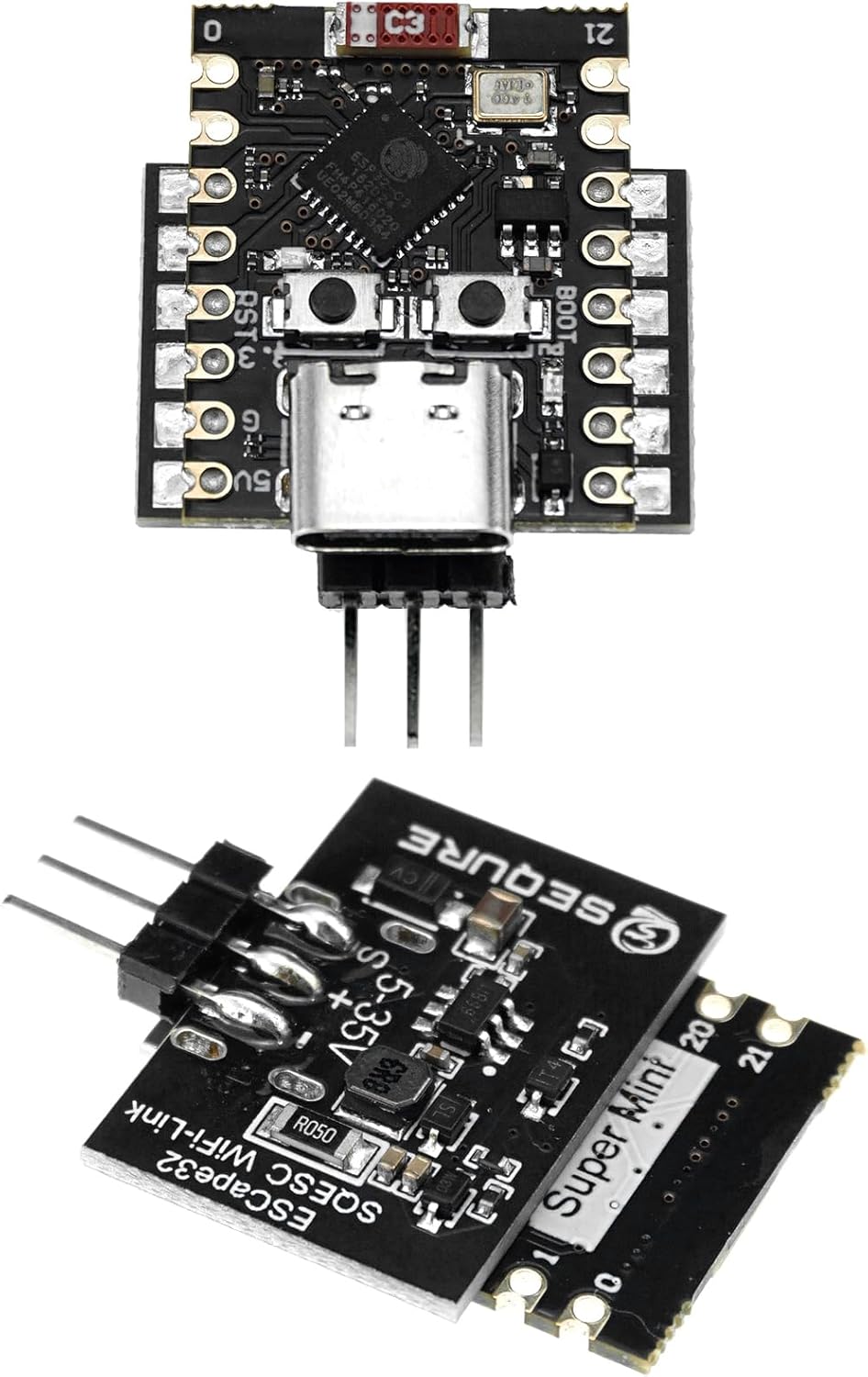
Image 5: The ESCape32 WiFi-Link module, used for wireless parameter configuration and firmware updates.
- Connect the WiFi-Link module to the designated port on the ESC.
- Power on the ESC. The WiFi-Link will create a wireless network.
- Connect your mobile device (smartphone or tablet) to the WiFi-Link's network.
- Open the ESCape32 configuration application on your mobile device.
- You can now adjust various parameters such as motor timing, motor steering, current detection, telemetry settings, and RGB LED colors. Refer to the ESCape32 application's user interface for detailed options.
For detailed instructions on using the ESCape32 firmware and WiFi-Link application, please consult the official ESCape32 documentation or the application's help section.
6. الصيانة
Regular maintenance helps ensure the longevity and optimal performance of your ESC.
- تنظيف: Keep the ESC clean and free from dust, dirt, and moisture. Use a soft brush or compressed air to remove debris. Avoid using liquid cleaners directly on the ESC.
- تقتيش: Periodically inspect all wires and connectors for signs of wear, damage, or corrosion. Ensure all solder joints are secure.
- إدارة الحرارة: Ensure adequate airflow around the ESC during operation to prevent overheating. The integrated metal heat sink aids in dissipation, but proper ventilation is still important.
- تخزين: Store the ESC in a dry, cool environment away from direct sunlight and extreme temperatures.
7. استكشاف الأخطاء وإصلاحها
If you encounter issues with your SQESC 2670, consider the following troubleshooting steps:
- لا يوجد طاقة:
- تحقق من توصيل البطارية ومستوى الشحن.
- Verify all power wires are securely connected and not damaged.
- Ensure the BEC voltage selection (if modified) is correctly soldered.
- Motor Not Responding / Stuttering:
- Perform throttle calibration again.
- Check motor wire connections for looseness or incorrect order.
- Verify signal cable connection to the receiver.
- Check motor timing settings in the ESCape32 application.
- Ensure the motor is compatible with a brushless ESC.
- ارتفاع درجة حرارة وحدة التحكم الإلكترونية:
- Ensure adequate ventilation around the ESC.
- Check for excessive load on the motor or drivetrain.
- Review motor timing settings; aggressive timing can increase heat.
- WiFi-Link Connection Issues:
- Ensure the WiFi-Link module is correctly connected to the ESC.
- Verify the ESC is powered on.
- Check your mobile device's WiFi settings to ensure it's connected to the WiFi-Link's network.
For further assistance, refer to the ESCape32 community forums or contact SEQURE customer support.
8. معلومات السلامة
Always observe the following safety precautions when handling and operating your ESC:
- سلامة البطارية: Use only compatible Lipo batteries within the specified voltage range (2-6S). Always handle Lipo batteries with care to prevent punctures or damage, which can lead to fire.
- السلامة الكهربائية: Ensure all connections are correct and secure before applying power. Incorrect wiring can cause damage to the ESC, motor, or battery. Avoid short circuits.
- حرارة: ESCs can generate significant heat during operation. Avoid touching the ESC immediately after use. Ensure proper ventilation.
- الأجزاء الدوارة: Keep hands, hair, and loose clothing away from rotating motor parts when the system is powered on.
- الماء والرطوبة: This ESC is not waterproof unless explicitly stated. Avoid exposure to water or high humidity.
- أطفال: This product is not a toy and is recommended for users 14 years and up. Keep out of reach of small children.
9. دعم العملاء
For technical support, warranty inquiries, or further information, please visit the official SEQURE webالموقع أو الاتصال بقسم خدمة العملاء.
الشركة المصنعة: سيكوير
Webموقع: Visit the SEQURE Store on Amazon