
1. المقدمة
This manual provides essential information for the installation, operation, and maintenance of your ANTEC GSK750 ATX3.1 80PLUS GOLD Power Supply Unit (PSU). Please read this manual thoroughly before installing and using the product to ensure proper function and safety. The ANTEC GSK750 is a high-efficiency, durable power supply designed for modern PC systems.
2. المميزات
- 80PLUS GOLD certification for high efficiency.
- Full modular design for improved cable management.
- Compact design with a depth of 140 mm.
- Active PFC and universal AC input support.
3. الإعداد والتثبيت
3.1. محتويات العبوة
تأكد من وجود جميع المكونات في العبوة:
- ANTEC GSK750 ATX3.1 80PLUS GOLD PSU
- مجموعة كابلات معيارية
- سلك الطاقة المتردد
- مسامير التثبيت
- دليل المستخدم (هذه الوثيقة)
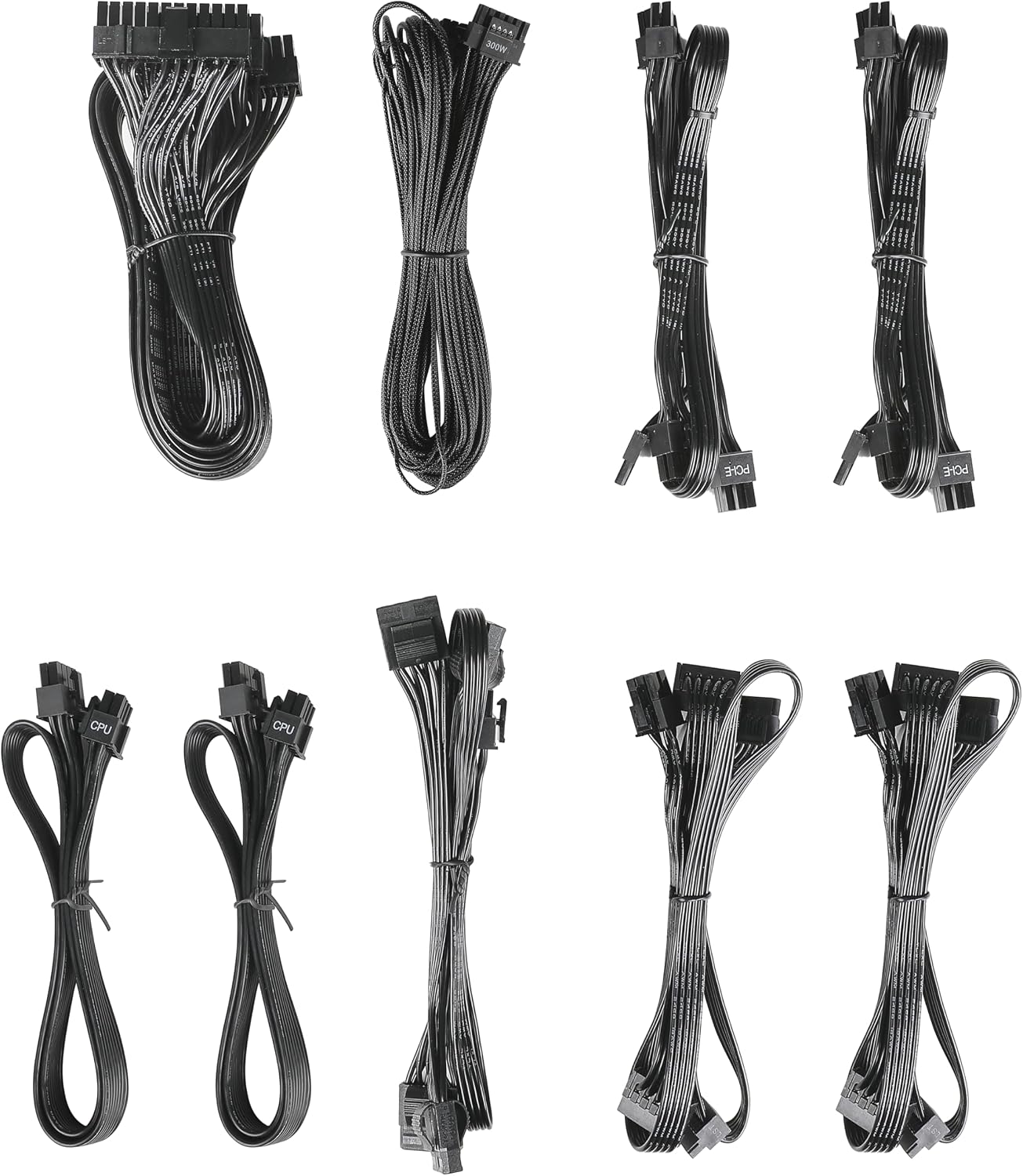
Image: The modular cable set included with the ANTEC GSK750 power supply unit. This includes various cables for motherboard, CPU, PCIe, SATA, and Molex connections.
3.2. التثبيت المادي
- تأكد من إيقاف تشغيل جهاز الكمبيوتر الخاص بك وفصله عن مقبس الحائط.
- Mount the PSU into the designated PSU bay in your computer case using the provided screws. Ensure the fan is oriented correctly for optimal airflow (typically facing downwards if there's a bottom vent, or upwards if not).

الصورة: من أعلى إلى أسفل view of the ANTEC GSK750 power supply unit, showing the fan grille and overall compact form factor.
3.3. وصلات الكابلات
Connect the necessary modular cables to the PSU and your system components. The full modular design allows you to connect only the cables you need, reducing clutter.
- 24-Pin Main Power: قم بتوصيله باللوحة الأم.
- 8-Pin (4+4) CPU Power: Connect to your motherboard's CPU power connector.
- PCI-E (6+2 دبوس): قم بالاتصال ببطاقة الرسوميات الخاصة بك.
- طاقة SATA: الاتصال بمحركات الأقراص SSD ومحركات الأقراص الصلبة ومحركات الأقراص الضوئية.
- طاقة موليكس: قم بالاتصال بالأجهزة الطرفية القديمة أو مراوح العلبة.

Image: The modular connector panel on the side of the ANTEC GSK750 power supply, clearly labeled for PCI-E, CPU, SATA/Molex, and M/B (motherboard) connections.
3.4. التشغيل الأولي
After all connections are secure, plug the AC power cord into the PSU and then into a wall outlet. Flip the main power switch on the back of the PSU to the 'ON' position. You can then power on your computer.
4. تعليمات التشغيل
4.1. Hybrid Mode
The ANTEC GSK750 features a Hybrid Mode switch located on the rear of the unit. When Hybrid Mode is enabled, the PSU fan will remain off under low load conditions, providing silent operation. The fan will automatically activate when the load increases to maintain optimal temperatures. When Hybrid Mode is disabled, the fan will operate continuously.

Image: The rear panel of the ANTEC GSK750 power supply, featuring the main power switch, AC input, and the 'Hybrid Mode' toggle switch.
5. الصيانة
لضمان طول عمر وحدة تزويد الطاقة (PSU) وأدائها الأمثل، اتبع إرشادات الصيانة التالية:
- تنظيف: Periodically clean the exterior of the PSU and the fan grille to prevent dust buildup. Use compressed air to gently clear dust from the fan and internal components. Ensure the PSU is unplugged before cleaning.
- تدفق الهواء: Ensure that the PSU has adequate airflow within your computer case. Avoid blocking the intake or exhaust vents.
6. استكشاف الأخطاء وإصلاحها
If you encounter issues with your ANTEC GSK750 PSU, consider the following:
- لا يوجد طاقة: Check all cable connections, especially the 24-pin motherboard connector and the CPU power connector. Ensure the AC power cord is securely plugged into both the PSU and the wall outlet. Verify the main power switch on the PSU is in the 'ON' position.
- عدم استقرار النظام/الأعطال: تأكد من أن مصدر الطاقة الخاص بكtage is sufficient for all your components. Overloading the PSU can lead to instability. Check for loose connections.
- ضوضاء المروحة: If the fan is excessively noisy and Hybrid Mode is off, ensure there is no obstruction. If Hybrid Mode is on, the fan will spin up under load, which is normal.
If problems persist, consult the ANTEC support webالموقع أو الاتصال بخدمة العملاء.
7. المواصفات
Detailed specifications for the ANTEC GSK750 ATX3.1 80PLUS GOLD PSU:

Image: The specification label of the ANTEC GSK750 power supply, detailing output voltages, currents, and total wattage.
| مواصفة | قيمة |
|---|---|
| ماركة | ANTEC |
| رقم الموديل | GSK750 ATX3.1 |
| انتاج واتtage | 750 واط |
| عامل الشكل | ايه تي اكس |
| شهادة الكفاءة | 80 بلس ذهبي |
| أبعاد المنتج (الطول × العرض × الارتفاع) | 14 × 15 × 8.6 سم |
| وزن المنتج | 2.5 كجم |
| الحد الأدنى لحجم الإدخالtage | 100 فولت (تيار متردد) |
| System Bus Connector Type | 24 دبوس |
| عدد المعجبين | 2 |
| رمز المنتج الموحد | 761345200547 |
| بلد المنشأ | الصين |
8. الضمان والدعم
8.1. معلومات الضمان
The ANTEC GSK750 ATX3.1 80PLUS GOLD Power Supply Unit comes with a ضمان لمدة 7 سنوات من تاريخ الشراء. يغطي هذا الضمان عيوب المواد والتصنيع في ظل الاستخدام العادي. يُرجى الاحتفاظ بإيصال الشراء للمطالبة بالضمان.
8.2. دعم العملاء
For technical assistance, troubleshooting, or warranty inquiries, please visit the official ANTEC website or contact their customer support department. Contact information can typically be found on the ANTEC webتغليف الموقع أو المنتج.