
1. المقدمة
This manual provides essential information for the safe and efficient operation of your elecsung 43-inch Smart Mirror Bathroom TV. This device integrates a 4K UHD television with a mirror, designed for environments such as bathrooms and kitchens due to its IPX6 waterproof rating. It features ATSC DTV, voice control, Wi-Fi, and Bluetooth connectivity, running on Android 11.0.
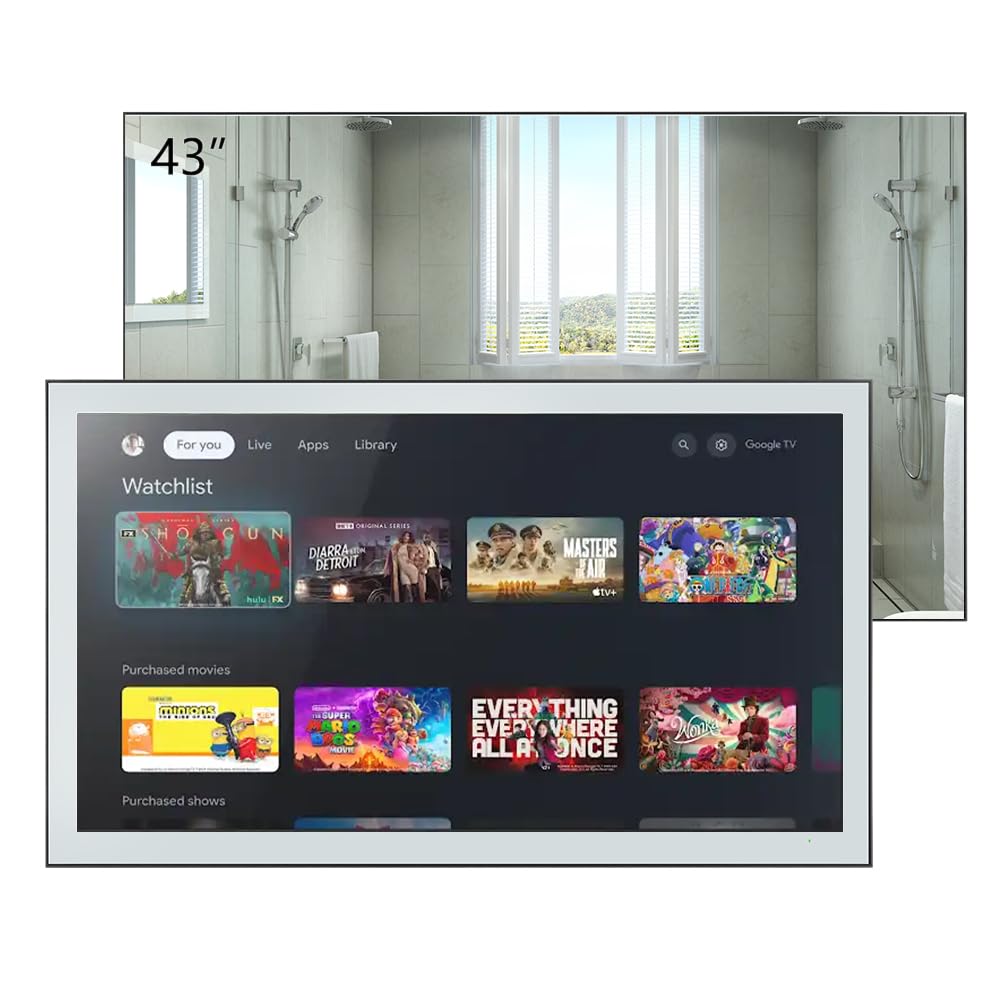
Figure 1.1: elecsung 43-inch Smart Mirror Bathroom TV with its smart interface.
2. معلومات السلامة
- السلامة الكهربائية: تأكد من أن مصدر الطاقة يطابق المجلدtage requirements (100-240 VAC, 50-60 Hz). Do not expose the power cord to excessive heat or moisture.
- مقاومة الماء: The TV is IPX6 waterproof, meaning it is protected against powerful water jets. However, it is not designed for submersion. Do not spray water directly onto the connections.
- تثبيت: Professional installation is recommended for wall mounting to ensure stability and safety. Follow all mounting instructions carefully.
- تنظيف: افصل الكهرباء قبل التنظيف. استخدم قطعة قماش ناعمة.amp القماش. تجنب استخدام المنظفات أو المذيبات الكاشطة.
- تهوية: تأكد من وجود تهوية كافية حول الوحدة. لا تسد فتحات التهوية.
3. محتويات العبوة
تأكد من وجود جميع العناصر في العبوة:
- elecsung 43-inch Smart Mirror Bathroom TV
- جهاز التحكم عن بعد
- حامل للتثبيت على الحائط
- محول الطاقة/الكابل
- دليل المستخدم (هذا المستند)
- Blu-ray (as listed in included components, may refer to Blu-ray playback capability rather than a physical disc)
4. انتهى المنتجview
4.1 الميزات الرئيسية
- عرض: 43-inch 4K Ultra HD (3840x2160) LED display with 75 Hz refresh rate.
- تصنيف مقاومة الماء: IPX6 for protection against powerful water jets.
- صوتي: Dolby Vision & Atmos support, 2.0 channel, 10W x 2 speakers.
- الاتصال: Dual-band Wi-Fi (2.4G/5G), Bluetooth 5.0, HDMI, USB, Ethernet.
- يتحكم: Voice control and remote control.
- نظام التشغيل: Android 11.0 for smart TV functionality and app access.
- الموالف: ATSC DTV tuner.

Figure 4.1: Product features and included remote control.
4.2 Physical Description and Dimensions
The TV features a sleek design with a mirror finish. When off, it functions as a mirror. The unit dimensions are 994.8mm (39.2") W x 580.1mm (22.8") H x 62.2mm (2.5") D. Recessed dimensions for in-wall installation are 521mm (20.5") W x 476mm (18.7") H x 35mm (1.4") D.

Figure 4.2: Product dimensions with bracket.
4.3 المنافذ والوصلات
The rear panel of the TV provides various input and output ports:
- منافذ HDMI (x4): For connecting external devices like Blu-ray players, gaming consoles, or set-top boxes. Supports CEC, ARC, eARC.
- منافذ USB (x2): لتوصيل أجهزة تخزين USB.
- إيثرنت (RJ45): للاتصال بالشبكة السلكية.
- مخرج الصوت البصري: للاتصال بأنظمة الصوت الخارجية.
- مدخلات AV: لتوصيل الأجهزة التناظرية القديمة.
- إدخال الهوائي: For connecting an ATSC antenna.
- مدخلات القمر الصناعي: For connecting satellite dish.
- مقبس التيار المتردد: لتوصيل الطاقة.

الشكل 4.3: توصيلات اللوحة الخلفية.
5. الإعداد
5.1 تركيب التلفزيون
The TV can be mounted on or in a wall using the supplied wall-mount bracket or a compatible VESA bracket. The VESA mount standard is 400 x 400 mm for the 43-inch model, requiring M6 x 12mm screws.
- اختيار موقع: Select a suitable wall location, ensuring it can support the TV's weight and has access to power and necessary connections.
- تثبيت القوس: Securely attach the wall-mount bracket to the wall according to the bracket's specific instructions. Use appropriate wall anchors for your wall type.
- Attach TV: Carefully lift the TV and attach it to the installed wall bracket. Ensure it is securely fastened.
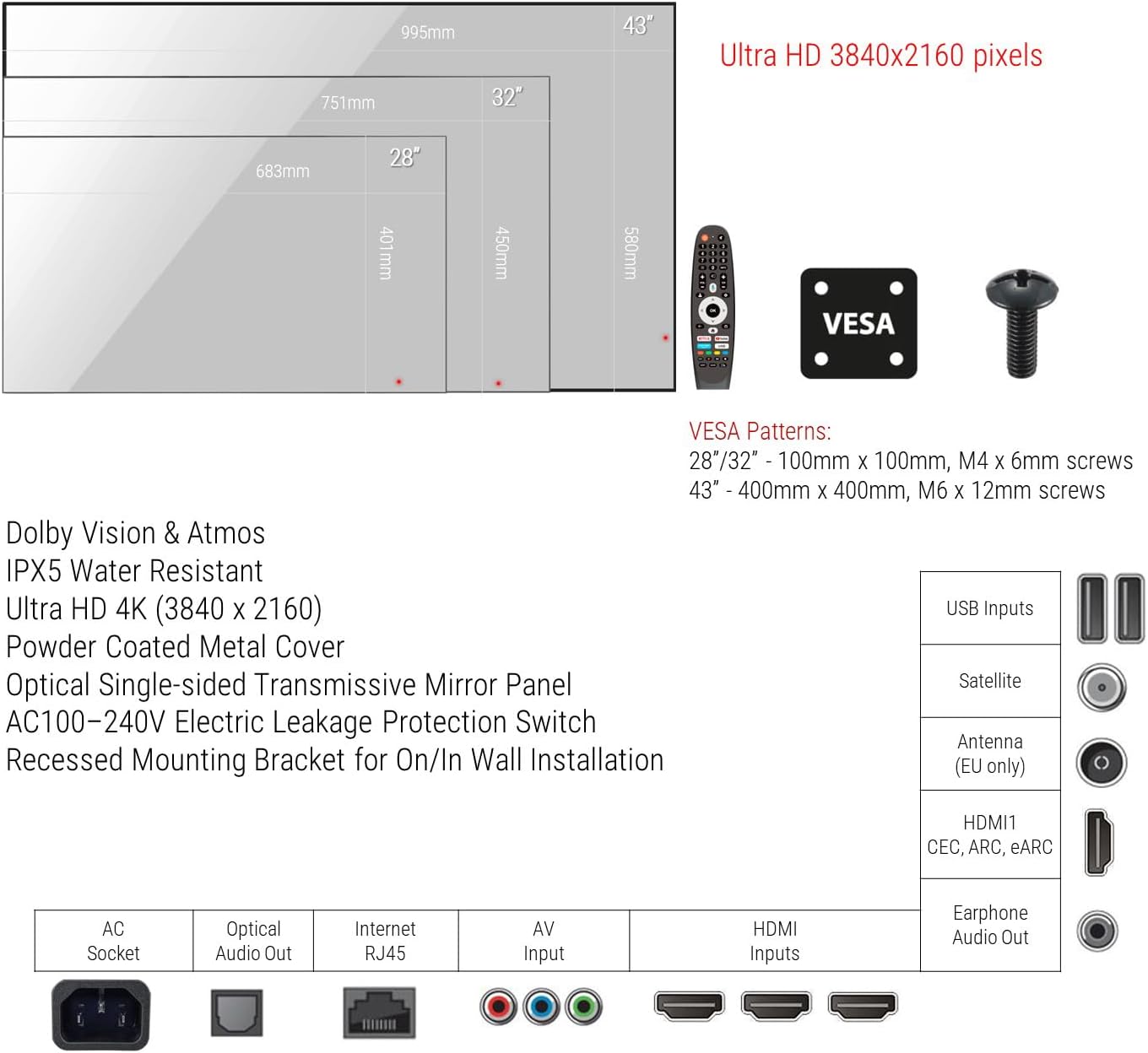
Figure 5.1: VESA mounting patterns and port overview.
5.2 الاتصالات الأولية
- قوة: Connect the power cable to the AC socket on the TV and then to a power outlet.
- هوائي / كابل: Connect your ATSC antenna or cable TV feed to the Antenna input.
- الأجهزة الخارجية: Connect any external devices (e.g., Blu-ray player, game console) to the HDMI ports.
- شبكة: For wired internet, connect an Ethernet cable to the RJ45 port. For wireless, you will configure Wi-Fi during initial setup.
6. تعليمات التشغيل
6.1 تشغيل/إيقاف التشغيل
Press the power button on the remote control to turn the TV on or off. The TV will display the smart interface when powered on.
6.2 التحكم عن بعد
Use the provided remote control to navigate the TV's interface, adjust volume, change channels, and access smart features. Refer to the remote control diagram for specific button functions.
6.3 التحكم الصوتي
The TV supports voice control for hands-free operation. Activate voice control by pressing the dedicated voice button on your remote or by saying the wake word (if configured). You can then issue commands such as "Change channel to CNN," "Open Netflix," or "بحث عن أفلام الحركة.
6.4 Smart TV Functions (Android 11.0)
Your TV runs on Android 11.0, providing access to a wide range of applications and streaming services. Navigate the home screen to find installed apps, browse content, and customize settings.
- الوصول إلى التطبيق: Download and install apps from the integrated app store.
- جاري: Access popular streaming platforms for movies, TV shows, and videos.
- إعدادات: Adjust network settings, display options, audio preferences, and more through the settings menu.
6.5 بث المحتوى
Stream content from your smartphone, tablet, or laptop directly to the TV using its casting feature. Ensure your device and the TV are connected to the same Wi-Fi network. Look for the casting icon within compatible apps on your mobile device to initiate screen mirroring.
7. الصيانة
Proper maintenance ensures the longevity and performance of your Smart Mirror TV.
- Cleaning the Screen/Mirror: Disconnect the TV from power. Use a soft, lint-free cloth slightly dampened with water or a non-abrasive, ammonia-free glass cleaner. Spray cleaner onto the cloth, not directly onto the screen. Wipe gently to avoid streaks.
- تنظيف الإطار: Use a soft, dry cloth to wipe the frame. Avoid harsh chemicals.
- تهوية: تحقق دورياً من خلو فتحات التهوية من الغبار والحطام.
8. استكشاف الأخطاء وإصلاحها
إذا واجهت مشكلات، راجع خطوات استكشاف الأخطاء وإصلاحها الشائعة التالية:
| مشكلة | السبب المحتمل | حل |
|---|---|---|
| لا يوجد طاقة | Power cable disconnected; Power outlet faulty. | تأكد من توصيل كابل الطاقة بإحكام. اختبر المقبس بجهاز آخر. |
| لا يوجد صورة/صوت | Incorrect input source; Loose HDMI/AV cable; Device not powered on. | Select correct input source. Check cable connections. Power on external device. |
| لا يوجد اتصال Wi-Fi | Router issue; Incorrect password; Out of range. | Restart router. Re-enter Wi-Fi password. Move TV closer to router or use Ethernet. |
| التحكم الصوتي لا يستجيب | Microphone blocked; Feature disabled; Remote battery low. | Ensure microphone is clear. Check voice control settings. Replace remote batteries. |
إذا استمرت المشكلة بعد تجربة هذه الحلول، فاتصل بدعم العملاء.
9. المواصفات
| ميزة | مواصفة |
|---|---|
| حجم الشاشة | 43 بوصة |
| تكنولوجيا العرض | قاد |
| دقة | 4 ألف (3840 × 2160) |
| معدل التحديث | 75 هرتز |
| تصنيف مقاومة الماء | IPX6 |
| نظام التشغيل | أندرويد 11.0 |
| الاتصال | Wi-Fi (Dual-band), Bluetooth 5.0, HDMI (x4), USB (x2), Ethernet, Optical Audio Out, AV Input, Antenna, Satellite |
| ميزات الصوت | Dolby Vision & Atmos, 2.0 channel, 10W x 2 speakers |
| طريقة التحكم | التحكم عن بعد ، التحكم الصوتي |
| أبعاد المنتج (العمق × العرض × الارتفاع) | 2.5 بوصة عمق × 39.2 بوصة عرض × 22.8 بوصة ارتفاع (62.2 مم × 994.8 مم × 580.1 مم) |
| Recessed Dimensions (D x W x H) | 1.4 بوصة عمق × 20.5 بوصة عرض × 18.7 بوصة ارتفاع (35 مم × 521 مم × 476 مم) |
| معيار حامل VESA | 400 × 400 ملم |
| استهلاك الطاقة | 46 واط |
| حجم الخطtage | من 100 إلى 240 فولت من التيار المتردد 50-60 هرتز |
| اسم الموديل | HYM43A-0BLS11052 |
10. الضمان والدعم
This product comes with a Full Warranty. For specific warranty terms and conditions, please refer to the documentation included with your purchase or visit the elecsung official website. For technical support, troubleshooting assistance, or service inquiries, please contact elecsung customer support through their official channels.
الدعم عبر الإنترنت: قم بزيارة elecsung Store on Amazon للحصول على معلومات المنتج وموارد الدعم.