
LIECTROUX M7S PRO
دليل مستخدم مكنسة الروبوت LIECTROUX M7S Pro
Model: M7S Pro
1. المقدمة
شكرا لك على الشراءasing the LIECTROUX M7S Pro Robot Vacuum Cleaner. This manual provides essential information for the safe operation, maintenance, and troubleshooting of your device. Please read this manual thoroughly before using the product and retain it for future reference.
تعليمات السلامة
- تأكد من شحن الروبوت بالكامل قبل الاستخدام الأول.
- لا تقم بتشغيل الروبوت في بيئات رطبة أو بالقرب من السوائل.
- Keep loose cables, curtains, and small objects out of the robot's path to prevent entanglement.
- راقب الأطفال والحيوانات الأليفة أثناء تشغيل الروبوت.
- Do not use the robot to pick up large debris, sharp objects, or burning materials.
- Only use the original charging dock and power adapter provided with the robot.
- Turn off the robot and unplug it from the charging dock before performing any maintenance.
2. محتويات العبوة
تأكد من وجود جميع العناصر في العبوة:
- LIECTROUX M7S Pro Robot Vacuum Cleaner
- قاعدة الشحن
- محول الطاقة
- فرش جانبية (مجموعة)
- فلتر HEPA (مثبت مسبقًا أو احتياطي)
- أداة التنظيف
- جهاز التحكم عن بعد
- دليل المستخدم
3. انتهى المنتجview
Familiarize yourself with the components of your LIECTROUX M7S Pro robot vacuum cleaner.

الشكل 3.1: The LIECTROUX M7S Pro robot vacuum cleaner, showcasing its sleek black design, along with its remote control and a smartphone displaying the cleaning map via the app.
المكونات الرئيسية:
- اللوحة العلوية: Power button, Wi-Fi indicator, charging indicator.
- المصد الأمامي: Obstacle detection sensors.
- الفرش الجانبية: Collect dust and debris from edges and corners.
- عجلات القيادة: Allow movement across various floor types.
- صندوق القمامة: يجمع الحطام الجاف.
- خزان مياه (للمسح): Holds water for wet cleaning.
- شحن جهات الاتصال: Connects with the charging dock.
- أجهزة استشعار المنحدرات: Detects drops and prevents falls.
4. الإعداد
4.1 موضع قاعدة الشحن
ضع قاعدة الشحن على الحائط في مكان مفتوح، مع التأكد من عدم وجود أي عوائق على بُعد متر واحد (3 أقدام) من الجانبين ومترين (6 أقدام) أمام القاعدة. وصّل محول الطاقة بقاعدة الشحن ثم وصّلها بمأخذ كهربائي.
4.2 الشحن الأولي
Place the robot onto the charging dock, ensuring the charging contacts align. The robot will begin charging automatically. For first use, allow the robot to charge completely (approximately 4-5 hours) before operation.

الشكل 4.1: The robot vacuum cleaner automatically returning to its charging dock when its battery is low, ensuring it is always ready for the next cleaning cycle.
4.3 App Connection (TUYA App)
- Download the "TUYA Smart" app from your smartphone's app store (iOS or Android).
- قم بالتسجيل أو تسجيل الدخول إلى حسابك في TUYA.
- تأكد من شحن الروبوت وتشغيله.
- Follow the in-app instructions to add your LIECTROUX M7S Pro robot vacuum cleaner. This typically involves pressing and holding a button on the robot to enter pairing mode and connecting to your home Wi-Fi network.
- Once connected, you can control the robot, view cleaning maps, and set schedules via the app.
4.4 تكامل المساعد الصوتي
The LIECTROUX M7S Pro supports voice control via Amazon Alexa and Google Home. Refer to the respective app (Alexa app or Google Home app) for instructions on how to link your TUYA Smart account and control your robot with voice commands.
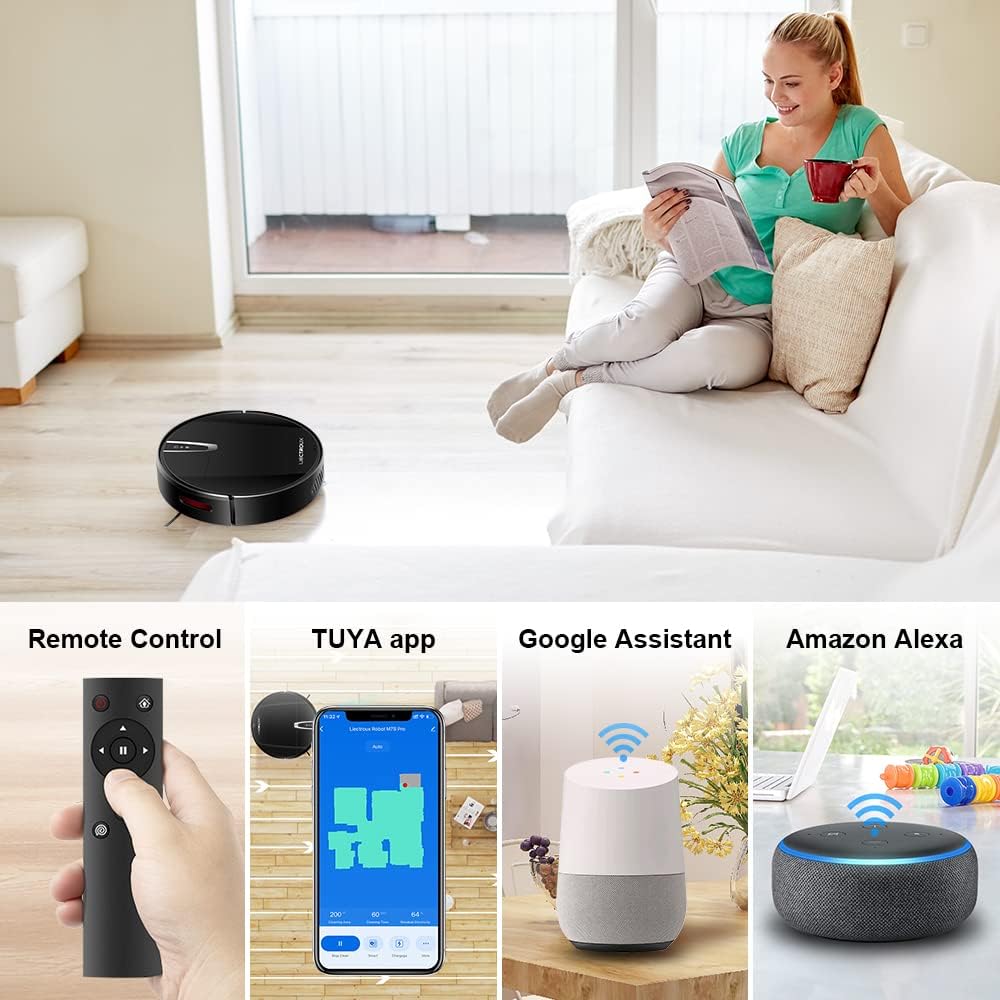
الشكل 4.2: Various control methods for the robot vacuum, including a physical remote control, the TUYA smartphone application displaying a cleaning map, and integration with voice assistants like Google Assistant and Amazon Alexa.
5. تعليمات التشغيل
5.1 أوضاع التنظيف
The robot offers multiple cleaning modes to suit different needs, accessible via the app, remote control, or voice commands:
- التنظيف التلقائي: يقوم الروبوت بالتنقل بذكاء وتنظيف مساحة الأرضية بأكملها.
- تنظيف البقعة: التركيز على منطقة متسخة محددة، وتنظيفها بنمط حلزوني.
- تنظيف الحواف: تنظيف على طول الجدران وحواف الأثاث.
- وضع المسح: For wet cleaning, attach the water tank and mopping cloth.

الشكل 5.1: The robot vacuum cleaner operating on a floor with scattered debris, illustrating its powerful suction and various cleaning modes: Scheduled Cleaning, Auto Cleaning, Edge Cleaning, and Spot Cleaning.
5.2 الملاحة ورسم الخرائط
The M7S Pro utilizes smart gyroscope navigation to create a 2D map of your environment, allowing for precise positioning and efficient route planning. This ensures comprehensive coverage and minimizes missed spots.

الشكل 5.2: The robot vacuum cleaner navigating a room, with a grid overlay illustrating its smart gyroscope navigation system for precise positioning and thorough cleaning.

الشكل 5.3: A visual comparison showing the efficient, systematic cleaning path generated by the LIECTROUX M7S Pro's gyroscope navigation versus a less organized common route planning method, highlighting intelligent route planning.
5.3 إعادة الشحن التلقائي
When the battery level is low or a cleaning task is complete, the robot will automatically return to its charging dock to recharge. Ensure the charging dock is always powered on and accessible.
5.4 Anti-Drop System
The robot is equipped with cliff sensors to detect stairs and elevated surfaces, preventing it from falling. It also intelligently detects different floor types and adjusts its direction within 10 milliseconds.
6. الصيانة
تضمن الصيانة المنتظمة الأداء الأمثل وتطيل عمر مكنسة الروبوت الخاصة بك.
6.1 إفراغ سلة المهملات
Empty the dustbin after each cleaning cycle or when the 'full' indicator appears. Open the top cover, remove the dustbin, and dispose of the collected debris.
6.2 تنظيف المرشح
The HEPA filter should be cleaned regularly (e.g., weekly) using the provided cleaning tool or a soft brush. Replace the HEPA filter every 3-6 months, depending on usage, to maintain suction efficiency.
6.3 تنظيف الفرش الجانبية
Inspect and clean the side brushes regularly. Remove any tangled hair or debris. If brushes are worn or damaged, replace them with new ones.
6.4 تنظيف أجهزة الاستشعار ونقاط اتصال الشحن
Wipe the cliff sensors and charging contacts on both the robot and the charging dock with a clean, dry cloth to ensure proper function and charging.
6.5 Brush-less Suction Nozzle
The M7S Pro features an advanced brush-less suction nozzle designed to minimize hair entanglement, reducing the frequency of cleaning the main suction path.

الشكل 6.1: An illustration of the robot vacuum's underside, highlighting the advanced brush-less suction nozzle designed to prevent hair entanglement and ensure consistent cleaning performance.
7. استكشاف الأخطاء وإصلاحها
إذا واجهت مشاكل مع مكنسة الروبوت الخاصة بك، فراجع المشاكل والحلول الشائعة التالية:
| مشكلة | السبب المحتمل | حل |
|---|---|---|
| الروبوت لا يعمل. | انخفاض مستوى البطارية؛ تم إيقاف تشغيل الجهاز. | Charge the robot; ensure the main power switch is on. |
| الروبوت لا يشحن. | نقاط التلامس الخاصة بالشحن متسخة؛ قاعدة الشحن غير موصولة بالكهرباء. | Clean charging contacts; ensure charging dock is plugged in. |
| الروبوت يتعطل بشكل متكرر. | العوائق (الكابلات، السجاد)؛ المساحات الضيقة. | Clear the cleaning area; use virtual walls if available. |
| أداء التنظيف ضعيف. | Dustbin full; filter clogged; brushes tangled. | Empty dustbin; clean/replace filter; clean brushes. |
| مشاكل اتصال التطبيق. | كلمة مرور الواي فاي غير صحيحة؛ الروبوت ليس في وضع الاقتران؛ شبكة واي فاي بتردد 5 جيجاهرتز. | Verify Wi-Fi details; re-enter pairing mode; ensure 2.4GHz Wi-Fi is used. |
8. المواصفات
| ميزة | التفاصيل |
|---|---|
| ماركة | ليكتروكس |
| اسم الموديل | مسنومكس برو |
| لون | أسود |
| أبعاد المنتج | 32 لترًا × 32 عرضًا × 7.8 ارتفاعًا سم |
| وزن العنصر | 4 كيلوغرام |
| قوة الشفط القصوى | 4000 باسكال |
| سعة البطارية | 2500mAh ليثيوم أيون |
| وقت التشغيل | حتى 120 دقيقة |
| نوع الفلتر | مرشح هواء عالي الكفاءة |
| نوع وحدة التحكم | App Control, Touchpad Control, Voice Control |
| التوافق مع مساعد الصوت | جوجل هوم، أمازون أليكسا |
| نوع التنقل | Gyroscope Navigation (2D Map) |
| ميزة خاصة | Anti-drop system, Brush-less suction nozzle |
| توصية السطح | Low-pile carpet, hard floors, ceramic tiles |
9. الضمان والدعم
The LIECTROUX M7S Pro Robot Vacuum Cleaner comes with a standard manufacturer's warranty. Please refer to the warranty card included in your package for specific terms and conditions, including the warranty period and coverage details.
For technical support, troubleshooting assistance, or warranty claims, please contact the seller or LIECTROUX customer service. Contact information can typically be found on the product packaging, the seller's website, or within the TUYA Smart app.
When contacting support, please have your product model number (M7S Pro) and purchase details readily available.
المستندات ذات الصلة - مسنومكس برو
 |
دليل المستخدم وتعليمات استخدام روبوت تنظيف النوافذ الذكي Liectroux X6 دليل مستخدم شامل لروبوت تنظيف النوافذ الذكي Liectroux X6، يغطي الإعداد والتشغيل والميزات والمواصفات واستكشاف الأخطاء وإصلاحها وإرشادات السلامة. |
 |
Liectroux C30B Robot Vacuum Cleaner Instruction Manual Comprehensive instruction manual for the Liectroux C30B Robot Vacuum Cleaner, covering setup, operation, app control, maintenance, troubleshooting, and specifications. Learn how to use your robot vacuum for efficient cleaning. |
 |
روبوت تنظيف النوافذ Liectroux YW810: دليل المستخدم ودليل السلامة دليل مستخدم شامل لروبوت تنظيف النوافذ Liectroux YW810، يوضح تعليمات السلامة وميزات المنتج وخطوات التشغيل واستكشاف الأخطاء وإصلاحها واتصال تطبيق SMART LIFE. |
 |
LIECTROUX X6 Robot Vacuum Cleaner Instruction Manual Comprehensive instruction manual for the LIECTROUX X6 Robot Vacuum Cleaner, covering setup, operation, maintenance, troubleshooting, and app control for efficient home cleaning. |
 |
LOOKI Robot Cleaner App Instructions and Setup Guide Step-by-step guide to download, install, and connect the LookiLife app to your LOOKI Robot Cleaner. Covers Wi-Fi setup, troubleshooting, and device management. |
 |
LIECTROUX YW509 Window Cleaning Robot: Instruction Manual Comprehensive instruction manual for the LIECTROUX YW509 Window Cleaning Robot, covering safety, product composition, usage, maintenance, troubleshooting, and app connectivity. |
Ask a question about this manual
Ask about setup, troubleshooting, compatibility, parts, safety, or missing instructions. Manuals+ will review the question and use this page’s manual context to help answer it.