
تومسون 32HF2S34
دليل مستخدم تلفزيون THOMSON 32 بوصة عالي الدقة بتقنية LED يعمل بنظام Fire TV
Model: 32HF2S34
مقدمة
This manual provides comprehensive instructions for setting up, operating, and maintaining your THOMSON 32" HD LED Fire TV (Model: 32HF2S34). This television combines useful technology with user-friendly features, offering easy access to applications, games, and streaming services through the intuitive Fire TV operating system. It supports Alexa voice control, AirPlay for Apple devices, and includes an integrated Smart Home dashboard. With a built-in Triple Tuner, Dolby Audio, and HDR10 visuals, this TV is designed to enhance your home entertainment experience.
دليل الإعداد
1. فتح العلبة ومحتويات العبوة
أزل جميع المكونات من العبوة بعناية. تأكد من وجود جميع العناصر المذكورة أدناه:
- THOMSON 32" HD LED Fire TV
- جهاز التحكم عن بعد
- كابل الطاقة
- حاملان للتلفزيون (2) ومسامير
- دليل المستخدم (هذا المستند)
ملحوظة: The remote control is included in the box.
2. تركيب حوامل التلفزيون
Place the TV screen face down on a soft, clean surface to prevent scratches. Align each stand with the corresponding screw holes on the bottom of the TV. Secure the stands using the provided screws.

الصورة: الجبهة view of the Thomson 32-inch HD Fire TV.

الصورة: الجانب المحترفfile of the Thomson 32-inch HD Fire TV.

الصورة: الخلفية view of the Thomson 32-inch HD Fire TV, highlighting the various input and output ports. These include Audio Out, CI+, Headphones, AV In, USB 2.0, 2x HDMI 1.4, Antenna, LAN, and Satellite connections.
3. توصيل الأجهزة الخارجية
Connect your external devices such as cable boxes, gaming consoles, or Blu-ray players to the appropriate ports on the back of the TV. The TV features 2 HDMI ports, 1 USB port, AV In, and a CI+ slot.
- HDMI: للحصول على صوت وفيديو عالي الدقة.
- USB: لتوصيل أجهزة تخزين USB.
- AV في: للأجهزة التناظرية القديمة.
- CI +: For encrypted cable or satellite channels.
- الهوائي/القمر الصناعي: لتوصيل الهوائيات الأرضية أو الفضائية.
- LAN: للاتصال بالإنترنت السلكي.
4. التشغيل والإعداد الأولي
Plug the power cable into the TV and then into a wall outlet. Press the power button on the remote control or on the TV. Follow the on-screen instructions to complete the initial setup, including language selection, network connection (Wi-Fi or Ethernet), and Fire TV account login.
تشغيل التلفزيون الخاص بك
1. Fire TV Operating System
The Thomson Fire TV provides an intuitive interface for accessing a wide range of content. The home screen offers personalized recommendations and quick access to your favorite apps and streaming services.

Image: The Fire TV interface displaying popular streaming applications such as Netflix, Prime Video, Disney+, YouTube, Spotify, and Apple TV.
2. التحكم الصوتي عبر أليكسا
Your TV comes with Alexa voice control integrated into the remote. Press the Alexa button on your remote and speak commands to control your TV, search for content, get recommendations, or manage smart home devices.

Image: Demonstrates the use of Alexa voice control with the Thomson Fire TV remote. Examples of voice commands include checking the weather, playing music, opening apps like Netflix, and controlling smart home lights.
3. وظيفة AirPlay
Stream content directly from your Apple devices (iPhone, iPad, Mac) to your Thomson Fire TV using AirPlay. Ensure both devices are connected to the same Wi-Fi network.

Image: Shows content being cast from an iOS device to the Thomson TV via Apple AirPlay.
4. Smart Home Dashboard
Control your connected smart home devices directly from your TV using the integrated Smart Home dashboard. This feature allows you to monitor and manage various smart devices from a single interface.
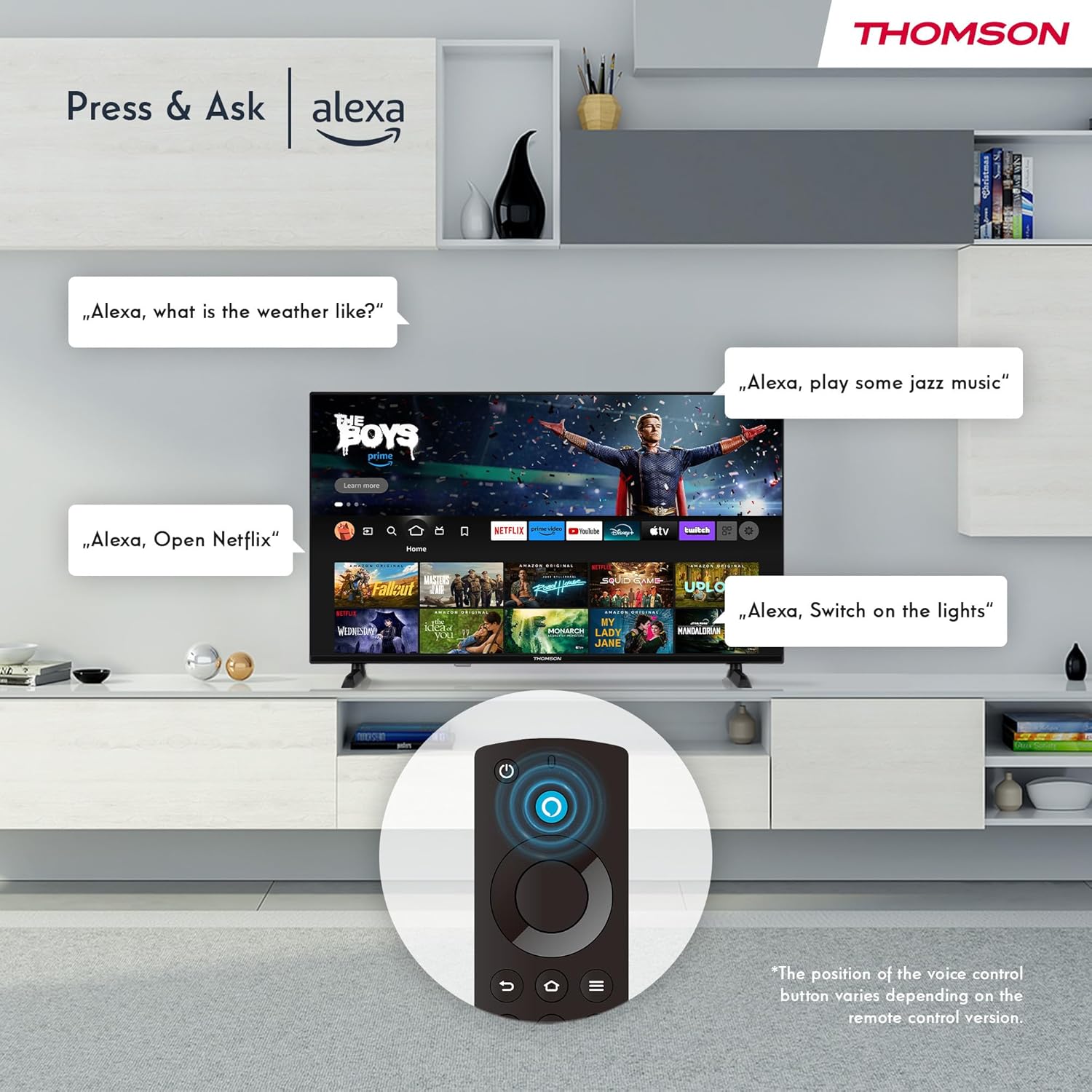
Image: The Smart Home dashboard on the Thomson TV, providing centralized control for various smart devices like cameras, lights, and plugs.
5. Multiple User Profiles
إنشاء العديد من المحترفينfiles on your Fire TV to receive personalized recommendations and settings for each user in your household.

Image: The Fire TV interface allowing creation of multiple user profileللحصول على توصيات بالمحتوى المخصص.
6. Triple Tuner and CI+
The integrated Triple Tuner allows you to receive signals from various sources:
- DVB-C: تلفزيون الكابل
- DVB-S2: التلفزيون الفضائي
- DVB T2: Terrestrial (antenna) television
Insert a CI+ card into the CI+ slot to access encrypted channels from your service provider.
7. Audio and Video Enhancements
Experience rich and clear sound with Dolby Audio and Dolby Digital Plus. Enjoy stunning visuals in HD resolution with HDR10 support for enhanced contrast and color.

Image: Visual representation of Dolby Audio technology enhancing the sound experience on the Thomson TV.

Image: A visual comparison demonstrating the superior image quality of HDR10 compared to SDR, highlighting enhanced colors and contrast.
8. جهاز التحكم عن بعد
The Bluetooth remote control provides easy navigation with direct access buttons for popular streaming services like Netflix and Prime Video, as well as the Amazon Silk browser. The Alexa button activates voice commands.
صيانة
تنظيف جهاز التلفزيون الخاص بك
لتنظيف الشاشة، امسحها برفق بقطعة قماش ناعمة وخالية من الوبر. لإزالة البقع الصعبة، استخدمampen the cloth slightly with water or a screen-cleaning solution. Avoid using harsh chemicals or abrasive materials. For the TV body, use a dry, soft cloth.
تحديثات البرامج
Your Fire TV will periodically receive software updates to improve performance and add new features. Ensure your TV is connected to the internet to receive these updates automatically. You can also manually check for updates in the settings menu.
استكشاف الأخطاء وإصلاحها
| مشكلة | السبب المحتمل / الحل |
|---|---|
| لا يوجد طاقة / لا يتم تشغيل التلفزيون |
|
| لا توجد صورة / شاشة سوداء |
|
| لا يوجد صوت |
|
| جهاز التحكم عن بعد لا يعمل |
|
| مشاكل اتصال الشبكة |
|
تحديد
| ميزة | التفاصيل |
|---|---|
| ماركة | تومسون |
| رقم الموديل | 32HF2S34 |
| حجم الشاشة (قطري) | 32 بوصة (80 سم) |
| تكنولوجيا العرض | قاد |
| دقة | HD (1366 x 768 Pixels) |
| معدل التحديث | 50 هرتز |
| نظام التشغيل | فاير تي في |
| التحكم الصوتي | اليكسا مدمج |
| الاتصال اللاسلكي | Wi-Fi, Bluetooth 5.0, AirPlay |
| الاتصال السلكي | 2x HDMI 1.4, 1x USB, AV In, CI+, Ethernet (LAN) |
| الموالفات | Triple Tuner (DVB-C, DVB-S2, DVB-T2) |
| تكنولوجيا الصوت | Dolby Audio, Dolby Digital Plus |
| دعم HDR | النطاق الديناميكي العالي 10 |
| الأبعاد (الطول × العرض × الارتفاع) | 71.9 × 45.6 × 15 سم (مع الحامل) |
| وزن | 4 كجم |
| فئة كفاءة الطاقة | E |
معلومات الضمان
Your THOMSON 32" HD LED Fire TV (Model: 32HF2S34) is covered by a manufacturer's warranty of سنتان from the date of purchase. This warranty covers defects in materials and workmanship under normal use. Please retain your proof of purchase for warranty claims. For detailed terms and conditions, refer to the warranty card included with your product or visit the official THOMSON support webموقع.
يدعم
For further assistance, technical support, or service requests, please contact THOMSON customer support through one of the following methods:
- الدعم عبر الإنترنت: Visit the official THOMSON support webالموقع الخاص بالأسئلة الشائعة، ودليل استكشاف الأخطاء وإصلاحها، وتنزيلات البرامج. www.thomsonconsumer.com/support (ملاحظة: هذا عنصر نائب URL, please refer to your product's specific support information.)
- دعم البريد الإلكتروني: support@thomsonconsumer.com (Note: This is a placeholder email, please refer to your product's specific support information.)
- دعم الهاتف: Refer to the contact numbers provided in your product packaging or on the official THOMSON webموقع لمنطقتك.
When contacting support, please have your TV's model number (32HF2S34) and serial number ready.
Ask a question about this manual
Ask about setup, troubleshooting, compatibility, parts, safety, or missing instructions. Manuals+ will review the question and use this page’s manual context to help answer it.