
مقدمة
Thank you for choosing the NBD 4K 48MP Digital Camera. This manual provides essential information for setting up, operating, and maintaining your camera. Please read it thoroughly before use to ensure optimal performance and longevity of your device.

Figure 1: NBD 4K 48MP Digital Camera with its 16x digital zoom capability and 180-degree rotatable screen.
محتويات الحزمة
تأكد من تضمين جميع العناصر المدرجة أدناه في الحزمة الخاصة بك:
- 1 x NBD 4K 48MP Digital Camera Body
- 1 x 32GB TF Memory Card
- 1 × كابل يو اس بي
- بطاريتان ليثيوم أيون قابلة لإعادة الشحن سعة 1500 مللي أمبير
- 1 × دليل المستخدم
- 1 x 52mm Wide-Angle Lens
- 1 x Macro Lens
- شنومكس x شاحن البطارية
- 1 x Custom Leather Case (Black)
- 1 x Leather Wrist Strap
انتهت الكاميراview
عدسات قابلة للتبديل
The NBD camera supports interchangeable lenses, allowing for versatile shooting. It comes equipped with a 52mm wide-angle lens and a macro lens. The wide-angle lens expands your field of view to 120 degrees, ideal for landscapes and group shots. The macro lens is designed for capturing clear and detailed close-up images of small subjects.
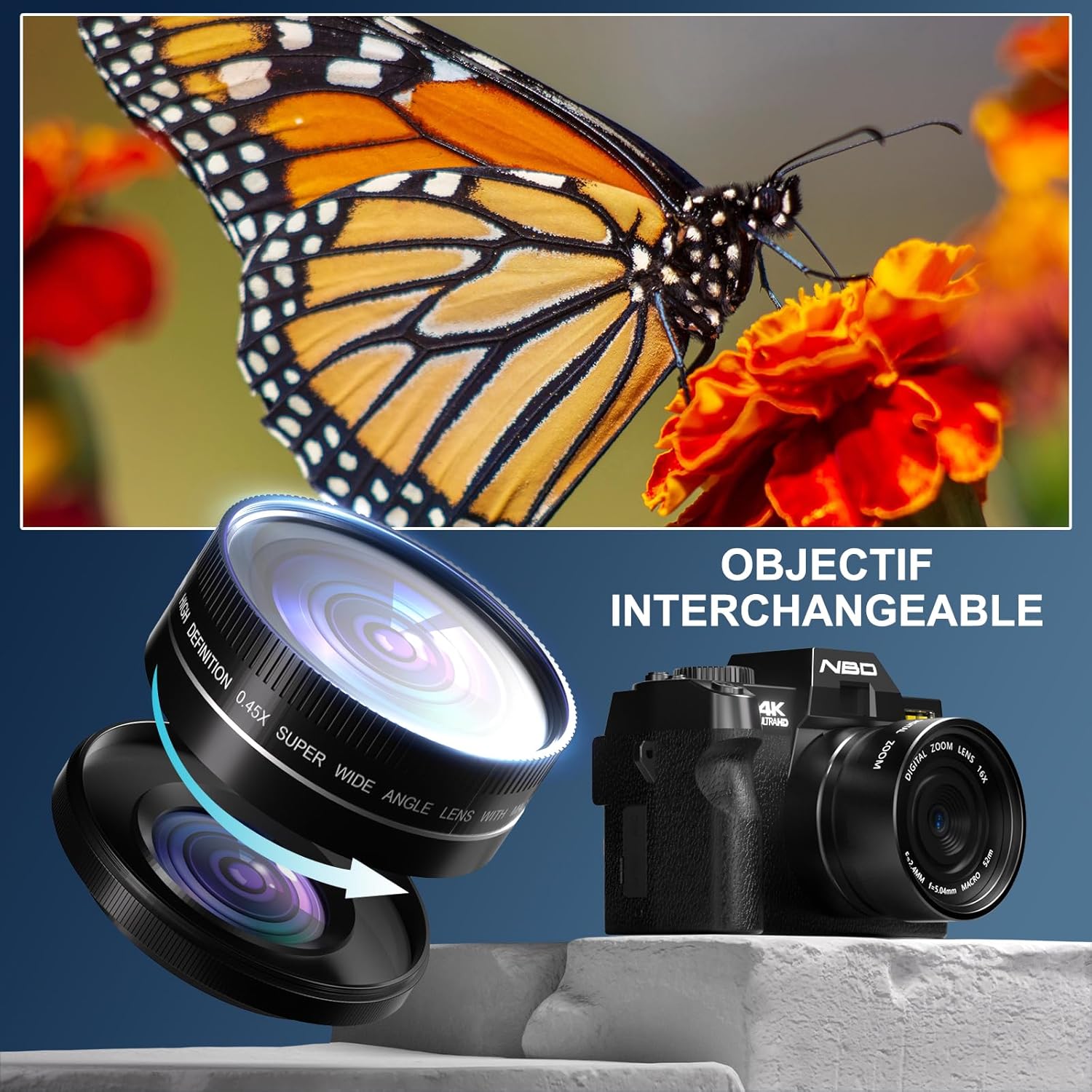
Figure 2: The camera's interchangeable lens system, featuring a wide-angle lens and a macro lens for diverse photographic needs.
الشاشة وعناصر التحكم
The camera features a 3-inch 180-degree rotatable IPS touchscreen, providing flexibility for various shooting angles, including vlogging and self-portraits. Physical buttons and a mode dial offer intuitive control over camera settings.
فيديو 1: أكثر منview of the NBD camera's design, including its rotatable screen and various control dials and ports, demonstrating its versatility in different shooting environments.
يثبت
1. شحن البطارية
Insert one or both 1500mAh lithium-ion batteries into the provided charger. Connect the charger to a power source using the USB cable. The indicator light on the charger will show the charging status. A full charge typically takes approximately 2-3 hours per battery. The camera supports recording while charging, allowing continuous use with an AC adapter or power bank.
2. إدخال بطاقة الذاكرة
Locate the memory card slot on the side of the camera. Insert the included 32GB TF card with the gold contacts facing the front of the camera until it clicks into place. To remove, press the card gently until it springs out.
3. تركيب العدسة
Align the mounting marks on the lens and the camera body. Gently twist the lens clockwise until it locks into position. To detach, press the lens release button (if present) and twist counter-clockwise.
تعليمات التشغيل
تشغيل/إيقاف الطاقة
اضغط مع الاستمرار على زر الطاقة لتشغيل الكاميرا أو إيقاف تشغيلها.
اختيار أوضاع التصوير
أدر قرص الوضع الموجود أعلى الكاميرا لاختيار وضع التصوير المطلوب. تشمل الأوضاع المتاحة ما يلي:
- وضع الصورة: For capturing still images up to 48MP.
- وضع الفيديو: For recording 4K/60fps video.
- المعدل الزمني للتصوير: Captures a series of images over time to create a video.
- اطلاق النار مستمر: يلتقط صوراً متعددة بسرعة متتالية.
- مؤقت ذاتي: Delays the shutter release for self-portraits or group shots.
- وضع التشغيل: لإعادةviewجي الصور ومقاطع الفيديو.

Figure 3: The camera's mode dial, illustrating the range of creative shooting options available.
باستخدام التكبير الرقمي
The camera features 16x digital zoom. Use the zoom controls (typically 'W' for wide and 'T' for telephoto) to adjust the magnification. Note that digital zoom may reduce image quality compared to optical zoom.
اتصال واي فاي
The camera supports Wi-Fi for easy file transfer to compatible devices like smartphones and tablets. Activate Wi-Fi in the camera settings, then connect your device to the camera's Wi-Fi network. Use the dedicated NBD app (if available) or your device's file transfer features.
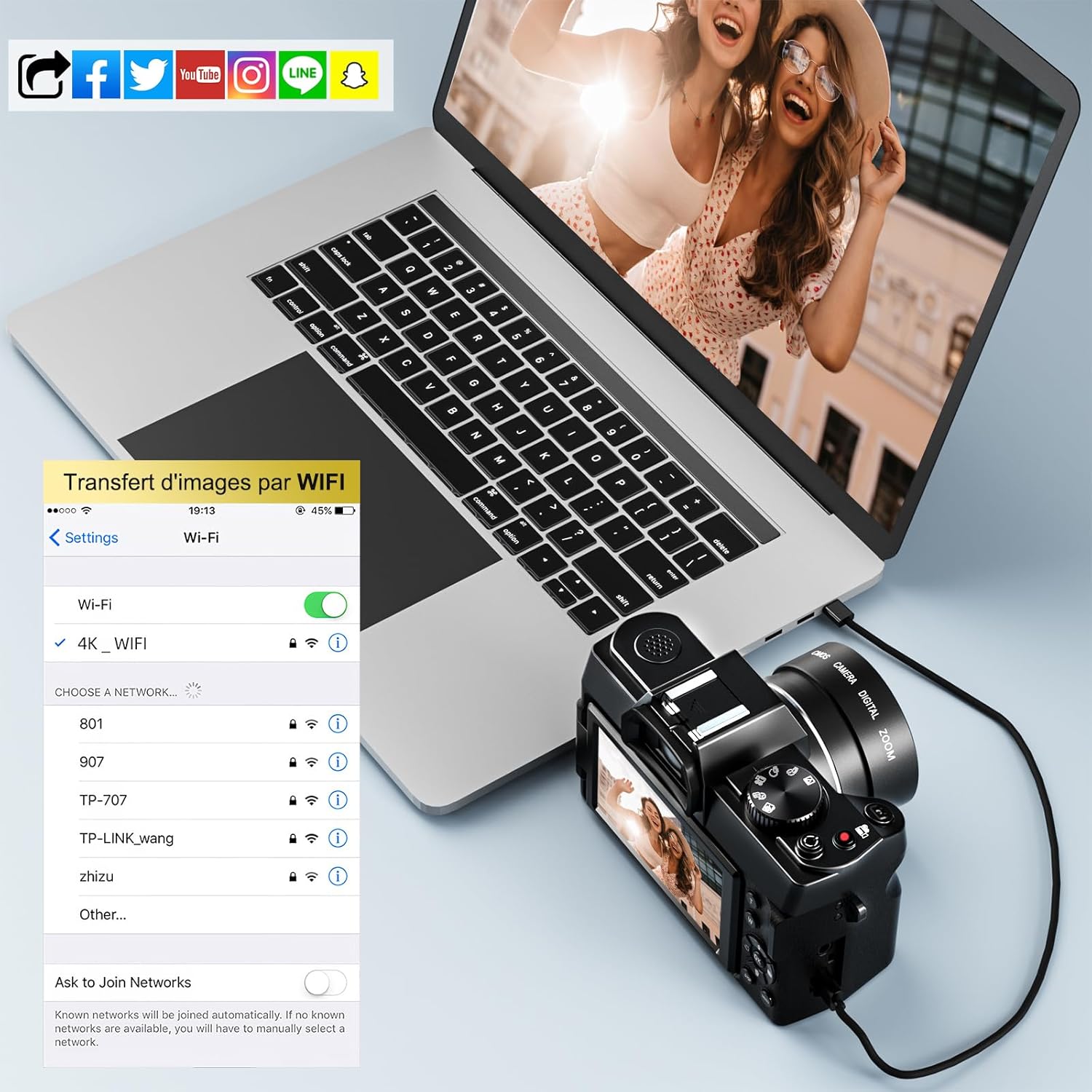
Figure 4: The camera's Wi-Fi interface, demonstrating how to connect and transfer images wirelessly to a laptop or other smart devices.
باستخدام الفلاش
The built-in flash can be used to illuminate subjects in low-light conditions. Access flash settings through the camera menu to select modes such as Auto Flash, Fill-in Flash, or Flash Off.

Figure 5: Comparison of a scene without flash (left) and with flash (right), highlighting the flash's ability to restore detail in low-light conditions.
PC Camera & HDMI Output
Connect the camera to your PC via USB. You can select "Storage Mode" for easy file transfer or "PC Camera" mode to use the camera for video chat or live streaming. For larger display, the camera supports HDMI output (HDMI cable not included) for direct connection to an HD TV.
صيانة
تنظيف الكاميرا
Use a soft, lint-free cloth to clean the camera body. For the lens, use a specialized lens cleaning cloth and solution. Avoid touching the lens surface directly with your fingers. Do not use harsh chemicals or abrasive materials.
تخزين
When not in use, store the camera in a cool, dry place away from direct sunlight and extreme temperatures. Remove the battery if the camera will not be used for an extended period. Use the provided leather case for protection during storage and transport.
استكشاف الأخطاء وإصلاحها
- الكاميرا لا تعمل: تأكد من شحن البطارية بالكامل وتركيبها بشكل صحيح. حاول استخدام البطارية الثانية.
- لا يمكن التقاط الصور/الفيديوهات: Check if the memory card is inserted correctly and has sufficient free space. Ensure the lens cap is removed.
- جودة الصورة رديئة: Verify that the lens is clean. Adjust shooting mode and settings according to lighting conditions. Digital zoom can reduce quality; use sparingly.
- مشاكل الاتصال بشبكة Wi-Fi: Ensure Wi-Fi is enabled on both the camera and your smart device. Restart both devices and try reconnecting.
- الشاشة لا تستجيب: If the touchscreen is unresponsive, try using the physical buttons. Power off and restart the camera.
تحديد
| ميزة | مواصفة |
|---|---|
| ماركة | بنك دبي الوطني |
| رقم الموديل | NBD-S100-WM-DPT-EU-2410 |
| دقة ثابتة فعالة | 48 ميجا بكسل |
| دقة الفيديو | 4K (2160p) at 60 FPS |
| تقريب رقمي | 16x |
| التكبير البصري | 16x |
| تقنية الاستشعار | سيموس |
| شاشة | 3-inch 180° Rotatable IPS Display |
| الاتصال | واي فاي، يو اس بي، اتش دي ام اي |
| نوع البطارية | بطارية ليثيوم أيون (1500 مللي أمبير/ساعة) |
| الذاكرة المضمنة | شنومكسب تف بطاقة |
| العدسات المرفقة | 52mm Wide-Angle Lens, Macro Lens |
| نطاق ISO | 100-6400 |
| فتحة | ف2.8 |
| نقاط ضبط تلقائي للصورة | 1 |
| الأبعاد (الطول × العرض × الارتفاع) | 12.6 × 11 × 8.2 سم |
| وزن | 1.03 كيلوغرام |
الضمان والدعم
NBD offers a three-month free replacement and refund service for this product. For any questions or assistance, please contact our customer support. We aim to provide a solution within 24 hours.
يرجى الاحتفاظ بإثبات الشراء الخاص بك لمطالبات الضمان.