
مقدمة
Thank you for choosing the GGSTOPWATER Open Ear Headphones, Model JM13. These headphones are designed to provide a comfortable listening experience while maintaining awareness of your surroundings. Featuring Bluetooth 5.4 connectivity and an IPX5 waterproof rating, they are suitable for various activities including sports, gaming, and driving.
Please read this manual carefully to ensure proper use and to maximize the performance and lifespan of your device.
محتويات الحزمة
تأكد من وجود جميع العناصر في الحزمة الخاصة بك:
- True Wireless Bluetooth Headphones (2 units)
- Headset Charging Compartment (1 unit)
- كابل شحن من النوع C (وحدة واحدة)
- دليل المستخدم (1 وحدة)
- Silicone Lanyard (1 unit)

المنتج انتهىview
The GGSTOPWATER JM13 headphones feature an open-ear design with ear hooks for a secure and comfortable fit. The charging case is designed for portability and convenience.
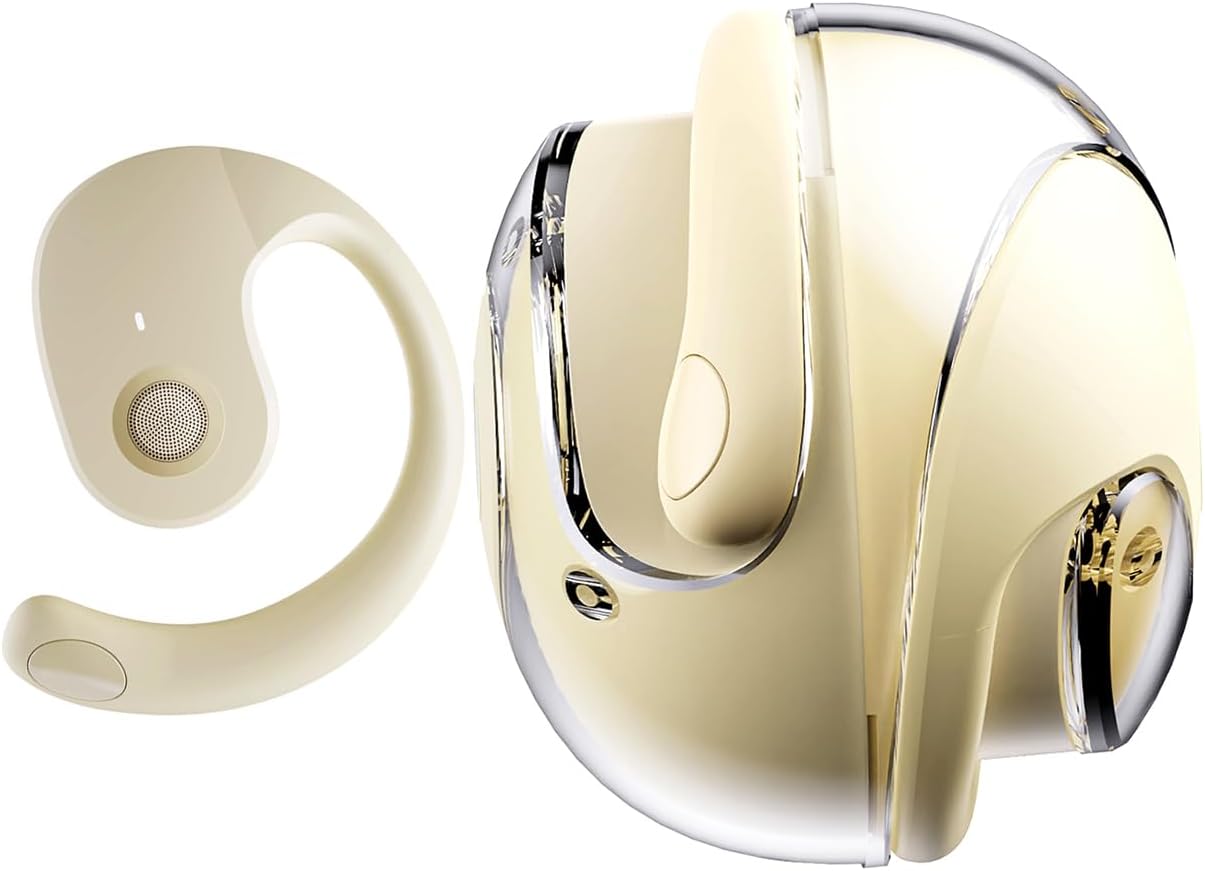
يثبت
1. شحن سماعات الرأس والعلبة
Before first use, fully charge the headphones and the charging case. Place the headphones into the charging case. Connect the Type-C charging cable to the charging port on the case and plug the other end into a USB power source.
- وقت الشحن: حوالي ساعتين للشحن الكامل.
- Headset Usage Time: ما يصل إلى 4 ساعة بتهمة واحدة.
- وقت الاستعداد: تصل إلى 120 ساعة.


2. ارتداء سماعات الرأس
The open-ear design with ear hooks ensures a stable and comfortable fit without entering the ear canal.
- Pick up the headset from the charging case.
- Wear it along the back of your ear, positioning the speaker over your ear canal.
- Gently adjust the headphones to a comfortable and secure position.

3. اقتران بلوتوث
The headphones utilize Bluetooth 5.4 for a stable and fast connection. They support multi-device linking and are compatible with iOS, Android, and Windows systems.
- تأكد من شحن سماعات الرأس وتشغيلها.
- Open the Bluetooth settings on your device (smartphone, tablet, laptop).
- بحث عن available devices and select "JM13" from the list.
- بمجرد الاتصال، ستسمع نغمة تأكيد، وسيظهر الجهاز على أنه "متصل".

تعليمات التشغيل
عناصر التحكم باللمس
The headphones feature intuitive touch controls for managing calls and music playback.

| فعل | Function (Telephone Mode) | الوظيفة (وضع الموسيقى) |
|---|---|---|
| الضغط لفترة طويلة 2 ثانية | رفض المكالمة | غير متاح |
| انقر | الرد على المكالمات الواردة | غير متاح |
| انقر مرة أخرى | قطع الاتصال | غير متاح |
| Double touch (L) | غير متاح | تشغيل الأغنية السابقة |
| Double touch (R) | غير متاح | تلعب الأغنية التالية |
| لمسة واحدة | غير متاح | تشغيل/إيقاف مؤقت |
| الضغط لفترة طويلة 3 ثانية | تشغيل/إيقاف الطاقة | تشغيل/إيقاف الطاقة |
| Three touch (L) | غير متاح | خفض الصوت |
| Three touch (R) | غير متاح | رفع الصوت |
اتصال متعدد النقاط
The headphones support connecting to multiple devices simultaneously. This allows you to seamlessly switch between, for example, your smartphone and laptop without needing to re-pair each time. Ensure both devices are paired with the headphones. The headphones will prioritize audio from the active device.
صيانة
تنظيف
يساعد التنظيف المنتظم على الحفاظ على جودة الصوت والنظافة:
- Use a soft, dry, lint-free cloth to wipe the headphones and charging case.
- لا تستخدم كيماويات مركزة أو محاليل التنظيف أو المنظفات القوية.
- تجنب دخول الرطوبة إلى أي فتحات.
تخزين
عند عدم الاستخدام، خزّن سماعات الرأس في علبة الشحن لحمايتها من الغبار والتلف. خزّنها في مكان بارد وجاف بعيدًا عن درجات الحرارة العالية.
مقاومة الماء (IPX5)
The headphones are rated IPX5 water-resistant, meaning they can withstand splashes of water and sweat. This makes them suitable for workouts and light rain exposure. However, they are not designed for submersion in water or for use during heavy rain or showering. Ensure the charging port is dry before charging.
استكشاف الأخطاء وإصلاحها
If you encounter issues with your GGSTOPWATER JM13 headphones, please refer to the following common solutions:
- لا يوجد طاقة: Ensure the headphones and charging case are fully charged.
- لا يمكن الاقتران:
- Ensure Bluetooth is enabled on your device and the headphones are within range.
- Turn off and then turn on the headphones.
- Delete "JM13" from your device's Bluetooth list and attempt to re-pair.
- إذا اتصلت سماعة أذن واحدة فقط، فحاول وضع كلتيهما في العلبة، وإغلاقها، ثم إعادة فتحها لإعادة الضبط.
- لا يوجد صوت أو مستوى الصوت منخفض:
- Check the volume level on both your connected device and the headphones using the touch controls.
- Ensure the headphones are properly seated on your ears.
- Confirm that the headphones are connected to the correct audio output on your device.
- عناصر التحكم باللمس غير المستجيبة:
- تأكد من أن أصابعك نظيفة وجافة عند استخدام عناصر التحكم باللمس.
- Restart the headphones by placing them in the charging case and taking them out again.
- مشاكل الشحن:
- تأكد من توصيل كابل الشحن بشكل آمن بكل من العلبة ومصدر الطاقة.
- جرب كابل Type-C ومحول طاقة مختلفين.
- Ensure the charging contacts on the headphones and inside the case are clean and free of debris.
إذا لم تنجح هذه الخطوات في حل مشكلتك، فيرجى الاتصال بدعم العملاء.
تحديد
| ميزة | التفاصيل |
|---|---|
| اسم الموديل | ج م 13 |
| ماركة | جي جي ستوب ووتر |
| تكنولوجيا الاتصال | لاسلكي (بلوتوث) |
| نسخة البلوتوث | 5.4 |
| وضع الأذن | أذن مفتوحة |
| شكل سماعة الأذن | خطاف الأذن |
| مستوى مقاومة الماء | IPX5 (Water Resistant, Sweatproof) |
| التحكم في الضوضاء | إلغاء الضوضاء النشط |
| نوع برنامج تشغيل الصوت | محرك ديناميكي (16 مم) |
| نطاق التردد | 20 هرتز - 20,000 هرتز |
| مقاومة | 32 أوم |
| طريقة التحكم | Remote (Touch) |
| نوع البطارية | بوليمر الليثيوم |
| وزن العنصر | 4.6 أونصات |
| مادة | سيليكون |
| الأجهزة المتوافقة | Laptops, Tablets, Cellphones (iOS, Android, Windows) |
الضمان والدعم
GGSTOPWATER products are manufactured to high-quality standards. For information regarding warranty coverage, please refer to the warranty card included in your product packaging or contact your retailer. Keep your purchase receipt as proof of purchase.
دعم العملاء
If you have any questions, concerns, or require technical assistance, please contact GGSTOPWATER customer support through the retailer's platform or the official GGSTOPWATER website. Please have your product model (JM13) and purchase details ready when contacting support.