1. انتهى المنتجview
The AW12 Multifunction Stainless Steel Smart Watch is a sophisticated and functional timepiece designed to seamlessly integrate into your daily life. It combines durable construction with advanced features to keep you connected and informed.
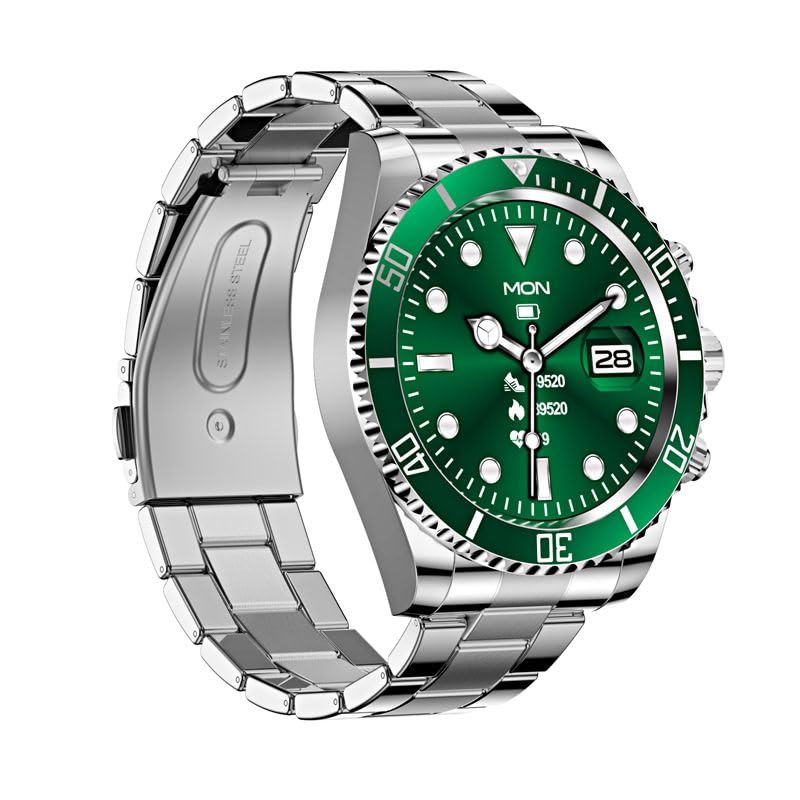
Figure 1: AW12 Multifunction Stainless Steel Smart Watch. The watch features a robust stainless steel case and bracelet, complemented by a vibrant green dial with luminous markers.
المميزات الرئيسية:
- Precision Timekeeping: Robust stainless steel case and bracelet design for exceptional durability.
- شاشة نابضة بالحياة: 1.28-inch Full-Touch IPS Screen with 240x240 resolution.
- علامات مضيئة: Green dial boasts luminous hour markers and hands for easy reading in low-light conditions.
- تتبع النشاط: Sleep Monitor, Cycle Tracking, Activity Tracker, Alarm Clock.
- الاتصال: Bluetooth for phone calls and notifications.
- مقاومة الماء: IP68 rating, water-resistant up to 200 meters.
- إطار دوار أحادي الاتجاه: For precise timekeeping and tracking of elapsed time.
2. ماذا يوجد في الصندوق
Upon opening your AW12 Smart Watch package, you will find the following items:
- ساعة ذكية AW12
- كابل الشحن
- دليل المستخدم (هذا المستند)
Video 1: AW12 Stainless Steel Smartwatch Overviewيقدم هذا الفيديو شرحًا شاملاًview of the AW12 Stainless Steel Smartwatch, highlighting its design, features, and what's included in the box.
3. دليل الإعداد
3.1 الشحن الأولي
- Connect the provided charging cable to the charging port on the back of your AW12 Smart Watch.
- Plug the USB end of the charging cable into a compatible USB power adapter (not included) or a computer's USB port.
- Allow the watch to charge fully before first use. A full charge typically takes approximately 2 hours. The battery indicator on the screen will show charging progress.
3.2 تشغيل/إيقاف التشغيل
- لتشغيل: اضغط باستمرار على الزر الجانبي حتى تضيء الشاشة.
- لإيقاف التشغيل: اضغط مع الاستمرار على الزر الجانبي، ثم حدد "إيقاف التشغيل" على الشاشة.
3.3 الاقتران بهاتفك الذكي
To unlock the full potential of your AW12 Smart Watch, pair it with your smartphone via Bluetooth.
- تأكد من تمكين Bluetooth على هاتفك الذكي.
- On your AW12 Smart Watch, navigate to the Bluetooth settings.
- On your smartphone, search for available Bluetooth devices and select 'AW12' from the list.
- Follow the on-screen prompts on both devices to complete the pairing process. A confirmation message will appear once successfully connected.
4. تعليمات التشغيل
4.1 التنقل عبر الواجهة
- شاشة تعمل باللمس: اسحب لليسار أو اليمين أو للأعلى أو للأسفل للتنقل بين القوائم والشاشات. انقر لتحديد خيار.
- زر جانبي: اضغط للعودة إلى الشاشة الرئيسية أو لتشغيل الجهاز. اضغط مطولاً لعرض خيارات الطاقة.
- الإطار الدوار: The unidirectional rotating bezel can be used for timing events or tracking elapsed time. Rotate it counter-clockwise to align the zero marker with the minute hand for timing.
4.2 الوظائف الأساسية
- الوقت والتاريخ: The watch automatically synchronizes time and date with your paired smartphone.
- المكالمات الهاتفية: Once paired, you can make and receive calls directly from your watch. Access the call log or dial pad from the phone icon on the watch.
- إشعارات: Receive alerts for messages, calls, and app notifications directly on your wrist.
4.3 Lifestyle Features
- متتبع النشاط: Monitors steps taken, distance covered, and calories burned. View your daily progress in the activity app.
- مراقب النوم: Tracks your sleep patterns, including deep sleep, light sleep, and awake times. Access sleep data in the dedicated sleep app.
- تتبع الدورة: Helps track and predict menstrual cycles. Input relevant data into the cycle tracking feature.
- التنبيه: Set multiple alarms directly from your watch.
5. الصيانة والعناية
5.1 مقاومة الماء
The AW12 Smart Watch has an IP68 water resistance rating and is water-resistant up to 200 meters. This means it is suitable for swimming, showering, and shallow diving. However, it is not recommended for high-pressure water activities or prolonged submersion at extreme depths. Avoid exposing the watch to hot water or steam, as this can compromise the seals.
5.2 تنظيف ساعتك
- امسح علبة الساعة وحزامها بانتظام بقطعة قماش ناعمة.amp قطعة قماش.
- بالنسبة للأوساخ العنيدة، استخدم محلول صابون خفيف ثم اشطف جيدًا بالماء النظيف.
- تأكد من جفاف الساعة تماماً قبل شحنها أو تخزينها لفترة طويلة.
5.3 العناية بالبطارية
- لإطالة عمر البطارية، تجنب تفريغ الساعة بالكامل بشكل متكرر.
- قم بتخزين الساعة في مكان بارد وجاف عندما لا تكون قيد الاستخدام لفترات طويلة.
- استخدم فقط كابل الشحن المرفق.
6. استكشاف الأخطاء وإصلاحها
If you encounter any issues with your AW12 Smart Watch, please refer to the following common troubleshooting steps:
| مشكلة | السبب المحتمل | حل |
|---|---|---|
| الساعة لا تعمل | بطارية منخفضة | اشحن الساعة لمدة 30 دقيقة على الأقل. |
| لا يمكن الاقتران بالهاتف الذكي | Bluetooth off, watch not in pairing mode, or interference | تأكد من تفعيل البلوتوث في كلا الجهازين. أعد تشغيل الجهازين، ثم حاول الاقتران مرة أخرى. |
| Display is unresponsive | خلل في البرامج أو انخفاض البطارية | Restart the watch. Ensure it is charged. |
| تتبع النشاط غير الدقيق | Improper fit or software calibration needed | Ensure the watch is worn snugly. Check for software updates or recalibrate if available in settings. |
إذا استمرت المشكلة بعد تجربة هذه الخطوات، يرجى الاتصال بدعم العملاء للحصول على مزيد من المساعدة.
7. المواصفات
| ميزة | التفاصيل |
|---|---|
| نموذج | خريف وشتاء 12 |
| عرض | 1.28-inch Full-Touch IPS LCD Screen |
| دقة | 240 × 240 بكسل |
| وزن | 300 جرام |
| سعة تخزين الذاكرة | 16 ميجا بايت |
| نظام التشغيل | نظام تشغيل AsteroidOS |
| الاتصال | بلوتوث |
| تصنيف مقاومة الماء | IP68, up to 200 meters |
| سعة البطارية | 12 Amp ساعات |
| نوع المشبك | مشبك تانغ |
| المميزات الخاصة | Sleep Monitor, Cycle Tracking, Activity Tracker, Alarm Clock, Phone Call |
8. الضمان والدعم
For information regarding warranty coverage and terms, please refer to the product packaging or the official product page on Amazon.in. For technical support, troubleshooting assistance beyond this manual, or to inquire about repairs, please contact the seller or manufacturer directly through the Amazon platform.
You can find more detailed information and contact options by visiting the product's detail page: AW12 Smart Watch on Amazon.in


