
1. المقدمة
This manual provides detailed instructions for setting up, operating, and maintaining your YOOSEE KAP X330 Wireless WiFi Repeater Router. Please read this manual carefully before using the device to ensure optimal performance, extended network coverage, and safety. This device is designed to easily expand the range of your existing WLAN network or create a new access point.
2. انتهى المنتجview
2.1 الميزات الرئيسية
- Extends the range of your WLAN network easily.
- Provides Internet access for computers located at the edge or outside the range of your main access point.
- Supports both Wireless Repeater Mode and standard Access Point (AP) Mode.
- Utilizes WLAN 802.11N for high-speed wireless access.
- Compatible with 802.11G (54 Mbps) and 802.11B (11 Mbps) standards.
- Operates on the 2.4GHz WLAN frequency.
- Ensures maximum WLAN network security with WPA2, WPA, and WEP (64/128-bit) encryptions.
- Features integrated antennas for compact design.
- Bivolt (110V / 220V) power input for versatile use.
- Supports WPS (Wi-Fi Protected Setup) for easy connection.
2.2 محتويات العبوة
- 1x YOOSEE KAP X330 Wireless WiFi Repeater Router
- 1 × دليل المستخدم
2.3 الوصف المادي
The KAP X330 is a compact, white device designed to plug directly into a wall outlet. It features indicator lights on the front panel and an Ethernet port on the side for wired connections.
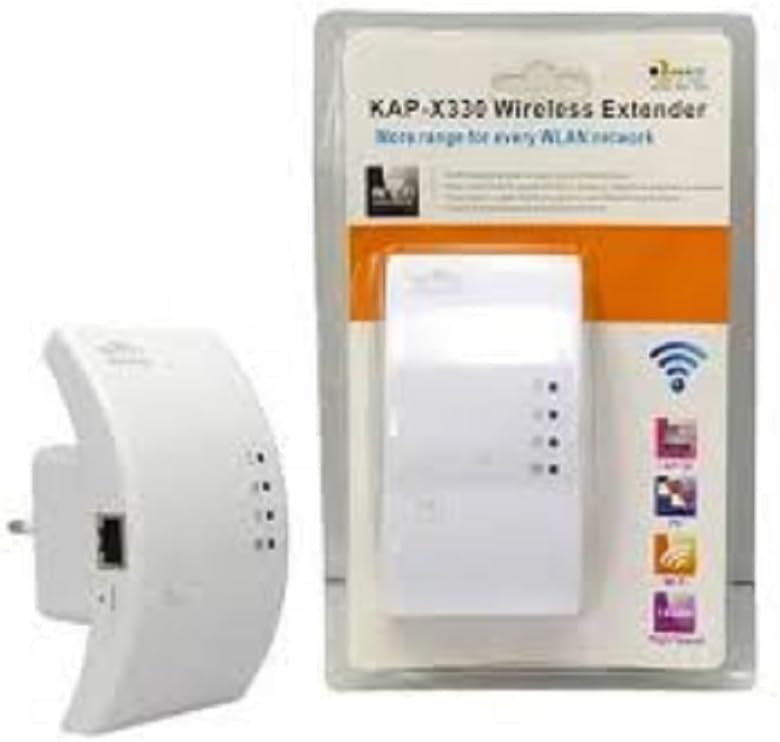
Figure 2.1: YOOSEE KAP X330 Wireless Repeater in its retail packaging and as a standalone unit. The packaging highlights its 'KAP-X330 Wireless Extender' name and 'More range for every WLAN network' slogan. The device itself is white with indicator lights and an Ethernet port visible.
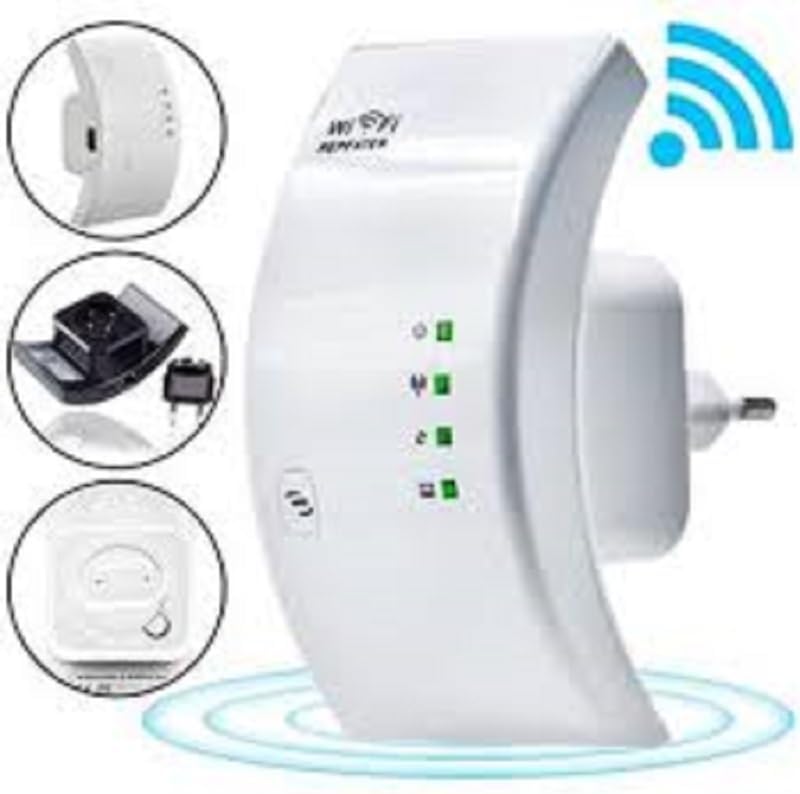
Figure 2.2: A closer look at the YOOSEE KAP X330 Wireless Repeater, emphasizing its design and features. It shows the device plugged into an outlet, with indicator lights illuminated. Insets highlight the side view with an Ethernet port, the power plug, and a reset button, along with a prominent WiFi signal icon.
3. دليل الإعداد
3.1 التشغيل
- Plug the KAP X330 into a standard electrical outlet within the range of your existing WiFi network (for Repeater Mode) or near your wired internet source (for AP Mode).
- Wait for the power indicator light to turn on, indicating the device is ready.
3.2 أوضاع الاتصال
The KAP X330 supports two main operational modes:
- وضع مكرر: يوسع نطاق تغطية شبكة لاسلكية موجودة.
- وضع نقطة الوصول (AP): Creates a new wireless network from a wired Ethernet connection.
3.3 Configuration Steps (Repeater Mode)
- الاتصال بجهاز إعادة الإرسال: On your computer or smartphone, connect to the repeater's default WiFi network (SSID usually starts with 'Wireless-N' or similar, without a password).
- وصول Web الواجهة: افتح web المتصفح وأدخل عنوان IP الافتراضي (على سبيل المثال،
192.168.1.1or192.168.10.1) or the default domain name (e.g.,repeater.net). Refer to the label on the device or the quick start guide for the exact address. - تسجيل الدخول: Enter the default username and password (commonly 'admin' for both).
- حدد وضع المكرر: On the setup page, select 'Repeater Mode'.
- البحث عن الشبكات: The device will scan for available wireless networks. Select your home WiFi network from the list.
- أدخل كلمة المرور: Enter the password for your home WiFi network.
- Configure Extended SSID (Optional): You can choose to keep the same SSID as your main network or create a new one (e.g., 'YourNetwork_EXT').
- حفظ الإعدادات: Click 'Apply' or 'Save'. The repeater will restart.
- إعادة الاتصال: After the restart, connect your devices to the extended WiFi network.
3.4 Configuration Steps (AP Mode)
- توصيل كابل إيثرنت: Connect an Ethernet cable from your router or modem to the LAN/WAN port on the KAP X330.
- الاتصال بجهاز إعادة الإرسال: On your computer or smartphone, connect to the repeater's default WiFi network (SSID usually starts with 'Wireless-N' or similar, without a password).
- وصول Web الواجهة: افتح web المتصفح وأدخل عنوان IP الافتراضي (على سبيل المثال،
192.168.1.1or192.168.10.1) or the default domain name (e.g.,repeater.net). - تسجيل الدخول: Enter the default username and password (commonly 'admin' for both).
- حدد وضع AP: On the setup page, select 'AP Mode'.
- Configure New Network: قم بتعيين اسم شبكة (SSID) جديد وكلمة مرور قوية لشبكتك اللاسلكية الجديدة.
- حفظ الإعدادات: Click 'Apply' or 'Save'. The device will restart.
- إعادة الاتصال: After the restart, connect your devices to the newly created WiFi network.
3.5 إعداد WPS (إعداد Wi-Fi المحمي)
WPS allows for a quick and easy connection to your main router without needing to enter the password manually.
- Plug in the KAP X330 and wait for it to power on.
- اضغط على زر WPS على جهاز التوجيه الرئيسي الخاص بك.
- Within two minutes, press the WPS button on the KAP X330.
- The devices will automatically connect and configure the repeater. The signal indicator lights on the repeater should show a strong connection.
4. التشغيل
4.1 مصابيح مؤشر
The KAP X330 features several indicator lights on its front panel to provide status information:
- مؤشر الطاقة LED: يشير إلى ما إذا كان الجهاز قيد التشغيل.
- WLAN/WiFi LED: Shows wireless activity and connection status.
- مؤشر LED لشبكة LAN/WAN: يشير إلى وجود نشاط على منفذ الإيثرنت.
- مؤشرات LED لقوة الإشارة: (If present) Indicate the strength of the signal received from the main router in Repeater Mode. More lights usually mean a stronger signal.
4.2 الوضع الأمثل
For best performance in Repeater Mode, place the KAP X330 halfway between your main router and the area where you need extended WiFi coverage. Avoid placing it near large metal objects, concrete walls, or other devices that emit radio frequency interference (e.g., microwaves, cordless phones).
5. الصيانة
5.1 التنظيف
To clean the device, unplug it from the power outlet. Use a soft, dry cloth to wipe the exterior. Do not use liquid cleaners or aerosol sprays.
5.2 تحديثات البرامج الثابتة
Periodically check the YOOSEE official website for firmware updates. Firmware updates can improve performance, add new features, or fix bugs. Follow the instructions provided with the firmware update package carefully.
6. استكشاف الأخطاء وإصلاحها
6.1 لا يوجد اتصال بالإنترنت بعد الإعداد
- Ensure the repeater is receiving a strong signal from your main router (check signal strength LEDs).
- Verify that you entered the correct WiFi password for your main network during setup.
- Try restarting both your main router and the KAP X330.
- If in AP Mode, ensure the Ethernet cable is securely connected and your main router is providing internet.
6.2 Weak Signal or Slow Speed
- Relocate the KAP X330 closer to your main router, ensuring it's still within the desired coverage area.
- Avoid physical obstructions like thick walls or large metal objects.
- تحقق من عدم وجود تداخل من الأجهزة الإلكترونية الأخرى.
6.3 لا يمكن الوصول Web الواجهة
- Ensure your device is connected to the repeater's WiFi network (or via Ethernet if in AP mode).
- تأكد من صحة عنوان IP أو اسم النطاق المُدخل في المتصفح.
- قم بمسح ذاكرة التخزين المؤقت للمتصفح الخاص بك أو جرب متصفحًا آخر.
- قم بتعطيل أي برنامج VPN أو جدار حماية على جهاز الكمبيوتر الخاص بك مؤقتًا.
6.4 إعادة ضبط المصنع
إذا واجهت مشاكل مستمرة أو نسيت بيانات تسجيل الدخول الخاصة بك، يمكنك إجراء إعادة ضبط المصنع:
- With the device powered on, use a paperclip or a thin object to press and hold the reset button (usually located in a small pinhole) for about 5-10 seconds.
- حرر الزر عندما تومض أضواء المؤشر أو عند إعادة تشغيل الجهاز.
- The device will revert to its factory default settings, and you will need to reconfigure it.
7. المواصفات
| ميزة | مواصفة |
|---|---|
| الشركة المصنعة | يوسي |
| نموذج | KAP-X330 |
| المعيار اللاسلكي | 802.11n (compatible with 802.11g/b) |
| تكرار | 2.4 جيجاهرتز |
| بروتوكولات الأمن | WPA2, WPA, WEP (64/128-bit) |
| المميزات الخاصة | WPS, Standard AP Mode |
| مدخلات الطاقة | Bivolt 110V / 220V |
| الأبعاد (الطول × العرض × الارتفاع) | 15 × 12 × 8 سم |
| وزن | 200 جرام |
| الأجهزة المتوافقة | Laptop, Smartphone, Tablet, Smart TV |
8. الضمان والدعم
For warranty information and technical support, please refer to the contact details provided by your retailer or visit the official YOOSEE webالموقع. احتفظ بإيصال الشراء الخاص بك كإثبات للشراء في حالة مطالبات الضمان.