
1. المقدمة
Thank you for choosing the LEADZM Piano209 Digital Piano. This instrument combines the authentic feel of an acoustic piano with modern digital features, including a fully weighted 88-key hammer action keyboard, a high-quality DREAM sound source, and versatile connectivity options like MIDI and Bluetooth audio. This manual provides essential information for setup, operation, and maintenance to ensure optimal performance and longevity of your digital piano.
2. ماذا يوجد في الصندوق
يرجى التأكد من تضمين جميع العناصر المدرجة أدناه في الحزمة الخاصة بك:
- 1 x LEADZM Digital Piano
- 1 × محول الطاقة
- 1 x Triple Pedal Unit
- 1 × سماعة رأس
- 1 x Headphone Adapter
- 1 × كابل يو اس بي
- 1 x Android Cable
- 1 x Piano Towel
- 1 x Piano Cover
- 1 x Keyboard Sticker Set
- 1 x Music Clip
- 1 x Screwdriver and Screw Accessories
- 1 × دليل المستخدم
If any items are missing or damaged, please contact LEADZM customer support.
3. تعليمات الإعداد
3.1 التفريغ والتنسيب
- قم بإزالة جميع المكونات بعناية من العبوة.
- Place the digital piano on a stable, flat surface. Ensure adequate space around the instrument for comfortable playing and connections.
- Avoid placing the piano in direct sunlight, near heat sources, or in areas with extreme temperature fluctuations or high humidity.
3.2 تركيب الحامل (إن وجد)
If your piano includes a stand, follow these general steps. Refer to the separate assembly diagram for detailed instructions and screw identification.
- Identify all stand components and hardware (screws, bolts, etc.).
- Assemble the side panels and crossbars using the provided screws. Ensure all connections are secure.
- Carefully place the main piano unit onto the assembled stand, aligning the mounting holes.
- Secure the piano to the stand using the appropriate screws. Do not overtighten.
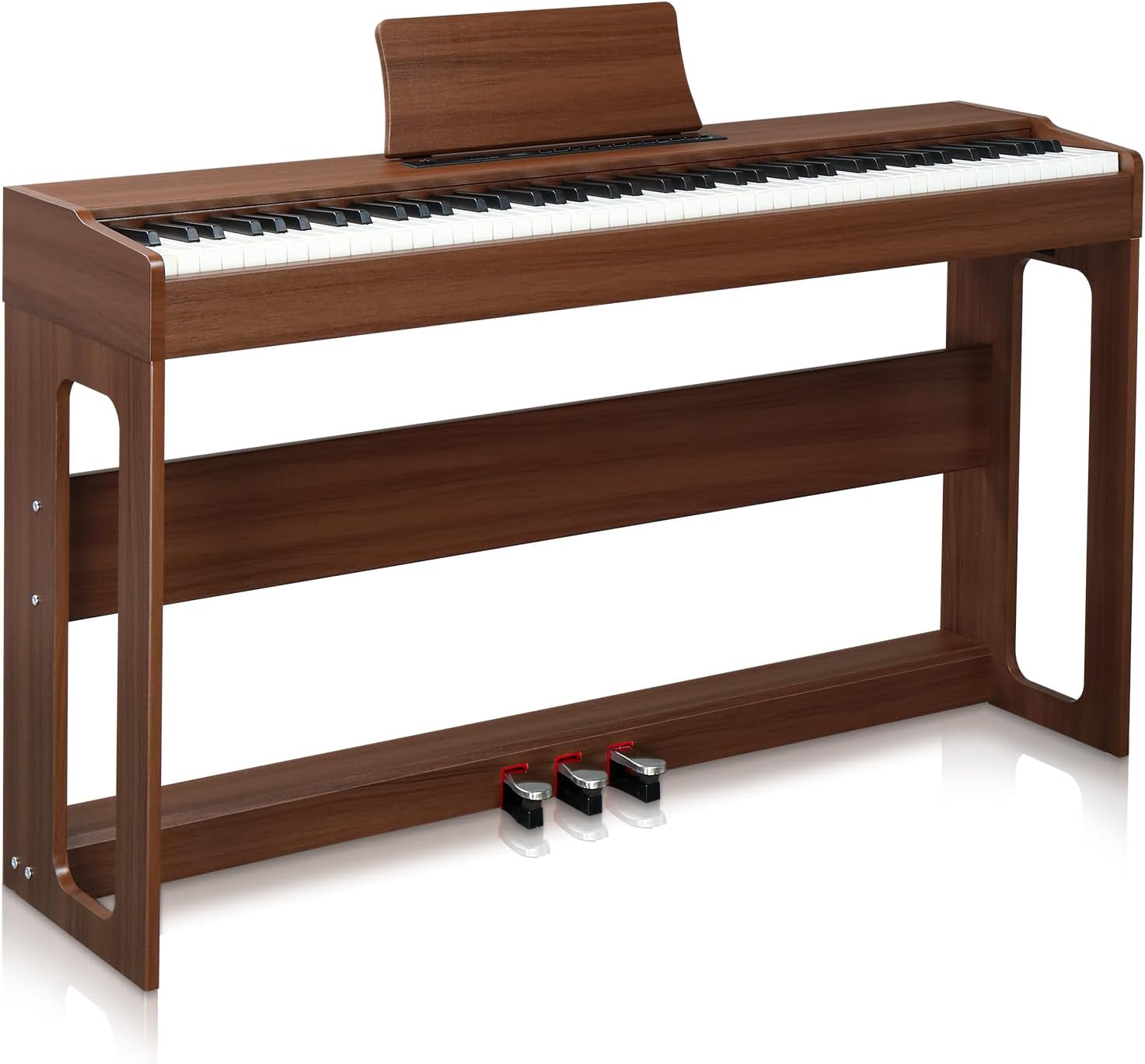
Image: The LEADZM Piano209 Digital Piano fully assembled, showcasing its elegant design and integrated stand.
3.3 Connecting the Triple Pedal Unit
- Locate the pedal input port on the underside or rear panel of the piano.
- Connect the cable from the triple pedal unit firmly into the designated port.

الصورة: لقطة مقربة view of the triple pedal system, showing the Soft, Sustain, and Sostenuto pedals.
3.4 توصيل الطاقة
- Connect the power adapter to the DC IN jack on the piano.
- قم بتوصيل محول الطاقة بمأخذ كهربائي قياسي.
4. تعليمات التشغيل
4.1 تشغيل/إيقاف التشغيل
- للتشغيل ، اضغط على قوة الزر الموجود على لوحة التحكم.
- لإيقاف التشغيل ، اضغط مع الاستمرار على قوة الزر حتى تنطفئ الشاشة.

Image: The simple control panel of the LEADZM Digital Piano, featuring power, volume, and function buttons.
4.2 ميزات لوحة المفاتيح
- 88 Fully Weighted Keys: The hammer action keyboard provides a realistic piano feel, with heavier touch in the lower register and lighter touch in the higher register.
- التحكم باللمس: Adjust the keyboard's sensitivity to your playing style. This allows for dynamic expression, from soft to powerful tones.
- Split Function: Divide the keyboard into two sections, allowing two different voices to be played simultaneously.
- نقل: Shift the pitch of the entire keyboard up or down in semitone steps without changing your fingerings.
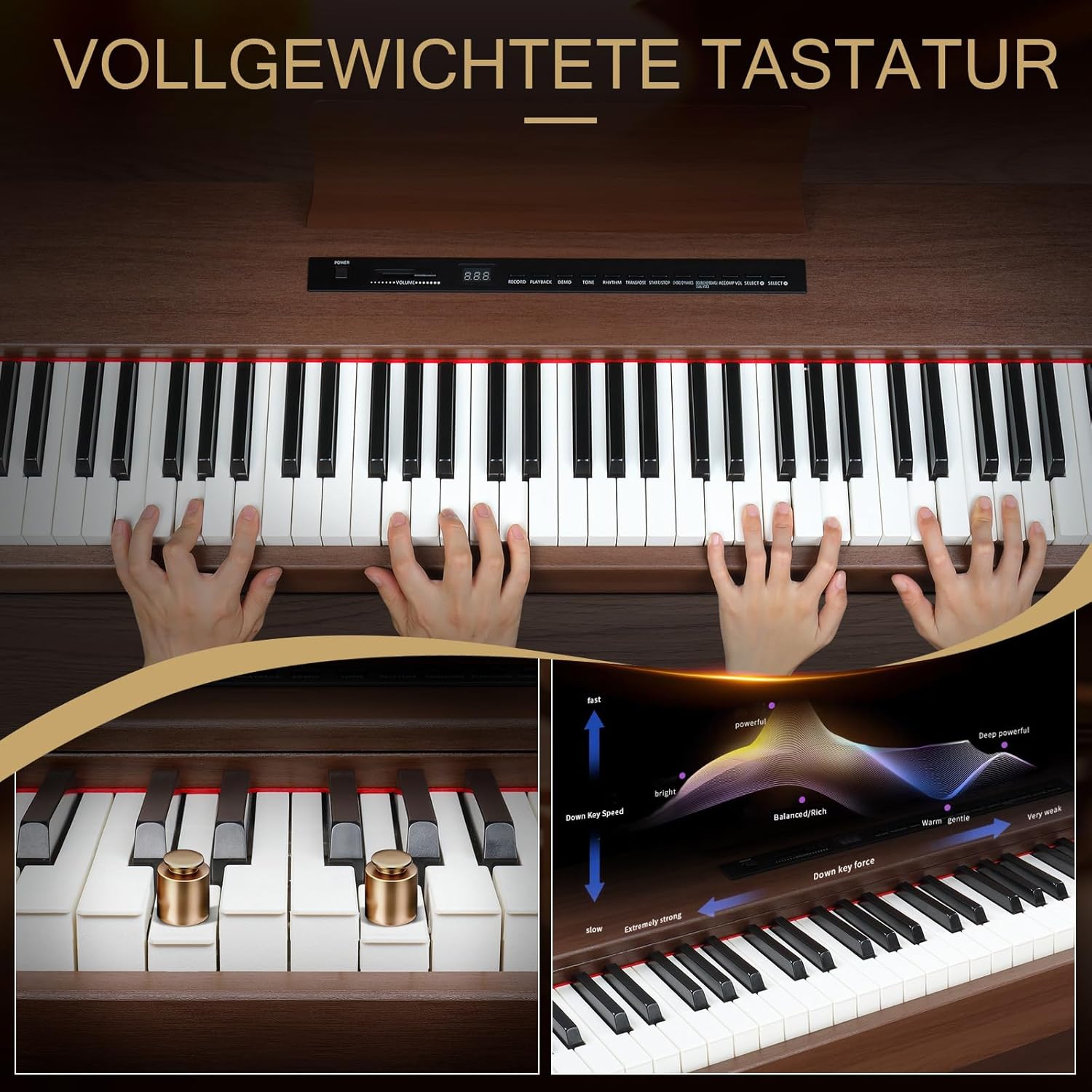
Image: Illustration of the fully weighted keyboard and its touch response, showing how key force affects sound dynamics.
4.3 Sound and Rhythm Selection
The Piano209 features a high-quality DREAM sound source with a wide array of musical options:
- 128 Tones (Voices): Select from various instrument sounds, including grand pianos, electric pianos, organs, strings, and more. Use the نغمة button to cycle through or select specific tones.
- 128 إيقاعات: Choose from a selection of accompaniment rhythms to practice with. Use the إيقاع زر للاختيار.
- 20 أغنية تجريبية: Enjoy pre-recorded demonstration songs. Press the العرض التوضيحي زر لبدء التشغيل.
- المسرع: Activate the metronome for timing practice.
4.4 Pedal Functions
The triple pedal unit provides enhanced expressive control:
- Soft Pedal (Left): Reduces the volume and slightly alters the timbre of the notes played.
- Sostenuto Pedal (Middle): Sustains only the notes that are held down at the moment the pedal is pressed, allowing subsequent notes to be played without sustain.
- Sustain Pedal (Right): Sustains all notes played while the pedal is depressed, allowing them to ring out longer.
4.5 ميزات الاتصال
- MIDI via USB: Connect the piano to a computer or tablet using a USB cable for MIDI interaction. This allows you to use the piano as a MIDI controller for music software (e.g., GarageBand) or to record your performances.

Image: A laptop connected to the digital piano via a USB cable, demonstrating MIDI functionality for music production software.
- صوت بلوتوث: The Bluetooth function automatically activates when the piano is powered on. You can connect your smartphone or tablet to the piano wirelessly to stream audio through the piano's speakers, allowing you to play along with your favorite songs or backing tracks.

Image: A smartphone displaying a music app, wirelessly connected to the digital piano via Bluetooth for audio streaming.
- مقبس سماعة الرأس: Connect headphones to the 1/8" (3.5mm) headphone jack for private practice. Connecting headphones automatically mutes the internal speakers.

Image: Headphones plugged into the digital piano, illustrating the private practice feature.
- التسجيل/التشغيل: The piano includes a built-in sequencer for recording and playing back your performances. Refer to the control panel for specific record and playback buttons.
- AUX In/Out & Line In/Out: These ports allow connection to external audio devices, ampمكبرات الصوت، أو معدات التسجيل.
5. الصيانة
Proper care will extend the life and performance of your digital piano:
- تنظيف: Use a soft, dry cloth (like the included piano towel) to wipe the surface of the piano. For stubborn dirt, slightly dampen the cloth with water. Avoid abrasive cleaners, solvents, or waxes, as they can damage the finish.
- العناية بلوحة المفاتيح: Keep the keys clean. If necessary, wipe them gently with a slightly damp قطعة قماش. لا تستخدم رطوبة زائدة.
- تخزين: When not in use, cover the piano with the provided piano cover to protect it from dust and spills.
- بيئة: Maintain a stable room temperature and humidity. Extreme changes can affect the instrument's components.
- مواصلات: When moving the piano, ensure it is properly disassembled from its stand (if applicable) and securely packed to prevent damage.
6. استكشاف الأخطاء وإصلاحها
إذا واجهت أي مشاكل، فيرجى الرجوع إلى المشاكل والحلول الشائعة التالية:
| مشكلة | السبب المحتمل | حل |
|---|---|---|
| لا يوجد صوت |
|
|
| Keys not responding or inconsistent touch |
|
|
| الدواسات لا تعمل |
|
|
| مشاكل اتصال البلوتوث |
|
|
If the problem persists after trying these solutions, please contact LEADZM customer support for further assistance.
7. المواصفات
| ميزة | التفاصيل |
|---|---|
| اسم الموديل | بيانو 209 |
| عدد المفاتيح | 88 (A1-C9) |
| العمل الرئيسي | Fully Weighted Hammer Action |
| مصدر الصوت | High-Quality DREAM Sound Source |
| Polyphony (Max) | 64 نغمة |
| النغمات (الأصوات) | 128 |
| الإيقاعات | 128 |
| الأغاني التجريبية | 20 |
| نظام الدواسة | 3-Pedal Unit (Soft, Sostenuto, Sustain) |
| المتحدثون | 2 × 10 واط مكبرات صوت ستيريو |
| الاتصال | MIDI via USB, Bluetooth Audio, 1/8" Headphone Jack, 3 Pedal Inputs, AUX In, Line In, Line Out |
| الوظائف | Metronome, Touch Control, Transpose, Split, Recording/Playback |
| الأبعاد (الطول × العرض × الارتفاع) | 126 سم × 32 سم × 60.8 سم (49.4 × 12.79 × 27.95 بوصة) |
| وزن | 26.5 كجم (58.4 رطل) |
| مادة | Walnut Wood (color: Black Walnut) |
| مصدر الطاقة | محول التيار المتردد |
8. الضمان والدعم
LEADZM is committed to providing high-quality products. For warranty information, please refer to the documentation included with your purchase or contact your retailer. For technical support, troubleshooting assistance, or inquiries about replacement parts, please visit the official LEADZM brand store or contact customer service through your point of purchase.
يمكنك العثور على مزيد من المعلومات والدعم في LEADZM Brand Store.