
1. المقدمة
This manual provides detailed instructions for the proper use, setup, operation, and maintenance of your EBTOOLS Bluetooth Headset. Please read this manual thoroughly before using the product to ensure optimal performance and longevity.
2. انتهى المنتجview
2.1 الميزات الرئيسية
- Rotatable Microphone: Easily adjust the microphone to the optimal angle for clear voice capture.
- تقنية البلوتوث 5.0: Ensures faster, more efficient, and stable wireless connectivity with compatible devices.
- تصميم مريح: Single-ear design with padded ear cushion and flexible headband for extended wear without discomfort.
- عمر بطارية طويل: Up to 17 hours of talk time and 200 hours of standby time on a 2-hour charge.
- التوافق العالمي: Works with laptops, cell phones, PCs, tablets, and other Bluetooth-enabled devices. Ideal for office, home, remote work, call centers, VoIP, and Skype.
2.2 محتويات العبوة
تأكد من وجود جميع العناصر في الحزمة الخاصة بك:
- EBTOOLS Bluetooth Headset
- قاعدة الشحن
- كابل شحن ميكرو يو اس بي
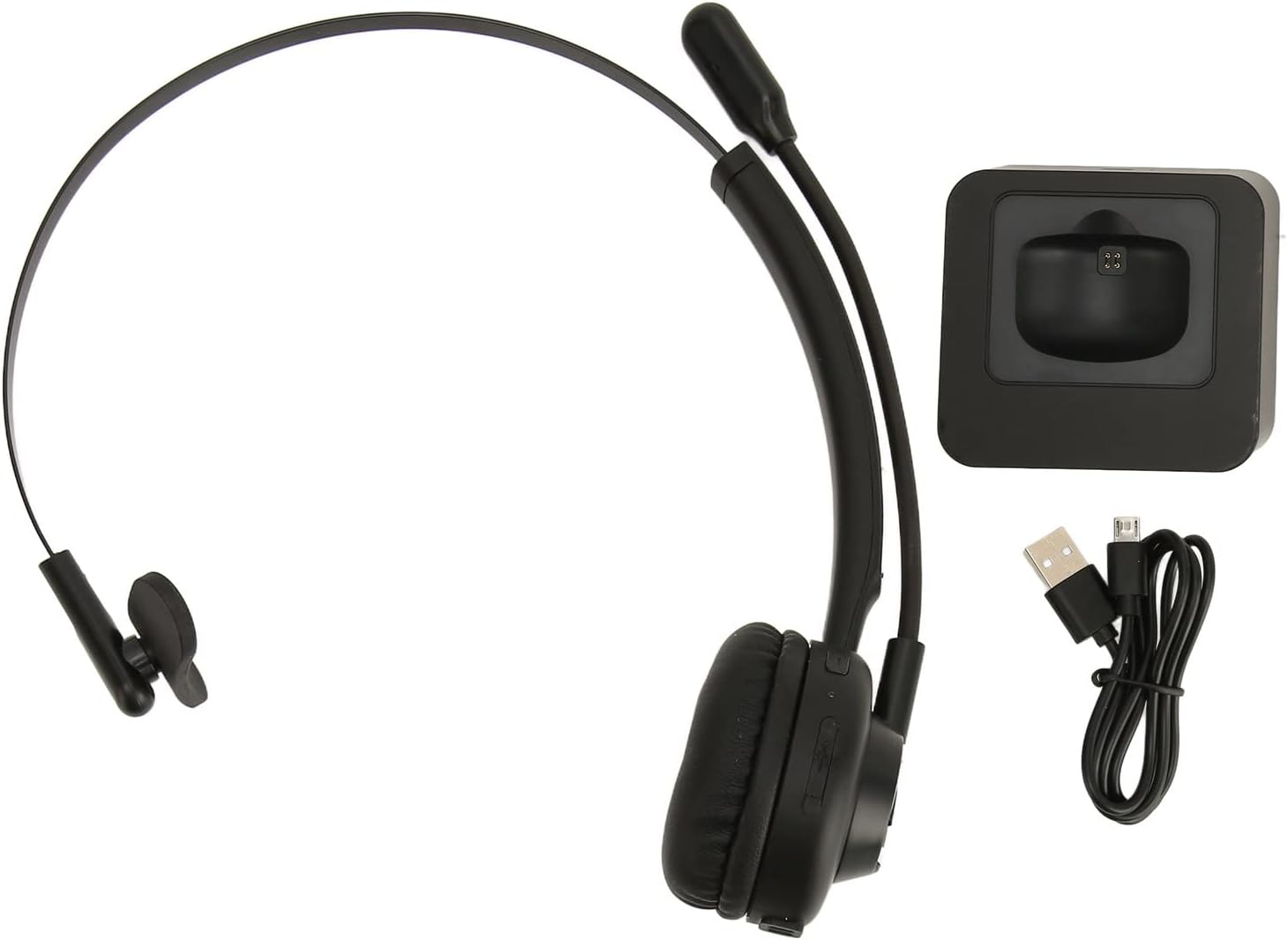
Image: The EBTOOLS Bluetooth Headset, its dedicated charging base, and a Micro USB charging cable, illustrating the complete package contents.
2.3 Headset Controls and Indicators

Image: A detailed diagram highlighting the Micro USB port, LED indicator, Volume Down button, Multifunctional button, and Volume Up button on the EBTOOLS Bluetooth Headset.
- منفذ مايكرو يو اس بي: For direct charging of the headset.
- مؤشر LED: يعرض حالة الطاقة والشحن والاقتران.
- زر التحكم في الصوت: يقلل من حجم الصوت.
- زر متعدد الوظائف: Controls power, pairing, call answer/end, and music playback.
- الصوت + الزر: يزيد من حجم الصوت.
3. الإعداد
3.1 شحن سماعة الرأس
Before first use, fully charge the headset. You can charge it using the included charging base or directly via the Micro USB port.
- Connect the Micro USB cable to the charging base and a power source (e.g., computer USB port, USB wall adapter).
- Place the headset onto the charging base, ensuring the charging contacts align. The LED indicator on the headset will show charging status.
- Alternatively, connect the Micro USB cable directly to the headset's Micro USB port and a power source.
- A full charge typically takes approximately 2 hours. The LED indicator will change color or turn off once fully charged.

الصورة: لقطة مقربة view of the headset's earcup, showing the charging contacts designed to connect with the charging base.
3.2 الاقتران بجهاز بلوتوث
لتوصيل سماعة الرأس بجهاز:
- تأكد من إيقاف تشغيل سماعة الرأس.
- اضغط مع الاستمرار على زر متعدد الوظائف for approximately 5-7 seconds until the LED indicator flashes red and blue alternately, indicating pairing mode.
- على جهازك (الهاتف، الكمبيوتر، الجهاز اللوحي)، قم بتمكين البلوتوث وابحث عن أجهزة جديدة.
- Select "EBTOOLS Headset" (or similar name) from the list of available devices.
- Once connected, the LED indicator on the headset will typically flash blue slowly or turn solid blue.
- إذا طُلب منك إدخال كلمة المرور، أدخل "0000".
3.3 ارتداء سماعة الرأس
The headset is designed for comfort and flexibility.
- Adjust the flexible headband to fit comfortably over your head.
- The single ear design allows you to remain aware of your surroundings.
- Rotate the microphone boom to position it close to your mouth for optimal voice clarity. The microphone can be rotated 180 degrees to be worn on either the left or right ear.

Image: A person wearing the EBTOOLS Bluetooth Headset, demonstrating the comfortable fit and the adjustable, rotatable microphone positioned for clear communication.
4. تعليمات التشغيل
4.1 تشغيل/إيقاف التشغيل
- تشغيل الطاقة: اضغط مع الاستمرار على زر متعدد الوظائف for approximately 3 seconds until the LED indicator flashes blue.
- إيقاف التشغيل: اضغط مع الاستمرار على زر متعدد الوظائف for approximately 3-5 seconds until the LED indicator flashes red and then turns off.
4.2 ضبط مستوى الصوت
- اضغط على حجم + زر to increase the listening volume.
- اضغط على زر التحكم في الصوت لخفض مستوى الاستماع.
4.3 إدارة المكالمات
- الرد على المكالمة: اضغط لفترة قصيرة على زر متعدد الوظائف when an incoming call rings.
- إنهاء المكالمة: اضغط لفترة قصيرة على زر متعدد الوظائف أثناء المكالمة.
- رفض المكالمة: اضغط مع الاستمرار على زر متعدد الوظائف for approximately 2 seconds when an incoming call rings.
- إعادة الاتصال بالرقم الأخير: اضغط مرتين على زر متعدد الوظائف when not on a call.
4.4 Music Playback (if supported by device)
- تشغيل/إيقاف مؤقت: اضغط لفترة قصيرة على زر متعدد الوظائف.
- المسار التالي: اضغط مع الاستمرار على حجم + زر.
- المسار السابق: اضغط مع الاستمرار على زر التحكم في الصوت.
4.5 استخدام الميكروفون
The rotatable microphone ensures your voice is captured clearly.
- Adjust the microphone boom to be approximately 1-2 inches from your mouth.
- The microphone can be rotated 180 degrees to allow wearing the headset on either the left or right ear.

الصورة: لقطة مقربة view of the EBTOOLS headset's flexible microphone boom, highlighting its design for optimal voice pickup.
5. الصيانة
5.1 التنظيف
- Wipe the headset with a soft, dry, or slightly damp قطعة قماش.
- لا تستخدم كيماويات مركزة أو محاليل التنظيف أو المنظفات القوية.
- تجنب دخول الرطوبة إلى أي فتحات.
5.2 العناية بالبطارية
- اشحن سماعة الرأس بانتظام، حتى لو لم تكن قيد الاستخدام المتكرر، للحفاظ على صحة البطارية.
- تجنب تفريغ البطارية بالكامل بشكل متكرر.
- قم بتخزين سماعة الرأس في مكان بارد وجاف بعيدًا عن درجات الحرارة القصوى.
6. استكشاف الأخطاء وإصلاحها
إذا واجهت مشكلات مع سماعة الرأس الخاصة بك، فراجع الحلول الشائعة التالية:
| مشكلة | الحل المحتمل |
|---|---|
| سماعة الرأس لا تعمل. | Ensure the headset is charged. Connect it to the charging base or directly via USB. |
| لا يمكن الاقتران بالجهاز. | Ensure the headset is in pairing mode (LED flashing red/blue). Turn off and on your device's Bluetooth. Delete previous pairings on your device and try again. Ensure the headset is within range (typically 10 meters). |
| لا يوجد صوت أو مستوى الصوت منخفض. | Increase volume on both the headset and your connected device. Ensure the headset is selected as the audio output device on your computer or phone. Re-pair the headset. |
| الميكروفون لا يعمل. | Ensure the microphone is positioned correctly. Check microphone settings on your connected device to ensure the headset is selected as the input device. |
| اتصال متقطع. | اقترب من جهازك المتصل. تجنب وجود عوائق بين سماعة الرأس والجهاز. قلل من التداخل الناتج عن الأجهزة اللاسلكية الأخرى. |
7. المواصفات
| ميزة | التفاصيل |
|---|---|
| العلامة التجارية | إبتولز |
| رقم الموديل | EBTOOLSrsgvuyg5fc |
| تكنولوجيا الاتصال | بلوتوث 5.0 |
| وزن العنصر | 11.6 أونصات |
| أبعاد الحزمة | 7.09 × 6.69 × 2.36 بوصة |
| وقت التحدث | تصل إلى 17 ساعة |
| وقت الاستعداد | تصل إلى 200 ساعة |
| وقت الشحن | حوالي 2 ساعات |
8. الضمان والدعم
For warranty information or technical support, please refer to the documentation included with your purchase or contact EBTOOLS customer service through the retailer where the product was purchased. Keep your proof of purchase for warranty claims.