
leapwell CD201W
Leapwell Portable CD Player User Manual
Model: CD201W
مقدمة
Thank you for choosing the Leapwell Portable CD Player. This device is designed to provide a versatile and high-quality audio experience, supporting multiple playback modes and featuring a classic design. Please read this manual thoroughly to understand the product's functions and ensure proper operation and maintenance.
ماذا يوجد في الصندوق
يرجى التحقق من محتويات طردك. في حال وجود أي عناصر مفقودة أو تالفة، يرجى الاتصال بخدمة العملاء.
- Leapwell Portable CD Player
- جهاز التحكم عن بعد
- سماعات الأذن
- كابل AUX 3.5 ملم
- كابل شحن USB-C
- دليل المستخدم

Image: The Leapwell Portable CD Player shown with its remote control, earphones, AUX cable, USB-C charging cable, and user manual, all neatly arranged next to its packaging box.
المنتج انتهىview
The Leapwell Portable CD Player combines classic design with modern functionality. It features a top-loading CD mechanism with a translucent dust cover, integrated speakers, and a control panel with a rotary knob for volume and various buttons for mode selection and playback control.

Image: A white Leapwell Portable CD Player with its top lid open, revealing a CD. The front speakers are illuminated with a blue glow, and control buttons are visible on the right side.
المميزات الرئيسية:
- Multi-Functional Playback: Supports CD Play, Bluetooth, FM Radio, USB, AUX, AB Repeat, and Optical Mode.
- HiFi Speaker System: Features independent sound cavity design and inner magnetic speaker unit for enhanced sound detail and bass.
- بطارية قابلة لإعادة الشحن: Built-in USB-C fast rechargeable battery provides 4-5 hours of playback.
- التصميم الكلاسيكي: Retro square design with an elegant volume knob and translucent CD dust cover.
- اتصال متعدد الاستخدامات: Includes 3.5mm audio, USB, and optical interfaces for external connections.
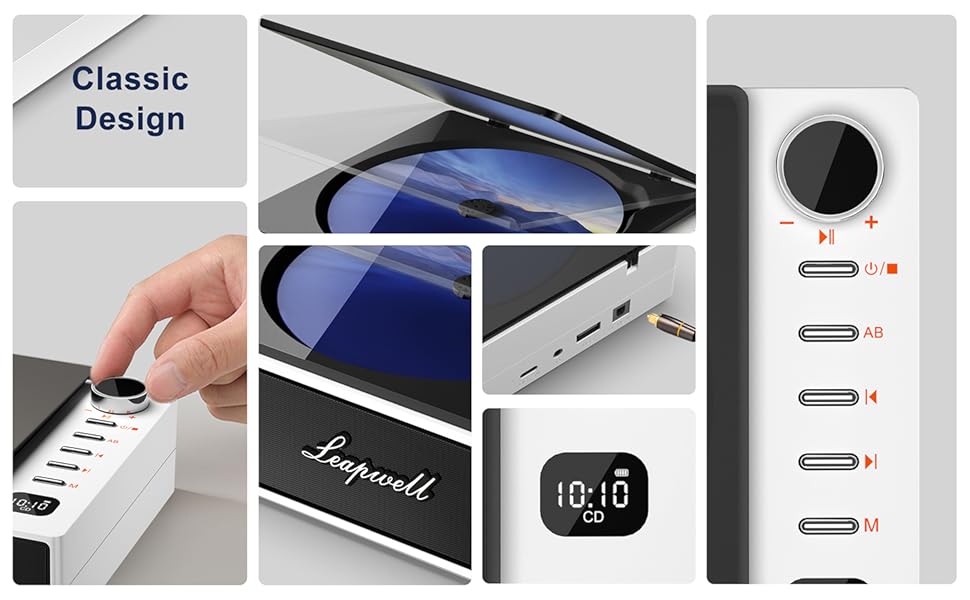
الصورة: عرض الكولاجasing various design elements and features of the CD player, including the volume knob, the open CD lid, the USB-C and optical ports, and the digital display.
يثبت
1. شحن الجهاز
Before first use, fully charge the CD player. Connect the provided USB-C charging cable to the USB-C port on the device and the other end to a 5V-2A power adapter (not included) or a computer's USB port. A blinking white light indicates charging. The light will become solid when fully charged. Charging typically takes 3.5 hours for 4-5 hours of playback.

Image: The portable CD player is shown outdoors, emphasizing its built-in rechargeable battery and portability, with icons indicating 4.5 hours playback and 3.5 hours charging time.
2. تشغيل / إيقاف التشغيل
Press and hold the power button (usually indicated by a power symbol) to turn the device on or off.
أوضاع التشغيل
The Leapwell CD Player supports multiple audio sources. Use the 'M' (Mode) button on the device or remote control to switch between modes.

Image: A circular diagram illustrating the six different operating modes of the CD player: CD Mode, BT Mode (Bluetooth), FM Mode, USB Mode, AB Repeat, and Optical Mode.
1. CD Play Mode
- Open the translucent dust cover on top of the player.
- Carefully place a CD onto the spindle, ensuring it is seated correctly.
- أغلق غطاء الغبار.
- Select "CD" mode using the 'M' button. The CD will begin playing automatically.
- Use the play/pause, skip forward/backward buttons, and volume knob to control playback.

Image: The Leapwell Portable CD Player with its top lid open, ready for a CD to be inserted. The internal mechanism is visible.
2. وضع بلوتوث
The CD player can connect to Bluetooth headphones or a mobile phone to play music.
- Switch the player to "BT" (Bluetooth) mode. The display will show "BT" and an indicator will blink, signifying pairing mode.
- On your Bluetooth device (e.g., smartphone, headphones), enable Bluetooth and search for "Leapwell CD Player".
- Select the device to pair. Once connected, the Bluetooth indicator on the CD player will stop blinking.
- You can now play audio from your connected device through the CD player's speakers or connected Bluetooth headphones.

Image: A person's hands are shown interacting with a smartphone and the CD player, illustrating the Bluetooth connection process. Bluetooth icons float between the devices.
3. وضع راديو FM
- Switch the player to "FM" mode.
- Use the skip forward/backward buttons to scan for radio stations.
- اضبط مستوى الصوت باستخدام المقبض الدوار.
4. وضع USB
- أدخل محرك أقراص فلاش USB يحتوي على الصوت files في منفذ USB.
- Switch the player to "USB" mode.
- سيقوم المشغل تلقائيًا باكتشاف الصوت وبدء تشغيله fileمن محرك أقراص USB.
5. وضع AUX
Connect external audio devices (e.g., smartphone, MP3 player) using the provided 3.5mm AUX cable.
- Connect one end of the 3.5mm AUX cable to the AUX-in port on the CD player.
- قم بتوصيل الطرف الآخر بمقبس سماعة الرأس أو مخرج الصوت الخاص بجهازك الخارجي.
- Switch the player to "AUX" mode.
- قم بتشغيل الصوت من جهازك الخارجي. سيتم إخراج الصوت عبر مكبرات صوت مشغل الأقراص المدمجة.
6. الوضع البصري
For high-fidelity audio output, connect the CD player to an external decoder or speaker system via an optical cable (not included).
- Connect an optical cable to the optical output port on the CD player.
- Connect the other end to the optical input of your compatible audio system.
- Switch the player to "Optical" mode.
- Audio from the CD player will now be transmitted digitally to your external system.
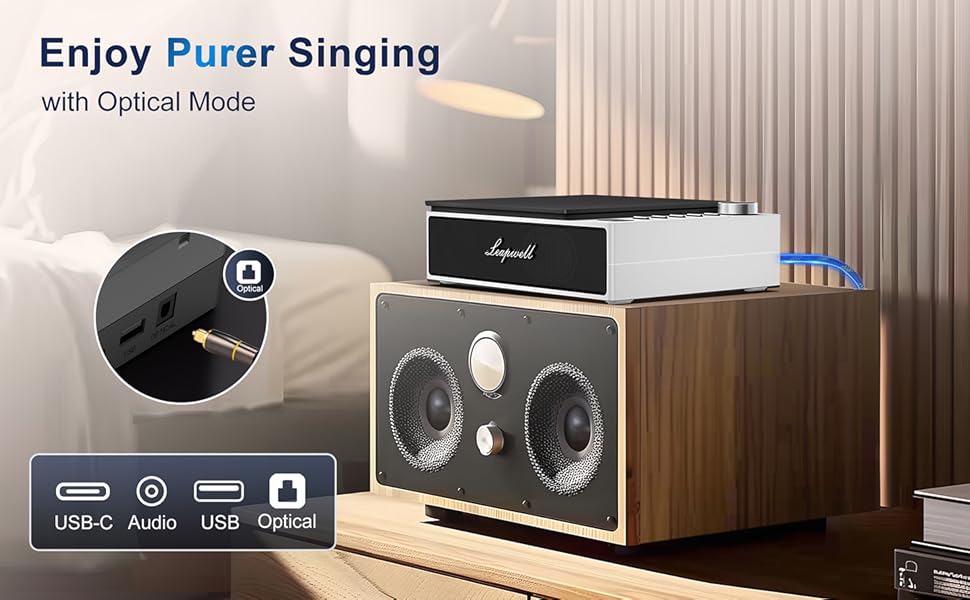
Image: The CD player is shown connected to a larger external speaker system using an optical cable, highlighting its capability for high-quality audio output.
7. AB Repeat Mode
This mode allows you to repeat a specific section of an audio track (CD or USB).
- During playback, press the "AB" button once to set the starting point (A).
- Press the "AB" button again to set the ending point (B). The section between A and B will now repeat.
- Press the "AB" button a third time to cancel the repeat function.
صيانة
- تنظيف: Use a soft, dry cloth to clean the exterior of the player. For the CD lens, use a specialized CD lens cleaner. Do not use abrasive cleaners or solvents.
- غطاء الغبار: Keep the translucent dust cover closed when not in use to protect the optical drive from dust and debris.
- تخزين: قم بتخزين المشغل في مكان بارد وجاف بعيدًا عن أشعة الشمس المباشرة ودرجات الحرارة القصوى.
- العناية بالبطارية: لإطالة عمر البطارية، تجنب تفريغها بالكامل بشكل متكرر. اشحن الجهاز بانتظام، حتى في حال عدم استخدامه باستمرار.
استكشاف الأخطاء وإصلاحها
| مشكلة | السبب المحتمل / الحل |
|---|---|
| الجهاز لا يعمل. | Battery might be depleted. Connect to power adapter and charge. Ensure the power button is pressed and held sufficiently. |
| لا يتم تشغيل القرص المضغوط أو تخطيه. | CD might be dirty or scratched. Clean the CD. Ensure the CD is properly seated. The player has anti-shake protection, but excessive movement can still cause skips. |
| لا يوجد صوت من مكبرات الصوت. | Volume might be too low. Increase volume using the knob. Ensure correct mode is selected. Check if external headphones or speakers are connected and functioning. |
| مشاكل الاتصال بالبلوتوث. | Ensure the player is in Bluetooth pairing mode. Make sure the external Bluetooth device is discoverable and within range. Try unpairing and re-pairing the devices. |
| جهاز التحكم عن بعد لا يعمل. | Check if the remote control's battery needs replacement. Ensure there are no obstructions between the remote and the player's IR receiver. |
| Slow charging via computer USB. | Charging via a computer's USB port will be slower. It is recommended to use a 5V-2A adapter for faster charging. |
تحديد
| ميزة | التفاصيل |
|---|---|
| أبعاد المنتج | 7.3 × 5.8 × 2.2 بوصة (18.5 × 14.7 × 5.6 سم) |
| وزن العنصر | 1.4 رطل (0.63 كجم) |
| رقم الموديل | قرص مضغوط 201 واط |
| نوع البطارية | 1 بطارية ليثيوم أيون (مضمنة) |
| أوضاع التشغيل | CD, Bluetooth, FM Radio, USB, AUX, AB Repeat, Optical |
| تكنولوجيا الاتصال | Auxiliary, Bluetooth, Optical, USB, USB-C |
| المميزات الخاصة | Anti-Skip Protection, Built-In Speaker, Portable, Rechargeable |
| تقنية الموالف | FM |
| مصدر الطاقة | تعمل بالبطارية |
الضمان والدعم
Leapwell CD Players come with lifelong technical support and 24/7 professional customer service. For any inquiries, issues, or warranty claims, please contact Leapwell customer support through the retailer's platform or the contact information provided in your product packaging.
المستندات ذات الصلة - قرص مضغوط 201 واط
 |
Leapwell L-CD202 Portable CD Player User Manual Comprehensive user manual for the Leapwell L-CD202 Portable CD Player. Learn how to use CD, USB, FM, Bluetooth, AUX, and Optical modes, troubleshooting tips, and specifications. |
 |
دليل تعليمات مشغل الأسطوانات أوديزيو رينو ريترو دليل تعليمات شامل لجهاز تشغيل الأسطوانات Audizio Reno Retro، يغطي عملية فتح العبوة، وشرح المنتج بالكامل.view، تشغيل الفونو، اتصال البلوتوث، احتياطات السلامة، والمواصفات الفنية. |
 |
XU RETRO XU20 V32 Handheld Game Console Instruction Manual Detailed guide for the XU RETRO XU20 V32 handheld console, covering device layout, control settings, global configurations, game and app management, and advanced developer options. |
 |
Retro CD Player Specifications and Features Detailed specifications and features for the Retro CD Player, including Bluetooth 5.0 connectivity, rechargeable battery, and versatile playback options. |
 |
دليل المستخدم لمشغل الأسطوانات A6 Retro يوفر دليل المستخدم هذا تعليمات ومواصفات مشغل الأسطوانات A6 Retro، وهو مشغل أسطوانات VINtagمشغل أسطوانات إلكتروني مزود بتقنية بلوتوث ومكبرات صوت مدمجة. يتضمن تفاصيل الإعداد والتشغيل ampاتصال مكبر الصوت، واستكشاف الأخطاء وإصلاحها بعدة لغات. |
 |
Odyssey Retro Audio Tabletop Media Player ODY-1969 User Manual Comprehensive instruction manual for the Odyssey Retro Audio Tabletop Media Player (Model ODY-1969), covering setup, operation of radio, CD, USB, Bluetooth, clock, alarm, extra features, troubleshooting, warranty, and safety warnings. |
Ask a question about this manual
Ask about setup, troubleshooting, compatibility, parts, safety, or missing instructions. Manuals+ will review the question and use this page’s manual context to help answer it.