
مقدمة
This manual provides detailed instructions for the installation, operation, and maintenance of your DEXTER PP120 Smart Digital Handle Lock. Please read this guide carefully before attempting to install or operate the lock to ensure proper functionality and safety. Keep this manual for future reference.
مميزات المنتج
The DEXTER PP120 Smart Digital Handle Lock offers multiple convenient and secure access methods:
- التحكم في التطبيق: Unlock and manage your lock remotely via a dedicated smartphone application.
- التعرف على بصمات الأصابع: Fast and secure access using registered fingerprints.
- Key Access: Traditional mechanical key override for emergency situations.
- Numeric Passcode: Keypad entry with a customizable numeric code.
- Unlock Card: Convenient access using RFID unlock cards.
- مقاومة الماء بمعيار IP53: Designed to withstand splashes and dust, suitable for various environments.
- اتصال واي فاي: Seamless integration with your home network for remote management and monitoring.
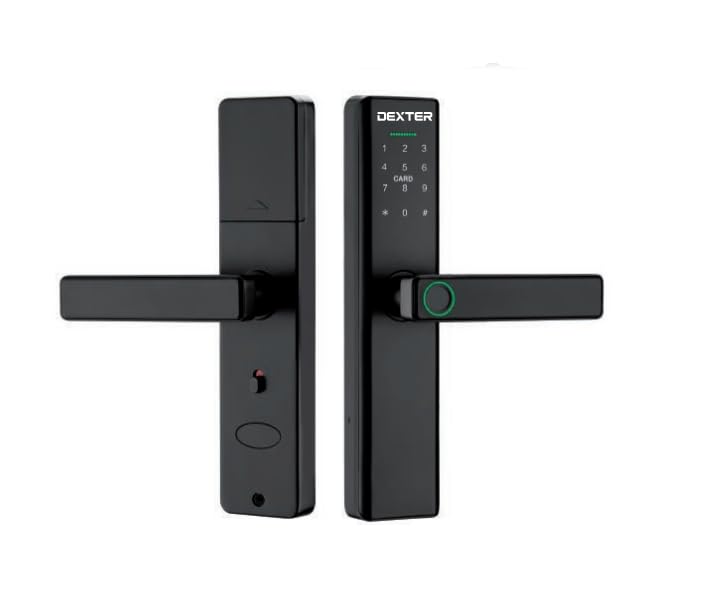
This image illustrates the DEXTER PP120 Smart Digital Handle Lock, highlighting its key features: App control, fingerprint recognition, key access, numeric passcode, unlock card functionality, IP53 water resistance, and Wi-Fi connectivity. The image also includes a table detailing model variations (PP120 and PP120 WIFI) with their article numbers, type (Embutir - Mortise), finish (Negro - Black), and master quantity.
محتويات الحزمة
Before beginning installation, please verify that all the following components are included in your package:
- Front Handle Assembly (with keypad and fingerprint sensor)
- Rear Handle Assembly (with battery compartment)
- هيئة قفل نقر
- لوحة الإضراب وصندوق الإضراب
- براغي التثبيت وملحقاتها
- Physical Keys (Emergency Override)
- Unlock Cards
- دليل المستخدم
الإعداد والتثبيت
Proper installation is crucial for the lock's performance. If you are unsure about any step, consult a professional locksmith.
- تحضير الباب: Ensure your door meets the lock's specifications regarding thickness and backset. Use the provided template to drill necessary holes if your door is not pre-drilled for a smart lock.
- تركيب قفل نقر: Insert the mortise lock body into the edge of the door. Secure it with the provided screws.
- Handle Assembly Installation: Connect the cable from the front handle assembly to the rear handle assembly. Carefully align and insert the spindle and mounting posts through the mortise lock. Secure both handle assemblies to the door using the provided screws.
- تركيب البطارية: Open the battery cover on the rear handle assembly. Insert four (4) AA alkaline batteries, ensuring correct polarity. Close the battery cover.
- تنزيل التطبيق والاقتران:
- Download the DEXTER smart lock application from your device's app store.
- إنشاء حساب وتسجيل الدخول.
- Follow the in-app instructions to add your new lock. This typically involves activating Bluetooth on your phone and bringing it close to the lock.
- Once paired via Bluetooth, the app will guide you through connecting the lock to your home Wi-Fi network for remote access and advanced features.
- الإعداد الأولي: Set up an administrator passcode and fingerprint through the app immediately after pairing.
تعليمات التشغيل
فتح الباب
- باستخدام التطبيق: Open the DEXTER app, select your lock, and tap the unlock icon.
- استخدام بصمة الإصبع: Place a registered finger flat on the fingerprint sensor located on the handle. The lock will unlock if the fingerprint is recognized.
- Using Numeric Passcode: Touch the keypad to activate it. Enter your registered 6-10 digit passcode, followed by the '#' key.
- Using Unlock Card: Present a registered unlock card to the card reader area on the front handle. The lock will unlock upon successful recognition.
- استخدام المفتاح المادي: In case of battery depletion or electronic malfunction, insert the physical key into the emergency keyhole (usually hidden) and turn to unlock.
قفل الباب
- القفل التلقائي: The lock is designed to automatically re-lock after a preset time (configurable in the app) once the door is closed.
- Manual Locking (from inside): Lift the handle upwards from the inside to engage the deadbolt.
- Manual Locking (via App): Use the DEXTER app to remotely lock the door.
User Management (via DEXTER App)
The DEXTER app allows you to manage access for various users:
- إضافة المستخدمين: Grant access to family members or guests by adding their fingerprints, creating unique passcodes, or assigning unlock cards.
- Modifying Access: Change existing passcodes, update fingerprints, or set time-limited access for specific users.
- حذف المستخدمين: Revoke access by deleting user profiles, fingerprints, passcodes, or unlock cards.
- سجلات الوصول: View a history of who entered and when (requires Wi-Fi connection).
صيانة
To ensure the longevity and optimal performance of your DEXTER PP120 lock, follow these maintenance guidelines:
- استبدال البطارية: Replace all four AA batteries when the low battery warning is indicated by the lock or in the app. Always use new, high-quality alkaline batteries. Do not mix old and new batteries or different battery types.
- تنظيف: امسح سطح القفل بقطعة قماش ناعمة وجافة. تجنب استخدام المنظفات الكاشطة أو المذيبات أو المواد الكيميائية القاسية، لأنها قد تتلف الطلاء والمكونات الإلكترونية.
- تحديثات البرامج الثابتة: Regularly check the DEXTER app for available firmware updates. Installing updates ensures your lock has the latest features, security enhancements, and bug fixes.
- الفحص الميكانيكي: Periodically check that all screws are tight and the handle operates smoothly. Do not force the handle if it feels stiff.
استكشاف الأخطاء وإصلاحها
If you encounter issues with your DEXTER PP120 lock, refer to the following common problems and solutions:
- القفل لا يستجيب:
- تحقق من مستويات البطارية واستبدلها إذا لزم الأمر.
- Ensure the lock is properly installed and all cables are connected.
- If using the app, ensure Bluetooth is enabled and you are within range.
- لم يتم التعرف على بصمة الإصبع:
- تأكد من أن إصبعك نظيف وجاف.
- Try placing your finger in different positions on the sensor.
- إذا استمرت المشكلات، فاحذف بصمة إصبعك ثم أعد تسجيلها في التطبيق.
- Numeric passcode not working:
- Ensure you are entering the correct passcode followed by the '#' key.
- Check if the passcode has expired or been disabled in the app.
- مشاكل الاتصال بشبكة Wi-Fi:
- Verify your home Wi-Fi network is active and stable.
- Ensure the lock is within range of your Wi-Fi router.
- Try reconnecting the lock to Wi-Fi through the DEXTER app settings.
- Lock is jammed or stiff:
- Do not force the handle.
- Check for any obstructions in the door frame or mortise.
- Ensure the lock is correctly aligned and installed.
تحديد
| مواصفة | التفاصيل |
|---|---|
| ماركة | دكستر |
| اسم الموديل | Dexter Pp120 |
| رقم الموديل | Dexter Pp120 |
| نوع القفل | قفل الكتروني |
| طريقة التحكم | طلب |
| الاتصال | بلوتوث ، واي فاي |
| مقاومة الماء | IP53 |
| GTIN / UPC | 633349060758 |
الضمان والدعم
For detailed warranty information, product registration, and technical support, please visit the official DEXTER website or contact DEXTER customer service directly. Keep your purchase receipt as proof of purchase for warranty claims.