
1. المقدمة
Thank you for choosing the Ninetom 12.3-inch Car Radio Touchscreen. This manual provides essential information for the proper installation, operation, and maintenance of your new infotainment system. This unit is designed to upgrade your Mercedes Benz ML/GL W166 X166 with a modern touchscreen interface, integrating wireless Apple CarPlay and Android Auto while preserving your vehicle's original functions.
2. التحقق من التوافق
This unit is specifically compatible with Mercedes Benz ML/GL W166 X166 models equipped with the NTG4.5 or NTG4.7 system. It is crucial to verify your car's system version before installation to ensure proper functionality. If you are unsure about your vehicle's NTG system, please consult your vehicle's manual or contact Ninetom customer support for assistance.

الشكل 2.1: Visual guide for identifying compatible NTG4.5/4.7 systems. Ensure your car's interface matches the 'Fit' examples and not the 'Not Fit' examples (NTG4.0 or NTG5.0).
3. محتويات العبوة
يرجى تحديد المربع للعناصر التالية:
- 1 x Ninetom 12.3-inch Car Radio Touchscreen (for NTG 4.5/4.7)
- 1 × كابل الطاقة
- 1 x USB / LVDS Cable
- 1 x Mounting Bracket (Note: Back bracket may vary depending on model)
- 1 x Installation Tool Kit
- 1 x Installation Guide (English version may be available online or upon request)

الشكل 3.1: All components included in the package: the 12.3-inch screen, power cable, USB/LVDS cable, mounting bracket, and installation tools.
4. الإعداد والتثبيت
The installation process is designed to be non-destructive, meaning no permanent modifications to your vehicle's wiring are required. Simply remove the original car dashboard components and connect the new unit using the provided cables.
4.1 خطوات ما قبل التثبيت
- افصل البطارية: For safety, always disconnect the vehicle's battery before starting any electrical work.
- إزالة الوحدة الأصلية: Carefully remove the original car radio and display following your vehicle's service manual.
- Identify NTG System: Double-check your NTG system version as per Section 2.
4.2 توصيلات الأسلاك
Connect the provided power cable and USB/LVDS cable to the corresponding ports on the new unit and your vehicle's existing wiring harness. Ensure all connections are secure.
4.3 تركيب الشاشة
Attach the new 12.3-inch display to the provided mounting bracket and secure it in the dashboard opening. Ensure the display is firmly in place and does not obstruct any vehicle controls or airbags.
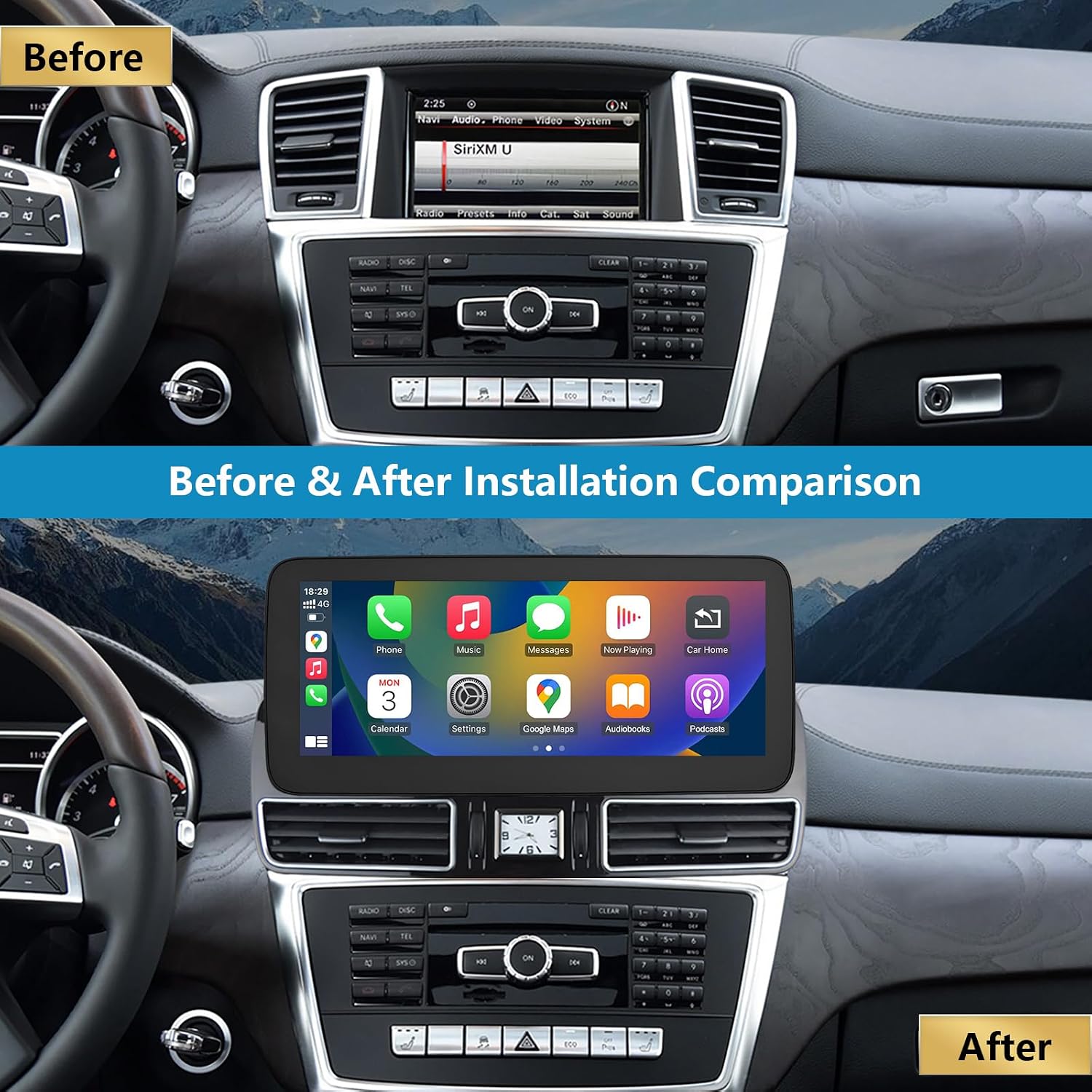
الشكل 4.1: Comparison of the dashboard before and after the installation of the Ninetom 12.3-inch touchscreen.
5. تعليمات التشغيل
The Ninetom touchscreen operates on a Linux system and integrates seamlessly with your vehicle's original functions.
5.1 انتهى النظامview
The unit features a 1920x720 resolution touchscreen. It supports preloaded map versions, various navigation software, and multiple languages.

الشكل 5.1: The main Linux system interface, providing access to OEM Car Info, CarPlay, Android Auto, Autolink, and AirPlay.
5.2 التبديل بين الأنظمة
You can easily switch between the new Linux system and your vehicle's original NTG system. Simply tap the "OEM Car Info" icon on the Linux interface to return to the original system. To switch back to the Linux system, touch the screen.

الشكل 5.2: The system allows seamless switching between the original car interface and the new Linux interface, retaining all original functions.
5.3 نظام CarPlay اللاسلكي ونظام Android Auto
The unit supports both wireless and wired Apple CarPlay and Android Auto. These functions allow you to access GPS navigation, phone calls, messages, music, and other applications directly on the car's screen.
- اتصال: Pair your smartphone via Bluetooth to enable wireless CarPlay or Android Auto. For wired connection, use a USB cable.
- ملاحة: Use your preferred navigation apps (e.g., Apple Maps, Google Maps) displayed on the 12.3-inch screen.
- تشغيل الموسيقى: Stream music from your phone through the car's audio system.
- مكالمات بدون استخدام اليدين: Make and receive calls using the integrated microphone and car speakers.
- التحكم الصوتي: Utilize Siri or Google Assistant for voice commands.

الشكل 5.3: The unit displaying both wireless CarPlay and Android Auto interfaces, along with MirrorLink functionality.
5.4 MirrorLink / AirPlay
The MirrorLink and AirPlay functions allow you to mirror your smartphone's screen directly onto the car radio display. This is useful for displaying content not natively supported by CarPlay or Android Auto.
5.5 Retained Original Functions
The upgrade screen retains all original vehicle functions, including:
- Original car radio and ampوظائف ليفية.
- Factory joystick control and command knob.
- Steering wheel controls (volume, track skip, call answer/end).
- Original rear view camera and aftermarket camera support.
- Door open warnings and other vehicle information.

الشكل 5.4: Examples of retained original functions, including the original system interface, new touch screen, reverse trajectory, one-touch screen switch, CD radio support, steering wheel control, original car audio, joystick, and shift control.

الشكل 5.5: The original car steering wheel buttons remain fully functional for multimedia control and voice commands.

الشكل 5.6: The new screen displays the rear camera view, including parking guidelines and obstacle detection.
6. الصيانة
To ensure the longevity and optimal performance of your Ninetom car radio touchscreen, follow these maintenance guidelines:
- تنظيف الشاشة: Use a soft, lint-free cloth specifically designed for electronics to clean the touchscreen. Avoid abrasive cleaners or harsh chemicals that can damage the screen coating.
- التحكم في درجة الحرارة: The unit is designed to operate within a working temperature range of -30°C to +80°C. Avoid exposing the unit to extreme temperatures for prolonged periods.
- تحديثات البرامج: Periodically check for available software updates to ensure the system runs efficiently and has the latest features.
- وصلات الكابلات: Ensure all cables remain securely connected to prevent intermittent issues.
7. استكشاف الأخطاء وإصلاحها
If you encounter any issues with your Ninetom car radio touchscreen, refer to the following common troubleshooting steps:
| مشكلة | السبب المحتمل | حل |
|---|---|---|
| No power/Screen blank | Loose power cable connection, blown fuse, incorrect wiring. | Check all power connections. Verify vehicle fuses. Re-check wiring according to the installation guide. |
| لا يتم الاتصال بـ CarPlay/Android Auto | Bluetooth not paired, Wi-Fi disabled, incorrect phone settings, incompatible phone. | Ensure Bluetooth and Wi-Fi are enabled on your phone. Pair your phone with the unit. Check phone settings for CarPlay/Android Auto permissions. Try a different USB cable for wired connection. |
| لا يوجد صوت | Volume too low, incorrect audio source selected, loose audio cables. | Increase volume on both the unit and your phone. Ensure the correct audio input is selected. Check audio cable connections. |
| شاشة اللمس لا تستجيب | System freeze, debris on screen. | Restart the unit (if possible). Clean the screen thoroughly. If the issue persists, contact support. |
| Original functions not working | Incorrect system switching, loose connections to original system. | Ensure you have switched back to the "OEM Car Info" interface. Check all connections related to the original vehicle system. |
If these steps do not resolve the issue, please contact Ninetom customer support for further assistance.
8. المواصفات
- رقم الموديل: RT-LN-NTG45-12-ML
- حجم الشاشة: 12.3 بوصة
- دقة: 1920 × 720
- نظام التشغيل: لينكس
- الاتصال: Wireless/Wired CarPlay, Android Auto, MirrorLink, Bluetooth
- طريقة التحكم: Touch, Original Joystick, Steering Wheel Controls
- نوع المركبة المتوافقة: Mercedes Benz ML/GL W166 X166 (NTG4.5/4.7 System)
- درجة حرارة العمل: من -30 درجة مئوية إلى +80 درجة مئوية
- وزن المنتج: 2.5 كيلوغرام
- أبعاد الحزمة: 39.5 × 18.4 × 17.3 سم
9. الضمان والدعم
This Ninetom product comes with a ضمان لمدة 12 شهرًا. In case of any manufacturing defects or issues arising from normal use within this period, please contact our professional customer service team for support. We offer technical assistance and installation support to ensure your satisfaction.
For warranty claims, technical support, or installation inquiries, please refer to the contact information provided with your purchase or visit the official Ninetom webموقع.