
1. المقدمة
Thank you for choosing the EZ EAR TRI Draco HiFi In-Ear Monitor Earbuds. These earbuds are engineered to deliver exceptional audio quality for musicians, gamers, and audio enthusiasts. Featuring a unique dual dynamic driver setup and a robust CNC aluminum alloy housing, the TRI Draco provides a balanced and immersive listening experience. This manual will guide you through the setup, operation, maintenance, and troubleshooting of your new earbuds to ensure optimal performance and longevity.
2. محتويات العبوة
يرجى التأكد من أن جميع العناصر المدرجة أدناه متضمنة في الحزمة الخاصة بك:
- EZ EAR TRI Draco In-Ear Monitor Earbuds (Left and Right)
- كابل صوت قابل للفصل مقاس 3.5 ملم
- TRI Horn-shaped Ear Tips (3 pairs for high frequencies)
- Balanced Ear Tips (3 pairs)
- Bass Ear Tips (3 pairs)
- Headphone Storage Pouch

Image: Package contents including earbuds, cable, and multiple ear tip sets.
3. انتهى المنتجview
The TRI Draco earbuds feature a sophisticated design for superior audio performance:
- CNC Aluminum Alloy Metal Housing: Precision-crafted for acoustic structure and durability.
- Dual Dynamic Driver System: Incorporates an 8mm third-generation LCP diaphragm dynamic driver for consistent low frequencies and a 6mm titanium diaphragm dynamic driver for cohesive midrange and sparkling treble.
- Open-Back Rear Cavity: Designed for an expansive soundstage and airy feel with balanced tuning.
- 4-Core OFC Silver-Plated Copper Wire: Ensures stable and enduring audio transmission.

الصورة: انفجرت view diagram of the earbud's internal components, highlighting the dual dynamic drivers and CNC housing.

Image: Cross-section diagram of the earbud showing the open-back rear cavity and through-type front cavity design.
4. الإعداد
4.1 توصيل الكابل
- Identify the left (L) and right (R) indicators on both the earbuds and the cable connectors.
- Align the 2-pin connector on the cable with the corresponding port on each earbud.
- Gently push the connectors firmly into place until they are secure.
4.2 اختيار أطراف الأذن
The TRI Draco comes with nine pairs of ear tips in three varieties (Horn-shaped for high frequencies, Balanced, and Bass) to suit different sound preferences and ear canal sizes. Experiment with different sizes and types to find the best fit for comfort and sound isolation.
- Gently remove the pre-installed ear tips by pulling them off.
- Select a new pair of ear tips and carefully push them onto the nozzle of the earbud until they are securely attached.
4.3 ارتداء سماعات الأذن
For optimal sound quality and comfort, wear the earbuds with the cable routed over your ears.
- أدخل سماعة الأذن في قناة أذنك.
- Loop the cable over the top of your ear, adjusting it for a snug and comfortable fit.
- Ensure a good seal in your ear canal for effective passive noise cancellation and full bass response.
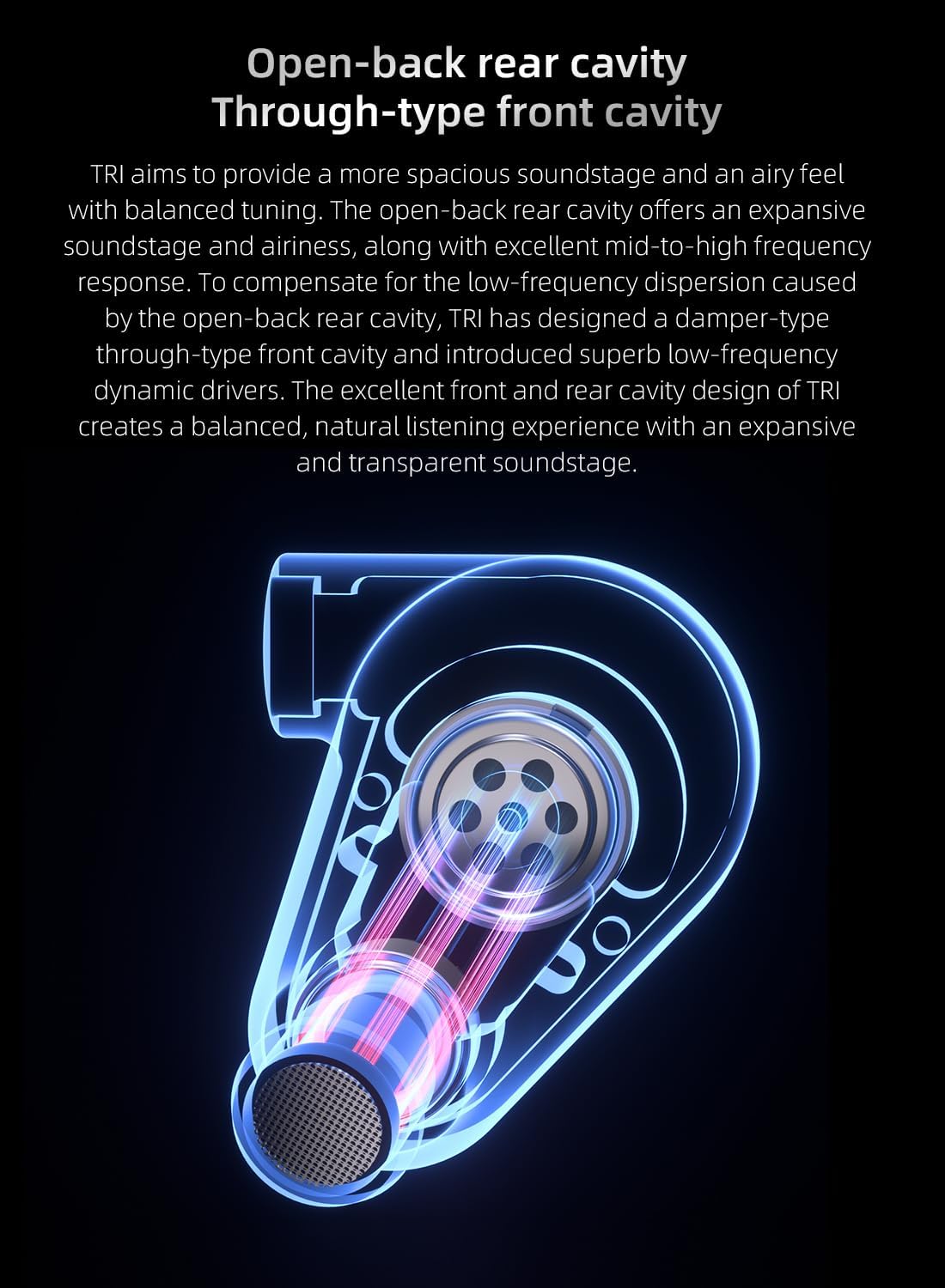
Image: Proper wearing technique for the earbuds, showing the cable routed over the ear for a secure fit.
5. تعليمات التشغيل
5.1 الاتصال بمصدر صوتي
Connect the 3.5mm jack of the earbud cable to the audio output port of your device (e.g., smartphone, tablet, laptop, audio interface). The earbuds are compatible with devices featuring a standard 3.5mm audio jack.
5.2 تشغيل الصوت
Once connected, begin audio playback from your device. Adjust the volume using your device's controls. The TRI Draco earbuds provide passive noise cancellation, which helps to reduce external distractions for a more focused listening experience.
Video: Official product video demonstrating the TRI Draco IEM Gaming Earbuds in use.
6. الصيانة
6.1 التنظيف
يساعد التنظيف المنتظم على الحفاظ على جودة الصوت والنظافة:
- نصائح الأذن: Remove ear tips and clean them with a soft, damp القماش. اتركها تجف تماماً قبل إعادة تثبيتها.
- Earbud Housing: Wipe the earbud housing with a dry, soft cloth. Avoid using harsh chemicals or abrasive materials.
- الفوهات: Gently remove any earwax or debris from the earbud nozzles using a small, soft brush or cleaning tool.
6.2 التخزين
When not in use, store your TRI Draco earbuds in the provided storage pouch to protect them from dust, dirt, and physical damage. This will prolong their lifespan and maintain sound quality.
7. استكشاف الأخطاء وإصلاحها
- لا يوجد صوت:
- تأكد من إدخال مقبس 3.5 ملم بالكامل في جهاز الصوت الخاص بك.
- تحقق من مستوى الصوت على جهازك الصوتي.
- Verify that the detachable cable connectors are securely attached to the earbuds.
- Test the earbuds with a different audio device to rule out device issues.
- Poor Sound Quality (e.g., muffled sound, weak bass):
- Ensure the ear tips create a proper seal in your ear canal. Try different sizes or types of ear tips.
- Clean the earbud nozzles to remove any obstructions.
- تحقق من مصدر الصوت بحثًا عن مشكلات الجودة.
- سقوط سماعات الأذن:
- Experiment with different ear tip sizes and types to find a more secure fit.
- Ensure the cable is properly looped over your ears for added stability.
8. المواصفات
| ميزة | التفاصيل |
|---|---|
| اسم الموديل | TRI Draco |
| ماركة | إي زي إير |
| تكنولوجيا الاتصال | سلكي |
| مقبس سماعات الرأس | 3.5 ملم جاك |
| نوع برنامج تشغيل الصوت | Dual Dynamic Driver (8mm LCP, 6mm Titanium) |
| مقاومة | 18 أوم |
| حساسية | 105 ديسيبل |
| التحكم في الضوضاء | إلغاء الضجيج السلبي |
| مادة | الألومنيوم |
| وزن العنصر | 1.41 أونصة (40 جرامًا) |
| لون | أبيض |
| أسلوب | without Mic |
9. معلومات الضمان
EZ EAR products are covered by a limited warranty against defects in materials and workmanship for a period of one (1) year from the original date of purchase. This warranty does not cover damage caused by accident, misuse, abuse, improper installation or operation, or unauthorized repairs. For warranty claims, please retain your proof of purchase.
10. الدعم
If you encounter any issues or have questions regarding your EZ EAR TRI Draco earbuds, please contact our customer support team:
- بريد إلكتروني: support@ezear.com
- Webموقع: EZ EAR Official Store