
1. المقدمة
The LEOBOG HI75C Pro is a 75% TKL mechanical wireless keyboard designed for versatility and performance. It features an aluminum alloy case, tri-mode connectivity (Bluetooth 5.0, 2.4GHz wireless, and USB-C wired), RGB backlighting, a multi-functional knob, and hot-swappable switches. This manual provides detailed instructions for setting up, operating, and maintaining your keyboard.

Figure 1: LEOBOG HI75C Pro Mechanical Wireless Keyboard Overview
2. محتويات العبوة
تأكد من وجود جميع العناصر في الحزمة الخاصة بك:
- LEOBOG HI75C Pro Mechanical Wireless Keyboard
- كيكاب بولير
- كبل USB (من النوع C)
- Replace Switch (Spare Switches)
3. مواصفات المنتج
The LEOBOG HI75C Pro keyboard incorporates several advanced features for an enhanced user experience:
- Aluminium Alloy Cover: Provides superior heat dissipation, robustness, and durability. Features an exquisite powder coating process for a luxurious feel and fingerprint resistance.
- تصميم الحشية: Significantly reduces cavity noise and improves typing sound for a satisfying low-noise experience.
- اتصال ثلاثي الأوضاع: Supports Bluetooth 5.0, 2.4GHz wireless, and USB wired connections, allowing connection to up to five devices simultaneously.
- 75% تخطيط: An 81-key layout that balances concise design with full functionality, saving desk space.
- إضاءة خلفية RGB: Features 16.8 million RGB lighting colors with 17 lighting effects and 10 music rhythm modes.
- مقبض ثنائي الوضع: A multi-functional knob for precise control over volume (office mode) and lighting brightness (game mode).
- High Speed Response: Equipped with an advanced gaming keyboard chip for a response speed of up to 2.8ms.
- مفاتيح قابلة للتبديل السريع: يُتيح استبدال المفاتيح بسهولة دون الحاجة إلى اللحام.
- بطارية 4000 مللي أمبير: Provides extended usage time, approximately one month without backlighting.

Figure 2: Key features of the LEOBOG HI75C Pro keyboard.

Figure 3: Diagram illustrating the multi-layered gasket structure for sound dampning.

Figure 4: Ergonomic keycap height design for comfortable typing.
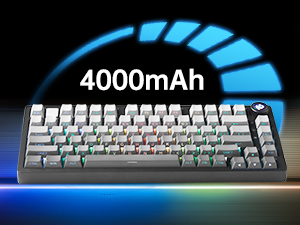
Figure 5: The keyboard is equipped with a 4000mAh battery.
4. الإعداد والاتصال
The LEOBOG HI75C Pro offers three connection modes: wired, 2.4GHz wireless, and Bluetooth. Use the switch on the side of the keyboard to select your desired mode.
4.1 اتصال سلكي
- Ensure the mode switch on the side of the keyboard is set to the wired (USB-C) position.
- Connect the provided USB-C cable to the keyboard and to an available USB port on your computer.
- سيتم التعرف على لوحة المفاتيح تلقائيًا وستكون جاهزة للاستخدام.
اتصال لاسلكي 4.2 2.4 جيجاهرتز
- Ensure the mode switch on the side of the keyboard is set to the 2.4GHz wireless position.
- قم بتوصيل جهاز استقبال USB بسرعة 2.4 جيجا هرتز بمنفذ USB متاح على جهاز الكمبيوتر الخاص بك.
- يجب أن تتصل لوحة المفاتيح تلقائيًا. إذا لم يحدث ذلك، فاضغط على FN + ~ لبدء الاقتران.
4.3 اتصال بلوتوث 5.0
- Ensure the mode switch on the side of the keyboard is set to the Bluetooth position.
- On your device (PC, Mac, Android, iOS), enable Bluetooth and search for new devices.
- اضغط مع الاستمرار الجبهة الوطنية + 1, الجبهة الوطنية + 2، أو الجبهة الوطنية + 3 for 3-5 seconds to enter pairing mode for BT1, BT2, or BT3 respectively. The indicator light will flash.
- Select "LEOBOG HI75C Pro" from the list of available Bluetooth devices on your device.
- Once connected, the indicator light will stop flashing. You can switch between paired Bluetooth devices using الجبهة الوطنية + 1/2/3.

Figure 6: The keyboard supports Type-C wired, 2.4GHz wireless, and Bluetooth connections.
Video 1: Official LEOBOG overview of the HI75C Pro Mechanical Gaming Keyboard, showcasinج- تصميمه وميزاته.
5. التشغيل
5.1 الإضاءة الخلفية RGB
The keyboard features extensive RGB backlighting with 17 preset lighting effects. Additionally, it offers 10 music rhythm RGB lighting modes that synchronize with audio output. You can adjust lighting effects and brightness using the multi-functional knob or dedicated key combinations. To turn off the lights, use the knob in game mode.
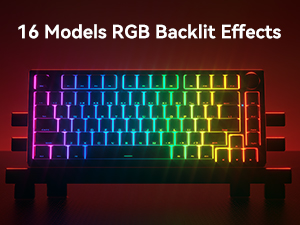
Figure 7: The keyboard offers 16 models of RGB backlit effects.
5.2 التحكم بمقبض ثنائي الوضع
The multi-functional knob allows for quick adjustments based on the selected mode:
- أوضاع التحويل: اضغط مع الاستمرار على الزر للتبديل بين وضع المكتب ووضع الألعاب.
- وضع المكتب: When the indicator light is continuously on, the keyboard is in office mode. Rotate the knob to adjust the system volume.
- وضع اللعبة: When the indicator light is breathing, the keyboard is in game mode. Rotate the knob to adjust the lighting brightness.

Figure 8: The multi-functional knob for volume and lighting control.
5.3 مفاتيح قابلة للتبديل السريع
The LEOBOG HI75C Pro supports hot-swappable 3-pin/5-pin mechanical switches, allowing you to easily change switches without soldering. This feature enables customization of typing feel and sound.

Figure 9: The keyboard features hot-swappable switches for customization.
6. الصيانة
6.1 التنظيف
للحفاظ على الأداء والمظهر الأمثل، قم بتنظيف لوحة المفاتيح بانتظام:
- افصل لوحة المفاتيح عن جميع مصادر الطاقة قبل التنظيف.
- استخدم قطعة قماش ناعمة وخالية من الوبر وامسحها برفق.ampened with water or a mild cleaning solution to wipe the keycaps and case.
- للتنظيف العميق، استخدم أداة سحب أغطية المفاتيح المتوفرة لإزالة أغطية المفاتيح وتنظيف الجزء السفلي منها باستخدام الهواء المضغوط أو فرشاة صغيرة.
- تأكد من جفاف لوحة المفاتيح تماماً قبل إعادة توصيلها.
6.2 استبدال أغطية المفاتيح والمفاتيح
The hot-swappable design allows for easy replacement of keycaps and switches:
- استخدم أداة سحب أغطية المفاتيح المرفقة لإزالة أغطية المفاتيح برفق.
- Use a switch puller (not included, but often comes with replacement switches) to carefully remove switches. Grip the switch firmly and pull straight up.
- Align the pins of the new switch with the holes on the PCB and press down gently until it clicks into place. Ensure pins are not bent.
- Place the desired keycap onto the new switch stem.
7. استكشاف الأخطاء وإصلاحها
7.1 مشاكل الاتصال
- لا يوجد اتصال: Ensure the mode switch on the side of the keyboard is set correctly for wired, 2.4GHz, or Bluetooth.
- 2.4GHz Disconnection: Re-plug the USB receiver. Try pairing again by pressing FN + ~.
- فصل البلوتوث: Ensure Bluetooth is enabled on your device. Re-enter pairing mode on the keyboard (الجبهة الوطنية + 1/2/3) and re-select the keyboard on your device.
- تدخل: Move the keyboard closer to the receiver/device or away from other wireless devices that might cause interference.
7.2 البرامج الثابتة والبرامج
For advanced customization, macro programming, and firmware updates, please visit the official LEOBOG website or authorized distributors' websites. Ensure you download the correct software/firmware version specifically for the LEOBOG HI75C Pro model to avoid compatibility issues.
7.3 إضاءة RGB لا تعمل
- Check if the keyboard is in Game Mode, where the knob controls brightness. Rotate the knob to increase brightness.
- Ensure the battery is sufficiently charged if using wireless mode.
- If using software, verify that lighting effects are enabled and configured correctly.
8. المواصفات
| ميزة | التفاصيل |
|---|---|
| رقم الموديل | HI75C PRO |
| أبعاد المنتج | 12.97 × 5.35 × 1.74 بوصة |
| وزن العنصر | 3.41 رطل |
| تكنولوجيا الاتصال | بلوتوث، USB-C، لاسلكي 2.4 جيجاهرتز |
| وصف لوحة المفاتيح | ميكانيكي |
| الأجهزة المتوافقة | جهاز ألعاب، كمبيوتر محمول، كمبيوتر شخصي، هاتف ذكي، جهاز لوحي |
| المميزات الخاصة | Customizable Display Keys, Ergonomic, Hot-Swappable, Hotkeys and Media Keys, Programmable Keys |
| الخلفية الخلفية لوحة المفاتيح | اللون الأحمر والأخضر والأزرق |
| بطارية | 1 A battery required (included), 4000mAh |
9. الضمان والدعم
LEOBOG provides a ضمان لمدة 2 سنوات for the HI75C Pro Mechanical Wireless Keyboard, covering manufacturing defects from the date of purchase. For warranty claims, technical assistance, or product inquiries, please contact LEOBOG customer support through their official webالموقع أو بائع التجزئة الذي تم شراء المنتج منه.

Figure 10: LEOBOG customer service is available for support.