
مرحباً
Thank you for choosing the BYTECH BICONIC True Wireless Earbuds. This manual provides essential information on how to set up, operate, maintain, and troubleshoot your new earbuds. Please read this manual thoroughly before use to ensure optimal performance and longevity of your device.
تعليمات السلامة الهامة
- لا تعرض سماعات الأذن أو علبة الشحن لدرجات حرارة أو رطوبة أو سوائل شديدة.
- تجنب إسقاط الجهاز أو اصطدامه أو تفكيكه.
- لا تستخدم المنظفات الكاشطة أو المواد الكيميائية القاسية لتنظيف سماعات الأذن أو العلبة.
- استمع بمستويات صوت معتدلة لتجنب تلف السمع. التعرض المطول للأصوات العالية قد يسبب فقدانًا دائمًا للسمع.
- يحفظ بعيدًا عن متناول الأطفال والحيوانات الأليفة.
- Dispose of the device responsibly according to local regulations. Do not dispose of with household waste.
ما هو المشمول
يرجى التحقق من محتويات الحزمة للتأكد من وجود جميع العناصر:
- BYTECH BICONIC True Wireless Earbuds (Left and Right)
- حافظة الشحن
- كابل الشحن
- دليل المستخدم
المنتج انتهىview
Familiarize yourself with the components of your BYTECH BICONIC True Wireless Earbuds.

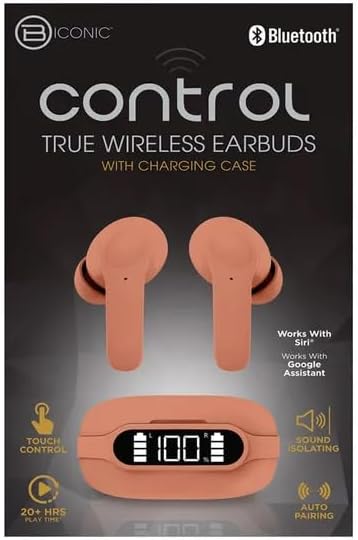
ابدء
شحن سماعات الأذن والعلبة
The BYTECH BICONIC earbuds come with a rechargeable battery in both the earbuds and the charging case. Ensure both are fully charged before first use.
- Place the earbuds into the charging case, ensuring they are correctly seated in their respective slots (L for left, R for right).
- Connect the provided charging cable to the charging port on the case and the other end to a USB power source (e.g., computer USB port, wall adapter).
- ستعرض الشاشة الرقمية على علبة الشحن مستوى البطارية. اترك وقتًا كافيًا لشحنها بالكامل.
- بمجرد الشحن بالكامل ، افصل كابل الشحن.
بلوتوث الاقتران
Follow these steps to pair your earbuds with your Bluetooth-enabled device:
- تأكد من شحن سماعات الأذن ووضعها داخل علبة الشحن.
- افتح علبة الشحن. ستدخل سماعات الأذن تلقائيًا في وضع الاقتران، وسيومض مؤشر ضوئي عليها.
- على جهازك (الهاتف الذكي، الجهاز اللوحي، إلخ)، انتقل إلى إعدادات البلوتوث وقم بتشغيل البلوتوث.
- بحث عن available devices. You should see "BYTECH BICONIC" or a similar name appear in the list.
- Select "BYTECH BICONIC" to connect. Once connected, a voice prompt will confirm the successful pairing, and the indicator lights on the earbuds will stop flashing.
- ستتصل سماعات الأذن تلقائيًا بالجهاز المقترن الأخير عند إخراجها من العلبة، بشرط أن يكون البلوتوث مفعلًا على الجهاز.
تعليمات التشغيل
عناصر التحكم باللمس
The BYTECH BICONIC earbuds feature intuitive touch controls for easy management of your audio and calls.
| فعل | وظيفة |
|---|---|
| نقرة واحدة (سماعة الأذن اليسرى/اليمنى) | تشغيل / إيقاف الموسيقى ، الرد / إنهاء المكالمة |
| الضغط مرتين على سماعة الأذن اليمنى | المسار التالي |
| الضغط مرتين على سماعة الأذن اليسرى | المسار السابق |
| الضغط الثلاثي (سماعة الأذن اليسرى/اليمنى) | تفعيل المساعد الصوتي (Siri/Google Assistant) |
| الضغط لفترة طويلة (سماعة الأذن اليسرى/اليمنى) | رفض المكالمة |
التشغيل وإيقاف التشغيل
- تشغيل الطاقة: سيتم تشغيل سماعات الأذن تلقائيًا عند إزالتها من علبة الشحن.
- إيقاف التشغيل: أعد وضع سماعات الأذن في علبة الشحن وأغلق الغطاء. ستتوقف تلقائيًا وتبدأ عملية الشحن.
الصيانة والعناية
Proper care will extend the life of your BYTECH BICONIC True Wireless Earbuds.
- تنظيف: Use a soft, dry, lint-free cloth to clean the earbuds and charging case. Do not use liquids or aerosol cleaners.
- تخزين: عندما لا تكون قيد الاستخدام، قم دائمًا بتخزين سماعات الأذن في علبة الشحن الخاصة بها لحمايتها والحفاظ عليها مشحونة.
- تجنب الظروف القاسية: Do not expose the device to extreme heat, cold, or direct sunlight.
- مقاومة الماء: These earbuds are not waterproof. Avoid contact with water or excessive moisture.
استكشاف الأخطاء وإصلاحها
إذا واجهت أي مشاكل مع سماعات الأذن الخاصة بك، فراجع الحلول الشائعة التالية:
| مشكلة | حل |
|---|---|
| سماعات الأذن لا تقترن | تأكد من شحن سماعات الأذن. أوقف تشغيل البلوتوث على جهازك ثم شغّله. انسَ الجهاز في إعدادات البلوتوث وأعد إقرانه. |
| تعمل سماعة أذن واحدة فقط | Place both earbuds back into the charging case, close the lid, wait a few seconds, then take them out again. Ensure both are charged. |
| لا يوجد صوت | Check volume levels on both your device and the earbuds. Ensure earbuds are properly connected. Try playing different audio. |
| علبة الشحن لا تشحن | تأكد من توصيل كابل الشحن بإحكام بالعلبة ومصدر الطاقة. جرّب منفذ USB أو محول طاقة مختلفًا. |
المواصفات الفنية
Detailed specifications for your BYTECH BICONIC True Wireless Earbuds:
| ميزة | التفاصيل |
|---|---|
| رقم الموديل | BC-AU-BE-144-TN |
| تكنولوجيا الاتصال | لاسلكي (بلوتوث) |
| عامل الشكل | داخل الأذن (داخل الأذن) |
| لون | مقهى |
| المميزات الخاصة | Rechargeable Battery, Touch Control, Sound Isolating, Auto Pairing |
| المكونات المضمنة | كابل |
| Estimated Play Time | أكثر من 20 ساعة (مع علبة الشحن) |
معلومات الضمان ودعم العملاء
BYTECH products are designed and manufactured to the highest quality standards. For information regarding warranty coverage, please refer to the warranty card included with your purchase or visit the official BYTECH webموقع.
If you require further assistance or have questions not covered in this manual, please contact BYTECH customer support through their official channels. Please have your model number (BC-AU-BE-144-TN) and purchase details ready when contacting support.