1. انتهى المنتجview
The DAJA A6 Pro 20W Laser Engraver and Cutter Machine is a high-precision, Class 1 laser device designed for engraving and cutting various materials. It features an enclosed design for enhanced safety and supports interchangeable laser heads for diverse applications. This manual provides essential information for safe and effective operation.
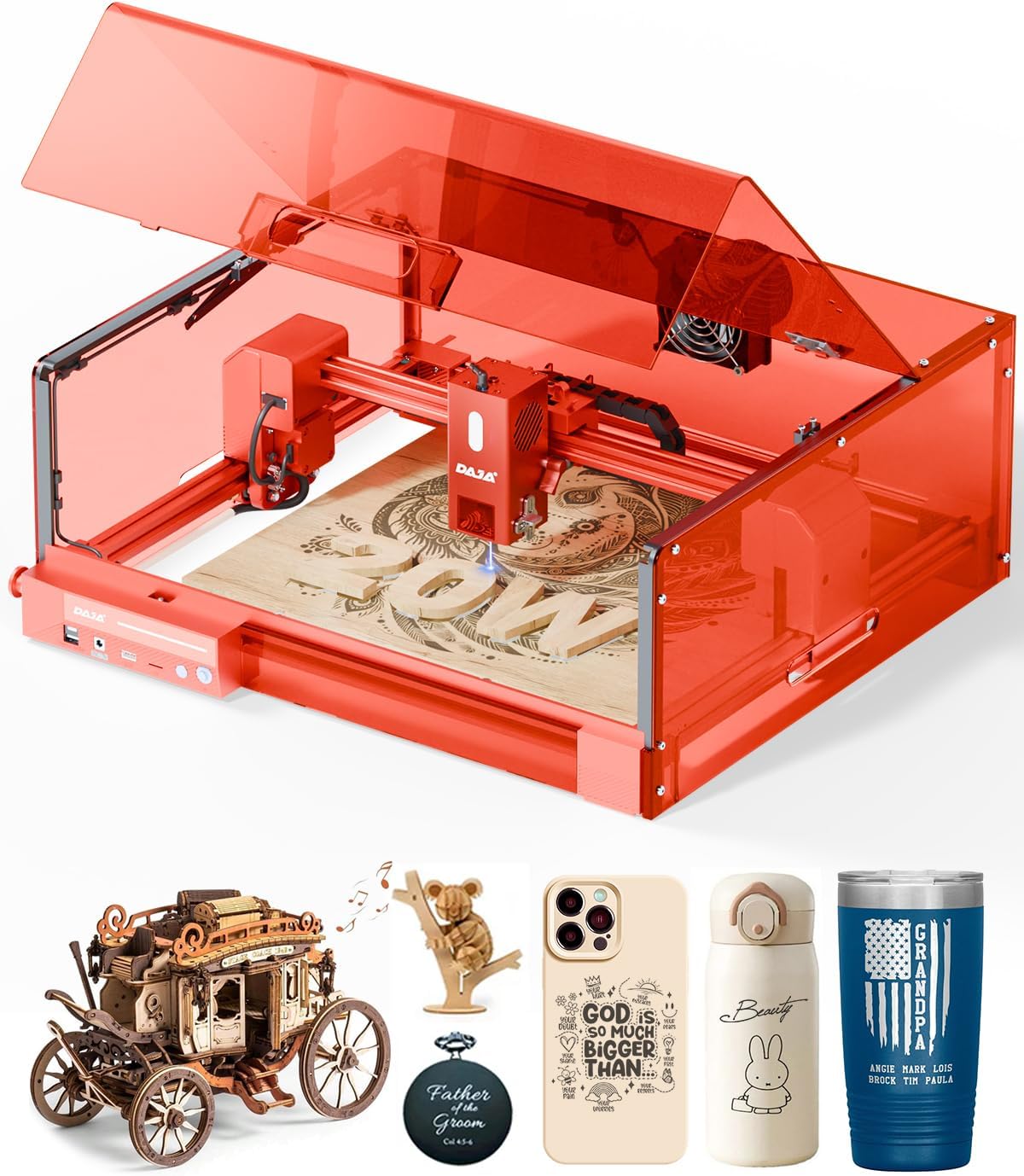
Figure 1: The DAJA A6 Pro 20W Laser Engraver and Cutter Machine with its protective cover and an engraved wooden piece.
2. معلومات السلامة
Your safety is paramount. The DAJA A6 Pro is equipped with multiple safety features to ensure secure operation. Always adhere to the following guidelines:
- سلامة الليزر من الفئة 1: The machine is fully enclosed for eye protection, reducing direct laser exposure.
- إيقاف الأمان عند فتح الغطاء: Operation automatically halts if the lid is opened during use, preventing accidental laser exposure.
- Built-in Flame Sensor: Detects unusual heat or flames and automatically stops operation to prevent hazards.
- زر التوقف في حالات الطوارئ: Provides immediate shutdown capability in case of an emergency.
- قفل أمان للأطفال: Prevents unauthorized access and operation.
- 15° Tilt Stop Feature: Automatically pauses the machine if it tilts beyond a safe angle.
- تهوية فعالة: Helps contain fumes and dust generated during engraving, ensuring a cleaner work environment.
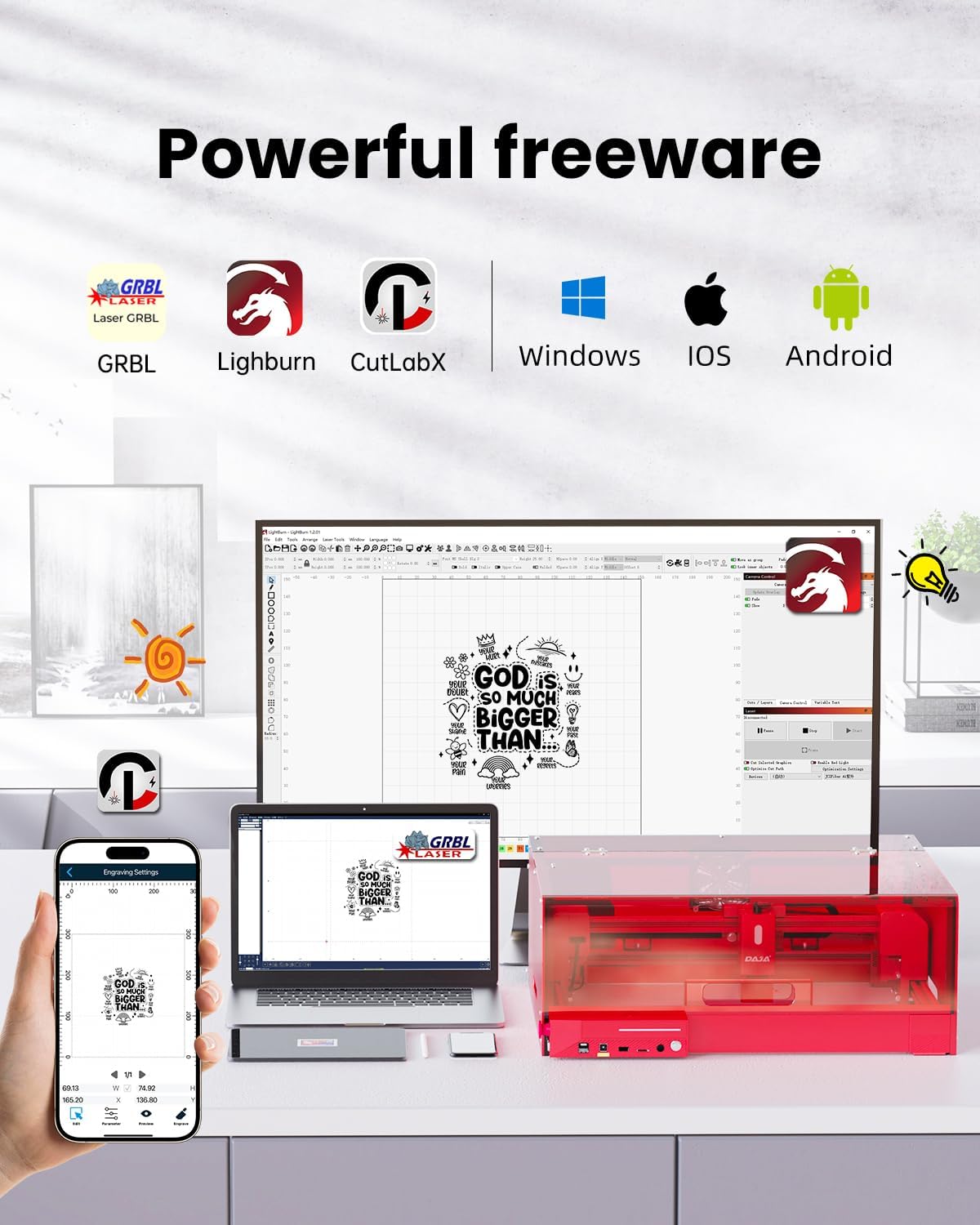
Figure 2: Visual representation of the DAJA A6 Pro's comprehensive safety enhancements, including the enclosed design, lid-open safety stop, and emergency stop button.
3. الإعداد والتجميع
The DAJA A6 Pro is designed for modular assembly. Follow these steps to set up your machine. For a visual guide, please refer to the installation video below.
Video 1: Machine Installation Guide. This video demonstrates the step-by-step assembly process for the DAJA A6 Pro laser engraver, including unboxing, module connection, and protective cover installation.
خطوات التجميع:
- فتح العلبة وتحديد المكونات: Carefully remove all components from the packaging. Identify the structural assemblies for the laser engraving machine and the light shield accessories.
- تجميع الهيكل الرئيسي:
- Install the Y-axis right module into the front module.
- Install the Y-axis left module assembly into the front module.
- Synchronize the installation of the rear module into both the Y-right and Y-left modules.
- Tighten and fix the 4 corners with M5 * 22 six-piece cup head screws.
- Connect the corresponding plug of the motherboard into its socket.
- Install X-axis Module:
- Push the Y-axis left sliding group backwards to the end.
- Install the X-axis group downwards into the sliding group.
- Insert the corresponding connector plug into the socket.
- Tighten and fix the X-axis module with M4 * 55 hexagonal socket head screws.
- Ensure the laser connection plug is properly plugged in.
- Assemble the Protective Cover:
- Assemble the protective cover (left module) and the protective cover (rear module) correspondingly.
- Tighten and fix with M4 * 8 half round head hexagon socket screws.
- Assemble the front module of the protective cover onto the protective cover (right module and left module).
- Tighten and fix with M3 * 14 hexagonal socket head screws.
- Hang the exhaust fan leads on the hooks in sequence.
- Install the protective cover assembly (top cover back panel module) onto the corresponding uncovered cover module.
- Use M4 * 8 half round head hex screws and M4 hex anti-slip nuts to fix and tighten with a wrench.
- Open the cover plate upwards.
- Install the pull rod to the designated position and tighten it with M3 * 8 socket head hex screws.
- التجميع النهائي: Install the assembled protective cover and the bare machine together. Fasten the 4 positions with M5 * 22 socket head cap screws.
4. تعليمات التشغيل
4.1 Engravable Materials
The DAJA A6 Pro supports engraving and cutting on over 300 types of materials. The interchangeable laser heads allow for versatility:
- Blue Laser (455nm): Suitable for engraving on wood, Kraft paper, painted metals, glass, ceramics, leather, acrylic, plastic, bamboo, PVC board, and food.
- Infrared Laser (1064nm): Ideal for marking on metals (gold, silver, copper, aluminum, platinum, titanium, stainless steel), plastics, and painted metals.

Figure 3: A visual guide to the wide range of materials compatible with the DAJA A6 Pro, including wood, metal, acrylic, and more.
4.2 توافق البرامج
The A6 Pro offers extensive compatibility with various operating systems and software, allowing users to choose their preferred interface for design and control:
- أنظمة التشغيل: ويندوز، ماك أو إس، آي أو إس، أندرويد، لينكس.
- برمجة: GRBL, LightBurn, CutLabX.

Figure 4: Illustration of the DAJA A6 Pro's compatibility with various software and operating systems, including mobile and desktop applications.
4.3 Laser Precision and Cutting Capabilities
The A6 Pro utilizes a high-power semiconductor laser to ensure ultra-precise movement and 100% printing of complex lines and patterns, achieving a laser precision of 0.01mm. Beyond engraving, the machine provides sufficient power for direct material cutting.
- Capable of cutting wood up to 16mm thick in a single pass.
- Capable of cutting acrylic up to 10mm thick in a single pass.

Figure 5: Demonstrates the DAJA A6 Pro's strong laser cutting capabilities, showing its ability to cut through materials like wood and acrylic with precision.
4.4 Creative Applications
The versatility of the DAJA A6 Pro allows for a wide range of creative and practical applications, from personal projects to small business needs:
- Pet customization (e.g., engraved pet tags).
- Brand customization (e.g., on tumblers).
- Commemorative items and personalized gifts (e.g., wooden hearts, custom notebooks).
- DIY hobbyist projects, including intricate designs (e.g., watch bands, wooden puzzles).
- Small business product creation and prototyping (e.g., jewelry, keychains).

الشكل 6: مثالamples of various items that can be created or customized using the DAJA A6 Pro, showcasing its versatility for personal and commercial use.
5. الصيانة
Regular maintenance ensures the longevity and optimal performance of your DAJA A6 Pro. Always power off and unplug the machine before performing any maintenance.
- تنظيف: Regularly clean the interior of the machine, especially the engraving area, to remove dust and debris. Use a soft, dry cloth.
- العناية بعدسات الليزر: The machine features a built-in replaceable laser protection lens. Inspect the lens periodically for any residue or damage. Replace if necessary to maintain engraving precision.
- نظام التهوية: Ensure the exhaust fan and ventilation ducts are clear of obstructions to maintain proper airflow and fume extraction.
- أجزاء متحركة: Check the X and Y axis rails for smooth movement. Keep them clean and free of debris.
6. استكشاف الأخطاء وإصلاحها
يوفر هذا القسم حلولاً للمشكلات الشائعة التي قد تواجهها.
- الجهاز لا يعمل:
- Check if the power adapter is securely connected to both the machine and a working power outlet.
- تأكد من أن مفتاح الطاقة في وضع "التشغيل".
- الليزر لا يعمل/إخراج ضعيف:
- Verify that the laser connection plug is properly seated.
- Check the laser protection lens for cleanliness or damage. Clean or replace if needed.
- Ensure the protective cover is fully closed and secured, as the machine has a lid-open safety stop.
- Confirm that the correct laser head is installed for the material being used.
- Engraving/Cutting Quality Issues (e.g., blurry, incomplete):
- Ensure the material is properly focused. Refer to the software instructions for focus adjustment.
- Check the laser power and speed settings in your software; adjust according to the material type and desired effect.
- Verify that the material is flat and securely placed on the working area.
- نظف عدسة الليزر.
- Machine Stops Mid-Operation:
- Check if the lid was accidentally opened. Close it securely to resume.
- The flame sensor might have been triggered. Inspect the working area for any signs of excessive heat or flame.
- Ensure the machine is on a stable, level surface to prevent triggering the tilt stop feature.
- مشاكل الاتصال بالبرامج:
- Ensure the USB cable is securely connected to both the machine and your computer.
- أعد تشغيل البرنامج والجهاز.
- Check for updated drivers or software versions.
7. المواصفات
| ميزة | التفاصيل |
|---|---|
| ماركة | داجا |
| نموذج | A6 Pro (A6-US) |
| قوة الليزر | 20,000 ميغاواط |
| دورة الليزر | المستوى 1 |
| منطقة العمل | 300 مم × 300 مم |
| التوافق المادي | Acrylic, Metal, Plastic, Wood, Paper, Leather, Glass, Ceramics, Bamboo, Stone, PVC board, Food |
| وزن العنصر | 6 كيلوجرام (13.2 رطل) |
| أبعاد المنتج | 17.72 × 15.75 × 7.09 بوصة |
| وضع التشغيل | يدوي |
| رمز المنتج الموحد | 797422370179 |
| الأنظمة المدعومة | ويندوز، ماك أو إس، آي أو إس، أندرويد، لينكس |
| برنامج التشغيل | LightBurn, LaserGRBL, CutLabX |
8. الضمان والدعم
The DAJA A6 Pro comes with a one-year warranty from the date of purchase.
For technical support, additional resources, and software downloads, please visit the official support drive:
drive.google.com/drive/folders/1Z9r2Ap8IN47GNqvXlkJtwx7TKAo6SIw-?usp=sharing
يرجى الاحتفاظ بإثبات الشراء الخاص بك لمطالبات الضمان.