
مقدمة
This manual provides detailed instructions for the installation, operation, and maintenance of your darkFlash DB330M Micro-ATX PC Case. Please read this manual thoroughly before beginning assembly to ensure proper setup and safe usage. The DB330M case features a 270° panoramic tempered glass panel, pre-installed PWM ARGB fans, and a high-speed I/O panel.
معلومات السلامة
- افصل دائمًا مصدر الطاقة من مقبس الحائط قبل تركيب أو صيانة أي مكونات داخل علبة الكمبيوتر.
- Handle tempered glass panels with care to prevent breakage. Avoid impacts or sharp objects.
- ارتدِ قفازات مضادة للكهرباء الساكنة أو استخدم سوار معصم مضاد للكهرباء الساكنة لمنع تلف المكونات الحساسة الناتج عن التفريغ الكهروستاتيكي (ESD).
- احتفظ بالأجزاء الصغيرة والبراغي بعيدًا عن متناول الأطفال.
- تأكد من وجود تهوية مناسبة حول علبة الكمبيوتر لمنع ارتفاع درجة الحرارة.
محتويات الحزمة
تأكد من وجود جميع العناصر في العبوة:
- darkFlash DB330M Micro-ATX PC Case
- 3 x Pre-installed PWM ARGB Fans
- صندوق الملحقات (براغي، روابط الكابلات، إلخ)
- دليل المستخدم (هذا المستند)
ميزات أكثرview
- 270° Panoramic Tempered Glass: يوفر نطاقًا واسعًا view من المكونات الداخلية وإضاءة RGB.
- لوحة إدخال/إخراج عالية السرعة: Includes USB 3.0 and Type-C ports for fast data transfer.
- Vertical Airflow Cooling: Optimized design with pre-installed fans for efficient heat dissipation.
- مرشحات الغبار المغناطيسية: Located on top and bottom to keep components clean.
- سهولة التركيب: User-friendly design for hassle-free assembly and maintenance.
تحديد
| ميزة | مواصفة |
|---|---|
| اسم الموديل | DB330M PC CASE |
| الأبعاد (الطول × العرض × الارتفاع) | 8.58 بوصة عمق × 13.11 بوصة عرض × 15.75 بوصة ارتفاع (218 مم × 333 مم × 400 مم) |
| التوافق مع اللوحة الأم | Micro ATX, ITX |
| نوع الحالة | برج ميدي |
| مادة | بلاستيك، زجاج مقسّى |
| مراوح مثبتة مسبقًا | 3 مراوح PWM ARGB مقاس 120 مم |
| أقصى ارتفاع لمبرد وحدة المعالجة المركزية | 180 ملم |
| الحد الأقصى لخلوص وحدة معالجة الرسومات | 305 ملم |
| دعامة المبرد (أعلى) | حتى 240 ملم |
| نوع تركيب مصدر الطاقة | Bottom Mount (Max 140mm PSU length) |
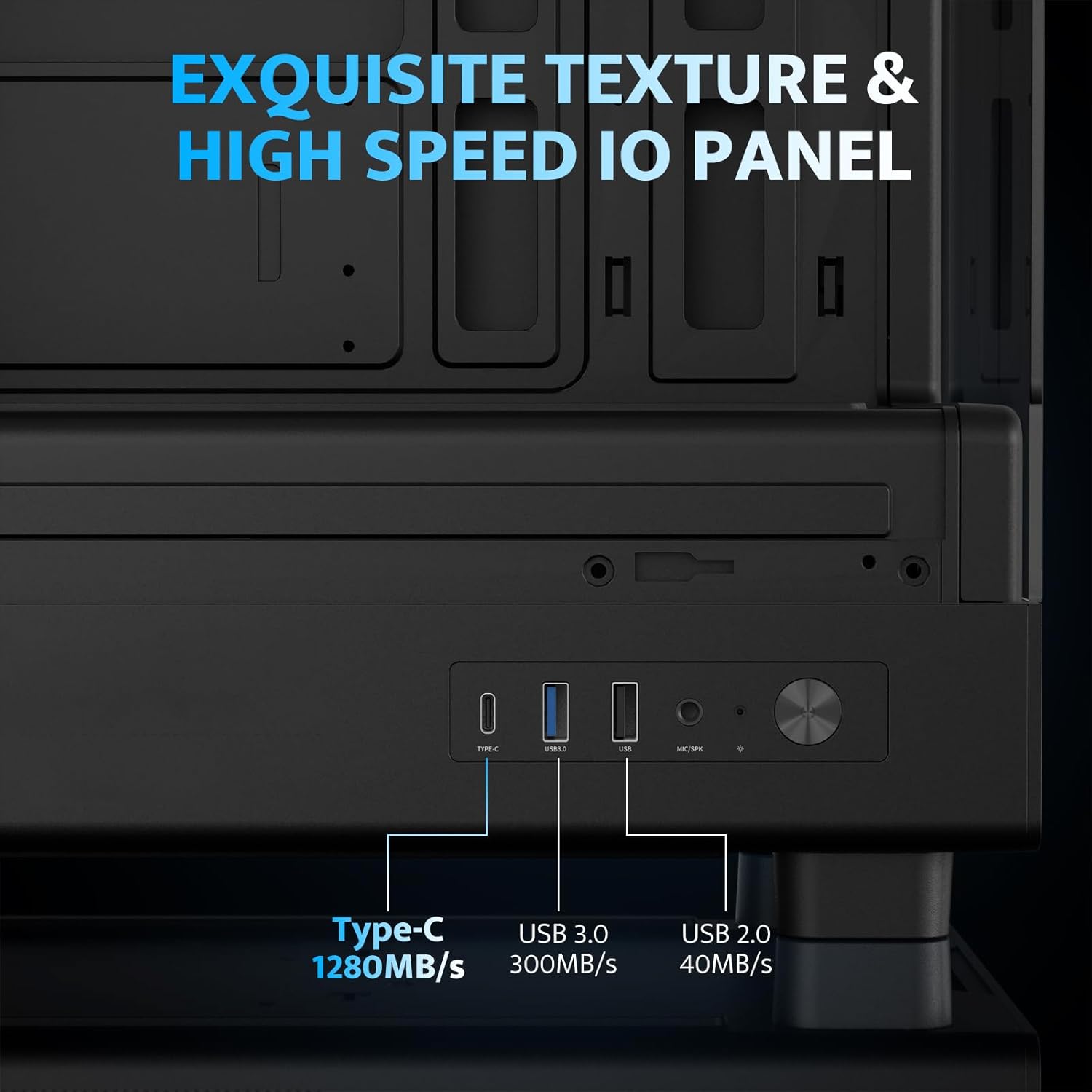
| منافذ الإدخال والإخراج | 1 x USB 3.0, 1 x Type-C, Audio In/Out |
الإعداد والتثبيت
1. Accessing the Interior (Quick Release Design)
The darkFlash DB330M features a quick-release design for easy access to internal components. The tempered glass panels can be removed by gently pulling them away from the chassis. The top panel also detaches for fan/radiator installation.

2. تركيب اللوحة الأم
Install your Micro-ATX or ITX motherboard into the designated area. Ensure standoffs are correctly aligned and secured. The case supports CPU coolers up to 180mm in height and GPUs up to 305mm in length.

3. تركيب المروحة ونظام التبريد
The case comes with three pre-installed 120mm PWM ARGB fans. Two fans are located at the top, and one at the rear. Additional fan mounts are available at the bottom (up to 2 x 120mm) for enhanced airflow. The case supports a 240mm AIO radiator on the top panel.
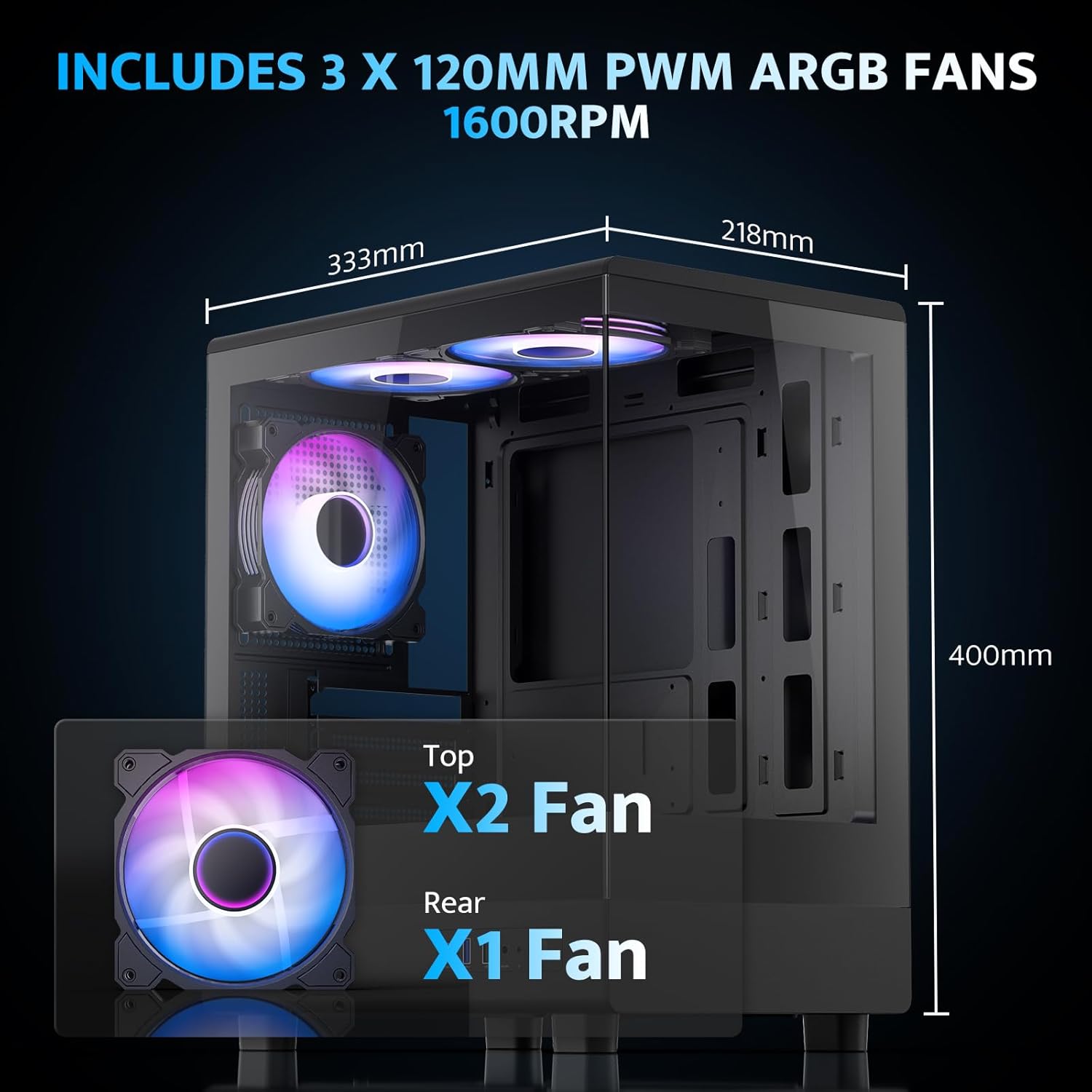
The pre-installed fans are PWM ARGB type, offering speed adjustment and rich lighting modes with motherboard synchronization. Note: An RGB hub controller is not included.

4. تركيب وحدة التزويد بالطاقة والتخزين
Install your power supply unit (PSU) in the bottom mount. The case supports PSUs up to 140mm in length. Utilize the standard hard drive cage for storage devices.
5. توصيل لوحة الإدخال/الإخراج الأمامية
Connect the front I/O panel cables to your motherboard. The panel includes a Type-C port, USB 3.0 port, and USB 2.0 port for various connectivity needs.
6. إدارة الكابلات
Utilize the cable routing options and tie-downs behind the motherboard tray to ensure clean cable management. This improves airflow and aesthetics.
تعليمات التشغيل
1. تشغيل
After all components are securely installed and connected, plug in the power cable to your PSU and press the power button on the front I/O panel to start your system.
2. التحكم في مروحة ARGB
The pre-installed ARGB fans can be controlled via compatible motherboard software (if connected to an ARGB header) to customize lighting effects and fan speeds. Refer to your motherboard manual for specific software instructions.
3. Airflow Configuration
The DB330M is designed with optimized airflow channels. The pre-installed fans facilitate vertical airflow, with the fan above the PSU directing air towards the graphics card. Ensure no obstructions block the airflow paths.


صيانة
1. تنظيف فلتر الغبار
Regularly clean the magnetic dust filters located on the top and bottom of the case. Gently remove the filters and clean them with compressed air or a soft brush. Reattach them securely after cleaning.
2 تنظيف بشكل عام
Use a soft, dry cloth to wipe down the exterior of the case. For tempered glass panels, use a glass cleaner and a microfiber cloth. Avoid abrasive cleaners or solvents.
استكشاف الأخطاء وإصلاحها
- جهاز الكمبيوتر لا يعمل:
- Ensure the power supply is properly connected to the wall and the PSU switch is in the 'ON' position.
- Verify all power cables from the PSU are securely connected to the motherboard and components.
- تحقق من توصيل مفتاح الطاقة الموجود على اللوحة الأمامية باللوحة الأم.
- المراوح لا تدور/إضاءة RGB لا تعمل:
- تأكد من توصيل كابلات طاقة المروحة باللوحة الأم أو وحدة التحكم بالمروحة.
- Ensure ARGB cables are connected to a compatible ARGB header on the motherboard or an ARGB controller.
- تحقق من إعدادات برنامج اللوحة الأم لمعرفة سرعة المروحة والتحكم في إضاءة RGB.
- منافذ USB لا تعمل:
- Verify the front panel USB 3.0 and Type-C cables are correctly plugged into the corresponding headers on your motherboard.
- تأكد من تحديث برامج تشغيل اللوحة الأم.
الضمان والدعم
يوفر برنامج دارك فلاش ضمان لمدة عام واحد for this computer case. For technical support, warranty claims, or further assistance, please contact darkFlash customer service through their official webالموقع الإلكتروني أو المتجر الذي تم شراء المنتج منه. يرجى الاحتفاظ بإثبات الشراء للتحقق من صحة الضمان.
دارك فلاش الرسمي Webموقع: www.darkflash.com