1. المقدمة
This manual provides detailed instructions for the installation, operation, and maintenance of the LTS LXIP3C82WI-28SDL Pro-X 8MP IP Camera. This camera is designed for both indoor and outdoor surveillance, offering high-resolution video and advanced detection features. Please read this manual thoroughly before using the product to ensure proper setup and functionality.
2. معلومات السلامة
- Ensure the power supply meets the camera's requirements (12V DC or PoE IEEE 802.3af).
- لا تعرض الكاميرا لدرجات حرارة عالية أو رطوبة أو بيئات تآكلية.
- Avoid pointing the lens directly at strong light sources for extended periods.
- يجب أن يتم التركيب بواسطة فنيين مؤهلين وأن يتوافق مع قوانين الكهرباء المحلية.
- Keep the camera clean and free from dust to maintain optimal performance.
3. محتويات العبوة
تأكد من وجود جميع العناصر في العبوة:
- LTS LXIP3C82WI-28SDL Pro-X 8MP IP Camera (1 unit)
- أجهزة التثبيت (المسامير، المراسي)
- دليل البدء السريع
4. انتهى المنتجview والميزات
The LTS LXIP3C82WI-28SDL is an 8 Megapixel (3840 x 2160) IP camera designed for advanced surveillance. Key features include:
- دقة عالية: Captures video at up to 8 MP (3840 × 2160) at 30 frames per second.
- عدسة ثابتة: Equipped with a 2.8 mm fixed lens.
- Advanced Illumination: Features built-in IR LED and warm light LED illuminators, providing clear images up to 98 feet (30 meters) even in low light conditions, enabling 24/7 color imaging.
- X-Deterrence: Integrated siren and visual alerts (red and blue flashing lights) for active deterrence.
- الحديث في اتجاهين: Built-in dual microphones and speaker facilitate two-way audio communication.
- كشف الحركة 2.0: Intelligent motion detection focusing on human and vehicle recognition to reduce false alarms.
- النطاق الديناميكي الواسع (WDR): True WDR 120 dB for clear images in scenes with strong backlighting.
- تخزين: Supports MicroSD card storage up to 256 GB.
- خيارات الطاقة: Can be powered via Power over Ethernet (PoE IEEE 802.3af) or 12V DC.
- متانة: IP67 rated for outdoor use, providing protection against dust and water.
- ضغط: Utilizes Smart H.264 / H.265 compression for efficient storage and bandwidth usage.
- متوافق مع قانون تفويض الدفاع الوطني: This device adheres to NDAA compliance standards.
5. الإعداد
5.1 Camera Wiring
The LXIP3C82WI-28SDL camera uses a network cable for both video and Power over Ethernet (PoE). It is not compatible with traditional DC power and BNC video connections.
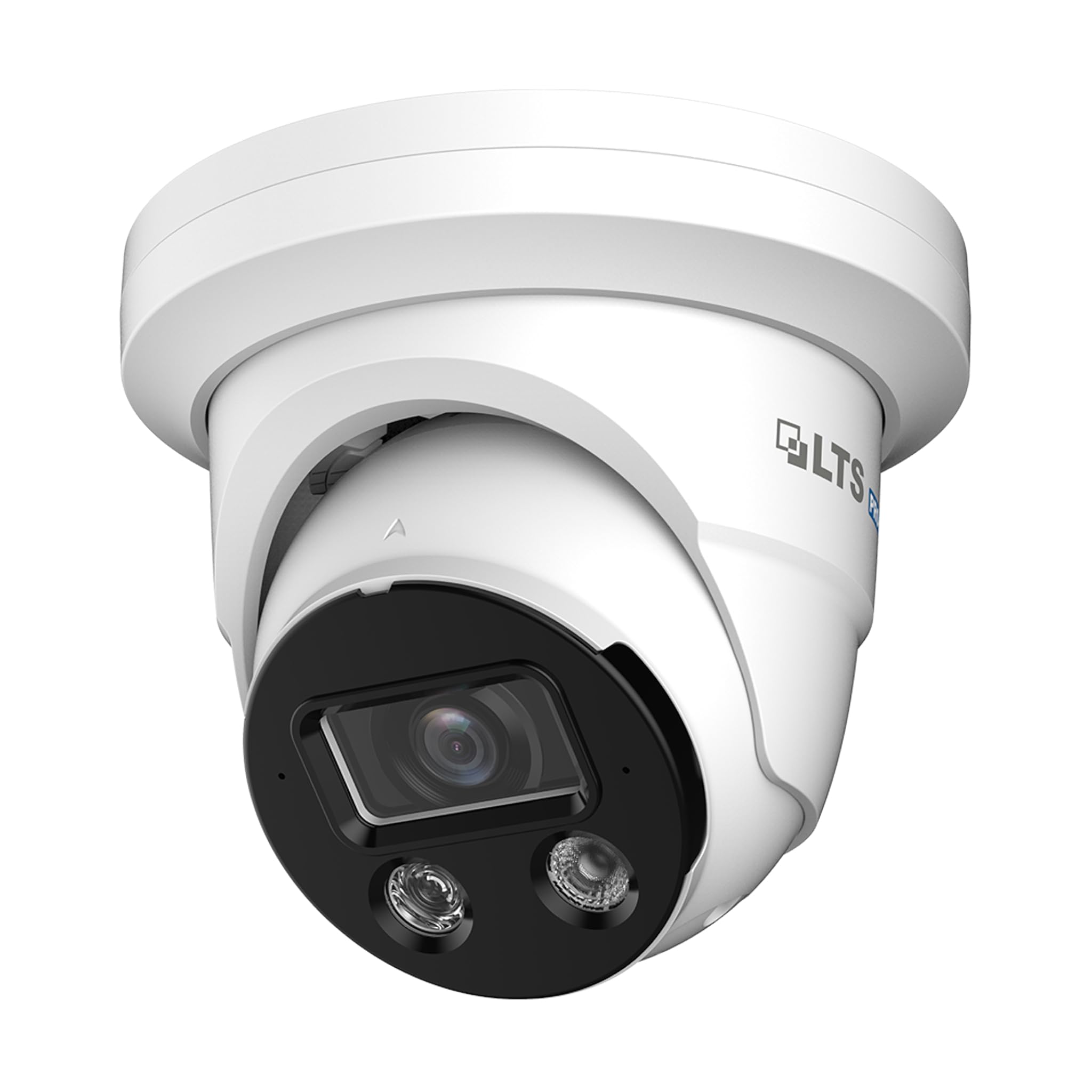
Image 1: Camera Wiring Compatibility. This diagram illustrates the correct wiring method using a network cable for both video and Power over Ethernet (PoE), marked as 'Compatible' with a green circle. It also shows traditional DC power and BNC video cables marked as 'Not Compatible' with a red cross, indicating they should not be used with this camera model.
- Connect a standard Ethernet network cable to the camera's network port.
- If using PoE, connect the other end of the network cable to a PoE-enabled switch or NVR.
- If not using PoE, connect the network cable to a standard network switch/router and provide 12V DC power to the camera's power input.
5.2 التركيب
الكاميرا مصممة للتركيب على السقف.
- Choose a suitable mounting location on the ceiling that provides the desired field of view.
- Use the provided mounting template (if included) to mark the drill holes.
- Drill pilot holes and insert anchors if necessary.
- Secure the camera base to the ceiling using the provided screws.
- اضبط زاوية الكاميرا حسب الحاجة للحصول على تغطية مثالية.
5.3 اتصال الشبكة والتكوين الأولي
After physical installation and wiring, connect the camera to your network. For best compatibility, pair this Pro-X series camera with a Pro-X NVR. It is not plug & play compatible with LTS Platinum NVRs.
- Ensure your network is properly configured for IP cameras.
- Use the manufacturer's provided software or a standard IP camera tool to discover the camera on your network.
- الوصول إلى الكاميرا web interface using its IP address to perform initial configuration, including setting a strong password, network settings, and video parameters.
6. التشغيل
6.1 مراقبة الفيديو
Access live video feeds through a compatible NVR, PC software, or mobile application. The camera supports 8MP resolution for detailed surveillance.
6.2 Motion Detection 2.0
Configure Motion Detection 2.0 settings via the camera's web interface or NVR. This feature distinguishes between human and vehicle movement, reducing false alarms from other sources.
- حدد مناطق الكشف ومستويات الحساسية.
- Set up recording schedules and notification preferences (e.g., email alerts, push notifications).
6.3 X-Deterrence (Siren and Lights)
The X-Deterrence feature can be activated manually or triggered by motion detection events. When triggered, the camera will emit a siren sound and flash red and blue lights to deter intruders.
- Configure X-Deterrence actions within the camera's event settings.
- Adjust siren volume and light flashing patterns if available.
6.4 الصوت ثنائي الاتجاه
Utilize the built-in microphone and speaker for two-way audio communication. This feature is accessible through compatible NVRs or client software.
- Ensure audio input/output settings are enabled in the camera's configuration.
- Use the talk button in your monitoring software to speak through the camera's speaker.
6.5 التخزين المحلي (بطاقة MicroSD)
The camera supports a MicroSD card up to 256 GB for local video storage. This provides a backup or primary recording solution.
- Insert a compatible MicroSD card into the designated slot (refer to the camera's physical diagram for location).
- Format the MicroSD card via the camera's web واجهة قبل الاستخدام.
- Configure recording schedules and overwrite settings for the MicroSD card.
7. الصيانة
7.1 التنظيف
قم بتنظيف عدسة الكاميرا وهيكلها بانتظام لضمان جودة صورة واضحة وتشغيل سليم.
- استخدم قطعة قماش ناعمة وجافة لمسح جسم الكاميرا.
- For the lens, use a lens cleaning solution and a microfiber cloth to avoid scratches.
- لا تستخدم كيماويات مركزة أو منظفات كاشطة.
7.2 تحديثات البرامج الثابتة
التحقق بشكل دوري من الشركة المصنعة website for firmware updates. Firmware updates can improve performance, add new features, and enhance security.
- Download the correct firmware version for your camera model.
- Follow the update instructions provided by the manufacturer carefully to avoid damaging the device.
8. استكشاف الأخطاء وإصلاحها
8.1 لا يوجد طاقة
- Verify that the power source (PoE switch/injector or 12V DC adapter) is functioning correctly.
- تأكد من تثبيت جميع توصيلات الكابلات بإحكام.
8.2 لا يوجد بث فيديو
- تأكد من تشغيل الكاميرا وتوصيلها بالشبكة.
- Verify network connectivity by pinging the camera's IP address.
- Check firewall settings on your network and viewجهاز ing.
- Confirm that the NVR or viewing software is compatible and correctly configured.
8.3 جودة الصورة الرديئة
- تنظيف عدسة الكاميرا.
- Adjust video settings (resolution, bitrate, exposure) in the camera's web واجهة.
- Ensure adequate lighting in the surveillance area, especially at night.
8.4 خاصية كشف الحركة لا تعمل
- Verify that motion detection is enabled and configured correctly in the camera settings.
- اضبط مناطق الكشف والحساسية.
- تأكد من عدم وجود أي عوائق تعيق حركة الكاميرا view.
9. المواصفات
| ميزة | مواصفة |
|---|---|
| رقم الموديل | LXIP3C82WI-28SDL |
| دقة ثابتة فعالة | 8 ميجا بكسل (3840 × 2160) |
| معدل الإطارات | 30 إطارًا في الثانية |
| عدسة | ثابت 2.8 ملم |
| Illuminator Distance | Up to 98 feet (IR LED & Warm Light LED) |
| الحد الأدنى من الإضاءة | 0.001 lux @ f 1.0 (Color, 30 IRE), 0 lux with illuminator on |
| ضغط | Smart H.264 / H.265 |
| المستشعر | CMOS بمسح تقدمي 1/2.8 بوصة |
| X-Deterrence | Siren and visual alerts (red and blue flashing lights) |
| صوتي | Built-in dual mic and speaker, two-way talk |
| نطاق العرض الديناميكي | True WDR 120 dB |
| تخزين | بطاقة MicroSD تصل إلى 256 جيجابايت |
| مزود الطاقة | 12V DC, PoE (IEEE 802.3af) |
| حماية الدخول | IP67 |
| كشف الحركة | MD 2.0 - Human and vehicle detection |
| نوع التركيب | التركيب على السقف |
| الأبعاد (الطول × العرض × الارتفاع) | 5.61 × 5.61 × 4.91 بوصة |
| وزن العنصر | 3 رطل |
| الشركة المصنعة | ال تي اس |
10. الضمان والدعم
For warranty information and technical support, please refer to the official LTS webقم بزيارة الموقع الإلكتروني أو اتصل بالوكيل المعتمد. احتفظ بإيصال الشراء لتقديم مطالبات الضمان.
- الشركة المصنعة: ال تي اس
- يدعم: Refer to the manufacturer's official support channels for assistance with product issues, firmware updates, and advanced configurations.