
Thomson 145G
Thomson Streaming Stick 4K 145G User Manual
الموديل: 145G
مقدمة
This user manual provides comprehensive instructions for the setup, operation, maintenance, and troubleshooting of your Thomson Streaming Stick 4K 145G. Please read this manual carefully before using the device to ensure proper functionality and to avoid damage.

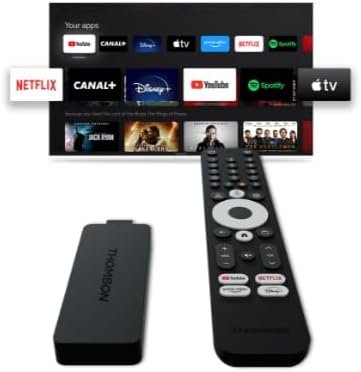
Image: The Thomson Streaming Stick 4K 145G alongside its remote control, illustrating the main components of the product.
ماذا يوجد في الصندوق
Upon unboxing your Thomson Streaming Stick 4K 145G, please verify that all components are present:
- Thomson Streaming Stick 4K 145G
- جهاز التحكم عن بعد
- محول الطاقة
- كبل USB (للطاقة)
- HDMI Extender (optional, may be included)
- دليل البدء السريع
دليل الإعداد
Follow these steps to set up your Thomson Streaming Stick 4K 145G:
- Connect the Streaming Stick: Plug the Thomson Streaming Stick 4K 145G directly into an available HDMI port on your television. If space is limited, use an HDMI extender if provided.
- توصيل الطاقة: Connect the provided USB cable to the power input port on the streaming stick and then connect the other end to the power adapter. Plug the power adapter into a wall outlet.
- قم بتشغيل التلفزيون واختر المدخل: Turn on your television and select the HDMI input to which the streaming stick is connected.
- الإعداد الأولي: The device will boot up and guide you through the initial setup process on your TV screen. This typically includes:
- اختيار اللغة.
- جارٍ الاتصال بشبكة الواي فاي الخاصة بك.
- تسجيل الدخول باستخدام حساب جوجل الخاص بك (مطلوب لميزات جوجل تي في وتنزيل التطبيقات).
- قبول الشروط والأحكام.
- إقران جهاز التحكم عن بعد: The remote control should automatically pair with the device. If not, follow the on-screen instructions or press and hold the Home and Back buttons simultaneously on the remote until pairing is complete.
الصورة: تفصيلية view of the Thomson Streaming Stick 4K 145G, highlighting its HDMI connector for TV input and the power input port.
تعليمات التشغيل
Once set up, you can begin using your Thomson Streaming Stick 4K 145G to access various streaming services and content.
وظائف التحكم عن بعد
تعرّف على أزرار جهاز التحكم عن بعد:
- زر الطاقة: Turns the device on or off (standby).
- زر مساعد جوجل: Activates voice commands for search and control.
- لوحة التنقل (دائرة): Use up, down, left, right to navigate menus.
- زر موافق / تحديد: يؤكد التحديدات.
- زر الرجوع: العودة إلى الشاشة السابقة.
- زر الصفحة الرئيسة: العودة إلى الشاشة الرئيسية لـ Google TV.
- أزرار التحكم في الصوت (+/-): ضبط مستوى صوت التلفزيون.
- زر كتم الصوت: Mutes TV volume.
- أزرار اختصار التطبيق: Dedicated buttons for Netflix, Disney+, YouTube, and Prime Video for quick access.

Image: The Thomson Streaming Stick 4K 145G and its remote control, showing the layout of the buttons on the remote.
التنقل في تلفزيون جوجل
The Google TV interface organizes content from your streaming services into a single, personalized experience.
- الشاشة الرئيسية: Displays recommended content, installed apps, and your watchlist.
- التطبيقات: Access all your installed applications. You can download more from the Google Play Store.
- مكتبة: Find your purchased movies and TV shows from Google Play.
- يبحث: Use the search icon or Google Assistant button to find content by title, genre, or actor.
To stream content, simply select an app or a recommended title from the home screen. Ensure you have an active subscription for paid services.
صيانة
Proper maintenance ensures the longevity and optimal performance of your streaming stick.
- تنظيف: Use a soft, dry, lint-free cloth to clean the device and remote control. Do not use liquid cleaners or aerosols.
- تهوية: Ensure the streaming stick is placed in a well-ventilated area and not covered, as proper airflow prevents overheating.
- تحديثات البرامج: The device will automatically check for and install software updates. Ensure it remains connected to the internet for these updates.
- تخزين: عند عدم استخدام الجهاز لفترات طويلة، قم بتخزينه في مكان بارد وجاف بعيدًا عن أشعة الشمس المباشرة.
استكشاف الأخطاء وإصلاحها
If you encounter issues with your Thomson Streaming Stick 4K 145G, refer to the following common problems and solutions:
| مشكلة | السبب المحتمل | حل |
|---|---|---|
| لا يوجد طاقة/الجهاز لا يعمل | Power adapter not connected, faulty outlet, or damaged cable. | تأكد من توصيل محول الطاقة بالجهاز بشكل صحيح وبمأخذ كهربائي يعمل. جرب مأخذاً كهربائياً آخر. |
| لا توجد إشارة على التلفزيون | Incorrect HDMI input selected, loose HDMI connection, or device not powered on. | Verify the TV is on the correct HDMI input. Re-seat the HDMI cable. Ensure the streaming stick has power. |
| جهاز التحكم عن بعد لا يستجيب | Batteries low/dead, remote not paired, or obstruction. | Replace batteries. Re-pair the remote by holding Home and Back buttons. Ensure no obstructions between remote and device. |
| التخزين المؤقت أو جودة البث الرديئة | Weak Wi-Fi signal, internet speed issues, or network congestion. | Move the device closer to the Wi-Fi router. Restart your router. Check your internet speed. Reduce other network activity. |
| تعطل التطبيقات أو تجميدها | Outdated app, insufficient memory, or software glitch. | Restart the device. Check for app updates in the Google Play Store. Clear app cache (Settings > Apps > [App Name] > Clear cache). |
If the issue persists after trying these solutions, you may need to perform a factory reset (Settings > System > About > Factory reset). Note that a factory reset will erase all data and settings on the device.
تحديد
Key technical specifications for the Thomson Streaming Stick 4K 145G:
- اسم الموديل: STREAMING STICK 4K THOMSON 145G
- رقم الموديل: 145 جيجا
- دقة: 4K الترا اتش دي
- الاتصال: Wi-Fi, USB, Ethernet (via adapter), HDMI, IR
- نوع الموصل: منفذ HDMI
- خدمات الإنترنت المدعومة: Netflix, Disney+, Prime Video, YouTube, Spotify (and others via Google Play Store)
- نوع تحكم: جهاز التحكم عن بعد
- عامل الشكل: عصا التلفزيون
- لون: أسود
- أبعاد المنتج: 1.3 × 9.3 × 3.4 سم
- وزن: 460 جرام
- الشركة المصنعة: تومسون
- أول متاح: 8 أغسطس
الضمان والدعم
For warranty information and technical support, please refer to the documentation included with your purchase or visit the official Thomson support webالموقع. احتفظ بإثبات الشراء الخاص بك لتقديم مطالبات الضمان.
الشركة المصنعة: تومسون
تحديثات البرامج مضمونة حتى: غير معروف (بحسب بيانات المنتج)
Ask a question about this manual
Ask about setup, troubleshooting, compatibility, parts, safety, or missing instructions. Manuals+ will review the question and use this page’s manual context to help answer it.