
1. المقدمة
The BUSICOM PC-SeaV15c is a 15-inch Windows IoT touch panel PC designed for commercial and industrial applications. This manual provides essential information for the safe and efficient setup, operation, and maintenance of your device. Please read this manual thoroughly before using the product and retain it for future reference.
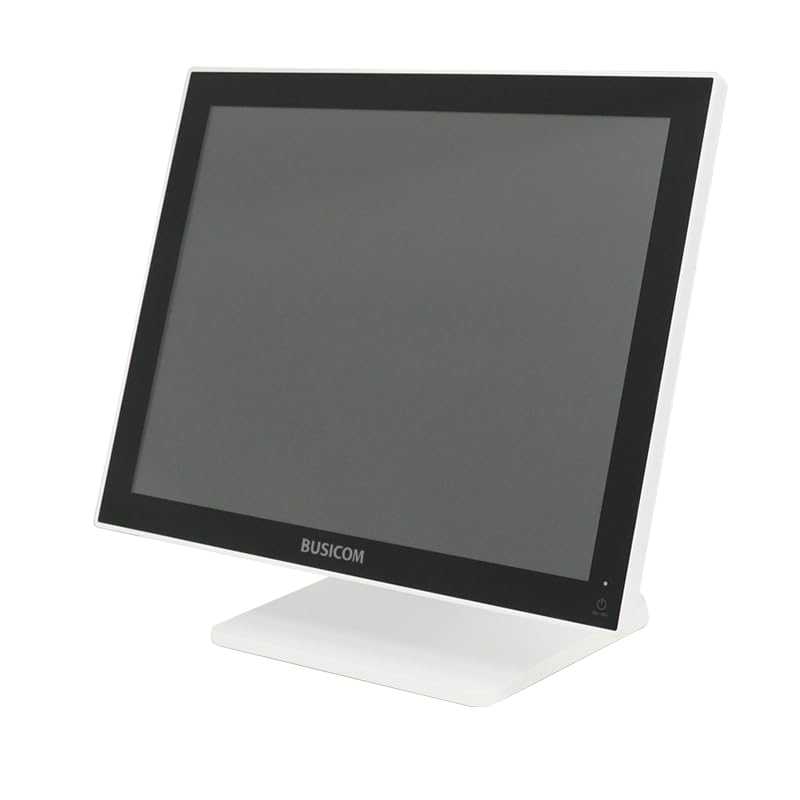
الشكل 1: الجبهة view of the BUSICOM PC-SeaV15c Touch Panel PC.
2. انتهى المنتجview
2.1 الميزات الرئيسية
- التصميم المتقدم: Features an ultra-thin bezel and a highly durable 7H reinforced display for enhanced aesthetics and protection.
- الأداء المتفوق: Equipped with Microsoft Windows 10 IoT Enterprise, ensuring long-term support and reliable operation.
- Intuitive Touch Panel: Utilizes a capacitive touch method, offering a familiar and responsive touch experience similar to smartphones and tablets.
- صيانة سهلة: Designed for simple RAM and SSD replacement, facilitating upgrades and servicing.
- واجهات متعددة الاستخدامات: Provides a wide range of connectivity options to integrate with various peripherals.
- تخزين فعال: SSD storage ensures fast processing speeds, quiet operation, and excellent shock resistance.
2.2 مكونات
The package typically includes the BUSICOM PC-SeaV15c unit and a power adapter. Additional accessories may vary.

Figure 2: Front and side profile of the PC-SeaV15c unit.

الشكل 3: خلفي view showing access panels for RAM and SSD components.
3. تعليمات الإعداد
3.1 فك التعبئة
- Carefully remove the PC-SeaV15c from its packaging.
- تحقق من وجود أي تلفيات ظاهرة. في حال وجود تلفيات، اتصل بالبائع فوراً.
- تأكد من وجود جميع المكونات المدرجة.
3.2 توصيل الأجهزة الطرفية
Refer to the interface diagram below for port locations and types.

Figure 4: Detailed diagram of the PC-SeaV15c's rear and bottom interfaces.
- توصيل الطاقة: Connect the provided power adapter to the DC In port and then to a power outlet.
- جهاز USB:٪ s: Use the USB 2.0 (4 ports) and USB 3.0 (2 ports) for connecting keyboards, mice, printers, and other USB peripherals.
- إتصال شبكة: Connect an Ethernet cable to the LAN port for wired network access.
- مخرج الصوت: Connect external speakers or headphones to the Audio Out port.
- Serial Ports (RJ45): Utilize COM1, COM2, COM3, and COM6 for connecting specialized POS peripherals such as barcode scanners or receipt printers.
- Cash Drawer (RJ11): Connect a compatible cash drawer to the RJ11 port.
- العرض الخارجي: If an external monitor is required, connect it to the Mini DisplayPort.
- USB نوع-C: للأجهزة المتوافقة.
3.3 تشغيل/إيقاف التشغيل
- تشغيل الطاقة: Press the power button located on the upper right side of the display bezel or the power mark on the rear panel.
- إيقاف التشغيل: To safely shut down the system, use the standard Windows shutdown procedure. Avoid direct power disconnection during operation to prevent data loss.
4. تعليمات التشغيل
4.1 Windows 10 IoT Enterprise
The PC-SeaV15c operates on Windows 10 IoT Enterprise 2021. Familiarize yourself with the Windows operating system for basic navigation, application management, and system settings.
4.2 Touch Panel Usage
The capacitive touch screen supports multi-touch gestures.
- مقبض: ما يعادل نقرة الماوس.
- النقر المزدوج: ما يعادل النقر المزدوج.
- اضغط مع الاستمرار على: ما يعادل النقر بزر الماوس الأيمن.
- انتقاد: للتمرير أو التنقل.
- التكبير والتصغير: استخدم إصبعين للتكبير أو التصغير.
5. الصيانة
5.1 تنظيف الجهاز
- قم دائمًا بإيقاف تشغيل الجهاز وفصله عن الكهرباء قبل التنظيف.
- استخدم قطعة قماش ناعمة وخالية من الوبر وامسحها برفق.ampاغسلها بالماء أو بمنظف شاشة غير كاشط.
- Do not spray liquids directly onto the screen or device.
- تجنب استخدام المواد الكيميائية القاسية، أو المذيبات، أو المواد الكاشطة.
5.2 RAM and SSD Replacement
The PC-SeaV15c is designed for easy replacement of RAM and SSD components. Refer to Figure 3 for the access panel location. For detailed instructions on component replacement, consult a qualified technician or the BUSICOM support webموقع.
6. استكشاف الأخطاء وإصلاحها
يوفر هذا القسم حلولاً للمشكلات الشائعة التي قد تواجهها.
- الجهاز لا يعمل:
- تأكد من توصيل محول الطاقة بشكل آمن بالجهاز ومأخذ الطاقة العامل.
- تأكد من أن منفذ الطاقة يعمل عن طريق توصيل جهاز آخر.
- Touch screen is unresponsive:
- أعد تشغيل الجهاز.
- تأكد من أن الشاشة نظيفة وخالية من أي عوائق.
- لا يوجد عرض:
- تحقق مما إذا كان الجهاز قيد التشغيل.
- If an external display is connected, ensure the correct input source is selected on the external display.
- Peripheral not detected:
- Ensure the peripheral is correctly connected to the appropriate port (USB, LAN, COM).
- حاول توصيل الجهاز المحيطي بمنفذ مختلف.
- Check the peripheral's own power supply, if applicable.
For further assistance, please contact BUSICOM customer support.
7. المواصفات
| ميزة | التفاصيل |
|---|---|
| ماركة | بوسيكوم |
| اسم الموديل | PC-SeaV15c |
| لون | أبيض |
| حجم الشاشة | 15 بوصة |
| دقة | 1024×768 |
| نظام التشغيل | ويندوز 10 إنترنت الأشياء المؤسسة 2021 |
| العلامة التجارية وحدة المعالجة المركزية | إنتل |
| مقبس المعالج | إنتل® N97 |
| سرعة وحدة المعالجة المركزية | 3.6 جيجاهرتز |
| نوع الذاكرة | دي دي ار 4 |
| تم تثبيت ذاكرة الوصول العشوائي (RAM) | 4 جيجا بايت |
| نوع القرص الصلب | SSD |
| سعة SSD | 128 جيجابايت (كما هو موضح في عنوان المنتج) |
| نوع بطاقة الرسومات | مدمج |
| VRAM Type | ذاكرة الوصول العشوائية DDR4 SDRAM |
| VRAM Capacity | 4 جيجا بايت |
| منافذ USB 2.0 | 4 |
| منافذ USB 3.0 | 2 |
| محرك بصري | لا أحد |
| وزن المنتج | 6 كيلوغرام |
| الارتفاع (تقريبا) | 307.5 mm (as per dimension diagram) |

الشكل 5: خلفي view of the PC-SeaV15c with approximate height dimension.
8. الضمان والدعم
For warranty information and technical support, please refer to the warranty card included with your product or visit the official BUSICOM webالموقع. احتفظ بإيصال الشراء الخاص بك كإثبات للشراء في حالة مطالبات الضمان.
BUSICOM Official Webموقع: BUSICOM Store on Amazon.co.jp