
م27
tranyoo M27 TWS Bluetooth Earphones User Manual
الموديل: M27
مقدمة
Thank you for choosing the tranyoo M27 TWS Bluetooth Earphones. These wireless earbuds are designed for an immersive audio experience, featuring Bluetooth 5.3 connectivity for stable connections, a comfortable in-ear fit, and a waterproof design suitable for sports. This manual provides detailed instructions on how to set up, operate, maintain, and troubleshoot your new earphones.

Image: The retail packaging for the tranyoo M27 TWS Bluetooth Earphones, showcasing the product and key features.
يثبت
1. فتح العلبة ومحتويات العبوة
Carefully open the product packaging. Ensure all components are present.
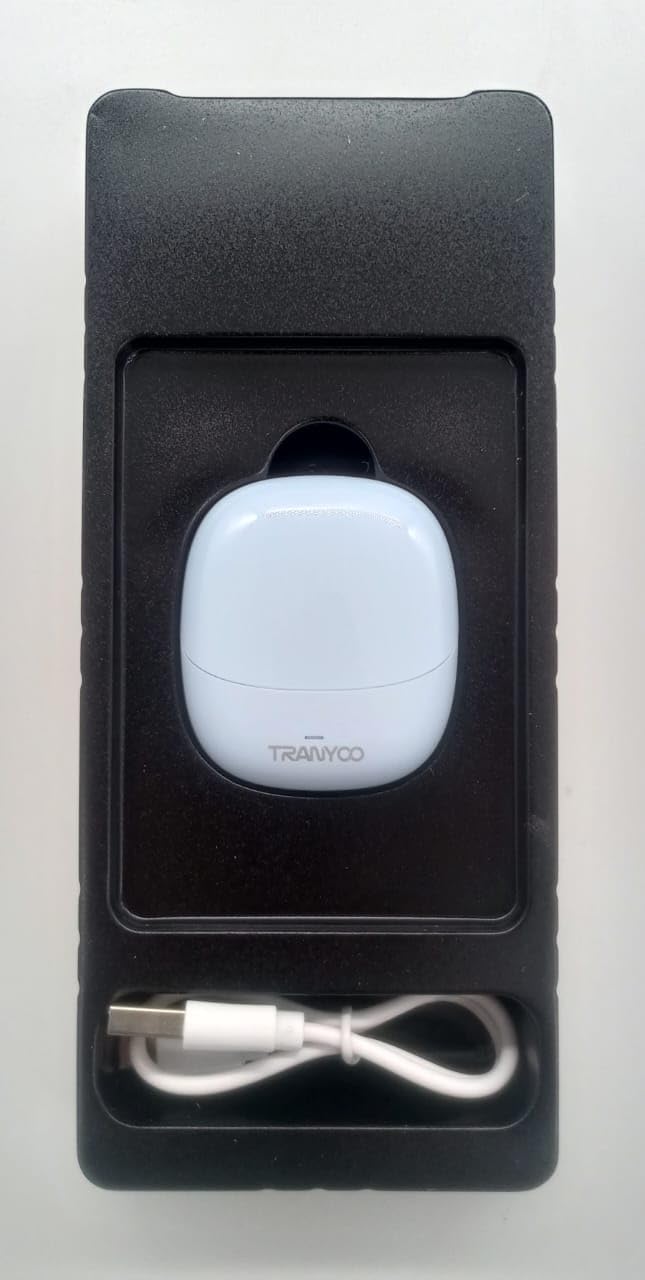
Image: The tranyoo M27 TWS Earphones nestled in their protective packaging, alongside the included USB charging cable.
- tranyoo M27 TWS Earbuds (Left and Right)
- حافظة الشحن
- كابل شحن USB
- دليل المستخدم (هذا المستند)
2. الشحن الأولي
قبل الاستخدام الأول، قم بشحن سماعات الأذن وعلبة الشحن بالكامل.
- ضع كلتا سمّاعات الأذن في علبة الشحن.
- Connect the USB charging cable to the charging port on the case and plug the other end into a USB power source (e.g., computer USB port, wall adapter).
- The indicator lights on the case and/or earbuds will show charging status. Refer to the specific light behavior in the Operating section للتفاصيل.
- بمجرد الشحن بالكامل ، افصل كابل الشحن.

Image: The tranyoo M27 TWS Earbuds securely seated within their open charging case, ready for charging or use.
3. الاقتران بجهاز
The tranyoo M27 uses Bluetooth 5.3 for quick and stable pairing.
- تأكد من شحن سماعات الأذن ووضعها في علبة الشحن.
- افتح علبة الشحن. ستدخل سماعات الأذن تلقائيًا في وضع الاقتران (سيومض مؤشر الضوء).
- على جهازك (الهاتف الذكي، الجهاز اللوحي، الكمبيوتر المحمول)، انتقل إلى إعدادات البلوتوث.
- قم بتشغيل البلوتوث.
- بحث عن available devices. You should see "tranyoo M27" or a similar name appear in the list.
- Select "tranyoo M27" to connect.
- Once connected, the indicator lights on the earbuds will stop flashing or change to a steady light, and you will hear a confirmation tone.
- For subsequent uses, the earbuds will automatically connect to the last paired device when taken out of the case, if Bluetooth is enabled on the device.
تعليمات التشغيل
1. تشغيل/إيقاف التشغيل
- تشغيل الطاقة: Open the charging case, and the earbuds will automatically power on. Alternatively, if out of the case and off, long-press the touch area on both earbuds for approximately 3 seconds.
- إيقاف التشغيل: Place the earbuds back into the charging case and close the lid. They will automatically power off and begin charging. Alternatively, if out of the case, long-press the touch area on both earbuds for approximately 5 seconds.
2. أدوات التحكم التي تعمل باللمس
The tranyoo M27 features intuitive touch controls on each earbud. The specific functions may vary slightly depending on your device and application.
| فعل | وظيفة |
|---|---|
| نقرة واحدة (يسار/يمين) | تشغيل/إيقاف الموسيقى مؤقتًا، الرد على المكالمة/إنهائها |
| الضغط مرتين على سماعة الأذن اليمنى | المسار التالي |
| الضغط مرتين على سماعة الأذن اليسرى | المسار السابق |
| النقر الثلاثي (يسار/يمين) | تنشيط مساعد الصوت (سيري ، مساعد جوجل) |
| الضغط المطوّل (يسار/يمين، ثانيتان) | رفض المكالمة |
| الضغط المطوّل (سماعة الأذن اليمنى، 2 ثوانٍ) | رفع الصوت |
| الضغط المطول (سماعة الأذن اليسرى، 2 ثوانٍ) | خفض الصوت |
3. ارتداء سماعات الأذن
للحصول على جودة صوت مثالية وراحة تامة، تأكد من وضع سماعات الأذن بشكل صحيح في أذنيك.
- Identify the 'L' (Left) and 'R' (Right) markings on each earbud.
- قم بإدخال كل سماعة أذن برفق في قناة الأذن المقابلة لها.
- Rotate the earbud slightly until it feels secure and comfortable, forming a good seal.
4. خاصية مقاومة الماء
The tranyoo M27 earphones are designed with a waterproof rating suitable for sports activities. This means they are resistant to sweat and light splashes. Do not submerge the earphones in water or expose them to heavy rain. علبة الشحن ليست مقاومة للماء.
صيانة
- تنظيف: نظّف سماعات الأذن وعلبة الشحن بانتظام باستخدام قطعة قماش ناعمة وجافة وخالية من الوبر. تجنّب استخدام المنظفات الكاشطة أو الكحول أو المذيبات الكيميائية. أزل برفق أي شمع أذن أو شوائب من أطراف سماعات الأذن وشبكة السماعة باستخدام فرشاة صغيرة ناعمة أو قطعة قطن.
- تخزين: عند عدم الاستخدام، احفظ سماعات الأذن في علبة الشحن لحمايتها من الغبار والتلف، وللحفاظ على شحنها. خزّنها في مكان بارد وجاف بعيدًا عن أشعة الشمس المباشرة ودرجات الحرارة المرتفعة والمنخفضة.
- العناية بالبطارية: لإطالة عمر البطارية، تجنب تفريغ سماعات الأذن وعلبة الشحن بالكامل بشكل متكرر. اشحنها بانتظام، حتى لو لم تكن قيد الاستخدام المستمر. تجنب تركها بدون شحن لفترات طويلة.
استكشاف الأخطاء وإصلاحها
If you encounter issues with your tranyoo M27 earphones, try the following solutions:
| مشكلة | الحل المحتمل |
|---|---|
| سماعات الأذن غير مقترنة بالجهاز. |
|
| لا يصدر صوت من إحدى سماعات الأذن أو كلتيهما. |
|
| علبة الشحن لا تشحن. |
|
| جودة الصوت رديئة أو الاتصال متقطع. |
|
تحديد
| ميزة | التفاصيل |
|---|---|
| نموذج | م27 |
| تكنولوجيا الاتصال | لاسلكي (بلوتوث 5.3) |
| وضع الأذن | في الأذن |
| عامل الشكل | في الأذن |
| مادة | بلاستيك |
| لون | أزرق |
| استخدامات محددة | رياضة |
| الأجهزة المتوافقة | Telephones, Tablets, Laptops, Smart Speaker, Cellphones |
| أبعاد الحزمة | 19 × 8.2 × 3.8 سم |
| وزن العنصر | 100 جرام |
الضمان والدعم
For warranty information and customer support, please refer to the documentation provided at the time of purchase or contact your retailer. You may also visit the official tranyoo webموقع إلكتروني لأحدث موارد الدعم ومعلومات الاتصال.
For technical assistance or inquiries, please have your product model (M27) and purchase details ready.