
1. المقدمة
This manual provides comprehensive instructions for the installation, operation, maintenance, and troubleshooting of your EIMSOAH 7in HD Carplay Screen. Please read this manual thoroughly before using the product to ensure proper function and safety.
The EIMSOAH Carplay Screen is an advanced in-dash navigation and multimedia system designed to enhance your driving experience with features such as wireless CarPlay/Android Auto, GPS navigation, and a high-definition touch screen display.
2. معلومات السلامة
Always prioritize safety. Improper installation or operation can lead to damage to the device, vehicle, or personal injury. Observe the following safety guidelines:
- تأكد من إيقاف تشغيل محرك السيارة وفصل البطارية قبل التركيب لمنع حدوث ماس كهربائي.
- استشر متخصصًا للتثبيت إذا لم تكن متأكدًا من أي خطوات.
- Do not operate the device in a way that distracts you from driving. Always keep your eyes on the road.
- تجنب تعريض الجهاز لدرجات حرارة عالية، أو أشعة الشمس المباشرة لفترات طويلة، أو الرطوبة الزائدة.
- لا تحاول تفكيك الوحدة أو تعديلها. سيؤدي ذلك إلى إلغاء الضمان وقد يتسبب في تلفها.
- Ensure all wiring is properly insulated and secured to prevent short circuits or interference.
3. محتويات العبوة
تأكد من وجود جميع العناصر المدرجة أدناه في الحزمة الخاصة بك:
- 1 x Car Multimedia Player Display
- 7 x Wiring Harnesses (various types for power, audio, video, etc.)
- 1 x GPS Box/Antenna
- 1 × دليل التعليمات (هذه الوثيقة)
- 1 x Wiring Instruction Diagram

Figure 3.1: Complete package contents including the main display unit, wiring harnesses, and GPS antenna.
4. الإعداد والتثبيت
This section outlines the general steps for installing the EIMSOAH Carplay Screen. Specific wiring details are provided in the separate Wiring Instruction Diagram included in your package. Professional installation is recommended.
- إعداد السيارة:
- أطفئ محرك السيارة وأخرج المفتاح.
- افصل الطرف السالب لبطارية السيارة لتجنب المخاطر الكهربائية.
- Carefully remove the existing car stereo or dashboard panel to access the wiring harness and mounting area.
- ربط أسلاك التوصيل:
- Refer to the provided Wiring Instruction Diagram for detailed connections.
- Connect the main power harness, speaker wires, and other necessary connections (e.g., AUX, USB, reverse camera input if applicable) to the corresponding ports on the car multimedia player.
- تأكد من أن جميع التوصيلات آمنة ومعزولة بشكل صحيح.
- تركيب هوائي نظام تحديد المواقع العالمي (GPS):
- قم بتركيب هوائي نظام تحديد المواقع العالمي (GPS) في مكان ذي رؤية واضحة view of the sky, typically on the dashboard or under the windshield, away from metal obstructions.
- Route the GPS antenna cable to the back of the head unit and connect it to the designated GPS input.
- تركيب الوحدة:
- Carefully slide the car multimedia player into the dashboard opening.
- Secure the unit using the provided mounting brackets or screws, ensuring it is firmly in place.
- أعد توصيل البطارية واختبارها:
- أعد توصيل الطرف السالب لبطارية السيارة.
- Turn on the vehicle's ignition and power on the car multimedia player.
- Test all functions, including audio, touch screen response, GPS signal, Bluetooth connectivity, and any connected accessories (e.g., reverse camera).
- إعادة تجميع لوحة المعلومات:
- Once all functions are verified, carefully reassemble the dashboard panels.

Figure 4.1: The Carplay screen integrated into a vehicle's dashboard.
5. تعليمات التشغيل
The EIMSOAH Carplay Screen operates on Android 12, providing a user-friendly interface. Below are common operations:
5.1 الملاحة الأساسية
- تشغيل/إيقاف التشغيل: Press and hold the power button (usually on the left side of the unit) to turn the device on or off. A short press typically mutes/unmutes audio.
- التحكم في مستوى الصوت: Use the volume buttons on the unit or steering wheel controls (if configured) to adjust audio levels.
- الشاشة الرئيسية: Tap the "Home" icon to return to the main application screen.
- زر الرجوع: Tap the "Back" icon to return to the previous screen or menu.
- التطبيقات الأخيرة: Tap the "Recent Apps" icon to view والتبديل بين التطبيقات المفتوحة مؤخرًا.
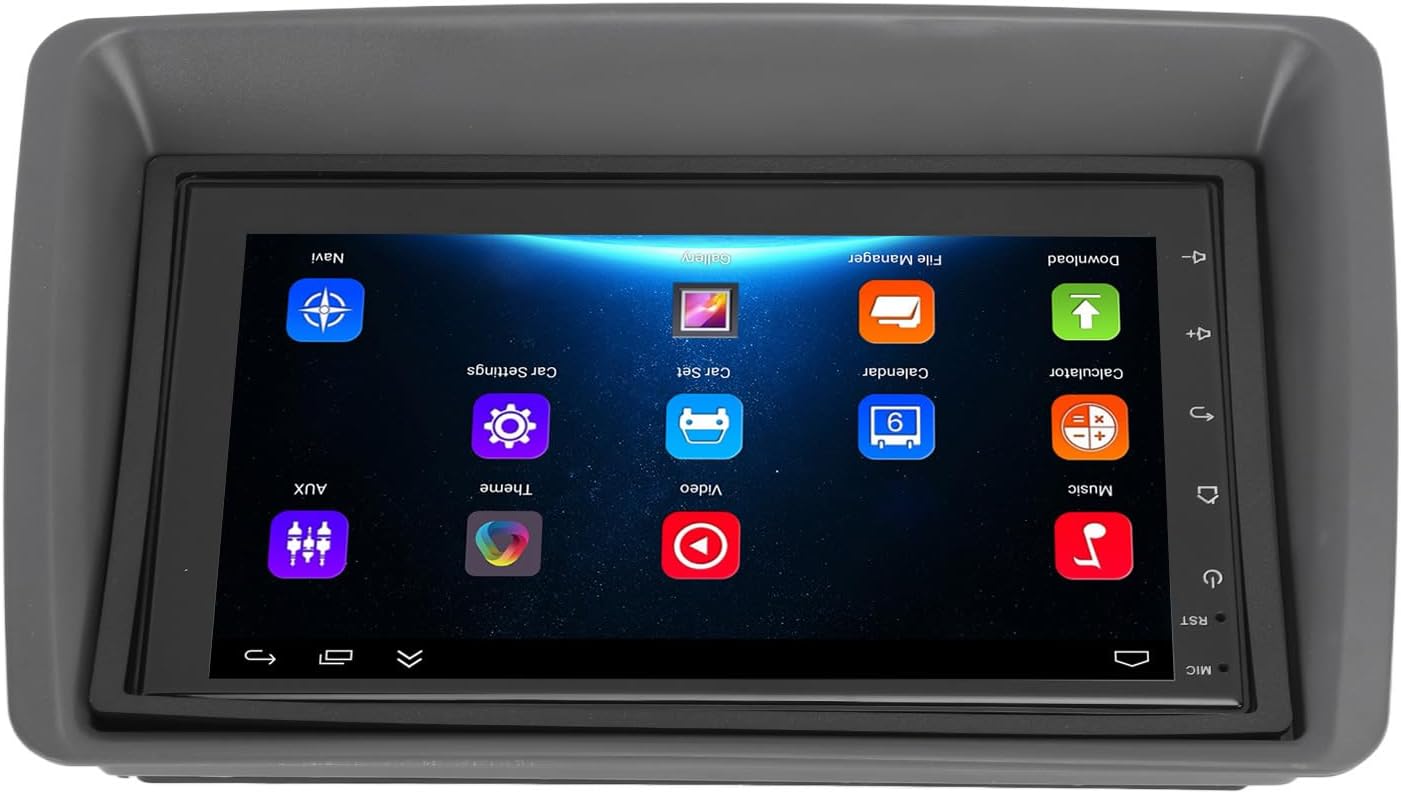
Figure 5.1: Main user interface of the Carplay screen.
5.2 CarPlay اللاسلكي / Android Auto
تدعم الوحدة نظامي Apple CarPlay و Android Auto اللاسلكيين لتكامل سلس مع الهواتف الذكية.
- تأكد من تمكين Bluetooth وWi-Fi على هاتفك الذكي.
- On the Carplay screen, navigate to the "CarPlay" or "Android Auto" application.
- اتبع التعليمات التي تظهر على الشاشة لربط هاتفك عبر البلوتوث. بمجرد الربط، سيقوم النظام تلقائيًا بإنشاء اتصال واي فاي لتفعيل وظائف CarPlay/Android Auto.
- Your phone's compatible apps (navigation, music, messaging) will be displayed on the Carplay screen.
5.3 ملاحة GPS
The unit supports both online and offline GPS navigation.
- التنقل عبر الإنترنت: Connect the unit to Wi-Fi (via a mobile hotspot or vehicle Wi-Fi) to use online mapping services. Download navigation apps from the pre-installed app store.
- التنقل دون اتصال بالإنترنت: Download map data for offline use within your preferred navigation application. This allows navigation without an active internet connection.
5.4 اتصال البلوتوث
قم بتوصيل هاتفك الذكي عبر البلوتوث لإجراء مكالمات بدون استخدام اليدين وبث الصوت.
- Go to the "Settings" menu on the Carplay screen and select "Bluetooth".
- قم بتمكين البلوتوث وجعل الجهاز قابلاً للاكتشاف.
- On your smartphone, search for available Bluetooth devices and select "EIMSOAH Carplay" (or similar name).
- تأكد من رمز الاقتران على كلا الجهازين.
- Once connected, you can make/receive calls and play audio through the car's speakers.
شاشة عرض مقسمة 5.5 بوصة
The unit supports split-screen functionality, allowing two applications to be viewإد في وقت واحد.
- افتح التطبيق الأول الذي ترغب في استخدامه.
- Press and hold the "Recent Apps" button (or swipe up and hold from the bottom of the screen, depending on the Android version).
- Drag the first app to one side of the screen.
- حدد التطبيق الثاني من قائمة التطبيقات الحديثة أو درج التطبيقات لملء النصف الآخر من الشاشة.
5.6 Reverse Image Function
If a compatible reverse camera is connected (not included), the screen will automatically display the reverse view عند تحويل السيارة إلى وضع الرجوع للخلف.
- Ensure the reverse camera is properly installed and connected to the designated video input.
- The system will automatically switch to the camera view عندما يتم تعشيق ترس الرجوع للخلف.
6. الصيانة
Proper maintenance ensures the longevity and optimal performance of your EIMSOAH Carplay Screen.
- تنظيف الشاشة: استخدم قطعة قماش ناعمة وخالية من الوبر لمسح الشاشة برفق. لإزالة البقع الصعبة، امسحها برفق.ampامسح الشاشة بقطعة قماش مبللة بالماء أو بمنظف آمن. تجنب المواد الكاشطة أو المواد الكيميائية القاسية.
- تحديثات البرامج: Periodically check for software updates through the system settings (if available) to ensure you have the latest features and bug fixes.
- الظروف البيئية: Avoid exposing the unit to extreme temperatures, high humidity, or direct sunlight for extended periods.
- إدارة الكابلات: Ensure all cables are securely connected and not pinched or exposed to excessive wear.
7. استكشاف الأخطاء وإصلاحها
If you encounter issues with your EIMSOAH Carplay Screen, refer to the following common problems and solutions:
| مشكلة | السبب المحتمل | حل |
|---|---|---|
| الوحدة لا تعمل بالطاقة. | انقطاع التيار الكهربائي؛ أسلاك مفكوكة؛ فيوز محترق. | Check power connections and vehicle fuse box. Ensure battery is connected. |
| لا يوجد إخراج صوتي. | Volume muted; speaker wires disconnected; incorrect audio settings. | Check volume level and mute status. Verify speaker wire connections. Adjust audio output settings. |
| شاشة اللمس لا تستجيب. | Software glitch; screen protector interference; physical damage. | Restart the unit. Remove any screen protectors to test. If problem persists, contact support. |
| إشارة نظام تحديد المواقع العالمي (GPS) ضعيفة أو مفقودة. | GPS antenna obstructed or disconnected; poor satellite coverage. | تأكد من أن هوائي GPS لديه إشارة واضحة view of the sky and is securely connected. Move to an open area. |
| مشاكل الاتصال بالبلوتوث. | Bluetooth off on device/phone; pairing error; interference. | تأكد من تفعيل البلوتوث على كلا الجهازين. احذف عمليات الاقتران السابقة وأعد الاقتران. قرّب الهاتف من الجهاز. |
| CarPlay/Android Auto غير متصل. | Wi-Fi/Bluetooth issues; phone compatibility; app issues. | Verify Wi-Fi and Bluetooth are active. Restart phone and unit. Ensure phone OS is up to date. |
If the problem persists after trying these solutions, please contact EIMSOAH customer support for further assistance.
8. المواصفات
Detailed technical specifications for the EIMSOAH 7in HD Carplay Screen:
| ميزة | وصف |
|---|---|
| حجم الشاشة | 7 بوصة |
| نظام التشغيل | أندرويد 12 |
| وحدة المعالجة المركزية | 4 النواة |
| دقة الشاشة | 1024×600 |
| نسخة البلوتوث | 4.0 |
| راديو | FM / RDS |
| طاقة الإخراج | 4 × 45 واط |
| Image Connection | For Android / For iOS (Wireless Apple CarPlay, Wired/Wireless Android Auto) |
| نظام الملاحة GPS | Support Online/Offline Navigation |
| نوع شاشة اللمس | HD Capacitive Multi-Point Touch |
| Wireless WI-FI | Support 3G/4G/5G wireless signal reception |
| تقسيم شاشة العرض | Supported (left and right split screen) |
| التحكم في عجلة القيادة | مدعوم |
| Reverse Image Input | Supported (HD reverse video input, camera not included) |
| USB وظيفة | Two USB ports (media playback, file نقل البيانات (جهاز التسجيل الرقمي) |
| وظيفة AUX | Audio/Video input from external devices |
| دوائر الحماية | الزائد ، أوفرفولtagهـ، ماس كهربائي |
| ذاكرة إيقاف التشغيل | مدعوم |
| إدخال / إخراج الفيديو | Two video inputs, one video output |
| مخرج الصوت | Left Audio Output, Right Audio Output |
| تنسيقات الصور المدعومة | JPEG، GIF، PNG، BMP، JPG |
| تنسيقات الفيديو المدعومة | MP4 / MP5 / MKV / AVI / RMVB / 1080P |
| تنسيقات الصوت المدعومة | MP3 / WMA / WAV / FLAC |
| لغة | Built-in Multiple Languages (Simplified Chinese, Traditional Chinese, English, German, Russian, Spanish, Italian, etc.) |
| الملاءمة | Replacement for Fiat Panda 2003-2012 |
| وزن العنصر | 2.57 رطل |
| أبعاد الحزمة | 14.17 × 8.27 × 4.72 بوصة |
9. الضمان والدعم
EIMSOAH products are designed for reliability and performance. For warranty information and technical support, please refer to the following:
- ضمان: Specific warranty terms and conditions may vary. Please refer to the warranty card included with your product or contact the seller/manufacturer directly for details regarding coverage period and claims process.
- الدعم الفني: For technical assistance, troubleshooting beyond this manual, or inquiries about parts and service, please contact EIMSOAH customer support through the retailer where you purchased the product or visit the official EIMSOAH brand store on Amazon: EIMSOAH Store.