
1. المقدمة
Thank you for choosing the Hama DR2002BT Digital Radio. This device offers a comprehensive audio experience with FM, DAB/DAB+ digital radio reception, and Bluetooth connectivity. Its user-friendly design, featuring large buttons and a clear 4.3-inch TFT color display, makes it suitable for all users. This manual will guide you through the setup, operation, and maintenance of your new digital radio.
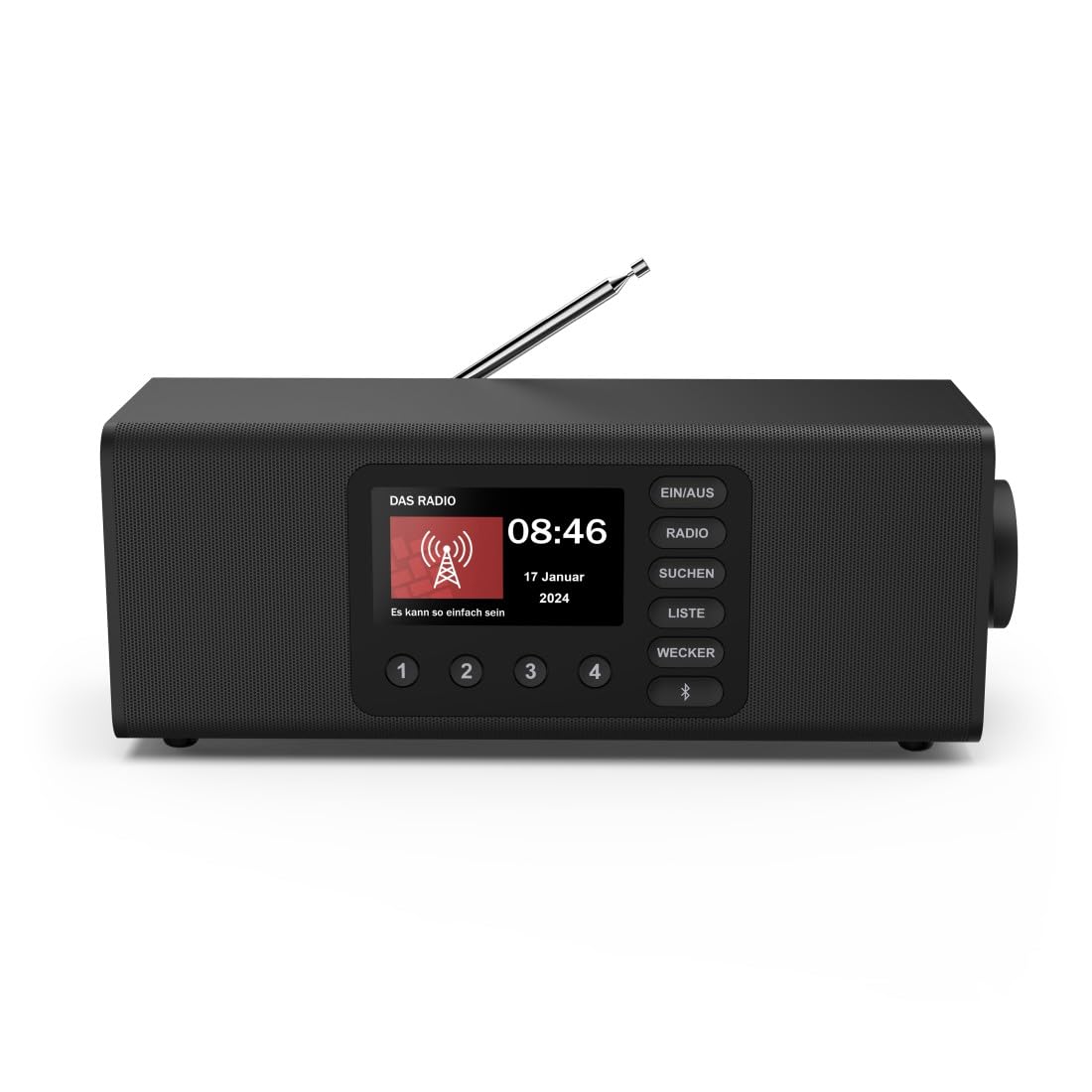
الصورة: الجبهة view of the Hama DR2002BT Digital Radio, showcasinز- أزرار العرض والتحكم.
2. معلومات السلامة
يرجى قراءة تعليمات السلامة هذه بعناية قبل استخدام الجهاز. احتفظ بهذا الدليل للرجوع إليه مستقبلًا.
- لا تعرض الجهاز للرطوبة أو المطر أو درجات الحرارة القصوى.
- تجنب وضع الجهاز بالقرب من مصادر الحرارة أو تحت أشعة الشمس المباشرة.
- لا تفتح الجهازasinز. يجب أن تتم عمليات الإصلاح فقط بواسطة أفراد مؤهلين.
- استخدم فقط محول الطاقة المقدم.
- تأكد من التهوية المناسبة حول الجهاز.
3. محتويات العبوة
تأكد من وجود جميع العناصر عند فك العبوة:
- Hama DR2002BT Digital Radio
- محول الطاقة
- دليل المستخدم
4. انتهى المنتجview
4.1 ضوابط وشاشة اللوحة الأمامية

Image: Front panel of the radio highlighting the display and control buttons, with icons for Bluetooth, DAB+, and Alarm functions.
The front panel features a 4.3-inch TFT color display, large control buttons, and a rotary knob for easy navigation and selection. Key buttons include:
- EIN/AUS (ON/OFF): يقوم بتشغيل الجهاز أو إيقاف تشغيله.
- راديو: Switches between FM and DAB/DAB+ modes.
- SUCHEN (SEARCH): يبدأ عملية مسح المحطة.
- LISTE (LIST): يتيح الوصول إلى قائمة المحطات المتاحة.
- WECKER (ALARM): يقوم بضبط إعدادات الإنذار.
- زر البلوتوث: يقوم بتفعيل وضع الاقتران عبر البلوتوث.
- الأزرار المحددة مسبقًا (1-4): الوصول السريع إلى المحطات المفضلة المحفوظة.
- المقبض الدوار (LAUTSTÄRKE/NAVIGIEREN): Controls volume and navigates menus.
4.2 اتصالات اللوحة الخلفية
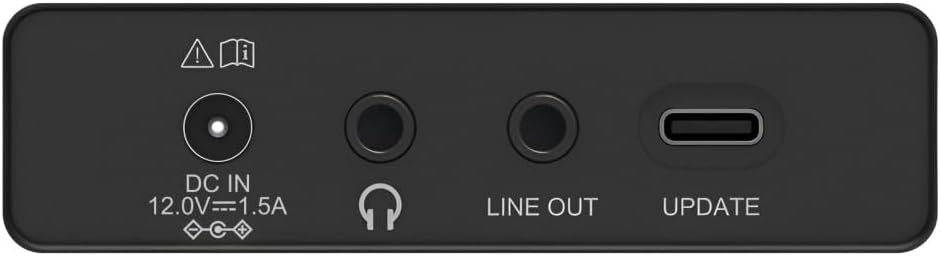
Image: Close-up of the rear panel showing the DC IN, Headphone, Line Out, and UPDATE (USB-C) ports.
The rear panel provides essential connectivity options:
- DC IN 12.0V --- 1.5A: Power input for the external adapter.
- مقبس سماعة الرأس (3.5،XNUMX ملم): للاستماع الخاص.
- خارج الخط: مخرج صوت للتوصيل بجهاز خارجي ampمكبرات الصوت أو مكبرات الصوت.
- UPDATE (USB-C): للحصول على تحديثات البرامج الثابتة.
- هوائي تلسكوبي: For FM and DAB/DAB+ reception.

الصورة: الخلفية view of the Hama DR2002BT Digital Radio with its telescopic antenna extended for optimal signal reception.
5. الإعداد
5.1 توصيل الطاقة
- قم بتوصيل محول الطاقة المرفق بـ تيار مستمر في الداخل منفذ في الجزء الخلفي من الراديو.
- قم بتوصيل محول الطاقة بمأخذ طاقة مناسب.
- سيتم تشغيل الراديو تلقائيًا أو سيدخل في وضع الاستعداد.
5.2 تحديد موقع الهوائي
For optimal FM and DAB/DAB+ reception, fully extend the telescopic antenna. Position the radio near a window if reception is poor.
5.3 Initial Setup (First Use)
Upon first power-on, the radio may guide you through an initial setup process, including language selection and an automatic DAB station scan. Follow the on-screen prompts.
6. تعليمات التشغيل
6.1 تشغيل/إيقاف التشغيل
اضغط على EIN / أستراليا زر لتشغيل الراديو أو إيقافه.
6.2 وضع راديو DAB/DAB+
- اضغط على راديو زر لتحديد وضع DAB.
- If this is the first time in DAB mode or if you want to rescan, press سوشن لإجراء مسح كامل للمحطات المتاحة.
- Use the rotary knob to navigate through the station list. Press the knob to select a station.
- ل view the station list, press the القائمة زر.
6.3 وضع راديو FM
- اضغط على راديو زر لتحديد وضع FM.
- يضعط سوشن to automatically scan for the next available FM station.
- Alternatively, use the rotary knob to manually tune to a frequency.
6.4 تخزين واسترجاع الإعدادات المسبقة
The radio allows you to store up to 4 favorite stations using the dedicated preset buttons (1-4).
- Tune to the desired station (DAB or FM).
- Press and hold one of the preset buttons (1-4) until the display confirms the station has been saved.
- To recall a preset station, simply press the corresponding preset button (1-4).
6.5 تشغيل بلوتوث

الصورة: الجبهة view of the radio with Bluetooth and stereo speaker icons, indicating its wireless audio streaming capability.
The Hama DR2002BT can stream audio from your smartphone, tablet, or laptop via Bluetooth 5.0.
- Press the Bluetooth button on the front panel to enter Bluetooth pairing mode. The display will show a pairing indicator.
- على جهازك الخارجي (الهاتف الذكي، الجهاز اللوحي)، قم بتمكين البلوتوث وابحث عن الأجهزة المتاحة.
- Select "Hama DR2002BT" from the list of devices to pair.
- Once paired, you can play audio from your device, and it will be output through the radio's speakers.
6.6 وظيفة المنبه

Image: A person waking up with the Hama DR2002BT Digital Radio placed on a bedside table, illustrating its alarm clock functionality.
The radio features two independent alarm settings.
- اضغط على ويكر زر للوصول إلى إعدادات المنبه.
- Use the rotary knob to select Alarm 1 or Alarm 2.
- Configure the alarm time, source (buzzer or radio station), and repetition (once, daily, weekdays, weekends, or specific days).
- Press the rotary knob to confirm each setting.
- To quickly activate/deactivate an alarm, press the ويكر button and use the rotary knob to toggle the alarm status.

Image: A person interacting with the Hama DR2002BT Digital Radio, demonstrating its ease of use for setting functions like alarms or tuning stations.
7. الصيانة
To ensure the longevity and optimal performance of your Hama DR2002BT Digital Radio, follow these maintenance guidelines:
- تنظيف: استخدم قطعة قماش ناعمة وجافة وخالية من الوبر لتنظيف الجزء الخارجي من الراديو. لا تستخدم المنظفات الكاشطة أو الشمع أو المذيبات.
- تراب: Regularly dust the device to prevent accumulation in vents and ports.
- تخزين: في حال تخزين الراديو لفترة طويلة، افصله عن مصدر الطاقة وخزنه في مكان بارد وجاف.
- الهوائي: تعامل مع الهوائي التلسكوبي بحرص لتجنب ثنيه أو كسره.
8. استكشاف الأخطاء وإصلاحها
إذا واجهت مشاكل مع جهاز الراديو الخاص بك، فراجع المشاكل والحلول الشائعة التالية:
| مشكلة | السبب المحتمل | حل |
|---|---|---|
| لا يوجد طاقة | محول الطاقة غير موصول؛ مأخذ الطاقة معطل | Check power adapter connection; Try a different power outlet. |
| ضعف استقبال الراديو (DAB/FM) | الهوائي غير ممتد؛ منطقة إشارة ضعيفة؛ تداخل | Fully extend the telescopic antenna; Reposition the radio (e.g., near a window); Perform a new station scan. |
| فشل اقتران البلوتوث | Bluetooth not enabled on external device; Radio not in pairing mode; Device too far | Ensure Bluetooth is on and visible on your device; Press the Bluetooth button on the radio; Move devices closer (within 10m). |
| لا يوجد صوت | مستوى الصوت منخفض جدًا؛ تم تفعيل كتم الصوت؛ تم اختيار مصدر غير صحيح | Increase volume using the rotary knob; Check if mute is active; Ensure the correct mode (DAB, FM, Bluetooth) is selected. |
| لا يصدر صوت التنبيه | Alarm not activated; Incorrect alarm time/day set | Verify alarm is enabled in settings; Check alarm time and repetition settings. |
9. المواصفات

Image: Diagram showing the dimensions of the Hama DR2002BT Digital Radio: 35 cm (width), 12.5 cm (depth), and 13 cm (height).
| ميزة | التفاصيل |
|---|---|
| رقم الموديل | DR2002BT (00054298) |
| استقبال | DAB، DAB+، FM |
| نسخة البلوتوث | 5.0 |
| طاقة الخرج (RMS) | 10 W (Stereo) |
| عرض | شاشة ملونة TFT مقاس 4.3 بوصة |
| الاتصالات | 3.5mm Jack (Headphone), USB-C (Update), Line Out, DC IN |
| مزود الطاقة | محول طاقة خارجي |
| الأبعاد (العرض × العمق × الارتفاع) | 35 × 12.5 × 13 سم |
| وزن | 1788 جرام |
| مادة | بلاستيك |
| لون | أسود |
| مميزات اضافية | Alarm Function (2 alarms), Direct Selection Keys |
10. الضمان والدعم
Hama GmbH & Co KG provides a warranty for this product. Please refer to the warranty card included in your package or visit the official Hama webالموقع للحصول على شروط وأحكام الضمان التفصيلية.
For technical support, troubleshooting assistance, or spare parts, please contact Hama customer service or visit their webالموقع. توافر قطع الغيار في الاتحاد الأوروبي مضمون لمدة 7 سنوات.
- الشركة المصنعة: شركة هاما المحدودة وشركاه
- بلد المنشأ: ألمانيا
- توافر قطع الغيار في الاتحاد الأوروبي: 7 سنة