
1. المقدمة
Thank you for choosing the AWESAFE 10.25 inch Android 13 Car Radio. This advanced multimedia system is designed to enhance your driving experience with its powerful features, including Android 13 operating system, 8GB RAM, 128GB ROM, wireless CarPlay, Android Auto, GPS navigation, Bluetooth, and 4G connectivity. This manual provides essential information for proper installation, operation, and maintenance of your new car radio. Please read it thoroughly before use.
2. معلومات السلامة
- يوصى بالتركيب الاحترافي: نظراً لتعقيد الأنظمة الكهربائية للسيارات، يُنصح بشدة بالتركيب الاحترافي لمنع حدوث أضرار للوحدة أو سيارتك.
- مزود الطاقة: Ensure the car radio is connected to a 12V DC power supply with negative grounding. Incorrect voltagقد يتسبب ذلك في أضرار.
- سلامة القيادة: لا تستخدم الجهاز بطريقة تشتت انتباهك عن القيادة. ضع سلامة الطريق في مقدمة أولوياتك دائمًا.
- درجة حرارة: تجنب تعريض الوحدة لدرجات حرارة عالية أو لأشعة الشمس المباشرة لفترات طويلة.
- رُطُوبَة: Keep the unit away from water and excessive moisture to prevent electrical hazards.
- تهوية: تأكد من التهوية المناسبة حول الوحدة لمنع ارتفاع درجة الحرارة.
3. محتويات العبوة
تأكد من تضمين جميع العناصر المدرجة أدناه في الحزمة الخاصة بك:

الصورة: أكثر منview of the AWESAFE car radio and its included accessories, such as cables, modules, and tools.
- AWESAFE 10.25 inch Car Radio Unit
- F20 EVO Base Support
- وحدة 4G
- وحدة نظام تحديد المواقع العالمي (GPS)
- كابل AUX
- كابل الطاقة
- Prying Tools
- مفك البراغي
- 4G SIM Card Cable
- كابل يو اس بي
4. التوافق
This car radio is specifically designed for:
- BMW 2 Series F45 (2018-2019)
- Only compatible with EVO System.
قبل الشراءasing, please provide a photo of your car's dashboard for compatibility confirmation if you have any doubts.
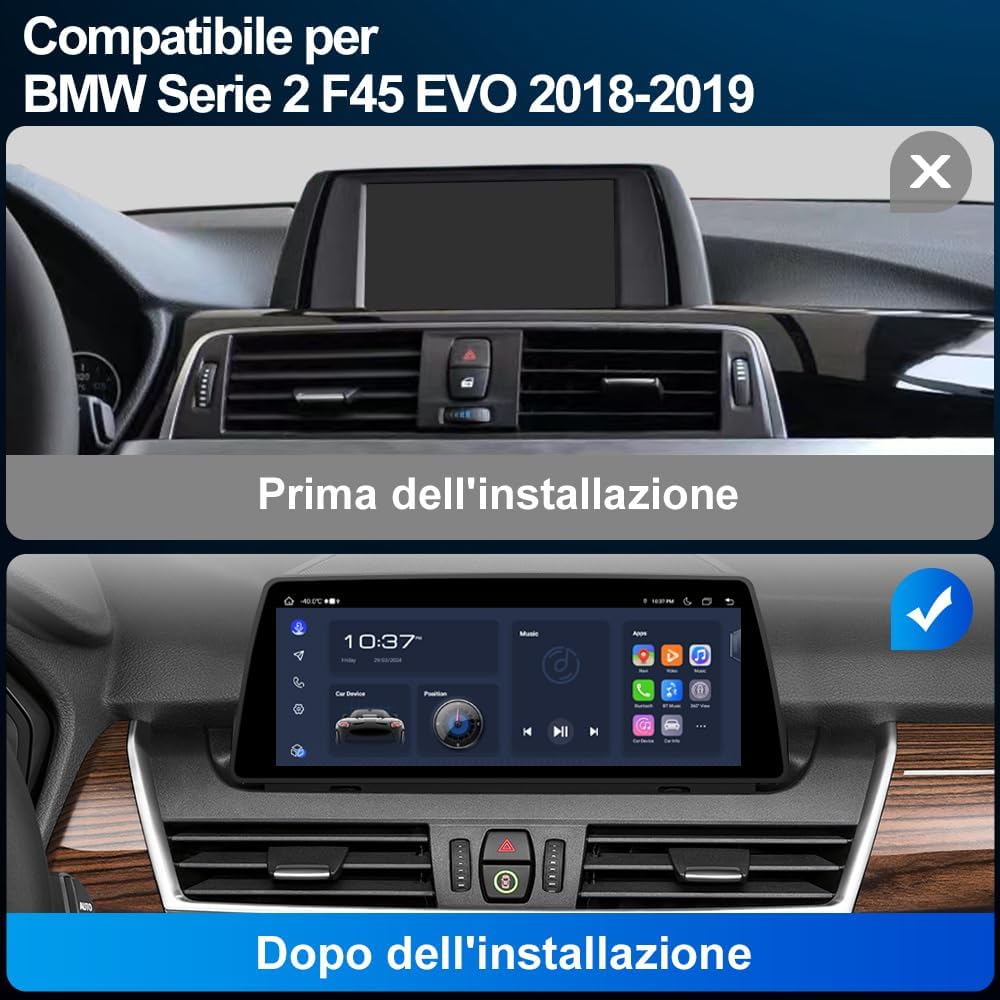
Image: A visual comparison showing the car's dashboard before and after the installation of the AWESAFE 10.25 inch car radio, highlighting the seamless integration.

Image: Details on applicable car models and years (BMW F45 EVO 2018-2019), showing the LVDS 6-pin connector, iDrive controller, and the EVO interface for system identification.

Image: Illustrates different BMW car system interfaces (CCC, CIC, NBT, EVO) to help users identify their vehicle's system for compatibility.
5. الإعداد والتثبيت
Installation of the AWESAFE car radio requires careful attention to detail and knowledge of car electronics. It is highly recommended to have the unit installed by a qualified professional.
فحص ما قبل التثبيت:
- Confirm your vehicle is a BMW 2 Series F45 (2018-2019) with an EVO system.
- تأكد من فصل بطارية السيارة قبل البدء في التثبيت.
- Gather all necessary tools, including those provided in the package.
خطوات التثبيت العامة (استشر متخصصًا للحصول على تعليمات مفصلة):
- Carefully remove the original car display and trim panels using the prying tools.
- Disconnect the original cables from the display unit.
- Connect the new AWESAFE car radio's power cable and other necessary cables (AUX, USB, GPS, 4G modules) according to the wiring diagram (not provided in this manual, typically included with the product or available online).
- Install the new display unit into the dashboard, ensuring all connections are secure.
- Reconnect the vehicle's battery and test the unit's functionality.
- Reassemble the trim panels.
6. تعليمات التشغيل
6.1. Android 13 System and Dual System Functionality
The car radio operates on Android 13, offering a modern and intuitive user interface. It features 8GB RAM and 128GB ROM for smooth performance and ampلو التخزين.

Image: A visual representation of the Android 13 system highlighting its 8GB RAM and 128GB ROM specifications.
This unit supports a dual-system operation, allowing you to switch between the original BMW system interface and the new Android 13 system at any time. This ensures that all original car functions and settings are preserved.

Image: Demonstrates how the car radio maintains the original system, including the original CD player, steering wheel controls, speaker, rearview camera, and iDrive controls.
6.2. كاربلاي وأندرويد أوتو
The multimedia system supports both wired and wireless CarPlay and Android Auto. This allows seamless integration with your smartphone for navigation, music, calls, and messaging.
- الاتصال اللاسلكي: Connect your smartphone via Bluetooth and Wi-Fi for a wireless CarPlay or Android Auto experience.
- الاتصال السلكي: Use a USB cable to connect your smartphone for a stable wired connection.

Image: The car radio display showing the CarPlay and Android Auto interfaces, with smartphone screens below illustrating the connection.

Image: Illustrates the wireless and wired connection options for CarPlay and Android Auto, showing Bluetooth and USB cable connections.
6.3. نظام الملاحة GPS
The unit supports online GPS navigation. Once connected to Wi-Fi or a 4G SIM, you can access various navigation applications directly from the Android system. For optimal GPS signal reception, it is recommended to position the GPS module near the windshield.

Image: The car radio display showing a map for GPS navigation, with location pins and a route highlighted.
6.4. اتصال البلوتوث
Utilize the built-in Bluetooth for hands-free calling and audio streaming. This feature enhances driving safety by allowing you to make and receive calls without holding your phone, and enjoy your favorite music wirelessly.
- الاتصال عبر البلوتوث: Pair your phone to make and receive calls directly from the car radio interface.
- تشغيل موسيقى البلوتوث: قم ببث الصوت من هاتفك إلى مكبرات الصوت في السيارة.

Image: The car radio display showing Bluetooth call interface and music playback, with an incoming call notification on a smartphone.
6.5. 4G SIM Connectivity
The car radio includes a SIM card slot and an integrated 4G antenna, allowing for direct 4G connectivity. This enables online features, app downloads, and real-time navigation without relying on a Wi-Fi hotspot from your phone.
6.6. وظيفة تقسيم الشاشة
The split-screen function allows you to run two applications simultaneously on the display. For example, you can have navigation on one side and music playback on the other, enhancing convenience and entertainment during your drive.

Image: The car radio display demonstrating the split-screen feature, showing a navigation map on one side and a music player on the other.
6.7. اتصال واي فاي
Connect the car radio to a Wi-Fi network (e.g., from your smartphone's hotspot) to access online content, download applications from the app store, and browse the internet. This provides a larger and safer screen experience compared to using a smartphone while driving.

Image: Illustrates Wi-Fi and phone hotspot connectivity options, showing the car radio display browsing online content and apps.
6.8.الخلفview وظيفة الكاميرا
The unit supports rearview camera input (camera not included). When a compatible rearview camera is connected via the Camera IN cable, the display will automatically switch to the camera view when reversing. It also supports parking assistance lines for easier maneuvering.

Image: The car radio display showing a rearview camera feed with parking assistance lines, illustrating the reversing function.
6.9. Maintaining Original Car Information Systems
The AWESAFE car radio is designed to integrate seamlessly while preserving the functionality of your original BMW car systems. This includes:
- Original System Interface: You can switch back to the original BMW interface at any time.
- Original CD Player: The functionality of your car's original CD player is retained.
- الضوابط عجلة القيادة: Original steering wheel controls remain fully functional.
- Original Speaker: The car's original speaker system is supported.
- Original iDrive Controls: The iDrive controller maintains its functionality for both original and Android systems.
- شاشة معلومات السيارة: Important vehicle information such as speed, parking brake status, seatbelt warnings, and oil level can still be accessed.

Image: The car radio display showing various car information systems, including speed, parking brake, seatbelt, general car information, and oil level.
7. الصيانة
- تنظيف: استخدم قطعة قماش ناعمة وجافة لتنظيف الشاشة والجزء الخارجي من الجهاز. تجنب استخدام المنظفات أو المذيبات الكاشطة.
- تحديثات البرامج: Periodically check for software updates to ensure optimal performance and access to new features. Updates can usually be performed via Wi-Fi.
- وصلات الكابلات: تأكد من توصيل جميع الكابلات بإحكام. قد تؤدي التوصيلات غير المحكمة إلى مشاكل متقطعة.
8. استكشاف الأخطاء وإصلاحها
إذا واجهت أي مشاكل، فيرجى الرجوع إلى المشاكل والحلول الشائعة التالية:
| مشكلة | السبب المحتمل | حل |
|---|---|---|
| لا يوجد طاقة | Loose power cable, blown fuse, incorrect wiring. | Check power cable connections. Inspect vehicle fuses. Verify wiring with a professional. |
| لا يوجد صوت | Volume too low, mute activated, loose audio cables, incorrect audio source. | Increase volume. Check mute settings. Ensure AUX/audio cables are connected. Select correct audio source. |
| GPS signal weak/lost | موقع هوائي نظام تحديد المواقع العالمي (GPS)، والتداخل البيئي. | Ensure GPS module is placed in an open area (e.g., near windshield). Avoid areas with high buildings or tunnels. |
| لا يتم الاتصال بـ CarPlay/Android Auto | Bluetooth/Wi-Fi off, incorrect phone settings, faulty USB cable. | Ensure Bluetooth and Wi-Fi are enabled on both devices. Check phone settings for CarPlay/Android Auto. Try a different USB cable for wired connection. |
| شاشة اللمس لا تستجيب | Software glitch, screen protector interference. | Restart the unit. Remove and reapply screen protector if applicable. |
If the problem persists after trying these solutions, please contact AWESAFE customer support for further assistance.
9. المواصفات
| ميزة | مواصفة |
|---|---|
| ماركة | أوآسيف |
| رقم الموديل | 0d3c4775-641c-43d1-a559-c2e5a609a7ff |
| نظام التشغيل | أندرويد 13 |
| كبش | 8 جيجا بايت |
| ذاكرة للقراءة فقط | 128 جيجا بايت |
| حجم الشاشة | 10.25 بوصة |
| تكنولوجيا الاتصال | Bluetooth, Wi-Fi, 4G SIM |
| المميزات الخاصة | Android Auto, Apple CarPlay, GPS Navigation, Split Screen, Rearview دعم الكاميرا |
| الأجهزة المتوافقة | BMW F45 2018-2019 EVO System |
| وضع إخراج الصوت | ستيريو |
| تكوين قناة الصوت المحيطي | 5.1 |
| ترميز الفيديو | H.264، H.265/HEVC، MPEG-4، وما إلى ذلك. |
| طريقة التحكم | التطبيق، اللمس |
| شكل | 4K |
| رمز المنتج الموحد | 759973852672 |
| بلد المنشأ | الصين |
10. الضمان والدعم
This AWESAFE car radio comes with a ضمان لمدة 1 سنوات من تاريخ الشراء. يغطي هذا الضمان عيوب التصنيع والأعطال في ظل الاستخدام العادي.
ما لا يغطيه الضمان:
- Damage caused by improper installation or unauthorized repairs.
- Damage caused by accidents, misuse, abuse, neglect, or external causes.
- الأضرار التجميلية ، بما في ذلك على سبيل المثال لا الحصر الخدوش والخدوش والبلاستيك المكسور على المنافذ.
- Damage caused by operating the product outside the permitted or intended uses described by AWESAFE.
دعم العملاء:
For technical support, warranty claims, or any questions regarding your AWESAFE car radio, please contact the seller or AWESAFE customer service through the platform where you purchased the product. Please have your purchase receipt and product model number ready when contacting support.