
Flashpoint R2 Nano
Flashpoint R2 Nano Touchscreen TTL Wireless Flash Trigger User Manual
For Panasonic and Olympus Cameras
1. المقدمة
The Flashpoint R2 Nano Remote is a compact and advanced wireless flash trigger designed for Panasonic and Olympus camera systems. It offers precise control over your flash settings through an intuitive touchscreen interface and OLED display, enhancing your photography experience with seamless integration and reliable performance.
تتضمن الميزات الرئيسية ما يلي:
- التكامل السلس: Full TTL compatibility with Olympus/Panasonic cameras for optimal exposure.
- Ultimate Reliability: Stable 2.4 GHz radio frequency with 32 channels, ensuring consistent triggering up to 328 feet (100 meters).
- المزامنة عالية السرعة (HSS): Achieve sync speeds up to 1/8000s for creative effects and motion freezing.
- تحكم بديهي بشاشة اللمس: Responsive interface for quick and easy adjustments.
- Versatile Group Control: Manage up to 16 groups (A-F, 0-9) independently for complex lighting setups.
2. ماذا يوجد في الصندوق
Upon unboxing your Flashpoint R2 Nano, please verify that all components are present:
- Flashpoint R2 Nano Remote
- كابل شحن USB-C
- حقيبة التخزين
- دليل المستخدم (هذا المستند)
3. انتهى المنتجview
Familiarize yourself with the components and controls of your R2 Nano remote.
الشكل 3.1: الأمامي والجانبي View of the R2 Nano with Key Components Labeled.
- شاشة اللمس: Main interface for settings and control.
- اختر الاتصال: للتنقل بين القوائم وضبط القيم.
- مفتاح التشغيل: يقوم بتشغيل/إيقاف تشغيل الجهاز.
- زر الاختبار: يُفعّل وميضًا تجريبيًا.
- Installing/Detaching Button: Releases the remote from the hotshoe.
- فتحة التركيب: Connects to the camera's hotshoe.
- منفذ شحن USB-C: لشحن البطارية.

Figure 3.2: R2 Nano Touchscreen Interface Details.
- القناة (CH): Displays the current wireless channel (e.g., CH6).
- Group (A, B, C, etc.): Indicates the active flash groups.
- مستوى طاقة الإخراج: Shows the flash power setting (e.g., +0.0, 1/128).
- Parameters - / +: Touch controls for decreasinغرام/إنكرasinقيم g.
- أوضاع المزامنة: Icons indicating sync modes (e.g., HSS, front curtain, rear curtain).
- النمذجة L.amp: Icon for modeling lamp حالة.
- مؤشر البطارية: يعرض مستوى البطارية الحالي.
4. الإعداد
4.1 شحن البطارية
The R2 Nano is equipped with a built-in rechargeable lithium battery. Before first use, fully charge the device.
- Locate the USB-C charging port on the side of the R2 Nano.
- قم بتوصيل كابل الشحن USB-C المرفق بالمنفذ.
- قم بتوصيل الطرف الآخر من الكابل بمحول طاقة USB (غير متضمن) أو بمنفذ USB الخاص بالكمبيوتر.
- The battery indicator on the screen will show charging status. A full charge from 0% to 100% typically takes approximately 2 hours.

Figure 4.1: Charging the R2 Nano via USB-C.
4.2 التركيب على الكاميرا
The R2 Nano features an easy-mounting, durable hotshoe design for secure attachment to your camera.
- تأكد من إيقاف تشغيل الكاميرا.
- Slide the R2 Nano's mounting slot onto your camera's hotshoe.
- Gently push until it clicks into place, ensuring a secure connection.
- To detach, press the Installing/Detaching Button and slide the remote off.

Figure 4.2: Mounting the R2 Nano on a Camera Hotshoe.
5. تعليمات التشغيل
5.1 تشغيل/إيقاف التشغيل
- To power on, press and hold the Power Switch until the screen illuminates.
- To power off, press and hold the Power Switch until the screen turns off.
5.2 التنقل في واجهة شاشة اللمس
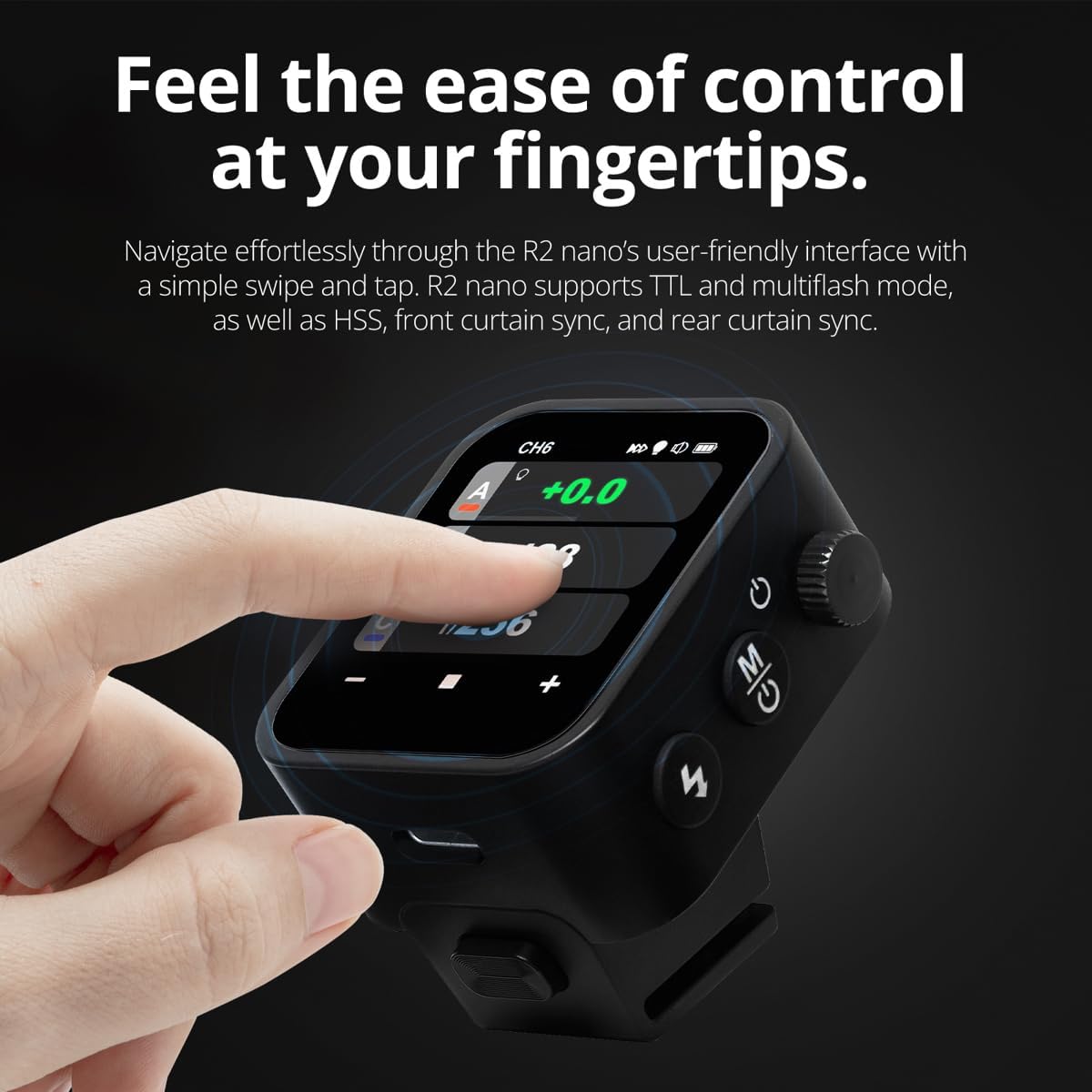
The R2 Nano features a responsive touchscreen and a select dial for intuitive control.

Figure 5.1: High Definition OLED Screen Interface.
- التفاعل باللمس: Tap on a group (A, B, C, etc.) to select it for adjustment. Tap on parameters like power level to modify them.
- اختر الاتصال: Rotate the dial to scroll through options or adjust values. Press the dial to confirm selections.
- تعديل المعلمة: Use the on-screen '-' and '+' buttons or the Select Dial to change flash power, exposure compensation, or other settings.

Figure 5.2: Touchscreen Interaction for Settings Adjustment.
5.3 Setting Channels and Groups
To avoid interference and control multiple flashes, set appropriate channels and groups.
- Access the channel settings through the touchscreen menu. Select a channel from 1 to 32. Ensure your flash units are set to the same channel.
- Assign flash units to different groups (A-F, 0-9) to control them independently. The R2 Nano allows control of up to 16 groups.
5.4 أوضاع الفلاش (TTL، يدوي، فلاش متعدد)
The R2 Nano supports various flash modes to suit different shooting scenarios.
- TTL (من خلال العدسة): Automatically adjusts flash output for correct exposure. Ideal for fast-paced shooting where lighting conditions change frequently.
- دليل (م): Allows precise control over flash power output (e.g., 1/1 to 1/256). Suitable for consistent lighting setups and creative control.
- Multi-flash (Stroboscopic): Fires a series of rapid flashes during a single exposure to capture multiple movements of a subject.
5.5 Sync Modes (HSS, Front Curtain, Rear Curtain)
Select the appropriate sync mode based on your shutter speed and desired effect.
- HSS (المزامنة عالية السرعة): Enables flash synchronization at shutter speeds faster than the camera's native sync speed (up to 1/8000s). Useful for overpowering ambient light or using wide apertures in bright conditions.
- مزامنة الستارة الأمامية: The flash fires at the beginning of the exposure. This is the standard sync mode.
- مزامنة الستارة الخلفية: The flash fires just before the second curtain closes. This creates a streaking effect behind moving subjects, giving a sense of motion.
6. الصيانة
Proper maintenance ensures the longevity and optimal performance of your R2 Nano remote.
- تنظيف: Use a soft, dry cloth to clean the exterior of the device. For the touchscreen, use a microfiber cloth specifically designed for electronics. Avoid using harsh chemicals or abrasive materials.
- تخزين: When not in use, store the R2 Nano in its provided storage bag to protect it from dust and scratches. Store in a cool, dry place away from direct sunlight and extreme temperatures.
- العناية بالبطارية: للحفاظ على صحة البطارية، تجنب تفريغها بالكامل بشكل متكرر. في حال تخزينها لفترات طويلة، اشحنها إلى حوالي 50% كل بضعة أشهر.
- Hotshoe Contacts: Keep the hotshoe contacts clean and free of debris to ensure reliable communication with your camera.
7. استكشاف الأخطاء وإصلاحها
If you encounter issues with your Flashpoint R2 Nano, refer to the following common problems and solutions.
| مشكلة | السبب المحتمل | حل |
|---|---|---|
| الجهاز لا يعمل. | نفدت طاقة البطارية. | اشحن الجهاز باستخدام كابل USB-C. |
| وحدات الفلاش لا تعمل. | إعدادات القناة أو المجموعة غير صحيحة. | Ensure the R2 Nano and flash units are set to the same channel and correct groups. |
| وحدات الفلاش لا تعمل. | Remote not securely mounted. | Ensure the R2 Nano is fully seated in the camera's hotshoe. |
| Inconsistent flash triggering. | التدخل البيئي. | Change the wireless channel to one with less interference. Ensure no obstructions between remote and flash. |
| شاشة اللمس لا تستجيب. | خلل مؤقت في البرنامج. | قم بإيقاف تشغيل الجهاز، وانتظر بضع ثوانٍ، ثم أعد تشغيله. |
| HSS not working. | Camera or flash not set to HSS mode. | Verify HSS is enabled on both the R2 Nano and your compatible flash unit. Ensure camera shutter speed is above sync speed. |
8. المواصفات
| ميزة | التفاصيل |
|---|---|
| نموذج | Flashpoint R2 Nano |
| التوافق | Panasonic and Olympus Cameras |
| التردد اللاسلكي | 2.4 جيجاهرتز |
| القنوات | 32 |
| المجموعات | 16 (تركيز تلقائي ، 0-9) |
| لاسلكي المدى | حتى 100 مترا (328 قدما) |
| سرعة المزامنة | حتى 1/8000 ثانية (HSS) |
| عرض | Touchscreen OLED |
| بطارية | المدمج في بطارية ليثيوم قابلة للشحن |
| منفذ الشحن | يو اس بي-سي |
| أبعاد المنتج | 5.25 × 4.25 × 2.5 بوصة |
| وزن العنصر | 6.4 أونصات |
| الشركة المصنعة | نقطة الوميض |
| تاريخ أول توفر | 19 يونيو 2024 |
9. الضمان والدعم
Flashpoint products are designed for reliability and performance. For warranty information, technical support, or service inquiries, please refer to the official Flashpoint webالموقع أو اتصل بالموزع المعتمد لديك.
يرجى الاحتفاظ بإثبات الشراء الخاص بك لاستخدامه في أي مطالبات بالضمان.
Ask a question about this manual
Ask about setup, troubleshooting, compatibility, parts, safety, or missing instructions. Manuals+ will review the question and use this page’s manual context to help answer it.