1. المقدمة
Thank you for choosing the MDHL Sonic Vibration Toothbrush. This manual provides important information on how to set up, operate, and maintain your new toothbrush. Please read it thoroughly before first use and keep it for future reference.
This sonic toothbrush is designed for effective oral cleaning, featuring a super soft brush head and carefully adjusted vibration frequency and amplitude. It is suitable for individuals with sensitive teeth, weak enamel, or easily bleeding gums, and can also be used for children during tooth replacement.
2. محتويات العبوة
يرجى التحقق من محتويات الحزمة للتأكد من وجود جميع العناصر:
- 1 x MDHL Sonic Vibration Toothbrush Handle
- 3 x Super Soft Brush Heads
- شنومكس x قاعدة الشحن
- 1 × كابل شحن USB
- 1 × دليل المستخدم (هذه الوثيقة)

Image: All components included in the MDHL Sonic Vibration Toothbrush package.
3. مواصفات المنتج
- Super Soft Bristles: Equipped with MDHL ultra-fine soft bristles, each finely polished to ensure effective cleaning while preventing irritation or damage to teeth and gums.
- وضعين للتنظيف: Offers "Clean" mode for daily thorough cleaning and "Soft" mode for gentle cleaning, suitable for sensitive teeth.
- التوقيت الذكي: Features a 2-minute smart timer, recommended by dentists, and a 30-second zone change reminder to ensure even cleaning of all four quadrants of your mouth.
- عمر بطارية طويل: Provides approximately 50 days of use on a single 4-hour charge.
- IPX7 مقاوم للماء: The toothbrush is fully washable and safe for use in the shower.

الصورة: مفصلة view of the toothbrush head design, highlighting round bristles and W-arc for effective cleaning.
4. الإعداد
- شحن فرشاة الأسنان: Before first use, fully charge the toothbrush. Connect the USB charging cable to the charging base and plug it into a compatible USB power adapter (not included). Place the toothbrush handle onto the charging base. The indicator light will show charging status. A full charge takes approximately 4 hours.
- قم بتركيب رأس الفرشاة: Align the brush head with the metal shaft on the toothbrush handle and push it down until it clicks into place. Ensure it is securely attached.
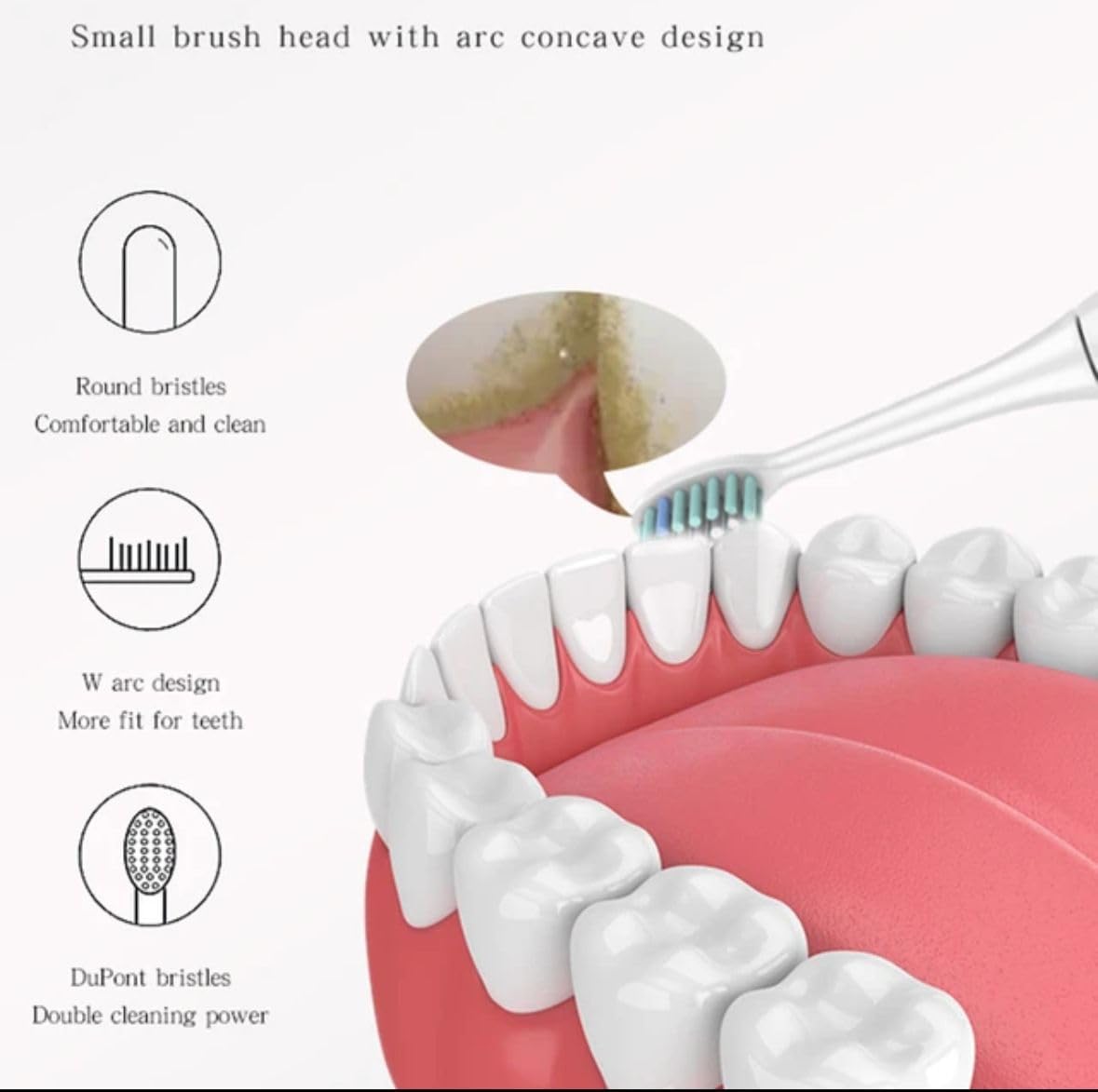
Image: The MDHL Sonic Vibration Toothbrush handle placed on its charging base, with additional brush heads.
5. تعليمات التشغيل
- بلل رأس الفرشاة: بلّل الشعيرات ثم ضع كمية صغيرة من معجون الأسنان.
- Place in Mouth: ضع رأس الفرشاة على أسنانك بزاوية بسيطة باتجاه خط اللثة.
- تشغيل الطاقة: Press the power button to turn on the toothbrush. It will start in the last used mode.
- حدد الوضع: Press the power button repeatedly to cycle through the "Clean" and "Soft" modes.
- فرشاة: Gently move the brush head slowly from tooth to tooth, allowing the sonic vibrations to clean. Do not scrub.
- مؤقت رباعي: The toothbrush will pause briefly every 30 seconds to remind you to move to the next quadrant of your mouth.
- إغلاق ذاتي: The toothbrush will automatically turn off after 2 minutes of brushing.
- إيقاف التشغيل يدويًا: To turn off the toothbrush before the 2-minute cycle is complete, press and hold the power button for 2 seconds.
- شطف: بعد تنظيف أسنانك بالفرشاة، اشطف فمك ورأس الفرشاة جيدًا تحت الماء الجاري.
6. الصيانة
6.1 تنظيف فرشاة الأسنان
- بعد كل استخدام، اشطف رأس الفرشاة والشعيرات جيدًا تحت الماء الجاري.
- امسح مقبض فرشاة الأسنان بالإعلانamp cloth. Do not immerse the handle in water for extended periods, although it is IPX7 waterproof.
- Clean the charging base periodically with a dry cloth. Ensure the charging base is unplugged before cleaning.
6.2 استبدال رأس الفرشاة
Dentists recommend replacing your toothbrush head every 3 months, or sooner if the bristles become frayed or worn. To replace:
- امسك رأس الفرشاة بقوة واسحبها مباشرة من المقبض.
- قم بمحاذاة رأس الفرشاة الجديد مع العمود المعدني وادفعه لأسفل حتى يستقر في مكانه.
7. الشحن وعمر البطارية
- The toothbrush uses a rechargeable battery.
- A full charge takes approximately 4 hours and provides up to 50 days of brushing (based on two 2-minute brushes per day).
- When the battery is low, the indicator light may flash or change color (refer to specific model indicator behavior if available).
- Always use the provided charging base and USB cable.
8. استكشاف الأخطاء وإصلاحها
| مشكلة | السبب المحتمل / الحل |
|---|---|
| فرشاة الأسنان لا تعمل. |
|
| Vibration is weak. |
|
| تتوقف فرشاة الأسنان أثناء الاستخدام. |
|
| مؤشر الشحن لا يعمل. |
|
9. المواصفات
- نموذج: DS-05
- ماركة: Generic (MDHL)
- مصدر الطاقة: تعمل بالبطارية (قابلة للشحن)
- عمر البطارية: حتى 50 يومًا (بناءً على تنظيف الأسنان بالفرشاة مرتين يوميًا لمدة دقيقتين)
- وقت الشحن: حوالي 4 ساعات
- تصنيف مقاومة الماء: IPX7
- Bristle Firmness: ناعم
- الفئة العمرية: بالغ
- أبعاد المنتج: 8 x 8 x 2 inches (approximate package dimensions); 1.21 Pounds (approximate package weight)
- الشركة المصنعة: كل امريكي
10. معلومات السلامة
- لا تستخدم هذا المنتج لأي غرض آخر غير تنظيف الفم.
- يُحفظ بعيدًا عن متناول الأطفال إلا تحت إشراف شخص بالغ.
- If you have any oral health concerns, consult your dentist before using this product.
- Do not attempt to disassemble or repair the toothbrush. Contact customer support if issues arise.
- Do not place the charging base in water or use it in a wet environment.
- في حالة تلف المنتج، يجب التوقف عن استخدامه على الفور.
11. الضمان والدعم
This product comes with a standard manufacturer's warranty. For specific warranty details, please refer to the documentation included with your purchase or contact the retailer where the product was purchased.
For technical support or inquiries, please contact the manufacturer or retailer.