
Ourlife Ourlife WiFi Extender 300Mbps
Ourlدليل مستخدم موسع نطاق الواي فاي من لايف بسرعة 300 ميجابت في الثانية
النموذج: Ourlife WiFi Extender 300Mbps (ASIN: B0D7HB4DBC)
مقدمة
Thank you for choosing the Ourlife WiFi Extender. This device is designed to expand your existing Wi-Fi network coverage, eliminate dead spots, and provide a stable, high-speed internet connection throughout your home or office. With a data transfer rate of up to 300Mbps on the 2.4GHz band, it is ideal for streaming, online gaming, and general internet use. This manual provides detailed instructions for setup, operation, and troubleshooting.
معلومات السلامة
- لا تعرض الجهاز للماء أو الرطوبة.
- لا تحاول تفكيك الجهاز أو إصلاحه بنفسك.
- استخدم فقط محول الطاقة المرفق أو الموصى به من قبل الشركة المصنعة.
- احفظ الجهاز بعيدًا عن مصادر الحرارة وأشعة الشمس المباشرة.
- تأكد من التهوية المناسبة حول الجهاز لمنع ارتفاع درجة الحرارة.
محتويات الحزمة
يرجى التحقق من محتويات العبوة بعناية. في حال وجود أي منتج مفقود أو تالف، يُرجى التواصل مع البائع.
- Ourlife WiFi Extender (repeater body)
- دليل المستخدم
المنتج انتهىview
الـ Ourlife WiFi Extender features a compact design with four high-gain external antennas for enhanced signal penetration and coverage. It includes an Ethernet port for wired connections.
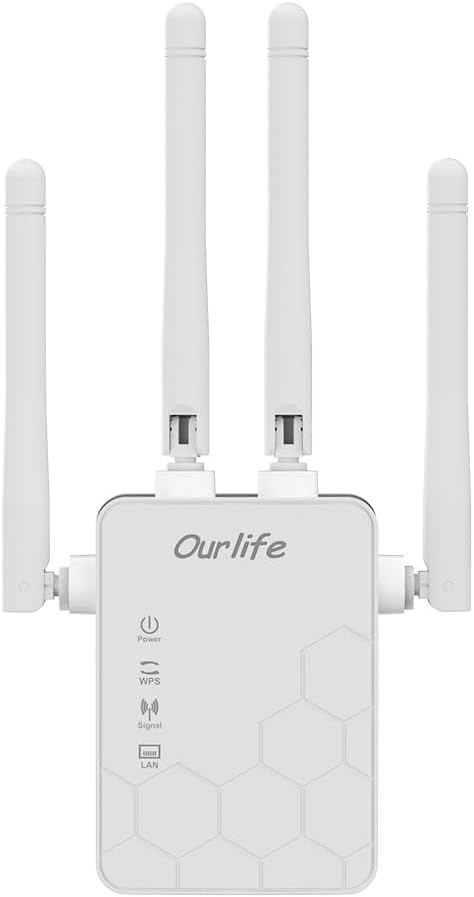
الصورة: الجبهة view of the Ourlife WiFi Extender, showing the Ourlife logo, power indicator, WPS button, signal strength indicator, and LAN port indicator. Four external antennas are visible.
المكونات الرئيسية:
- مؤشر الطاقة: يضيء عند تشغيل الجهاز.
- زر WPS: يُستخدم للإعداد السريع بضغطة زر واحدة مع أجهزة التوجيه المتوافقة.
- مؤشر الإشارة: Shows the strength of the Wi-Fi signal received from the main router.
- منفذ LAN: An Ethernet port for connecting wired devices or for setting up the extender in Access Point (AP) mode.
- الهوائيات الخارجية: Four adjustable antennas to optimize signal reception and transmission.

الصورة: الجانب view of the Ourlife WiFi Extender with dimensions. The device measures approximately 17.2cm/6.8in in height, 5.4cm/2.1in in width, and 3.3cm/1.3in in depth.
يثبت
الـ Ourlife WiFi Extender offers two primary setup methods: WPS (Wi-Fi Protected Setup) for quick connection, and manual setup via a web المتصفح.
Method 1: WPS Setup (Recommended for quick setup)
- تشغيل الطاقة: Plug the Ourlife WiFi Extender into an electrical outlet near your main Wi-Fi router. Wait for the Power indicator to light up.
- اضغط على WPS على الموسع: Press the WPS button on the Ourlife WiFi Extender. The WPS indicator light will start blinking.
- اضغط على WPS على جهاز التوجيه: في غضون دقيقتين، اضغط على زر WPS الموجود على جهاز توجيه Wi-Fi الرئيسي الخاص بك.
- انتظر الاتصال: The WPS indicator on the extender will stop blinking and remain solid when the connection is established. The Signal indicator will also light up, indicating a successful connection.
- نقل الموسع: Once connected, unplug the extender and move it to a location halfway between your router and the Wi-Fi dead zone. Ensure the Signal indicator shows a strong signal (usually green or multiple bars) for optimal performance.

Image: Visual representation of the four simple setup steps: 1. Unbox, 2. Plug it in, 3. Press the button (WPS), 4. And Pair (with router).
Method 2: Manual Setup via Web المتصفح
- تشغيل الطاقة: Plug the Ourlife WiFi Extender into an electrical outlet near your computer or mobile device.
- الاتصال بشبكة Wi-Fi الخاصة بالموسع: On your computer or mobile device, connect to the Wi-Fi network named "Ourlife_Extender" (or similar, check the label on the device). No password is required for the initial connection.
- يفتح Web المتصفح: افتح web browser (e.g., Chrome, Firefox, Safari) and enter the default IP address or domain name (e.g., 192.168.10.1 or reapeter.net) into the address bar. Refer to the device label or included mini-manual for the exact address.
- تسجيل الدخول: أدخل اسم المستخدم وكلمة المرور الافتراضيين (عادةً مشرف/مشرف).
- حدد الوضع: Choose "Repeater Mode" or "AP Mode" based on your needs.
- وضع مكرر: Extends your existing Wi-Fi network wirelessly.
- وضع نقطة الوصول (AP): Converts a wired internet connection into a wireless Wi-Fi hotspot. Connect an Ethernet cable from your router to the extender's LAN port.
- تكوين الشبكة:
- For Repeater Mode: Select your main Wi-Fi network from the list, enter its password, and choose whether to keep the same SSID or create a new one for the extended network.
- For AP Mode: Set a new SSID (network name) and password for the Wi-Fi hotspot.
- تطبيق الإعدادات: Save the settings and wait for the extender to restart.
- نقل الموسع: Once configured, unplug and relocate the extender to an optimal position.
التشغيل
After successful setup, the Ourlife WiFi Extender will operate automatically. The Signal indicator will provide visual feedback on the connection quality.
توصيل الأجهزة:
- أجهزة لاسلكية: Connect your smartphones, tablets, laptops, and other Wi-Fi enabled devices to the extended Wi-Fi network (the SSID you configured during setup).
- Wired Devices (via LAN Port): If you are using the extender in Repeater mode, you can connect a wired device (e.g., desktop PC, smart TV, game console) to the extender's LAN port using an Ethernet cable to provide it with network access.
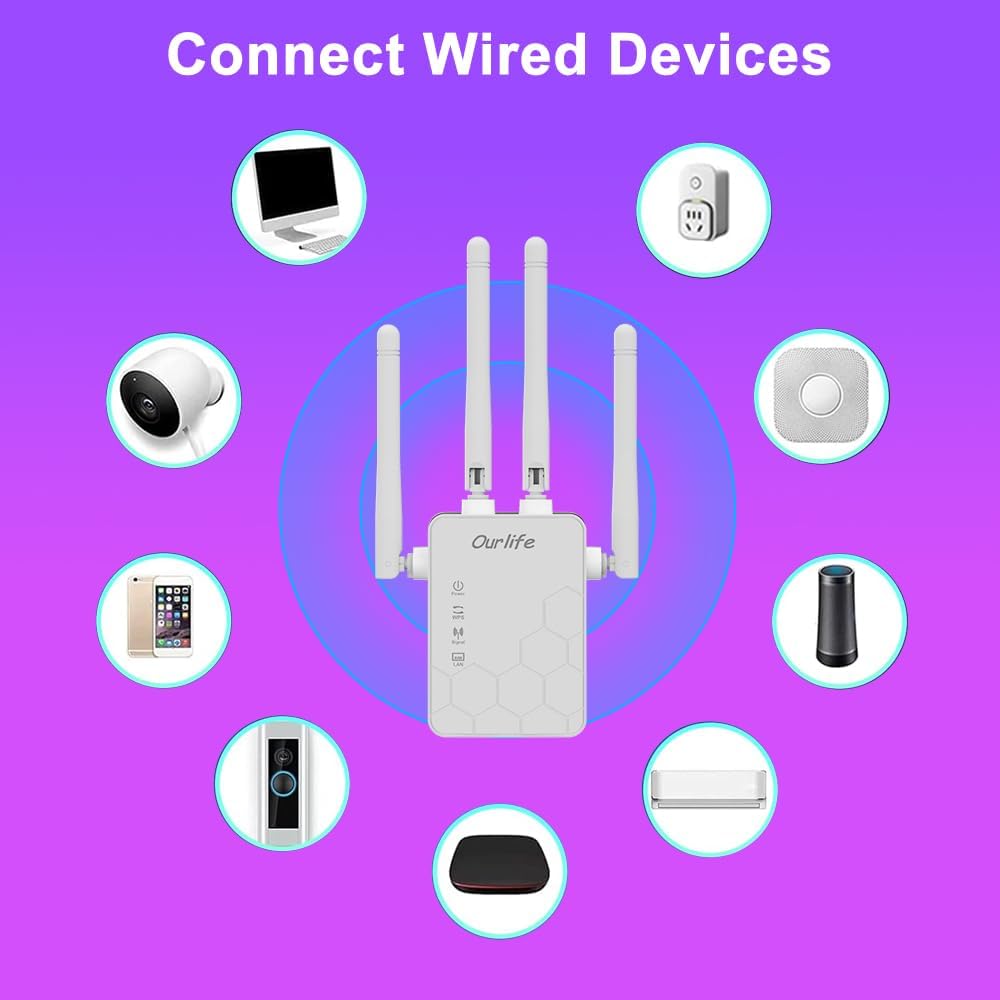
Image: Diagram showing various wired and wireless devices (e.g., desktop computer, smart plug, smart speaker, air conditioner, smart doorbell, security camera, smartphone) that can connect to the Ourlife WiFi Extender.

Image: The Ourlife WiFi Extender plugged into a wall outlet, with an Ethernet cable connected to its LAN port, illustrating its capability to provide a wired connection.
صيانة
Regular maintenance helps ensure the longevity and optimal performance of your Ourlife WiFi Extender.
- تنظيف: استخدم قطعة قماش ناعمة وجافة لتنظيف الجهاز. لا تستخدم المنظفات السائلة أو البخاخات.
- تحديثات البرامج الثابتة: التحقق بشكل دوري من الشركة المصنعة webموقع لتحديثات البرامج الثابتة. يمكن لتحديث البرامج الثابتة تحسين الأداء، وإضافة ميزات جديدة، وإصلاح الأخطاء.
- إعادة التشغيل: إذا واجهت مشاكل في الشبكة، فحاول إعادة تشغيل موسع نطاق الشبكة عن طريق فصله عن مأخذ الطاقة لمدة 10 ثوانٍ ثم إعادة توصيله.
- الوضع الأمثل: Ensure the extender is placed in an open area, away from large metal objects, concrete walls, and other electronic devices that may cause interference.
استكشاف الأخطاء وإصلاحها
If you encounter issues with your Ourlife WiFi Extender, refer to the following common problems and solutions:
| مشكلة | الحل المحتمل |
|---|---|
| الممدد لا يعمل. | تأكد من توصيل المُوسِّع بإحكام بمقبس كهربائي سليم. جرِّب مقبسًا كهربائيًا آخر. |
| Cannot connect to the extender's Wi-Fi for setup. | Ensure you are connecting to the correct default SSID (e.g., "Ourlife_Extender"). Try restarting the extender and your device. |
| فشل إعداد WPS. | Ensure your router supports WPS. Press the WPS button on both devices within the 2-minute window. Try manual setup if WPS continues to fail. |
| لا يوجد اتصال بالإنترنت بعد الاتصال بالشبكة الموسعة. | Check if your main router has internet access. Relocate the extender closer to your main router to ensure a strong signal (check Signal indicator). Reconfigure the extender. |
| Slow speeds on the extended network. | Relocate the extender to an optimal position where the Signal indicator shows a strong connection to the main router. Avoid placing it near interference sources. Ensure your main router is providing good speeds. |
| نسيت كلمة مرور تسجيل الدخول لـ web صفحة الإدارة. | Perform a factory reset on the extender (usually by pressing and holding a reset button for 5-10 seconds). This will revert all settings to default, including the login credentials. |
تحديد
| ميزة | التفاصيل |
|---|---|
| ماركة | Ourlإيف |
| نموذج | Ourlife WiFi Extender 300Mbps |
| ASIN | B0D7HB4DBC |
| معدل نقل البيانات | 300 ميغابت في الثانية (2.4 جيجاهرتز) |
| الهوائيات | 4 هوائيات خارجية عالية الكسب |
| منفذ إيثرنت | 1 × منفذ LAN |
| لون | أبيض |
| الاتصال | Wireless-N (802.11n/g/b) |
| بروتوكولات الأمن | Supports Wireless Security (WPA/WPA2) |
| الأبعاد (تقريبًا) | 17.2 سم (ارتفاع) × 5.4 سم (عرض) × 3.3 سم (عمق) |
الضمان والدعم
For warranty information and technical support, please refer to the documentation included with your purchase or visit the official Ourlإيف website. You can also contact Ourlife customer service directly for assistance with product setup, troubleshooting, or warranty claims.
Ourlife Store Link: Visit the Ourlife Store on Amazon
Ask a question about this manual
Ask about setup, troubleshooting, compatibility, parts, safety, or missing instructions. Manuals+ will review the question and use this page’s manual context to help answer it.