
مقدمة
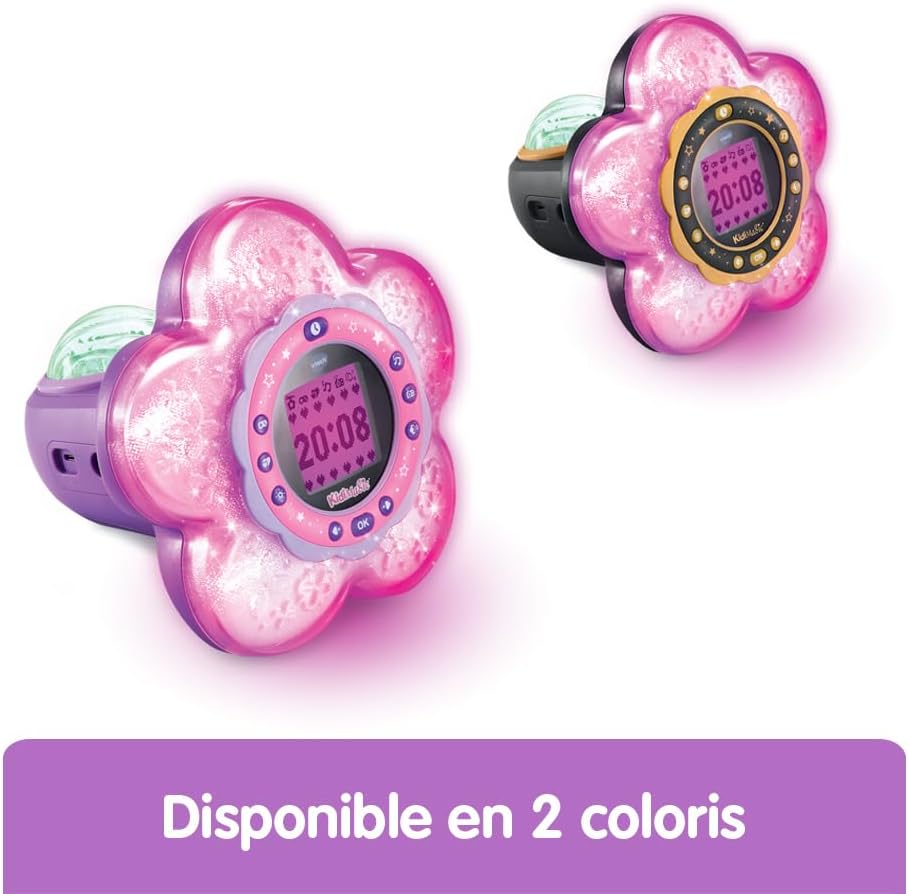
The VTech KidiMagic Galaxy Light is a versatile 9-in-1 device designed for children aged 6 to 12 years. It functions as an alarm clock, FM radio, speaker, and features an aurora borealis projector, interactive light effects, and various games and activities. This manual provides instructions for proper setup, operation, and maintenance of your device.
معلومات السلامة
- تحذير: غير مناسب للأطفال دون سن 36 شهرًا بسبب الأجزاء الصغيرة.
- قم دائمًا بمراقبة الأطفال أثناء الاستخدام.
- Do not immerse the device in water. Clean with a dry cloth only.
- Use only the recommended batteries or VTech power adapter (sold separately).
- الابتعاد عن مصادر الحرارة وأشعة الشمس المباشرة.
محتويات الحزمة
- 1 KidiMagic Galaxy Light unit
- 4 LR6-AA batteries (for demonstration purposes)
- 1 Audio cable (for external music player connection)
المنتج انتهىview
Familiarize yourself with the main components and controls of your KidiMagic Galaxy Light.

صورة: أمام view of the KidiMagic Galaxy Light, illustrating the time display and the aurora borealis projection feature.

صورة: خلف view of the KidiMagic Galaxy Light, highlighting the battery compartment and various connection ports.
عناصر التحكم والعرض:
- شاشة LCD: Displays time, game information, and settings.
- المستشعر: Located on top, detects hand movements for light effects.
- أزرار: Various buttons for navigation, settings, and game control.
- المتحدث: مكبر صوت مدمج لإخراج الصوت.
- مقبس إدخال الصوت: For connecting external music players.
- حجرة البطارية: Located at the back.
يثبت
1. تركيب البطارية
- حدد مكان حجرة البطارية في الجزء الخلفي من الوحدة.
- باستخدام مفك البراغي ، افتح غطاء حجرة البطارية.
- Insert 4 new LR6-AA batteries, ensuring correct polarity (+/-).
- أعد تركيب الغطاء وشد البرغي.
Alternatively, the device can be powered by a VTech duo AC adapter (002181), sold separately.
2. التشغيل الأولي
Press the Power button to turn on the device. The screen will light up, and you may be prompted to set the time.
التشغيل الأساسي
ضبط الوقت
- Access the 'Settings' menu using the navigation buttons.
- Select 'Time' and adjust the hour and minute using the arrow buttons.
- Confirm your selection with the 'OK' button.
ضبط المنبه
- Navigate to the 'Alarm' menu.
- Choose an alarm slot and set the desired wake-up time.
- Select an alarm melody from the available options.
- Confirm to activate the alarm.
ضبط مستوى الصوت
Use the dedicated volume buttons (usually marked with '+' and '-') to increase or decrease the sound level.
الإغلاق التلقائي
The device features an automatic shut-off timer to conserve battery life. You can set it to 60 minutes, 120 minutes, 240 minutes, or disable the sleep mode entirely through the settings menu.
سمات
Aurora Borealis Projection
The KidiMagic Galaxy Light projects beautiful aurora borealis effects onto the ceiling, creating a celestial atmosphere in the room. This feature can be activated and customized through the light settings.

صورة: A child interacting with the KidiMagic Galaxy Light, demonstrating the dynamic light effects and color changes.
Interactive Light Effects and Color Changes
Wave your hand over the magic sensor on the device to change its color and activate 12 different light effects and 7 color variations. This allows for personalized ambiance.
راديو اف ام
Tune into your favorite FM radio stations. The device can store preferred stations for quick access.
External Music Player (MP3) Connection
Connect an external music player, such as an MP3 player, using the included audio cable. This transforms the KidiMagic Galaxy Light into a speaker, allowing you to play your own music.

صورة: جانب view of the KidiMagic Galaxy Light, emphasizing its capability to function as a musical speaker when connected to an external device.
Integrated Games
The device includes 4 enchanting games for entertainment:
- Buzzy Adventure
- الغميضة
- Magic Mushroom
- الحديقة السحرية
صورة: A child engaged in playing one of the integrated games on the KidiMagic Galaxy Light's screen.
Magic Activities
Explore 6 magical activities designed for fun and relaxation:
- كرة بلورية
- Magic Card
- Your Elf of the Day
- Emotion Management
- Positive Emotions
- الاسترخاء
صيانة
- تنظيف: امسح الجهاز برفق دamp قماش. لا تستخدم مواد كيميائية قاسية أو منظفات كاشطة.
- استبدال البطارية: Replace batteries when the device's performance diminishes or if the screen becomes dim. Follow the battery installation steps.
- تخزين: Store the device in a cool, dry place away from direct sunlight when not in use for extended periods. Remove batteries if storing for several months.
استكشاف الأخطاء وإصلاحها
الجهاز لا يعمل:
- تأكد من إدخال البطاريات بشكل صحيح مع القطبية الصحيحة.
- استبدلها ببطاريات جديدة.
- If using an AC adapter, ensure it is properly connected and functional.
Screen is dim or flickering:
- قد تكون البطاريات ضعيفة. استبدلها.
- تأكد من عدم تعريض الجهاز لدرجات حرارة قصوى.
مشاكل الصوت:
- تحقق من إعدادات مستوى الصوت.
- If using an external music player, ensure the audio cable is fully inserted and the external device's volume is up.
تحديد
| رقم الموديل | 572705 |
| الأبعاد (الطول × العرض × الارتفاع) | 18.5 × 18 × 17.3 سم |
| وزن | 635 جرام |
| العمر الموصى به | 6 - 10 years (Manufacturer's minimum: 72 months, maximum: 120 months) |
| مصدر الطاقة | 4 x LR6-AA batteries (included for demo) or VTech AC adapter (sold separately) |
| مادة | بلاستيك |
| لغة | French (Product content) |
| سمات | Alarm Clock, FM Radio, Speaker, Aurora Projection, 12 Light Effects, 7 Colors, 6 Magic Activities, 4 Games |
الضمان والدعم
For warranty information and customer support, please refer to the documentation included with your purchase or visit the official VTech webالموقع. احتفظ بإثبات الشراء الخاص بك لاستخدامه في أي مطالبات بالضمان.