
مقدمة
Thank you for choosing the Wipro NS9200 B22D 9W Wi-Fi Smart LED Bulb. This smart bulb offers advanced lighting control, including 16 million colors, dimming capabilities, and integration with smart home assistants like Amazon Alexa and Google Assistant. This manual provides essential information for the safe and efficient use of your smart bulb.
المميزات الرئيسية:
- اتصال سهل: Frustration-free setup for automatic and hassle-free pairing.
- الجودة الممتازة: Engineered with LM80-tested LED chips for durability and longevity.
- ميزة مزامنة الموسيقى: Inbuilt music synchronization with color-changing lights that respond to music rhythm.
- 16 مليون لون: Choose from a vast spectrum of colors to create various ambiances.
- قابلة للتعتيم: Adjust brightness from 10% to 100% to suit your needs and save energy.
- التحكم من أي مكان: Manage your smart bulb remotely using the Wipro Next Smart Home App.
دليل الإعداد
1. التثبيت الأولي
Before proceeding with the smart features, ensure the bulb is physically installed correctly.
- إيقاف التشغيل: Ensure the power supply to the light fixture is turned off before installation.
- إدراج لمبة: Carefully screw the Wipro Smart LED Bulb into a standard B22D bulb holder.
- تشغيل الطاقة: Turn on the power supply to the light fixture. The bulb should light up.

Image: The Wipro NS9200 B22D 9W Wi-Fi Smart LED Bulb alongside its product packaging.
2. App Pairing (Wipro Next Smart Home App)
Follow these steps to connect your smart bulb to the Wipro Next Smart Home App:
- تحميل التطبيق: Install and open the Wipro Next Smart Home app on your mobile device. Ensure your device is in pairing mode.
- التسجيل/تسجيل الدخول: Register with your email ID and follow the on-screen instructions to log in.
- إضافة جهاز: Tap on "Add Device" or the "+" icon (top right corner) and then select "Add Device".
- الكشف التلقائي: The device will automatically be detected. Select the appropriate device from the options available.
- تأكيد الإضافة: Tap on "Add" and then on the "+" icon beside the device name.
- الإعداد الكامل: Your Smart Device is now added. Tap "Done" to open the Smart world of Wipro.
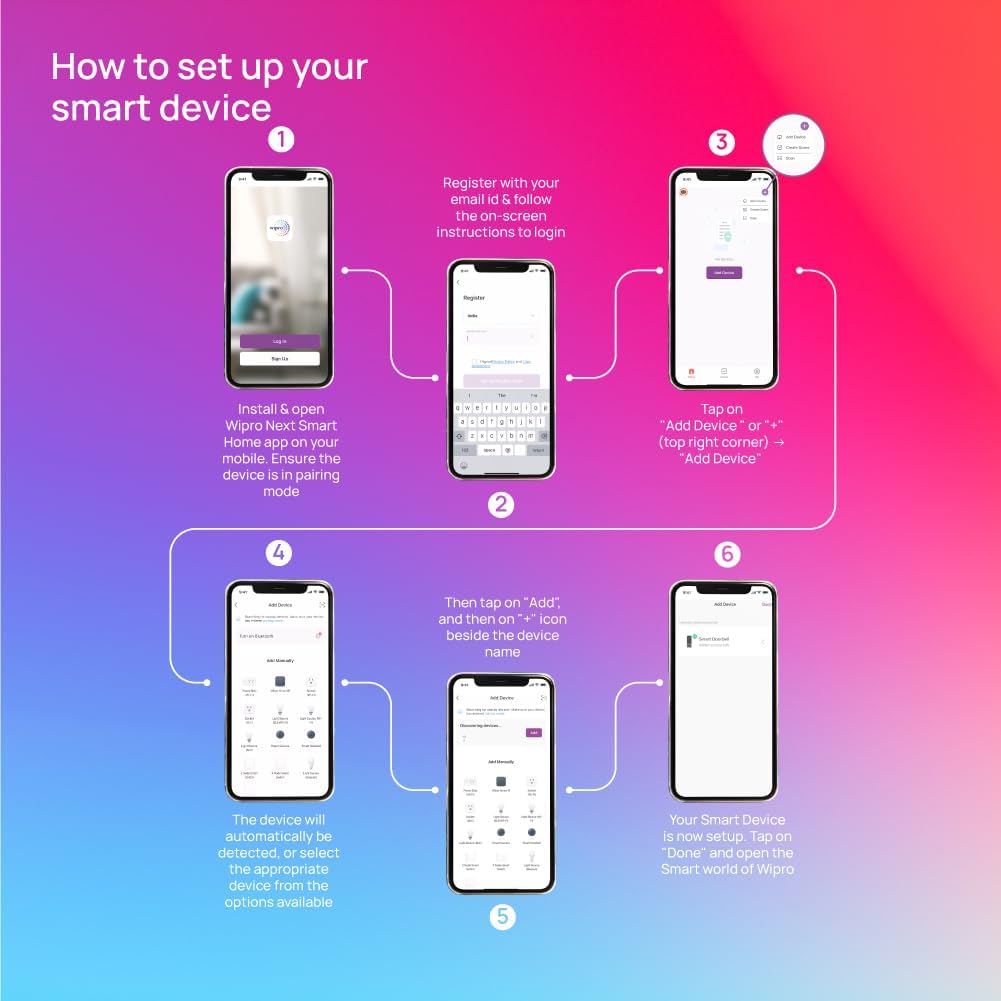
Image: Visual guide illustrating the six steps to set up your Wipro smart device via the mobile application.
3. تكامل المساعد الصوتي (Alexa/Google Assistant)
To control your smart bulb with voice commands, integrate it with Amazon Alexa or Google Assistant:
- Bulb Flashing: Power on the bulb and check if it is flashing. If not, switch the bulb on and off 3 times to initiate flashing mode.
- Connect to Voice Assistant: Wait for 60-120 seconds for the bulb to get connected. The device will appear in the "Devices" section of your Alexa or Google Home app post 90 seconds. It will be successfully connected to the internet and can be controlled with your voice assistant device.
- Manual Setup (if not discovered): If the device is not discovered by your voice assistant, download the Wipro Next Smart Home App from your app store and complete registration. Then, follow the steps mentioned in the user manual for linking the Wipro app with your voice assistant.
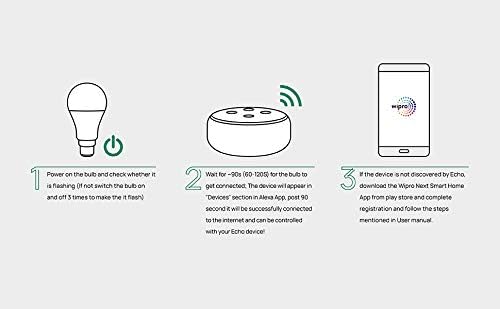
Image: A visual representation of connecting the Wipro smart bulb to an Amazon Echo device via the Wipro app.
تعليمات التشغيل
Once set up, you can control your Wipro Smart LED Bulb using the Wipro Next Smart Home App or voice commands.
1. Basic Controls (On/Off, Dimming)
- تشغيل/إيقاف: Tap the power icon in the app or say "Alexa, turn on/off the light" or "Hey Google, turn on/off the light."
- يعتم: Use the brightness slider in the app to adjust intensity from 10% to 100%. Voice command example: "Alexa, set the light to 50% brightness."
2. التحكم في اللون
- اختيار اللون: In the app, navigate to the color palette to choose from 16 million colors.
- الأمر الصوتي: "Alexa, change the light to blue" or "Hey Google, make the light red."
3. مزامنة الموسيقى
- فعل: Within the Wipro Next Smart Home App, select the Music Sync feature. The bulb will change colors in rhythm with music played through your device.
4. الجدولة والمؤقتات
- تحديد الجداول الزمنية: Use the app to create custom schedules for your bulb to turn on/off or change settings at specific times.
- المؤقتات: Set countdown timers for the bulb to switch off automatically.
صيانة
To ensure optimal performance and longevity of your Wipro Smart LED Bulb, follow these maintenance guidelines:
- تنظيف: Ensure the bulb is switched off and cool before cleaning. Use a soft, dry cloth to wipe the surface. Do not use liquid cleaners or abrasive materials.
- بيئة: Use the bulb in dry, indoor environments. Avoid exposure to water, high humidity, or extreme temperatures.
- التعامل: Handle the bulb with care. Avoid dropping or subjecting it to physical shock.
استكشاف الأخطاء وإصلاحها
If you encounter issues with your Wipro Smart LED Bulb, refer to the table below for common problems and solutions.
| مشكلة | السبب المحتمل | حل |
|---|---|---|
| المصباح لا يضيء. | No power supply; Bulb not screwed in properly; Bulb is faulty. | Check power switch and circuit breaker. Ensure bulb is securely screwed into the holder. Test bulb in another fixture. |
| لا يمكن الاتصال بشبكة Wi-Fi / التطبيق. | Incorrect Wi-Fi password; Bulb too far from router; Wi-Fi signal interference; Bulb not in pairing mode. | Ensure correct 2.4GHz Wi-Fi password. Move bulb closer to router. Restart router. Reset bulb to pairing mode (turn on/off 3 times). |
| التحكم الصوتي لا يعمل. | Bulb not linked to voice assistant; Incorrect voice commands; Internet connectivity issues. | Verify Wipro app is linked to Alexa/Google Assistant. Use precise commands. Check internet connection. |
| Bulb flickers or responds erratically. | Unstable power supply; Software glitch; Connectivity issues. | Check power source stability. Restart the bulb by turning it off and on. Re-pair the bulb if issues persist. |
تحديد
Detailed technical specifications for the Wipro NS9200 B22D 9W Wi-Fi Smart LED Bulb:
| ميزة | التفاصيل |
|---|---|
| ماركة | ويبرو |
| اسم الموديل | Wi Fi Enabled Smart Bulb |
| رقم موديل العنصر | NS9200_3 |
| نوع الضوء | قاد |
| ميزة خاصة | Colour Changing, Dimmable |
| قاعدة المصباح | ب22د |
| لون فاتح | متعدد الألوان |
| درجة حرارة اللون | 6500 كلفن |
| استهلاك الطاقة | 9 واط |
| المجلد المقبولtagالتردد | 220 إلى 240 فولت و50 هرتز |
| طريقة التحكم | التطبيق ، الصوت |
| الاستخدام الداخلي والخارجي | داخلي |
| شكل | الكرة الأرضية(G) |
| أبعاد المنتج | 14.2 عرض × 6.5 ارتفاع سم |
| وزن العنصر | 300 جرام |
| بلد المنشأ | الهند |
الضمان والدعم
Wipro products are designed for reliability and performance. For warranty information and technical support, please contact Wipro customer service.
- الشركة المصنعة: Wipro Enterprises Private Ltd
- رقم التواصل: 1-800-425-1969
- عنوان: Bangaluru-560 035, India
يرجى الاحتفاظ بإيصال الشراء الخاص بك كدليل على الشراء لأي مطالبات بالضمان.