
مقدمة
This manual provides essential information for the safe and effective use of your VR SHINECON SC-G10 VR Headset. Please read it thoroughly before operation to ensure optimal performance and user experience. This VR headset is designed to provide an immersive virtual reality experience using your smartphone.
ماذا يوجد في الصندوق
- VR SHINECON SC-G10 VR Headset
- دليل المستخدم (هذا المستند)
- قطعة قماش للتنظيف

Image: The VR SHINECON SC-G10 VR Headset displayed alongside its product packaging, illustrating the complete product and its box.
دليل الإعداد
Follow these steps to set up your VR Headset for the first time:
- جهّز هاتفك الذكي:
Ensure your smartphone is charged and has VR content (movies or games) downloaded from an appropriate app. The headset is compatible with smartphones ranging from 4.7 inches to 7.2 inches in screen size. For optimal viewing, select content formatted for 3D right and left viewعمل.
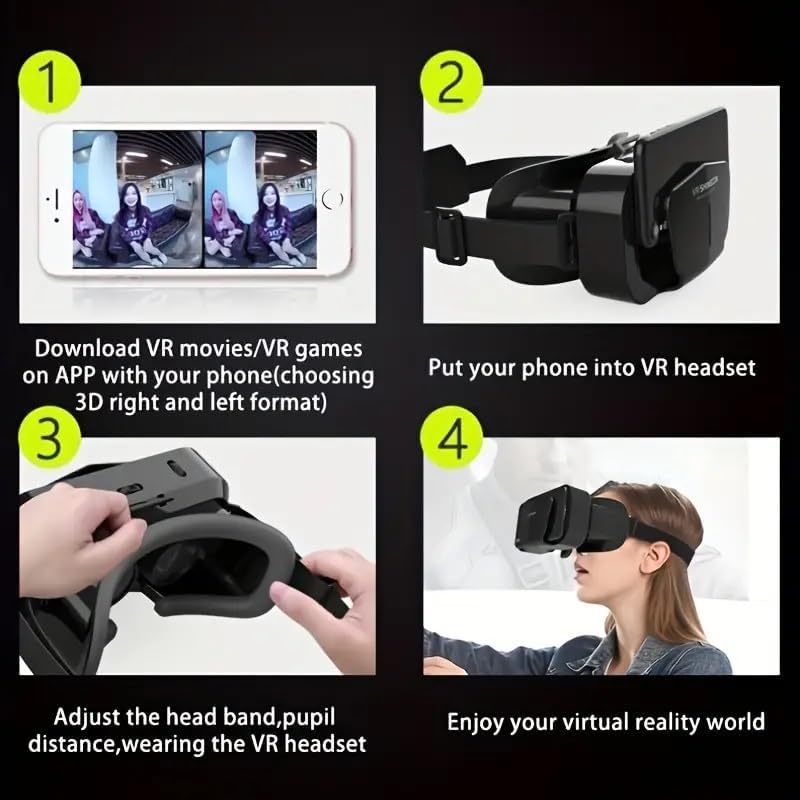
Image: A smartphone screen displaying a split-screen VR video, indicating the type of content suitable for the headset.
- Insert Your Phone into the VR Headset:
Open the front cover of the VR headset. Carefully slide your smartphone into the designated slot, ensuring it is securely positioned. The headset features a multi-angle cooling design to help dissipate heat from your phone during use.

الصورة: لقطة مقربة view of the VR headset's front compartment, showing how a smartphone is easily inserted into the device.

Image: An illustration highlighting the multi-angle cooling design of the VR headset, with arrows indicating airflow for heat dissipation.
- Adjust Headband and Lenses:
Place the VR headset on your head. Adjust the elastic head straps to achieve a comfortable and secure fit. Utilize the adjustable focal and pupil distance settings to ensure a clear and crisp image. These adjustments are crucial for users with varying vision needs, including near-sightedness or far-sightedness.
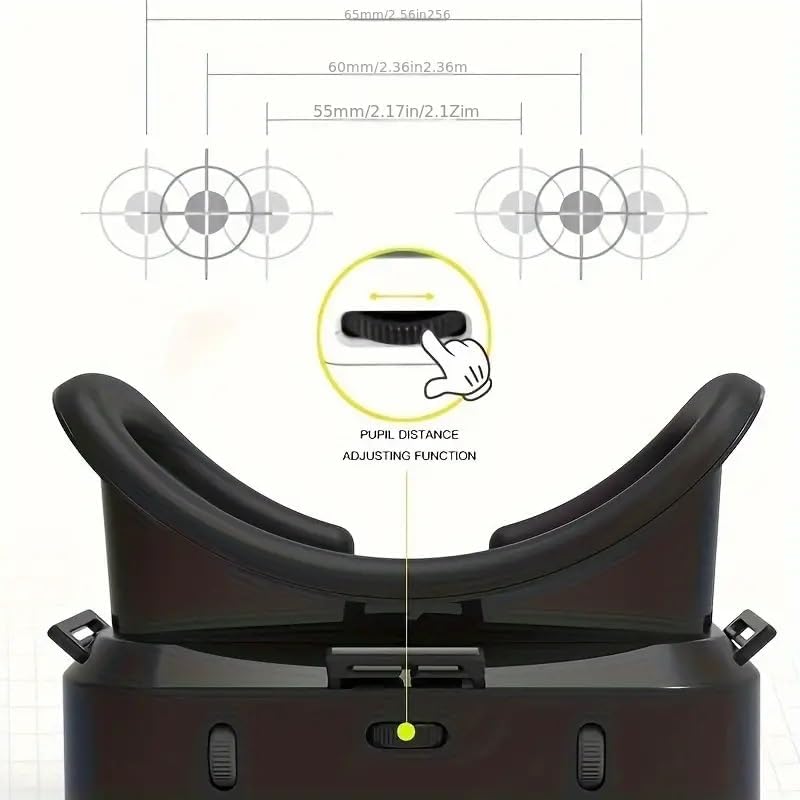
الصورة: تفصيلية view of the VR headset's top, showing the dial for adjusting pupil distance to optimize visual clarity.
- Enjoy Your Virtual Reality Experience:
Once the headset is comfortably fitted and the lenses are adjusted, you are ready to immerse yourself in 360-degree videos and VR games.
إعداد دليل الفيديو
Video: A demonstration of the VR Headset, showcasing its features and how to set it up for use with a smartphone. This video is provided by the seller.
تعليمات التشغيل
After completing the setup, operating your VR Headset is straightforward:
- Content Selection: Use your smartphone to browse and select VR applications, games, or 360-degree videos. Many platforms offer a wide range of immersive content.
- Viewتجربة جي: The headset provides a wide field of view for an immersive experience. Adjust the headset's position and lens settings as needed during use to maintain clarity and comfort.
- راحة: The soft, breathable foam padding and adjustable straps are designed for comfortable long-term use. If you experience any discomfort, readjust the straps or take a short break.
الصيانة والعناية
To ensure the longevity and optimal performance of your VR Headset, follow these maintenance guidelines:
- تنظيف العدسات: Use the provided cleaning cloth or a soft, dry microfiber cloth to gently wipe the lenses. Avoid using abrasive materials or liquid cleaners, which can damage the lens coating.
- هيكل سماعة الرأس: امسح الجزء الخارجي من سماعة الرأس بقطعة قماش ناعمة قليلاًamp cloth. Do not submerge the headset in water or expose it to excessive moisture.
- تخزين: Store the headset in a cool, dry place away from direct sunlight and extreme temperatures. Keep it free from dust and debris.
- العناية بالحشوة: The soft foam padding can be gently wiped with a damp cloth. Ensure it is completely dry before prolonged storage or next use.
استكشاف الأخطاء وإصلاحها
If you encounter issues with your VR Headset, refer to the following common problems and solutions:
| مشكلة | السبب المحتمل / الحل |
|---|---|
| الصورة غير واضحة أو غير واضحة. | Adjust the focal distance and pupil distance dials on the headset until the image becomes clear. Ensure your smartphone screen is clean. |
| Headset feels uncomfortable or too tight/loose. | Adjust the elastic head straps to achieve a snug yet comfortable fit. The soft foam padding should rest evenly on your face. |
| Smartphone does not fit or is not secure. | Verify your smartphone's screen size is within the compatible range of 4.7 to 7.2 inches. Ensure it is properly aligned and secured within the phone tray. |
| Experiencing motion sickness or dizziness. | Take frequent breaks. Ensure the headset is properly adjusted for clear vision. Some individuals may be more sensitive to VR experiences. Start with shorter sessions. |
| Headset components feel loose or damaged. | Inspect all adjustable parts and straps. If any component is broken or significantly loose, contact customer support for assistance. Avoid forcing adjustments. |
تحديد
| ميزة | التفاصيل |
|---|---|
| رقم الموديل | إس سي-جي 10 |
| الأجهزة المتوافقة | Smartphones (4.7" to 7.2" screen size) |
| توافق نظام التشغيل | أندرويد، آي أو إس |
| الحد الأقصى لدقة العرض | 2560x1440 (dependent on smartphone) |
| وزن العنصر | 6.7 أونصة (حوالي 190 جرامًا) |
| أبعاد الحزمة | 6.18 × 4.21 × 3.94 بوصة |
| ميزة خاصة | تصميم خفيف الوزن |
| تكنولوجيا الاتصال | USB (for phone connection, not headset power) |
| تقنية الاستشعار | Gyroscope, Accelerometer (smartphone features utilized) |
الضمان والدعم
For any questions, technical support, or warranty inquiries regarding your VR SHINECON SC-G10 VR Headset, please refer to the contact information provided with your purchase documentation or visit the official VR SHINECON webالموقع. احتفظ بإثبات الشراء الخاص بك لتقديم مطالبات الضمان.