
1. المقدمة
Thank you for choosing the SIFENE Mini Single Serve Coffee Maker, Model KC211. This manual provides essential information for the safe operation, maintenance, and troubleshooting of your new coffee maker. Please read it thoroughly before first use and retain it for future reference.

Image 1.1: SIFENE Mini Single Serve Coffee Maker in operation, showing coffee pouring into a white mug.
2. تعليمات السلامة الهامة
عند استخدام الأجهزة الكهربائية، يجب دائمًا اتباع احتياطات السلامة الأساسية لتقليل خطر نشوب حريق أو حدوث صدمة كهربائية و/أو إصابة الأشخاص، بما في ذلك ما يلي:
- اقرأ كافة التعليمات.
- لا تلمس الأسطح الساخنة. استخدم المقابض أو الأزرار.
- للحماية من الحرائق والصدمات الكهربائية وإصابة الأشخاص، لا تغمر الأسلاك أو المقابس أو ماكينة القهوة في الماء أو أي سائل آخر.
- من الضروري المراقبة الدقيقة عند استخدام أي جهاز بواسطة الأطفال أو بالقرب منه.
- افصل الجهاز عن المقبس عند عدم استخدامه وقبل التنظيف. اتركه ليبرد قبل تركيب أو خلع الأجزاء وقبل تنظيف الجهاز.
- لا تقم بتشغيل أي جهاز به سلك أو قابس تالف أو بعد تعطل الجهاز أو تعرضه للتلف بأي شكل من الأشكال. قم بإعادة الجهاز إلى أقرب مركز خدمة معتمد للفحص أو الإصلاح أو التعديل.
- قد يؤدي استخدام ملحقات غير موصى بها من قبل الشركة المصنعة للجهاز إلى نشوب حريق أو حدوث صدمة كهربائية أو إصابة الأشخاص.
- لا تستخدمه في الهواء الطلق.
- لا تترك السلك يتدلى على حافة الطاولة أو المنضدة، أو يلامس الأسطح الساخنة.
- لا تضعه على أو بالقرب من موقد غاز أو كهرباء ساخن، أو في فرن ساخن.
- احرص دائمًا على توصيل القابس بالجهاز أولًا، ثم وصل السلك بمقبس الحائط. لفصله، أدر أي جهاز تحكم إلى وضع "إيقاف التشغيل"، ثم افصل القابس من مقبس الحائط.
- لا تستخدم الجهاز لغير الغرض المخصص له.
- هذا الجهاز مخصص للاستخدام المنزلي فقط.
3. انتهى المنتجview
3.1 الميزات الرئيسية
- 2-in-1 Brewing: Compatible with K-pods and fresh coffee grounds using the included reusable stainless steel filter.
- Customizable Water Levels: Clear water window with measurements from 6 to 12 oz for precise filling.
- التخمير السريع: Brews a 12 oz cup in approximately 2 minutes.
- التحكم بلمسة واحدة: Simple operation with a single button.
- تصميم مضغوط: Ideal for small spaces (4.3" D x 7.8" W x 9.4" H).
- Self-Cleaning & Descaling Reminder: Indicator light for descaling and easy cleaning process.
- مواد خالية من مادة BPA: Constructed from non-BPA materials for safety.
3.2 مكونات

الصورة 3.1: انتهىview of the coffee maker with key dimensions and features. The image shows the compact size of the coffee maker (7.8" W x 4.3" D x 9.4" H) next to a water bottle and a coffee mug, highlighting its small footprint and the water window with cup size markings (6, 8, 10, 12 oz).
- Water Reservoir with Water Window
- غطاء
- رأس المشروب
- Control Button / Descale Indicator
- صينية التنقيط
- K-pod Holder (removable)
- Ground Coffee Filter Basket (removable)
4. الإعداد والاستخدام الأول
4.1 فك التعبئة
Carefully remove all packaging materials and inspect the coffee maker for any damage. Ensure all components listed in Section 3.2 are present.
4.2 التنظيف الأولي
Before first use, clean all removable parts (K-pod holder, ground coffee filter basket, drip tray) with warm, soapy water. Wipe the exterior of the coffee maker with a damp قماش. لا تغمر الوحدة الرئيسية في الماء.
4.3 دورة التخمير الأولى (دورة التنظيف)
To prime the machine and remove any manufacturing residues:
- Fill the water reservoir with fresh water up to the MAX (12 oz) line.
- ضع كوبًا فارغًا على صينية التنقيط.
- Close the lid without any K-pod or ground coffee filter inserted.
- Press the power button once. The white light will illuminate, and the machine will begin a brewing cycle, dispensing hot water into the mug.
- Once the cycle is complete, discard the hot water. Your coffee maker is now ready for use.
5. تعليمات التشغيل
5.1 Brewing with K-pods
- افتح غطاء ماكينة صنع القهوة.
- Insert a K-pod into the K-pod holder. Ensure the K-pod is seated correctly.
- Fill the water reservoir with fresh water to your desired level (6-12 oz). Do not exceed the MAX line.
- ضع كوب القهوة على صينية التنقيط.
- Close the lid firmly. Ensure the handle of the holder is placed horizontally for proper closure.
- Press the power button once for hot coffee. The white light will indicate brewing.
- Wait for the brewing cycle to complete. Do not open the lid during brewing.
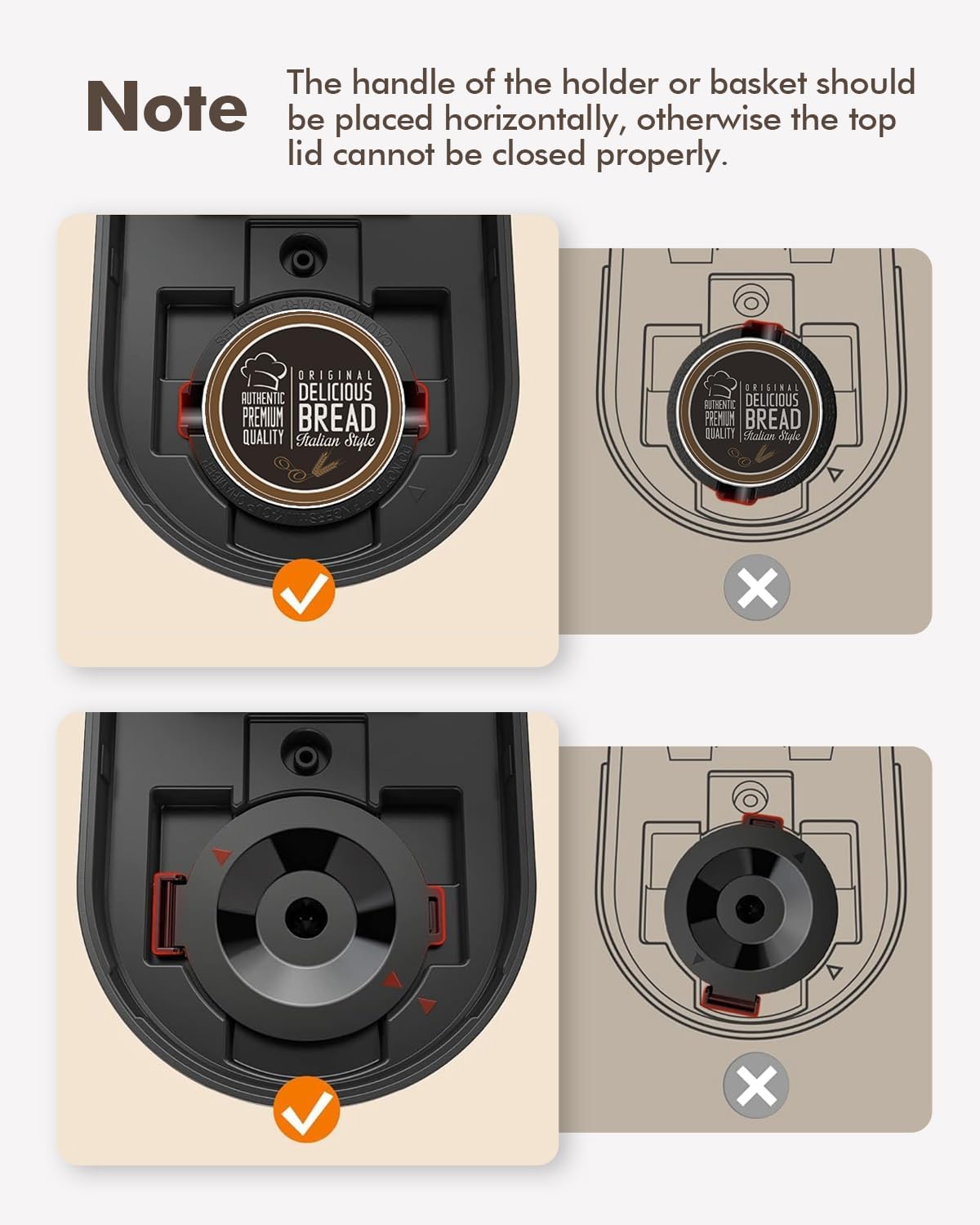
Image 5.1: Correct placement of K-pod and ground coffee filter. The image illustrates the proper horizontal alignment of the holder handle for both K-pods and ground coffee filters to ensure the lid closes securely.
5.2 Brewing with Ground Coffee
- افتح غطاء ماكينة صنع القهوة.
- Insert the reusable ground coffee filter basket into the brew head.
- Add your desired amount of ground coffee to the filter basket. Do not overfill.
- Fill the water reservoir with fresh water to your desired level (6-12 oz). Do not exceed the MAX line.
- ضع كوب القهوة على صينية التنقيط.
- Close the lid firmly. Ensure the handle of the filter basket is placed horizontally for proper closure.
- Press the power button once for hot coffee. The white light will indicate brewing.
- Wait for the brewing cycle to complete. Do not open the lid during brewing.
5.3 Iced Coffee Function
The coffee maker features an iced coffee brewing mode. Follow these steps:
- Prepare your K-pod or ground coffee as described above.
- Fill the water reservoir with fresh water to your desired level (6-12 oz).
- Fill your coffee mug with ice and place it on the drip tray.
- أغلق الغطاء بإحكام.
- Press the power button twice. The blue light will illuminate, indicating iced coffee brewing mode.
- انتظر حتى تكتمل دورة التخمير.

Image 5.2: Control panel with power button and descale reminder. The image shows the power button and the "DESCALE" indicator light, along with simple operating instructions printed on the lid.
6. الصيانة والتنظيف
6.1 التنظيف اليومي
- After each use, remove and rinse the K-pod holder or ground coffee filter basket.
- قم بتفريغ صينية التنقيط وشطفها.
- امسح الجزء الخارجي من صانع القهوة بالإعلانamp قطعة قماش.
6.2 إزالة الترسبات
Over time, mineral deposits (scale) can build up in your coffee maker, affecting performance and coffee taste. The "DESCALE" indicator light will illuminate red when descaling is recommended.

Image 6.1: Preparing descaling solution. The image shows a hand pouring descaling powder into a measuring cup filled with water, next to the coffee maker.
إجراء إزالة الترسبات:
- قم بتحضير محلول إزالة الترسبات وفقًا لتعليمات الشركة المصنعة (على سبيل المثال، خليط من الخل الأبيض والماء، أو عامل إزالة الترسبات التجاري).
- Pour the descaling solution into the water reservoir up to the MAX (12 oz) line.
- Place a large empty mug or container on the drip tray to collect the solution.
- Close the lid without any K-pod or ground coffee filter inserted.
- Press and hold the power button for 2 seconds to initiate the descaling cycle. The red "DESCALE" light will illuminate.
- The machine will run a descaling cycle, dispensing the solution. This may take longer than a regular brew cycle.
- Once the cycle is complete, discard the used solution.
- Rinse the reservoir thoroughly and run 2-3 cycles with fresh water to flush out any remaining descaling solution.
- The "DESCALE" light should turn off after successful descaling.
7. استكشاف الأخطاء وإصلاحها
| مشكلة | السبب المحتمل | حل |
|---|---|---|
| Coffee not brewing / No water dispensed. |
|
|
| طعم القهوة ضعيف أو مائي. |
|
|
| ضوء "إزالة الترسبات" مضاء. | تراكم المعادن في الجهاز. | قم بإجراء عملية إزالة الترسبات (القسم 6.2). |
| تسريبات الآلة. |
|
|
8. المواصفات
| ميزة | التفاصيل |
|---|---|
| ماركة | سيفين |
| اسم الموديل | كيه سي211 |
| أبعاد المنتج | 7.79 بوصة عمق × 4.33 بوصة عرض × 9.48 بوصة ارتفاع |
| نوع ماكينة صنع القهوة | Drip Coffee Machine, Single-Serve |
| نوع إدخال القهوة | Both K-pods and ground coffee |
| المجلدtage | 120 فولت |
| المميزات الخاصة | Auto Clean Function, Auto Shut-Off, Permanent Filter, Descaling Reminder |
| المكونات المضمنة | Single Serve Coffee Maker, 2 Filters (K-pod holder, ground coffee filter) |
| وزن العنصر | 2.5 رطل |
9. الضمان والدعم
9.1 معلومات الضمان
تُرفق تفاصيل الضمان المحددة عادةً مع عبوة المنتج أو على الموقع الرسمي للشركة المصنعة. webيرجى الرجوع إلى هذه المصادر للحصول على أدق وأحدث شروط وأحكام الضمان.
9.2 دعم العملاء
For technical assistance, troubleshooting beyond this manual, or warranty claims, please contact SIFENE customer support. Contact information can usually be found on the product packaging, the official SIFENE webالموقع، أو من خلال بائع التجزئة الخاص بك.
يمكنك أيضًا زيارة SIFENE Store on Amazon لمزيد من المعلومات حول المنتج وموارد الدعم.