
هونج كونج 11
دليل مستخدم ساعة RRP Creation Hk11 Pro Max Ultra 2 الذكية
Model: Hk11 Pro Max Ultra 2
مقدمة
This user manual provides comprehensive instructions for the RRP Creation Hk11 Pro Max Ultra 2 Smart Watch. It covers essential information regarding product setup, operation, maintenance, and troubleshooting to ensure optimal performance and user experience. Please read this manual carefully before using your new smartwatch.
ماذا يوجد في الصندوق
Upon opening the package, please verify that all components are present and in good condition. The standard package contents include:
- Hk11 Pro Max Ultra 2 Smart Watch
- شاحن لاسلكي
- Extra Band (two pairs of straps are included as per product description)
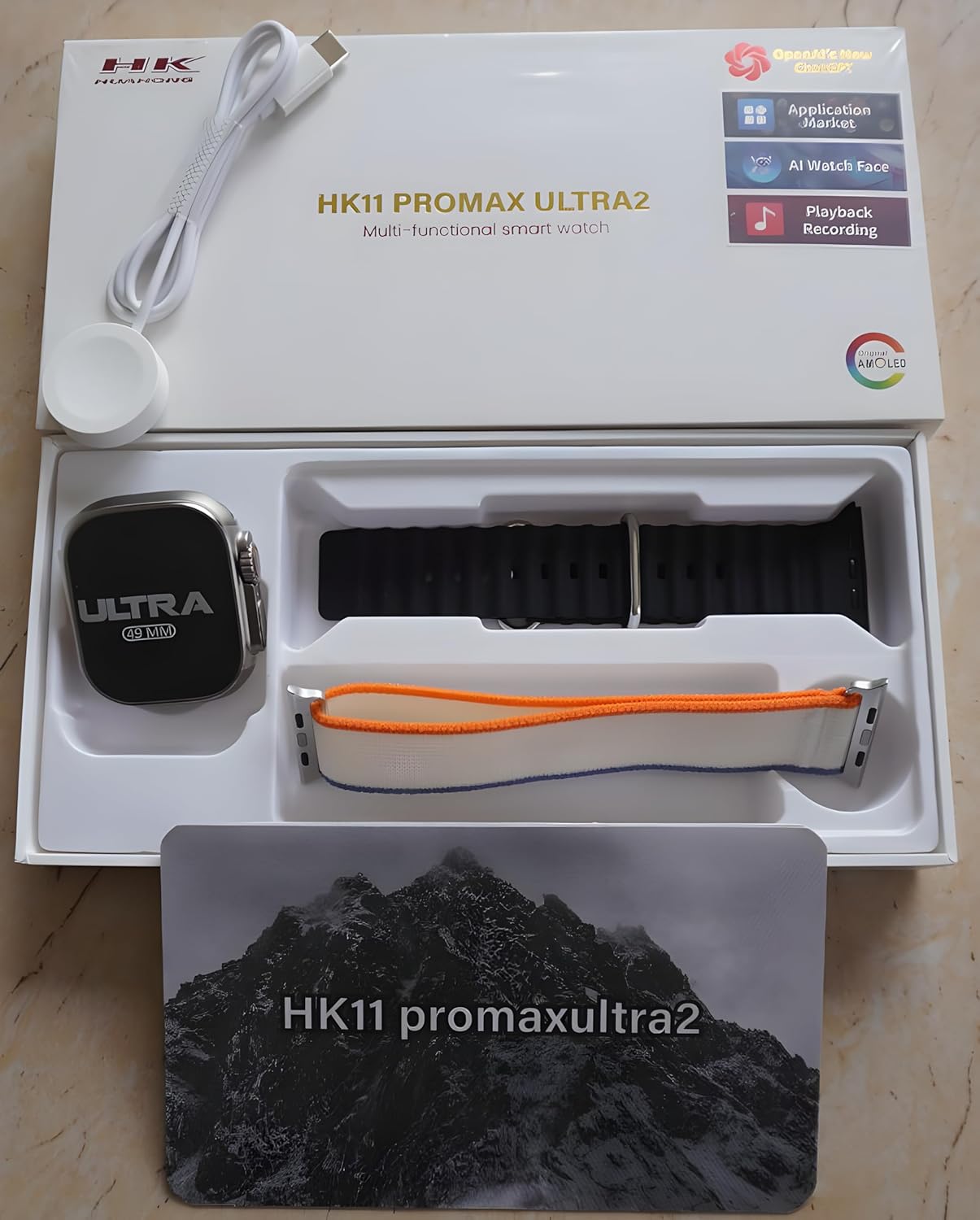
Figure 1: Package Contents. The image displays the Hk11 Pro Max Ultra 2 Smart Watch, two pairs of interchangeable straps, and the wireless charging puck, all neatly arranged within the product packaging.
المنتج انتهىview
The Hk11 Pro Max Ultra 2 Smart Watch features a robust design with advanced functionalities. Key components include:

Figure 2: Product Packaging. This image shows the white retail box for the HK11 Pro Max Ultra 2 Multi-functional smart watch, highlighting its key features like OpenAI's new ChatGPT, Application Market, AI Watch Face, Playback Recording, and AMOLED display.
- عرض: 2.12-inch Super AMOLED full touch screen with 485*520 resolution.
- قضية: Durable Titanium alloy.
- Buttons/Crown: Typically located on the side for navigation and function access.
- أجهزة الاستشعار: Heart rate monitor, pedometer, compass, thermometer.
- منفذ الشحن: Wireless charging area on the back.
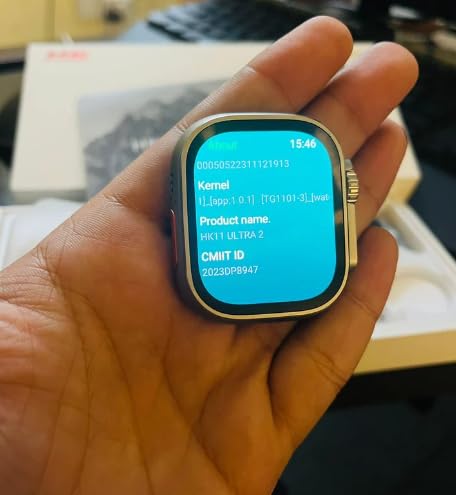
Figure 3: Smart Watch Display. This image shows the smartwatch screen displaying system information, including Kernel version, Product name (HK11 Ultra 2), and CMIIT ID.
دليل الإعداد
1. شحن الساعة الذكية
Before initial use, fully charge your smartwatch. Place the watch on the provided wireless charger. Ensure the charging contacts on the watch align with the charger. The display will indicate charging status. A full charge typically takes approximately 2-3 hours.
2. تشغيل / إيقاف التشغيل
- تشغيل الطاقة: Press and hold the side button (usually the crown) for a few seconds until the screen lights up.
- إيقاف التشغيل: Press and hold the side button, then select the "Power Off" option on the screen.
3. الاقتران بهاتفك الذكي
لفتح جميع وظائف ساعتك الذكية، قم بإقرانها بهاتفك الذكي عبر البلوتوث.
- تأكد من تمكين البلوتوث على هاتفك الذكي.
- On your smartwatch, navigate to the Bluetooth settings or the pairing screen.
- On your smartphone, open the Bluetooth settings and search for available devices. Select "Hk11 Pro Max Ultra 2" or a similar device name from the list.
- قم بتأكيد طلب الاقتران على كل من ساعتك والهاتف الذكي.
- For optimal performance and access to all features, download the companion application (if available, check the watch's manual or packaging for app name) from your phone's app store (compatible with Android 5.0 and above, and iOS 10.0 and above).
تعليمات التشغيل
العرض والملاحة
- شاشة اللمس: مرر لليسار، لليمين، للأعلى، وللأسفل للتنقل بين القوائم والشاشات. انقر لتحديد العناصر.
- الزر الجانبي/التاج: Press to return to the home screen, or rotate to scroll through lists (functionality may vary).
- التحكم بالإيماءات: The watch supports gesture control for certain functions (e.g., raising wrist to wake screen).
الميزات والوظائف الرئيسية
Your Hk11 Pro Max Ultra 2 Smart Watch offers a wide range of features to enhance your daily life and health monitoring:
- إدارة المكالمات: Answer, dial, and receive calls directly from your wrist via Bluetooth 5.2.
- إشعارات: Receive push messages and message reminders from your paired smartphone.
- مراقب معدل ضربات القلب: تتبع معدل ضربات قلبك بشكل مستمر.
- مراقبة ضغط الدم: Monitor your blood pressure (for reference only, not a medical device).
- متتبع النوم: قم بتحليل أنماط نومك للمساعدة في تحسين جودة النوم.
- Fitness Tracker/Pedometer: Track steps, distance, and calories burned.
- أوضاع الرياضة المتعددة: Dedicated modes for various activities to track performance.
- بوصلة: بوصلة مدمجة للملاحة.
- ميزان الحرارة: Measure ambient temperature.
- جهاز التحكم عن بعد: التحكم في تشغيل الموسيقى على هاتفك الذكي.
- Alarm Clock & Countdown: Set alarms and use countdown timers.
- تقويم: Access calendar functions.
- التخصيص: Multiple dial switch options to personalize your watch face.
الصيانة والعناية
Proper care will extend the life and maintain the performance of your smartwatch.
- تنظيف: Wipe the watch and straps regularly with a soft, dry, lint-free cloth. For stubborn dirt, slightly dampاغسل قطعة القماش بالماء. تجنب استخدام المواد الكيميائية القاسية أو المواد الكاشطة.
- مقاومة الماء: While smartwatches often have some water resistance, avoid prolonged exposure to water, swimming, or showering with the watch unless explicitly stated as waterproof for such activities. Refer to product specifications for exact water resistance ratings.
- درجة حرارة: Avoid exposing the watch to extreme temperatures (hot or cold) or direct sunlight for extended periods.
- الشحن: Always use the original wireless charger provided. Do not attempt to charge with damaged cables or chargers.
- تخزين: عند عدم استخدام الساعة لفترات طويلة، قم بتخزينها في مكان بارد وجاف.
استكشاف الأخطاء وإصلاحها
If you encounter issues with your smartwatch, refer to the following common troubleshooting steps:
| مشكلة | السبب المحتمل | حل |
|---|---|---|
| الساعة لا تعمل. | انخفاض مستوى البطارية؛ خلل في البرنامج. | Charge the watch for at least 30 minutes. If still unresponsive, try a forced restart (refer to specific model instructions, usually holding down a button for 10-15 seconds). |
| لا يمكن الاقتران بالهاتف الذكي. | تم إيقاف تشغيل البلوتوث؛ الساعة ليست في وضع الاقتران؛ تداخل. | Ensure Bluetooth is on for both devices. Put watch in pairing mode. Restart both devices. Clear previous Bluetooth connections on your phone. |
| لم يتم استلام الإشعارات. | App permissions; Bluetooth disconnected; DND mode. | Check app notification permissions on your phone. Ensure Bluetooth connection is stable. Disable Do Not Disturb mode on both devices. |
| بيانات صحية غير دقيقة. | عدم ملاءمة المنتج؛ انسداد المستشعر. | تأكد من أن الساعة مُحكمة على معصمك، ليست ضيقة جدًا ولا واسعة جدًا. نظّف المستشعر الموجود على ظهر الساعة. |
| عمر البطارية قصير. | Frequent use of features; high brightness; old firmware. | Reduce screen brightness. Limit continuous heart rate monitoring. Turn off unnecessary features. Ensure firmware is updated. |
إذا استمرت المشكلة بعد تجربة هذه الخطوات، فيرجى الاتصال بدعم العملاء.
تحديد
Detailed technical specifications for the Hk11 Pro Max Ultra 2 Smart Watch:
| ميزة | التفاصيل |
|---|---|
| شاشة العرض | 2.12 inch Super AMOLED Full Touch Screen |
| دقة | 485*520 بكسل |
| نسخة البلوتوث | 5.2 |
| ذاكرة | 256 ميجا بايت |
| مقاس | 49 ملم |
| الأنظمة المتوافقة | Android 5.0 (above), iOS 10.0 (inclusive) and above |
| سعة البطارية | 480 مللي أمبير |
| مادة العلبة | سبائك التيتانيوم |
| عمر البطارية العادي | 2-3 أيام |
| وقت الاستعداد | حتى 3 يوما |
| المميزات الخاصة | Compass, Thermometer, Calendar, Alarm Clock, Power Reserve, Remote Control, Countdown, Sleep Tracker, Fitness Tracker, Passometer, Call Reminder, Answer Call, Push Message, Message Reminder, Dial Call, Heart Rate Tracker, Moisture Measurement, Gesture control, Heart Rate Monitor |
| نوع الشحن | شاحن لاسلكي |
الضمان والدعم
For information regarding warranty coverage and customer support, please refer to the warranty card included with your product or contact the retailer/manufacturer directly. Keep your purchase receipt as proof of purchase.
Manufacturer: RRP cration, nawada fatehpur Sec-86 Gurgaon
Model: Hk11
ASIN: B0D4R3WCDH
Ask a question about this manual
Ask about setup, troubleshooting, compatibility, parts, safety, or missing instructions. Manuals+ will review the question and use this page’s manual context to help answer it.