
1. المقدمة
The SEQURE TVA3006 is a compact and powerful USB tester designed for real-time monitoring of various electrical parameters of USB-A and Type-C devices. This multifunctional device can detect voltage, current, power, work timekeeping, current direction, capacitance, and quantity of electricity. With its high-precision 4-bit measurement resolution and clear 1.14-inch IPS LCD, it provides accurate and easily readable data for a wide range of applications, from mobile phones and laptops to power banks and other USB-powered equipment.

Figure 1: The SEQURE TVA3006 USB Tester, showcasing its compact design and integrated LCD screen.
2. مواصفات المنتج
- Multifunctional Detection: Real-time detection of voltage, current, power, work timekeeping, current direction, capacitance, and quantity of electricity.
- دقة عالية: Features 4-bit measurement resolution for accurate readings with minimal data errors.
- شاشة عرض LCD ملونة: Equipped with a 1.14-inch IPS LCD screen for clear and instant display of parameters.
- Dual Interface Support: Integrated USB-A and Type-C interfaces for broad compatibility.
- إحصائيات البيانات: Displays maximum, minimum, and average values for voltagه ، التيار ، والقوة.
- Adjustable Display Direction: The screen display can be flipped for convenient viewing regardless of insertion orientation.
- دعم ترقية البرامج الثابتة: Allows for future software enhancements and updates.

Figure 2: Key components and interfaces of the TVA3006 USB Tester.

Figure 3: The adjustable display direction feature, allowing for convenient reading when the tester is inserted in reverse.
3. الإعداد
Setting up the SEQURE TVA3006 USB Tester is straightforward:
- Identify the appropriate port on your power source (e.g., wall charger, power bank, computer USB port). This can be a USB-A or Type-C port.
- Insert the male end of the TVA3006 tester (USB-A Male or Type-C Male) into the power source's corresponding female port.
- Connect the device you wish to test (e.g., mobile phone, laptop, USB fan) to the female end of the TVA3006 tester (USB-A Female or Type-C Female).
- Once connected, the tester's LCD screen will automatically power on and begin displaying real-time measurement data.
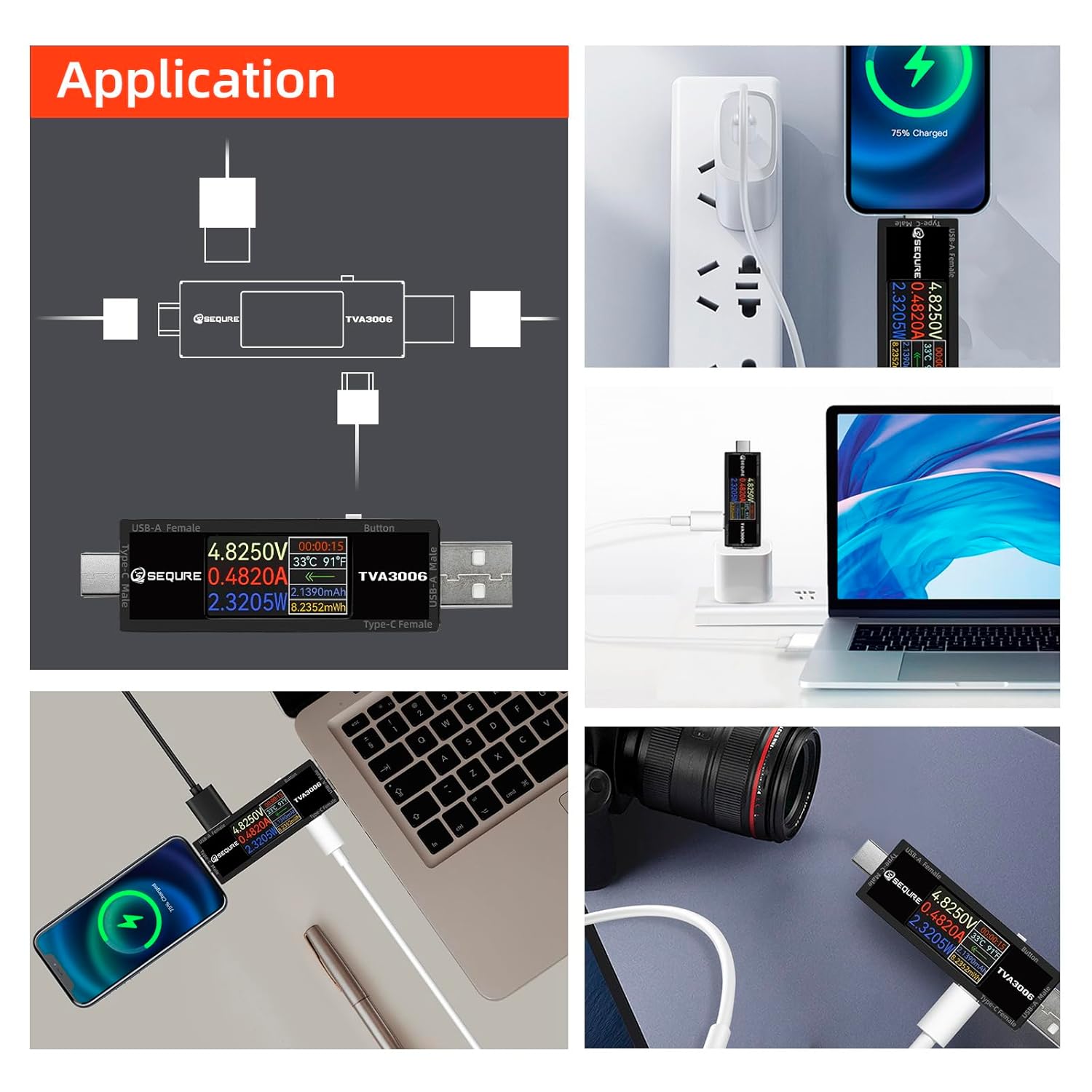
الشكل 4: مثالamples of how to connect and use the TVA3006 in different application scenarios.
4. تعليمات التشغيل
The TVA3006 features a user-friendly interface and a single button for navigation.
4.1 واجهة العرض الرئيسية
Upon connection, the main interface displays the following real-time parameters:
- المجلدtagه (الخامس): المجلد الحاليtagالقراءة الإلكترونية.
- التيار (أ): حاضِر ampقراءة erage.
- القدرة (واط): Calculated power consumption.
- Work Timekeeping: Duration of the current measurement session.
- درجة حرارة: درجة الحرارة الداخلية للجهاز.
- Direction of Current: Indication of current flow direction.
- Quantity of Electricity (mAh/mWh): Accumulated charge and energy.
- السعة: Measured capacitance.

Figure 5: Main display interface and data statistics interface.
4.2 Data Statistics Interface
The tester automatically records and displays statistical data:
- البيانات في الوقت الحقيقي: Current live readings.
- Maximum Value (Max): Highest recorded voltagه ، التيار ، والقوة.
- Average Value (Ave): متوسط المجلدtage, current, and power over the measurement period.
- Minimum Value (Min): Lowest recorded voltagه ، التيار ، والقوة.
4.3 زر التشغيل
The single button on the side of the tester allows for display control:
- الصحافة القصيرة: Cycles through different display screens (e.g., main interface, data statistics).
- ضغطة طويلة: Flips the display orientation. This is useful when the tester is inserted in a way that makes the screen difficult to read, allowing you to view data in the forward direction.
4.4 ترقية البرامج الثابتة
The TVA3006 supports firmware upgrades to enhance functionality and improve performance. Connect the tester to a computer via its Type-C port and follow the instructions provided by SEQURE for the upgrade process.
![SEQURE USB Tester connected to a laptop via a Type-C cable, with the screen displaying 'UPDATE V15.00 [READY]', indicating firmware upgrade support.](https://m.media-amazon.com/images/S/aplus-media-library-service-media/68511f6e-bebc-4637-99ff-d7c8e1db7505.__CR0,0,970,600_PT0_SX970_V1___.jpg)
Figure 6: The TVA3006 supporting data transmission and firmware upgrades.
4.5 Important Note on PD Measurement
For Power Delivery (PD) measurement, a load connection is required for data to be displayed on the screen. For other protocols, a load connection is not necessary for basic data display.

Figure 7: High precision calibration and note on PD measurement requirements.
5. الصيانة
To ensure the longevity and optimal performance of your SEQURE TVA3006 USB Tester:
- احفظ الجهاز جافًا وبعيدًا عن الرطوبة.
- Clean the screen and body with a soft, dry cloth. Avoid using abrasive cleaners or solvents.
- Store the tester in a cool, dry place when not in use.
- تجنب إسقاط الجهاز أو تعريضه لصدمات قوية.
6. استكشاف الأخطاء وإصلاحها
- لا يوجد عرض: Ensure the tester is properly connected to a power source and a device. Check if the power source is active.
- قراءات غير دقيقة: Verify that all connections are secure. Ensure the device being tested is functioning correctly. If testing PD, confirm a load is connected.
- Screen Not Flipping: Ensure you are performing a long press on the button. A short press will cycle through display modes.
7. المواصفات

Figure 8: Detailed product parameters for the TVA3006.
| المعلمة | قيمة |
|---|---|
| اسم الموديل | TVA3006 |
| المجلدtage المدى | العاصمة 4.5-30V |
| النطاق الحالي | 0-15A (Continuous 6A) |
| واجهة مواصفات | USB-A و Type-C |
| المجلدtagدقة القياس | ±0.01 فولت |
| دقة القياس الحالية | ± 0.01 أمبير |
| مواصفات الشاشة | 1.14" IPS LCD |
| طرق الرصد | المرور عبر |
| Monitoring Content | المجلدtage, Current, Power, Work Timekeeping, Temperature, Current Direction, Capacitance, Quantity of Electricity |
| Adjustable Display Direction | يدعم |
| إحصائيات البيانات | يدعم |
| ترقية البرامج الثابتة | يدعم |
| Dimension of Host | 80 × 20 × 14 ملم (3.14 × 0.78 × 0.55 بوصة) |
| وزن المضيف | 18 جرام (0.62 أونصات) |
8. الضمان والدعم
The SEQURE TVA3006 USB Tester comes with a 90-day warranty. If you encounter any issues or are unsatisfied with the product for any reason, please contact SEQURE customer support. We are committed to resolving your concerns within 24 hours.


