مقدمة
This manual provides comprehensive instructions for the W26 Pro Max Smart Watch with Bluetooth Earphones. It covers setup, operation, maintenance, and troubleshooting to ensure optimal use of your device. The W26 Pro Max is a versatile 2-in-1 device, combining a smartwatch with integrated wireless Bluetooth earphones, designed to keep you connected and active.
محتويات الحزمة
عند فتح العبوة، يرجى التأكد من وجود جميع المكونات:
- W26 Pro Max Smart Watch
- Integrated Wireless Bluetooth Earphones
- كابل الشحن
- دليل المستخدم (هذا المستند)
- Additional Watch Strap (if included as a free gift)

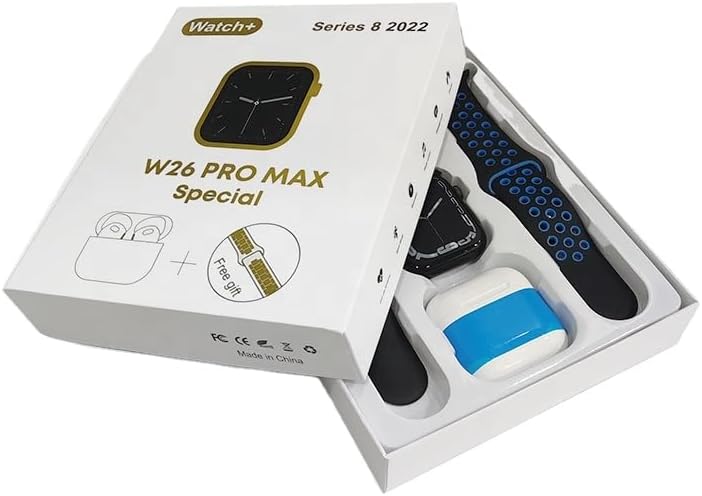
Image: The W26 Pro Max Smart Watch and its accompanying Bluetooth earphones, along with an extra watch strap, are neatly arranged within their retail packaging. The watch face is visible, and the earphones are housed in their charging case.

الصورة: من أعلى إلى أسفل view of the W26 Pro Max Smart Watch and Bluetooth Earphones within their packaging. The watch, earphones, and an additional strap are clearly visible, indicating the complete product set.
دليل الإعداد
1. الشحن الأولي
Before first use, fully charge both the smartwatch and the integrated earphones. Connect the provided charging cable to the watch and a compatible USB power source. The watch display will indicate charging status. Ensure the earphones are properly seated in their charging case within the watch.
2. تشغيل / إيقاف التشغيل
- تشغيل الطاقة: Press and hold the side button on the smartwatch until the screen illuminates.
- إيقاف التشغيل: Press and hold the side button, then select the "Power Off" option on the screen.
3. الاقتران بهاتفك الذكي
To unlock full functionality, pair your W26 Pro Max with your smartphone via Bluetooth.
- تأكد من تمكين Bluetooth على هاتفك الذكي.
- On the W26 Pro Max, navigate to the Bluetooth settings.
- On your smartphone, search for available Bluetooth devices and select "W26 Pro Max" from the list.
- Confirm the pairing request on both devices if prompted.
- For optimal performance, download and install the recommended companion application (e.g., "FitPro app" as mentioned in product description) from your smartphone's app store.
4. Earphone Pairing
The integrated earphones automatically pair with the smartwatch when removed from their charging slots. To pair them with another device (e.g., directly with your phone):
- Remove the earphones from the smartwatch.
- قم بتمكين Bluetooth على الجهاز الذي ترغب في الاقتران به.
- بحث عن "W26 Pro Max Earphones" (or similar name) in the Bluetooth device list and select to connect.
تعليمات التشغيل
Navigating the Smartwatch
- شاشة تعمل باللمس: اسحب لليسار/اليمين، وللأعلى/للأسفل للتنقل بين القوائم والوصول إلى الميزات. انقر للاختيار.
- زر جانبي: Press to return to the home screen or wake the device. Long press for power options or voice assistant.
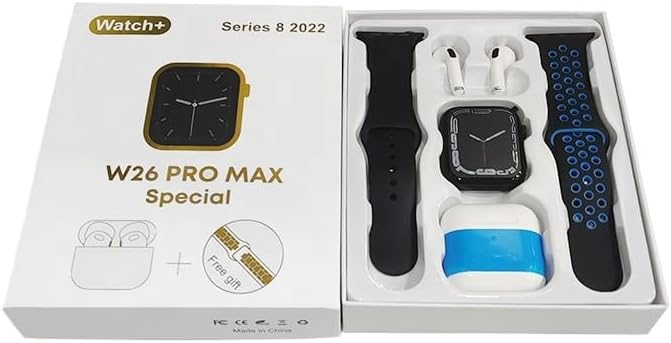
Image: The W26 Pro Max Smart Watch screen shows a voice assistant interface, with text bubbles indicating "Call Linda!" and "What's the weather like today?". This illustrates the voice command functionality.
الميزات الرئيسية
تتبع اللياقة البدنية والصحة
The W26 Pro Max is equipped with sensors to monitor various health metrics.
- رصد معدل ضربات القلب: The optical heart rate sensor continuously tracks your heart rate. View real-time data on the watch or in the companion app.
- عداد الخطى: يتتبع خطواتك اليومية والمسافة والسعرات الحرارية المحروقة.
- تتبع النوم: يراقب أنماط نومك، بما في ذلك النوم العميق والنوم الخفيف وأوقات الاستيقاظ.

Image: The W26 Pro Max Smart Watch screen displays heart rate information, showing a graph of heart rate over time, current beats per minute (bpm), and blood pressure readings. This demonstrates the health monitoring capabilities.
الصورة: تفصيلية view of the W26 Pro Max Smart Watch screen showing heart rate and blood pressure monitoring. The text explains that an optical heart rate sensor is used for precise calculation and data can be viewed on the watch or via the FitPro app.
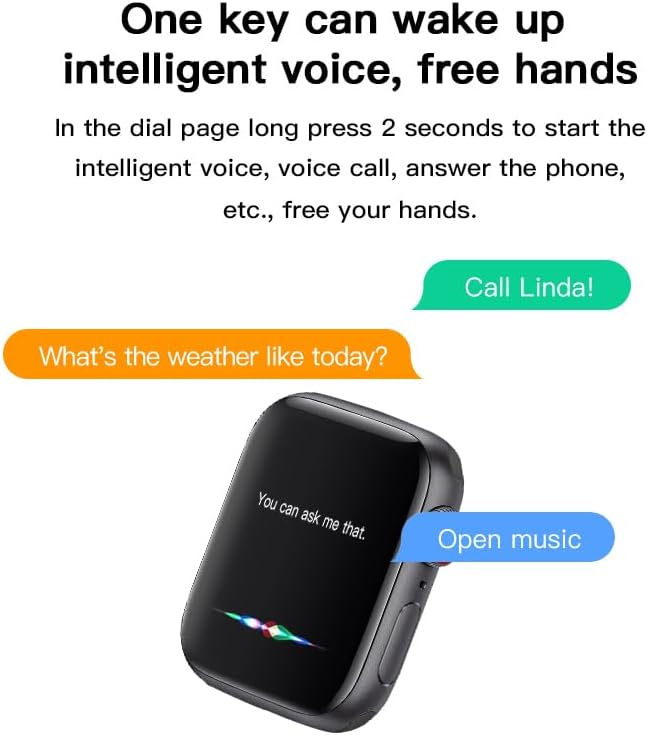
Image: The W26 Pro Max Smart Watch screen displays sleep monitoring data, showing sleep quality (Excellent), percentages of deep sleep, light sleep, and awake time, along with total sleep duration. This highlights the sleep tracking feature.
الاتصالات والإعلام
- مكالمات بلوتوث: Make and receive calls directly from your smartwatch using the integrated microphone and speaker.
- إشعارات: تلقي تنبيهات للمكالمات والرسائل وإشعارات التطبيقات من هاتفك الذكي المقترن.
- تشغيل الموسيقى: Control music playing on your smartphone or listen directly via the integrated earphones.

Image: The W26 Pro Max Smart Watch screen shows music playback controls, including play/pause and skip track buttons, along with a visualizer. This indicates the watch's capability to control audio.
مساعد صوتي
Long press the side button to activate the intelligent voice assistant. Use voice commands for calls, weather inquiries, music control, and more, providing hands-free operation.
الصيانة والعناية
- تنظيف: Wipe the watch and earphones with a soft, dry, lint-free cloth. For stubborn dirt, slightly dampاغسل القماش بالماء. تجنب المواد الكيميائية القاسية أو المواد الكاشطة.
- مقاومة الماء: The W26 Pro Max has an IP68 rating, meaning it is resistant to dust and can withstand immersion in water up to 1.5 meters for 30 minutes. However, it is not suitable for diving, hot showers, or saunas. Always dry the device thoroughly after exposure to water.
- العناية بالبطارية: To prolong battery life, avoid fully discharging the device frequently. Charge it regularly and store it in a cool, dry place when not in use for extended periods.
- تخزين: قم بتخزين الجهاز في بيئة باردة وجافة بعيدًا عن أشعة الشمس المباشرة ودرجات الحرارة القصوى.
استكشاف الأخطاء وإصلاحها
| مشكلة | السبب المحتمل | حل |
|---|---|---|
| الجهاز لا يعمل. | بطارية منخفضة. | Charge the device for at least 30 minutes before attempting to power on again. |
| لا يمكن الاقتران بالهاتف الذكي. | Bluetooth is off on phone/watch; device not in pairing mode; interference. | Ensure Bluetooth is enabled on both devices. Restart both devices. Move closer to the phone. Forget previous pairings and try again. |
| Earphones not connecting. | Earphones not properly seated; low earphone battery. | Ensure earphones are fully seated in their charging slots within the watch. Charge the watch to ensure earphones are charging. |
| بيانات صحية غير دقيقة. | عدم ملاءمة المنتج؛ انسداد المستشعر. | تأكد من أن الساعة مُحكمة على معصمك، ليست ضيقة جدًا ولا واسعة جدًا. نظّف المستشعر الموجود على ظهر الساعة. |
| عمر البطارية قصير. | Frequent use of power-intensive features; old battery. | Reduce screen brightness, limit notifications, disable unnecessary features. Ensure full charge cycles. |
تحديد
| ميزة | التفاصيل |
|---|---|
| رقم الموديل | W26 Pro Max |
| عرض | شاشة لمس AMOLED مقاس 1.78 بوصة |
| نظام التشغيل | ارتداء نظام التشغيل |
| الاتصال | بلوتوث |
| سعة البطارية | 280mAh (watch) |
| عمر البطارية | مدة تصل إلى 3 أيام (للاستخدام المعتاد) |
| مقاومة الماء | IP68 |
| المميزات الخاصة | Integrated Bluetooth Earphones, Heart Rate Sensor, Pedometer, Sleep Tracker, Microphone, Speaker, Voice Assistant |
| سعة تخزين الذاكرة | 16 ميجا بايت |
| أبعاد الحزمة | 16.8 × 12.8 × 3 سم |
| وزن | 170 جرام |
الضمان والدعم
For information regarding warranty coverage and customer support, please refer to the documentation provided with your purchase or contact the retailer where the product was acquired. As this product is manufactured by "Generic", specific warranty details may vary by region and seller.
For technical assistance or further inquiries, please reach out to the customer service channels provided by your point of purchase.


