
مقدمة
Thank you for choosing the XHDATA R-9012 AM/FM/SW 12 Bands Shortwave Radio Receiver. This compact and portable radio is designed to provide reliable reception across multiple frequency bands, including FM, AM, and 12 Shortwave bands. This manual provides detailed instructions for the proper setup, operation, and maintenance of your new radio. Please read it thoroughly before use to ensure optimal performance and longevity of your device.
المنتج انتهىview
المميزات الرئيسية:
- استقبال متعدد النطاقات: FM (76-108MHz), AM (525-1620KHz), SW (3.7-21.85MHz).
- صغير الحجم وقابل للحمل: Dimensions of 80 x 126 x 28 mm (3.1 x 5.0 x 1.1 inches) for easy transport.
- Analog Tuning: Features a tuning dial for straightforward frequency selection.
- يعمل بالبطارية: Requires AA batteries (not included) for power.
- هوائي مدمج: Telescopic antenna for enhanced reception.
تحديد المكون:

الشكل 1: أمام view of the XHDATA R-9012 radio with labeled components.
- LED Indicator for Tuning: Illuminates to indicate successful tuning.
- Stand (rear): Fold-out stand for upright positioning.
- Telescopic Antenna for SW/FM: Extendable antenna for improved signal reception on FM and Shortwave bands.
- موجة الضبط: Used to select the desired frequency.
- Frequency Tuning Dial Scale Display: Visual display of the selected frequency band.
- مفتاح تشغيل / إيقاف التشغيل: Toggles the radio's power.
- Band Selector (FM/MW/SW 1-10): Slide switch to choose between FM, AM (MW), and various Shortwave bands.
- مؤشر النطاق: Displays the currently selected band.
- Battery Compartment (rear): Location for AA batteries.
- جاك DC: For external power adapter (not included).
- مدخل سماعة الأذن: مخرج صوت 3.5 ملم لسماعات الرأس.
- مقبض الصوت: يضبط مستوى إخراج الصوت.
- حزام اليد: لسهولة الحمل.
يثبت
1. تركيب البطارية:
The XHDATA R-9012 radio operates on AA batteries (not included).
- Locate the battery compartment on the rear of the radio (Component 9 in Figure 1).
- حرك غطاء حجرة البطارية لفتحه.
- Insert the required number of AA batteries, ensuring correct polarity (+ and - terminals) as indicated inside the compartment. Incorrect battery insertion can prevent the radio from functioning.
- أغلق غطاء حجرة البطارية جيدًا.
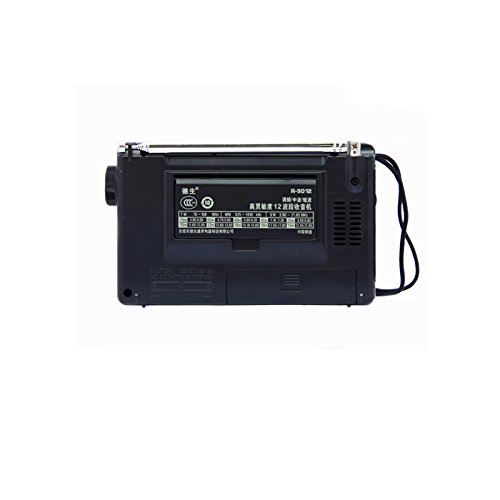
الشكل 2: مؤخرة view of the radio, highlighting the battery compartment.
2. التشغيل الأولي:
After installing batteries, slide the Power On/Off switch (Component 6 in Figure 1) to the "ON" position. The radio should power on.
تعليمات التشغيل
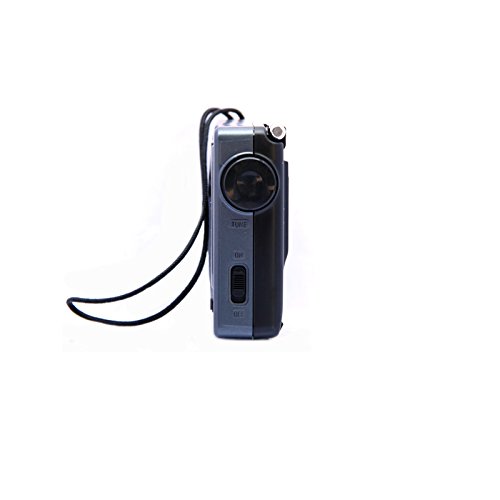
الشكل 3: جانب view of the radio, illustrating the power switch, tuning knob, and earphone jack.
1. تشغيل / إيقاف تشغيل الطاقة:
To turn the radio on, slide the Power On/Off switch (Component 6) to the "ON" position. To turn it off, slide the switch to the "OFF" position.
2. ضبط الحجم:
Rotate the Volume Knob (Component 12) to increase or decrease the audio output level.
3. Selecting a Band:
Use the Band Selector slide switch (Component 7) to choose your desired frequency band:
- وزير الخارجية: For local FM broadcasts.
- صباحا (ميغاواط): For local AM broadcasts.
- SW 1-10: For various Shortwave bands.
4. ضبط المحطة:
Once a band is selected:
- For FM and Shortwave reception, extend the Telescopic Antenna (Component 3) fully for optimal signal. For AM reception, the internal antenna is typically sufficient, but rotating the radio may improve reception.
- Slowly rotate the Tuning Knob (Component 4) to scan through frequencies.
- Observe the Frequency Tuning Dial Scale Display (Component 5) to identify the frequency.
- The LED Indicator for Tuning (Component 1) will illuminate when a strong signal is received, indicating successful tuning to a station.

الشكل 4: مفصل view of the tuning dial and frequency scale.
5. Using Earphones:
Plug standard 3.5mm earphones into the Earphone Jack (Component 11) for private listening. The internal speaker will automatically mute when earphones are connected.
صيانة
- تنظيف: امسح الراديو بقطعة قماش ناعمة وجافة. لا تستخدم المنظفات الكاشطة أو المذيبات.
- العناية بالبطارية: قم بإزالة البطاريات إذا لم يتم استخدام الراديو لفترة طويلة لمنع التسرب.
- تخزين: قم بتخزين الراديو في مكان بارد وجاف بعيدًا عن أشعة الشمس المباشرة ودرجات الحرارة القصوى.
- الهوائي: Handle the telescopic antenna gently to avoid bending or breaking. Retract it when not in use.
استكشاف الأخطاء وإصلاحها
| مشكلة | السبب المحتمل | حل |
|---|---|---|
| الراديو لا يعمل. |
|
|
| ضعف الاستقبال أو وجود تشويش. |
|
|
| لا يوجد صوت من مكبر الصوت. |
|
|
تحديد
- ماركة: XHDATA
- رقم الموديل: ر-9012
- نطاق التردد:
- FM: 76-108 ميجا هرتز
- AM (MW): 525-1620 KHz
- SW: 3.7-21.85 MHz (12 Bands)
- حساسية:
- FM: <5uV
- MW: <1mV/m
- SW: <50uV
- مزود الطاقة: AA Battery Operated (Batteries not included)
- أبعاد المنتج: 12.6L x 2.8W x 8H Centimeters (approximately 3.1 x 5.0 x 1.1 inches)
- وزن: حوالي 200 جرام
- مادة: بلاستيك
- الاتصال: 3.5mm Audio Jack (for earphones)
- ميزة خاصة: محمول
الضمان والدعم
This product comes with a standard manufacturer's warranty. Please refer to the packaging or your point of purchase for specific warranty terms and conditions. For technical support or inquiries, please contact the retailer or XHDATA customer service.
For further assistance, you may also refer to the official XHDATA webالموقع أو الاتصال بقنوات الدعم الخاصة بهم.