
1. المقدمة
Thank you for choosing the VOLT PLUS TECH Dual USB-C + MicroUSB Switch Cable. This versatile cable is designed to provide efficient charging and high-speed data transfer for a wide range of devices, featuring both Micro USB and USB-C connectors. This manual provides essential information for setup, operation, maintenance, and troubleshooting to ensure optimal performance of your cable.
2. الميزات الرئيسية
- التوافق العالمي: Equipped with both Micro USB and USB-C connectors, ensuring compatibility with a vast majority of modern devices.
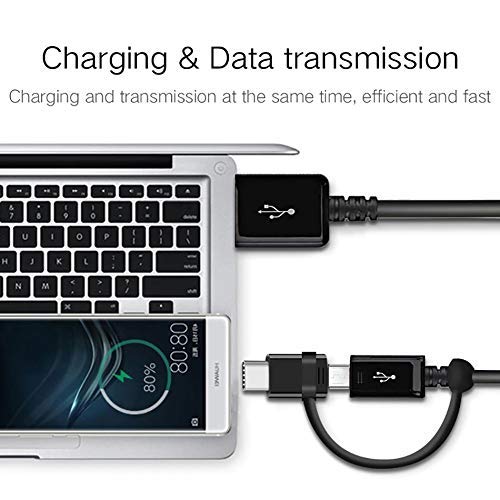
- وظيفة مزدوجة: Supports both power delivery for charging and high-speed data transmission simultaneously.
- دعم الشحن السريع: Engineered to support various fast charging technologies, including Quick Charge (QC 3.0/2.0/1.0) and Power Delivery (PD) up to 25W, for compatible devices.
- نقل البيانات بسرعة عالية: Utilizes USB 3.1 technology for rapid data synchronization between your device and computer.
- بناء متين: Built with premium materials and advanced engineering for enhanced durability and a long lifespan, designed to withstand daily use.
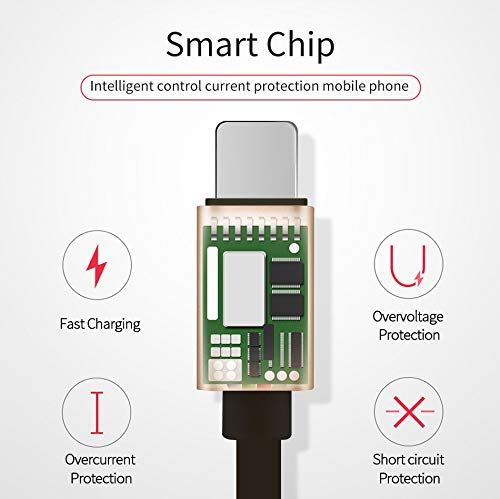
- Integrated Smart Chip: Features an intelligent circuit system for automatic device recognition and protection against overcharging, overcurrent, overvoltagه، والدوائر القصيرة.

3. تعليمات الإعداد
Follow these steps to connect your VOLT PLUS TECH Dual USB-C + MicroUSB Switch Cable:
- تحديد موصل الجهاز: Determine whether your device requires a Micro USB or a USB-C connection. The cable features a switch tip design where the USB-C connector attaches over the Micro USB connector.
- الاتصال بالجهاز: Gently insert the appropriate connector (Micro USB or USB-C) into your device's charging/data port. Ensure a secure fit.
- الاتصال بمصدر الطاقة أو الكمبيوتر: Insert the standard USB-A end of the cable into a compatible USB power adapter for charging, or into a USB port on your computer for both charging and data transfer.

4. تشغيل الكابل
4.1 شحن جهازك
Once connected as described in the Setup section, your device will begin charging. The cable supports fast charging when paired with a compatible fast charger and a device that supports fast charging protocols.
4.2 نقل البيانات
لنقل البيانات بين جهازك وجهاز الكمبيوتر:
- قم بتوصيل طرف USB-A من الكابل بمنفذ USB الخاص بجهاز الكمبيوتر.
- Connect the appropriate Micro USB or USB-C end to your mobile device.
- Your computer should recognize the connected device. You may need to select a 'File Transfer' or 'MTP' mode on your mobile device if prompted.
- You can now access your device's storage to copy files, photos, or videos. The cable's USB 3.1 support ensures efficient transfer speeds.
5. الرعاية والصيانة
To ensure the longevity and optimal performance of your cable, please observe the following guidelines:
- تخزين: Store the cable in a clean, dry environment away from direct sunlight and extreme temperatures.
- التعامل: تجنب ثني الكابل أو لفه أو سحبه بشكل مفرط، خاصة بالقرب من الموصلات، لمنع حدوث تلف داخلي.
- تنظيف: إذا لزم الأمر، امسح الكابل والموصلات برفق بقطعة قماش ناعمة وجافة. لا تستخدم المنظفات السائلة أو المواد الكاشطة.
- حماية: Do not expose the cable to water or other liquids.

6. استكشاف الأخطاء وإصلاحها
If you encounter issues with your cable, please refer to the following common problems and solutions:
- الجهاز لا يشحن:
- Ensure both ends of the cable are securely plugged into the device and the power source.
- Verify that the power adapter or USB port is functional by testing with another cable or device.
- تحقق من منفذ شحن جهازك بحثًا عن أي شوائب أو تلف.
- الشحن البطيء:
- Confirm that your power adapter supports fast charging (e.g., QC 3.0, PD) and provides sufficient wattage.
- Ensure your device itself is compatible with fast charging technology.
- مشاكل نقل البيانات:
- Make sure the cable is firmly connected to both your device and computer.
- On your mobile device, check if you have selected the correct USB connection mode (e.g., 'File Transfer' or 'MTP') when prompted.
- حاول توصيل الكابل بمنفذ USB مختلف على جهاز الكمبيوتر الخاص بك.
7. المواصفات
| ماركة | فولت بلس تك |
| رقم الموديل | في بي تي-2074 |
| نوع الموصل | مايكرو يو اس بي، يو اس بي نوع ايه، يو اس بي نوع سي |
| نوع الكابل | USB Type-C / MicroUSB to USB-A |
| الأجهزة المتوافقة | Android, iOS, Mac, Vivo Xplay5 Elite, Windows devices |
| المميزات الخاصة | Digital IC Chip, Heavy Duty, Lightweight, Multi-Functional, Tangle Free Cord |
| أبعاد الحزمة | 2 × 0.3 × 0.3 بوصة |
| وزن العنصر | 1.4 أونصات |

8. معلومات الضمان
For detailed warranty information regarding your VOLT PLUS TECH Dual USB-C + MicroUSB Switch Cable, please refer to the documentation included with your purchase or visit the official VOLT PLUS TECH webقد تختلف شروط وأحكام الضمان.
9. دعم العملاء
If you require further assistance or have questions not covered in this manual, please contact VOLT PLUS TECH customer support through their official website or the retailer from whom you purchased the product. Please have your model number (VPT-2074) and purchase details ready when contacting support.