
مقدمة
This manual provides comprehensive instructions for the ProtoArc EK01 Plus Ergonomic Wireless Backlit Keyboard. Please read this guide carefully to ensure proper setup, operation, and maintenance of your device. Keep this manual for future reference.
محتويات الحزمة
تأكد من وجود جميع العناصر في العبوة:
- ProtoArc EK01 Plus Ergonomic Wireless Backlit Keyboard
- مسند المعصم
- كابل شحن USB-C
- جهاز استقبال يو اس بي 2.4 جيجا
- دليل المستخدم
المنتج انتهىview
The ProtoArc EK01 Plus is a full-size ergonomic keyboard designed to enhance typing comfort and reduce muscle strain. Its split and curved keyframe design promotes a natural hand and wrist posture.
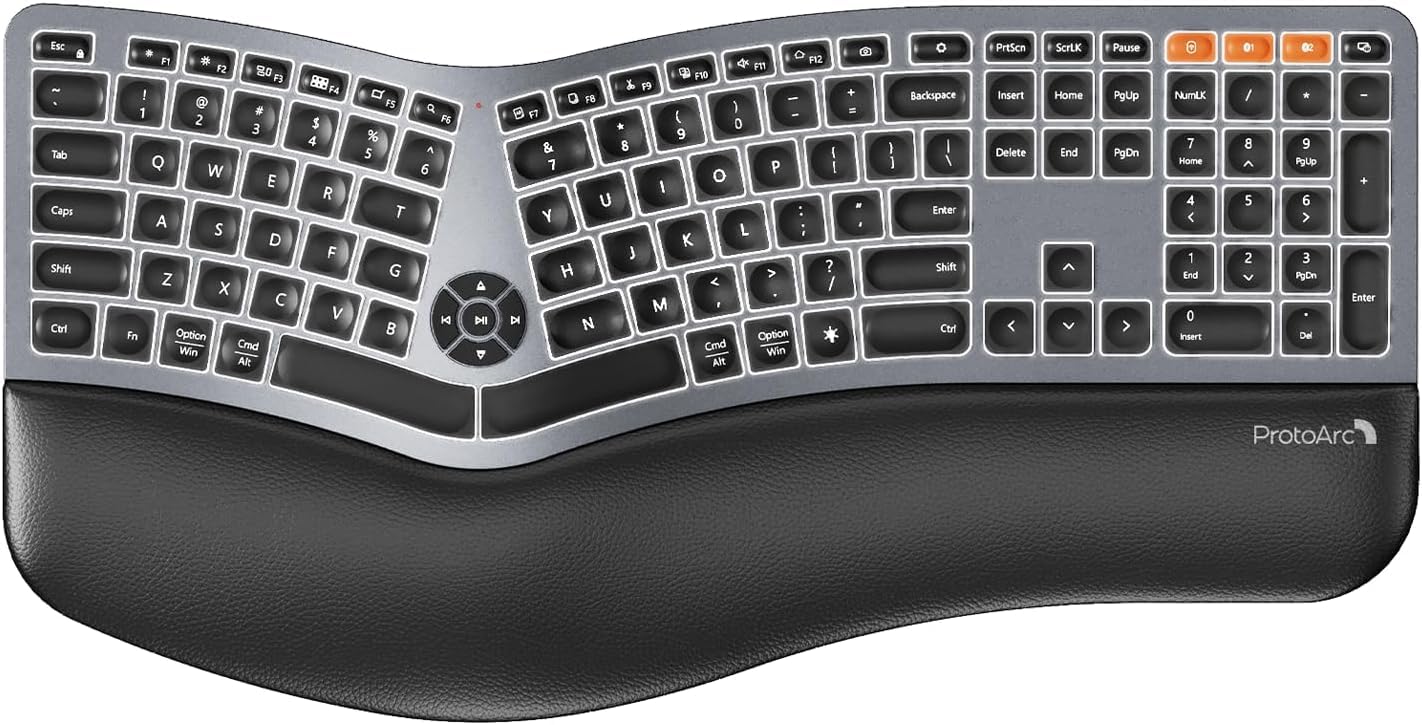
Image 1: ProtoArc EK01 Plus Ergonomic Wireless Backlit Keyboard. This image displays the full keyboard with its split design, integrated wrist rest, and key layout.
المميزات الرئيسية:
- Ergonomic Full-Size Design: Features a split, curved keyframe and integrated wrist rest to minimize muscle fatigue and promote proper posture.
- Adjustable Tilt Feet: Four adjustable tilt feet allow customization of the keyboard angle for optimal comfort.
- Adjustable Backlighting: Soft white LED backlighting with three adjustable brightness levels (low-medium-high) for comfortable typing in various lighting conditions.
- الاتصال بأجهزة متعددة: Connects to up to three devices simultaneously via Bluetooth and 2.4G USB. Easily switch between devices with a dedicated key.
- USB-C قابلة للشحن: Equipped with a 2000 mAh rechargeable lithium battery for extended use.
- وضع السكون التلقائي: Enters sleep mode after 60 minutes of inactivity to conserve power, waking up within 3 seconds upon key press.
- التوافق: Widely compatible with Windows 7/8/10, Mac OS X 10.12 or higher, and Android 4.3 or higher.
يثبت
1. شحن لوحة المفاتيح
- حدد موقع منفذ الشحن USB-C الموجود على لوحة المفاتيح.
- Connect the provided USB-C cable to the keyboard and the other end to a USB power source (e.g., computer USB port, wall adapter).
- سيضيء مؤشر الشحن. بعد اكتمال الشحن، قد يتغير لونه أو ينطفئ.
2. الاتصال بالأجهزة
The keyboard supports both 2.4G USB and Bluetooth connectivity.
2.1. 2.4G USB Connection
- Locate the 2.4G USB receiver (dongle). It is usually stored in a compartment on the keyboard or in the packaging.
- قم بتوصيل مستقبل USB بمنفذ USB متاح على جهاز الكمبيوتر الخاص بك.
- قم بتشغيل لوحة المفاتيح باستخدام مفتاح الطاقة.
- يجب أن تتصل لوحة المفاتيح بجهازك تلقائيًا.
2.2. اتصال بلوتوث (حتى جهازين)
- قم بتشغيل لوحة المفاتيح.
- Press and hold one of the Bluetooth channel keys (e.g., بي تي 1, بي تي 2، أو بي تي 3) for 3-5 seconds until the indicator light flashes, indicating pairing mode.
- على جهازك (الكمبيوتر، الجهاز اللوحي، الهاتف الذكي)، قم بتمكين البلوتوث والبحث عن أجهزة جديدة.
- Select "ProtoArc EK01 Plus" (or similar name) from the list of available devices.
- اتبع التعليمات التي تظهر على الشاشة لإكمال عملية الاقتران. سيتوقف ضوء المؤشر عن الوميض بمجرد الاتصال.
- Repeat these steps for up to two additional Bluetooth devices using the other Bluetooth channel keys.
عملية
1. التبديل بين الأجهزة
To switch between connected devices, simply press the corresponding connection key:
- يضعط 2.4 جيجا to switch to the device connected via the USB receiver.
- يضعط بي تي 1 to switch to the first Bluetooth device.
- يضعط بي تي 2 to switch to the second Bluetooth device.
- يضعط بي تي 3 to switch to the third Bluetooth device.
2. ضبط الإضاءة الخلفية
The keyboard features a soft white LED backlight with three brightness levels.
- To cycle through brightness levels (low, medium, high, off), press the dedicated backlight key (refer to keyboard layout for specific key).
3. Sleep Mode and Power Saving
To conserve battery life, the keyboard will automatically enter sleep mode after 60 minutes of inactivity. To wake the keyboard, press any key. The keyboard will be ready for use within 3 seconds.
4. إمكانية تعديل الميل
The keyboard includes four adjustable tilt feet. Extend or retract these feet to customize the typing angle to your preference, ensuring comfortable wrist positioning whether sitting or standing.
صيانة
1. تنظيف لوحة المفاتيح
- افصل لوحة المفاتيح عن جميع الأجهزة ومصادر الطاقة قبل التنظيف.
- استخدم قطعة قماش ناعمة وخالية من الوبر وامسحها برفق.ampاغسل سطح لوحة المفاتيح بالماء أو بمحلول تنظيف خفيف.
- Avoid using harsh chemicals, abrasive cleaners, or solvents, as these can damage the keyboard's finish.
- لتنظيف ما بين المفاتيح، استخدم الهواء المضغوط لإزالة الغبار والحطام.
2. العناية بالبطارية
- اشحن لوحة المفاتيح بانتظام للحفاظ على صحة البطارية.
- تجنب تفريغ البطارية بالكامل بشكل متكرر.
- If storing the keyboard for an extended period, charge it to approximately 50% before storage.
استكشاف الأخطاء وإصلاحها
| مشكلة | السبب المحتمل | حل |
|---|---|---|
| لوحة المفاتيح لا تستجيب | Low battery; Keyboard off; Incorrect connection mode; USB receiver not plugged in (2.4G); Bluetooth not paired. | Charge the keyboard; Turn on the keyboard; Switch to the correct connection mode (2.4G, BT1/2/3); Ensure USB receiver is securely plugged in; Re-pair Bluetooth. |
| تأخر أو تأخير في الإدخال | التداخل؛ المسافة من جهاز الاستقبال/الجهاز؛ انخفاض مستوى البطارية. | Move closer to the receiver/device; Ensure no strong interference sources nearby; Charge the keyboard. |
| الإضاءة الخلفية لا تعمل | تم إيقاف تشغيل الإضاءة الخلفية؛ انخفاض مستوى البطارية. | Press the backlight key to adjust brightness; Charge the keyboard. |
| لا يمكن الاتصال عبر البلوتوث | Keyboard not in pairing mode; Device Bluetooth off; Already connected to 3 devices. | Ensure keyboard is in pairing mode (flashing indicator); Enable Bluetooth on your device; Disconnect from an existing Bluetooth device if maximum reached. |
تحديد
| ماركة | بروتوآرك |
| رقم الموديل | EK01 بلس |
| تكنولوجيا الاتصال | بلوتوث، منفذ USB بسرعة 2.4 جيجا هرتز |
| وصف لوحة المفاتيح | Ergonomic, Full Size, Split Design |
| المميزات الخاصة | Ergonomic, Full Size, Wrist Rest, Backlit, Rechargeable |
| لون | رمادي فضائي |
| دعم ألوان الإضاءة الخلفية | Monochromatic (White LED) |
| مادة | بلاستيك |
| مصدر الطاقة | Battery Powered (2000 mAh Lithium Battery) |
| نوع المفتاح | غشاء |
| تخطيط لوحة المفاتيح | QWERTY (UK layout for this variant) |
| عدد المفاتيح | 117 |
| الأجهزة المتوافقة | Laptop, PC, Tablet, Windows/Mac/Android |
| وزن العنصر | 1.6 كيلوغرام |
| الأبعاد (تقريبًا) | 48 سم (الطول) × 25 سم (العرض) |
الضمان والدعم
For warranty information and technical support, please refer to the ProtoArc official website or contact their customer service. Details are typically provided on the product packaging or the official brand store.
ProtoArc Official Store: Visit ProtoArc Store on Amazon