
1. المقدمة
This manual provides essential information for the safe and effective operation of your Mastech MS8301A Digital Multimeter. Please read this manual thoroughly before using the device to ensure proper functionality and to prevent potential hazards. Keep this manual for future reference.
2. معلومات السلامة
Always adhere to the following safety precautions to avoid electric shock or personal injury, and to prevent damage to the multimeter or the equipment under test.
- اقرأ التعليمات: Understand all instructions and safety information before use.
- تصنيف المجلدtage: لا تستخدم أكثر من الحجم المقدرtage، كما هو موضح على جهاز القياس المتعدد، بين الأطراف أو بين أي طرف والأرض.
- يؤدي الاختبار: افحص أسلاك الاختبار بحثًا عن أي تلف في العزل أو وجود معدن مكشوف. استبدلها إذا كانت تالفة.
- Circuit Disconnection: Disconnect the circuit power and discharge all high-voltagالمكثفات قبل اختبار المقاومة أو الاستمرارية أو الثنائيات أو السعة.
- اختيار الوظيفة: تأكد من أن مفتاح الوظيفة في الوضع الصحيح للقياس الذي يتم إجراؤه.
- الدوائر الحية: Do not measure current on a live circuit with the test leads connected in parallel.
- بيئة التشغيل: Do not operate the multimeter in explosive gas, vapor, or damp البيئات.
- معدات الحماية الشخصية: Always wear appropriate personal protective equipment, such as safety glasses, when working with electrical circuits.
- تصنيف السلامة: This device is rated for CAT III 600V. Do not exceed this rating.
3. انتهى المنتجview
3.1 المميزات
The Mastech MS8301A Digital Multimeter offers a range of features for various electrical measurements:
- عرض: 2000 عدد
- امسك المعلومات: Freezes the displayed reading for convenient recording.
- جهاز اختبار البطارية: For 1.5V and 9V batteries.
- تصميم مضغوط: Product Size: 150mm x 74mm x 48mm (5.9" x 2.9" x 1.7")
- خفيف الوزن: Product Weight: 220g (0.48lb)

Image: Detailed features and specifications of the Mastech MS8301A multimeter, including display count, data hold, battery test function, and physical dimensions.
3.2 مكونات
The Mastech MS8301A package typically includes the following components:
- Mastech MS8301A Digital Multimeter Unit
- أسلاك الاختبار (الأحمر والأسود)
- AAA Batteries (2x1.5V)
- Calibration Certificate (if applicable)
- دليل البدء السريع
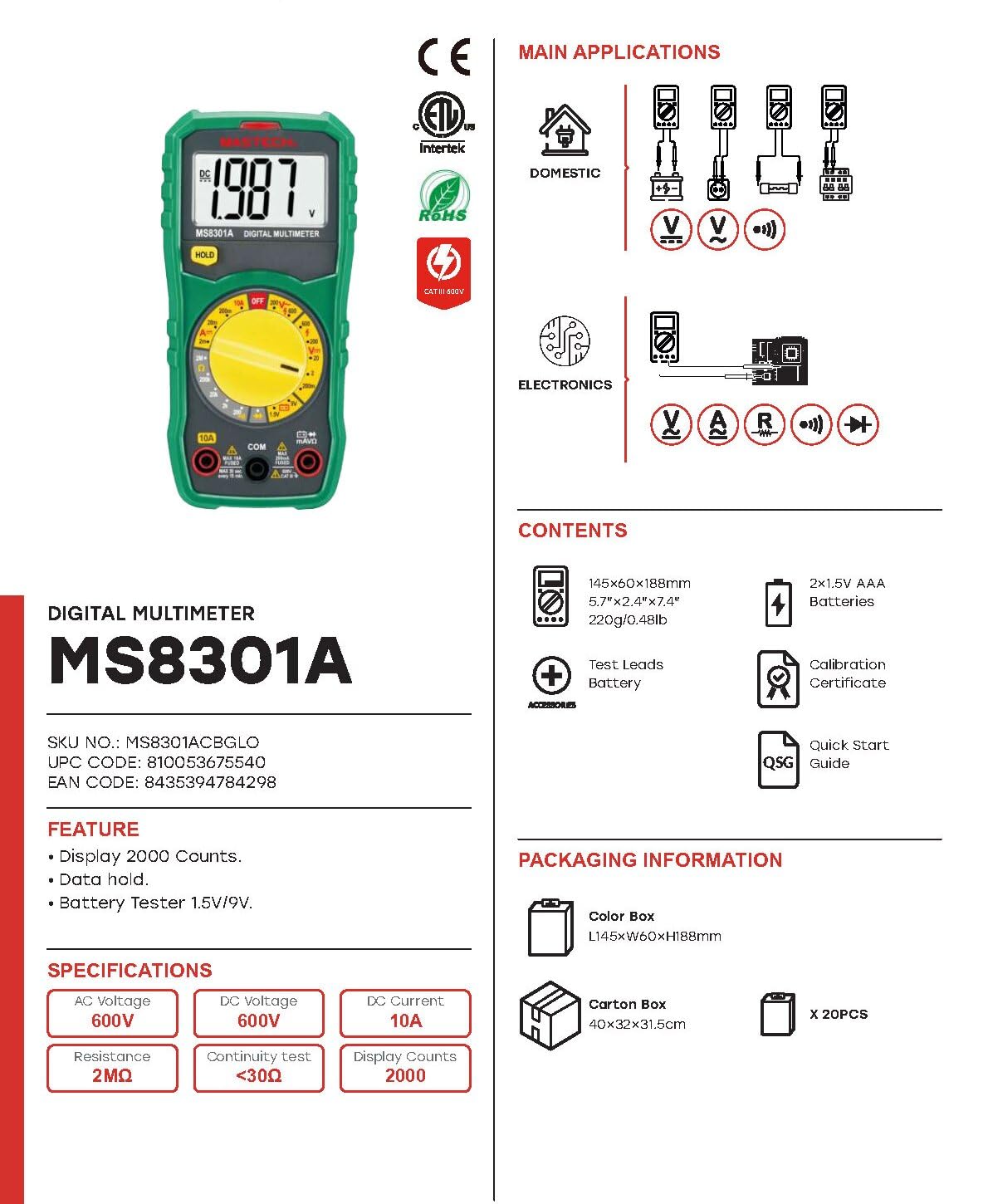
Image: The Mastech MS8301A Digital Multimeter showing its front panel, rotary switch, display, input jacks, and a list of included accessories such as test leads and batteries.
4. الإعداد
4.1 تركيب البطارية
- تأكد من إيقاف تشغيل جهاز القياس المتعدد وفصل أي أسلاك اختبار.
- حدد موقع غطاء حجرة البطارية في الجزء الخلفي من جهاز القياس المتعدد.
- قم بفك البراغي المثبتة وإزالة الغطاء.
- أدخل بطاريتين AAA بجهد 1.5 فولت، مع مراعاة القطبية الصحيحة (+ و -) كما هو موضح داخل الحجرة.
- أعد تركيب غطاء حجرة البطارية وثبته بالبرغي (البراغي).
4.2 توصيل أسلاك الاختبار
قم بتوصيل أسلاك الاختبار بمنافذ الإدخال المناسبة في جهاز القياس المتعدد:
- أدخل أسود الاختبار يؤدي إلى كوم (العادي) جاك.
- بالنسبة لمعظم القياسات (الحجم)tage, Resistance, Diode, Continuity, Temperature, Battery Test), insert the أحمر الاختبار يؤدي إلى VΩmA جاك.
- For high current measurements (up to 10A), insert the أحمر الاختبار يؤدي إلى 10 أمبير جاك.
5. تعليمات التشغيل
قبل إجراء أي قياس، تأكد من توصيل أسلاك الاختبار بشكل صحيح وضبط المفتاح الدوار على الوظيفة المطلوبة.
5.1 قياس حجم التيار المستمرtage (V=)
- Set the rotary switch to the desired V= range (e.g., 20V for measuring up to 20V DC).
- قم بتوصيل سلك الاختبار الأحمر بالجانب الموجب (+) من الدائرة وسلك الاختبار الأسود بالجانب السالب (-).
- اقرأ المجلدtagقيمة البريد على الشاشة.
5.2 قياس حجم التيار المترددtagه (الخامس ~)
- Set the rotary switch to the desired V~ range (e.g., 200V for measuring up to 200V AC).
- قم بتوصيل أسلاك الاختبار عبر جهد التيار المترددtagالمصدر هـ.
- اقرأ المجلدtagقيمة البريد على الشاشة.
5.3 قياس التيار المستمر (A=)
- مهم: Disconnect power to the circuit before connecting the multimeter in series.
- Set the rotary switch to the desired A= range (e.g., 200mA or 10A). Remember to move the red lead to the 10A jack for high current.
- Open the circuit where current is to be measured.
- Connect the multimeter in series with the circuit, ensuring the current flows through the multimeter.
- قم بتوصيل الطاقة بالدائرة واقرأ القيمة الحالية على الشاشة.
5.4 قياس المقاومة (Ω)
- مهم: تأكد من فصل التيار الكهربائي عن الدائرة وتفريغ جميع المكثفات قبل قياس المقاومة.
- Set the rotary switch to the desired Ω يتراوح.
- قم بتوصيل أسلاك الاختبار عبر المكون المراد قياسه.
- اقرأ قيمة المقاومة على الشاشة.
5.5 اختبار الثنائي (→|)
- مهم: تأكد من فصل الصمام الثنائي عن الدائرة.
- اضبط المفتاح الدوار على ملف اختبار الصمام الثنائي موضع.
- قم بتوصيل سلك الاختبار الأحمر بالأنود وسلك الاختبار الأسود بالكاثود للدايود. ستعرض الشاشة جهد التيار الأماميtagه قطرة.
- اعكس أطراف التوصيل. يجب أن تظهر على الشاشة عبارة "OL" (حلقة مفتوحة) للدلالة على أن الصمام الثنائي سليم.
5.6 اختبار الاستمرارية ())))
- مهم: تأكد من فصل الطاقة عن الدائرة.
- اضبط المفتاح الدوار على ملف اختبار الاستمرارية موضع.
- Connect the test leads across the component or wire to be tested.
- إذا كانت المقاومة أقل من 30 أوم تقريبًا، فسيصدر صوت تنبيه، مما يشير إلى وجود اتصال. كما ستعرض الشاشة قيمة المقاومة.
5.7 Battery Test (1.5V/9V)
- اضبط المفتاح الدوار على ملف 1.5 فولت or 9V battery test position, corresponding to the battery type.
- قم بتوصيل سلك الاختبار الأحمر بالطرف الموجب (+) للبطارية وسلك الاختبار الأسود بالطرف السالب (-).
- اقرأ حجم البطاريةtagه على الشاشة.
5.8 عقد البيانات
Press the "HOLD" button to freeze the current reading on the display. Press it again to release the hold function and resume live readings.
6. المواصفات
| قياس | يتراوح | دقة |
|---|---|---|
| المجلد العاصمةtage | 200 مللي فولت / 2 فولت / 20 فولت / 200 فولت / 600 فولت | 100µV / 1mV / 10mV / 100mV / 1V |
| المجلد ACtage | 200 فولت / 600 فولت | 100mV / 1 فولت |
| التيار المستمر | 2 مللي أمبير / 20 مللي أمبير / 200 مللي أمبير / 10 أمبير | 1µA / 10µA / 100µA / 10mA |
| مقاومة | 200 أوم / 2 كيلو أوم / 20 كيلو أوم / 200 كيلو أوم / 2 ميجا أوم | 0.1Ω / 1Ω / 10Ω / 100Ω / 1kΩ |
| اختبار الاستمرارية | Buzzer sounds at <30Ω | — |
| اختبار الصمام الثنائي | إلى الأمام المجلدtagه قطرة | — |
| اختبار البطارية | 1.5 فولت / 9 فولت | — |
المواصفات العامة
- عرض: 2000 عدد
- مزود الطاقة: بطاريتان AAA بقوة 2 فولت
- أبعاد: 150mm X X 74mm 48mm (5.9 "س 2.9" س 1.7 ")
- وزن: 220 جرام (0.48 رطل)
- تصنيف السلامة: CAT III 600 فولت
- مادة: أكريلونيتريل بوتادين ستايرين (ABS)
- لون: أزرق

Image: A table detailing manual ranging specifications for various Mastech digital multimeters, including the MS8301A, showing display counts, safety ratings, and measurement capabilities.
7. الصيانة
7.1 استبدال البطارية
When the battery low indicator appears on the display, replace the batteries immediately to ensure accurate readings. Follow the steps outlined in Section 4.1 for battery installation.
7.2 التنظيف
امسح الحالة بالإعلانamp استخدم قطعة قماش ومنظفًا معتدلًا. لا تستخدم مواد كاشطة أو مذيبات. تأكد من جفاف جهاز القياس المتعدد تمامًا قبل الاستخدام.
7.3 التخزين
If the multimeter is not used for an extended period, remove the batteries to prevent leakage and damage to the device. Store in a cool, dry place away from direct sunlight.
8. استكشاف الأخطاء وإصلاحها
| مشكلة | السبب المحتمل | حل |
|---|---|---|
| لا يوجد عرض أو عرض باهت | بطاريات فارغة أو ضعيفة؛ قطبية البطارية غير صحيحة. | استبدل البطاريات؛ وتأكد من وضعية البطاريات. |
| تم عرض "OL" (حمل زائد) | Measurement exceeds selected range; open circuit. | Select a higher range; check for open circuit in the component or leads. |
| قراءات غير صحيحة | Incorrect function selected; poor test lead connection; damaged test leads. | Verify function switch position; ensure secure lead connection; inspect and replace damaged leads. |
| لا يصدر صوت تنبيه استمرارية | Open circuit; resistance too high. | Check for breaks in the circuit; ensure resistance is below 30Ω. |
9. الضمان والدعم
Mastech products are designed for reliability and performance. For specific warranty information, please refer to the warranty card included with your product or contact Mastech customer support. Keep your purchase receipt as proof of purchase.
For technical support or service inquiries, please visit the official Mastech webالموقع أو اتصل بمراكز الخدمة المعتمدة لديهم.