
1. المقدمة
This manual provides detailed instructions for the installation, operation, and maintenance of the Intellinet 48-Port L3 Managed Gigabit PoE+ Switch, Model 562041. This device is designed for enterprise networks requiring efficient and scalable routing solutions with high-powered Power over Ethernet (PoE) capabilities.
2. معلومات السلامة
Observe the following safety precautions to prevent damage to the device and injury to personnel:
- تأكد من التأريض الصحيح للجهاز.
- لا تعرض المفتاح للماء أو الرطوبة الزائدة.
- قم بتشغيل الجهاز ضمن نطاقات درجة الحرارة والرطوبة المحددة.
- Use only the power cable provided or a compatible replacement.
- Do not open the switch casinج؛ إحالة الخدمة إلى الموظفين المؤهلين.
- تأكد من وجود تهوية كافية حول المفتاح لمنع ارتفاع درجة الحرارة.
3. محتويات العبوة
تأكد من وجود جميع العناصر في العبوة:
- Intellinet 48-Port L3 Managed Gigabit PoE+ Switch (Model 562041)
- كابل الطاقة
- 19" rackmount brackets
- أقدام مطاطية
- التعليمات (هذا الدليل)
4. انتهى المنتجview
The Intellinet 562041 is a robust Layer 3 managed switch featuring 48 Gigabit PoE+ ports and six 10G SFP+ uplink slots. It supports a total power budget of 850 watts for PoE devices.
4.1 اللوحة الأمامية
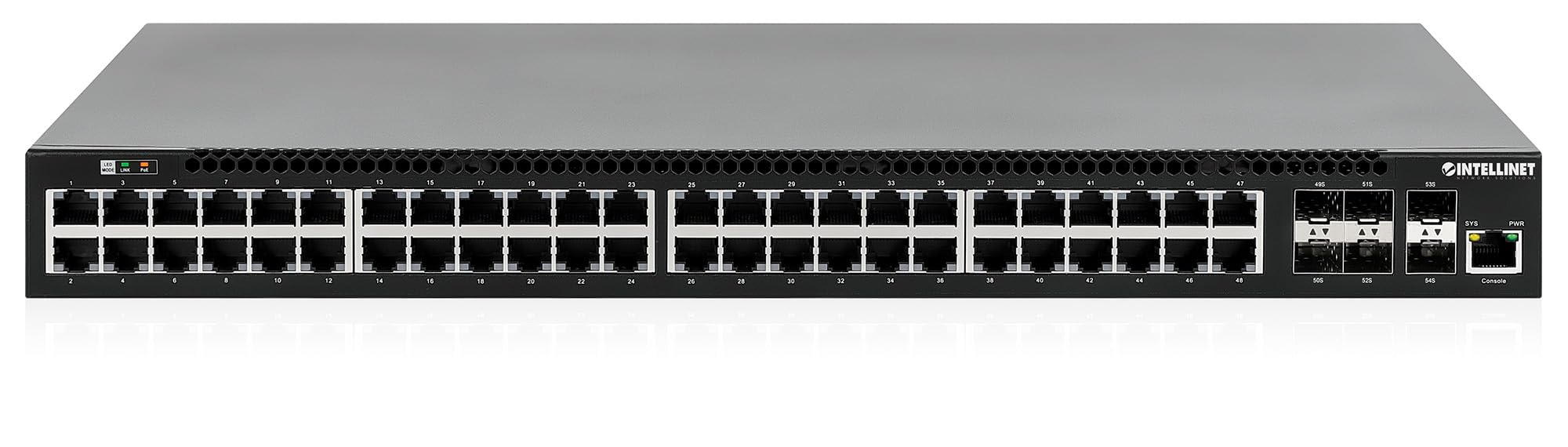
تتضمن اللوحة الأمامية:
- 48 x 10/100/1000 Mbps RJ45 Ports: These ports support Power over Ethernet Plus (PoE+) for connecting compatible devices.
- 6 x 10 Gigabit SFP+ Slots: For high-speed uplink connections to other network devices.
- مؤشرات LED: Provide status information for power, system, link activity, and PoE status.
- منفذ وحدة التحكم: للإدارة والتكوين المحليين.


4.2 اللوحة الخلفية

The rear panel typically includes the AC power input and cooling fans for heat dissipation.

5. الإعداد
5.1 التثبيت المادي
يمكن تركيب المحول في رف معدات قياسي مقاس 19 بوصة أو وضعه على سطح المكتب.
- تركيب حامل الرف: Attach the provided rackmount brackets to the sides of the switch using the included screws. Secure the switch into a standard 19-inch rack.
- تثبيت سطح المكتب: Attach the provided rubber feet to the bottom of the switch to prevent scratching and ensure stability. Place the switch on a flat, stable surface.
5.2 توصيل الطاقة
Connect the provided power cable to the AC power input on the rear panel of the switch and then to a grounded electrical outlet. Ensure the power switch is in the OFF position before connecting the power cable.
5.3 اتصالات الشبكة
- أجهزة PoE: Connect PoE-compatible devices (e.g., IP cameras, VoIP phones, wireless access points) to any of the 48 Gigabit RJ45 ports. The switch will automatically detect and provide power to these devices.
- اتصالات الوصلة الصاعدة: Insert compatible SFP+ transceivers into the 10 Gigabit SFP+ slots and connect them to your core network or other high-speed devices using appropriate fiber optic cables.
- اتصال وحدة التحكم: For initial configuration or direct management, connect a console cable from your computer to the console port on the switch.
5.4 التكوين الأولي
Refer to the separate software configuration guide for detailed instructions on accessing the switch's management interface (web-based GUI or command-line interface via console port) and performing initial setup, including IP address assignment, user accounts, and basic network settings.
6. تعليمات التشغيل
6.1 Layer 3 Routing
This switch offers dynamic Layer 3 IP routing capabilities, including OSPF (Open Shortest Path First), RIP (Routing Information Protocol), and VRRP (Virtual Router Redundancy Protocol). These protocols enable efficient and scalable routing within complex network environments.

6.2 الطاقة عبر الإيثرنت (PoE+)
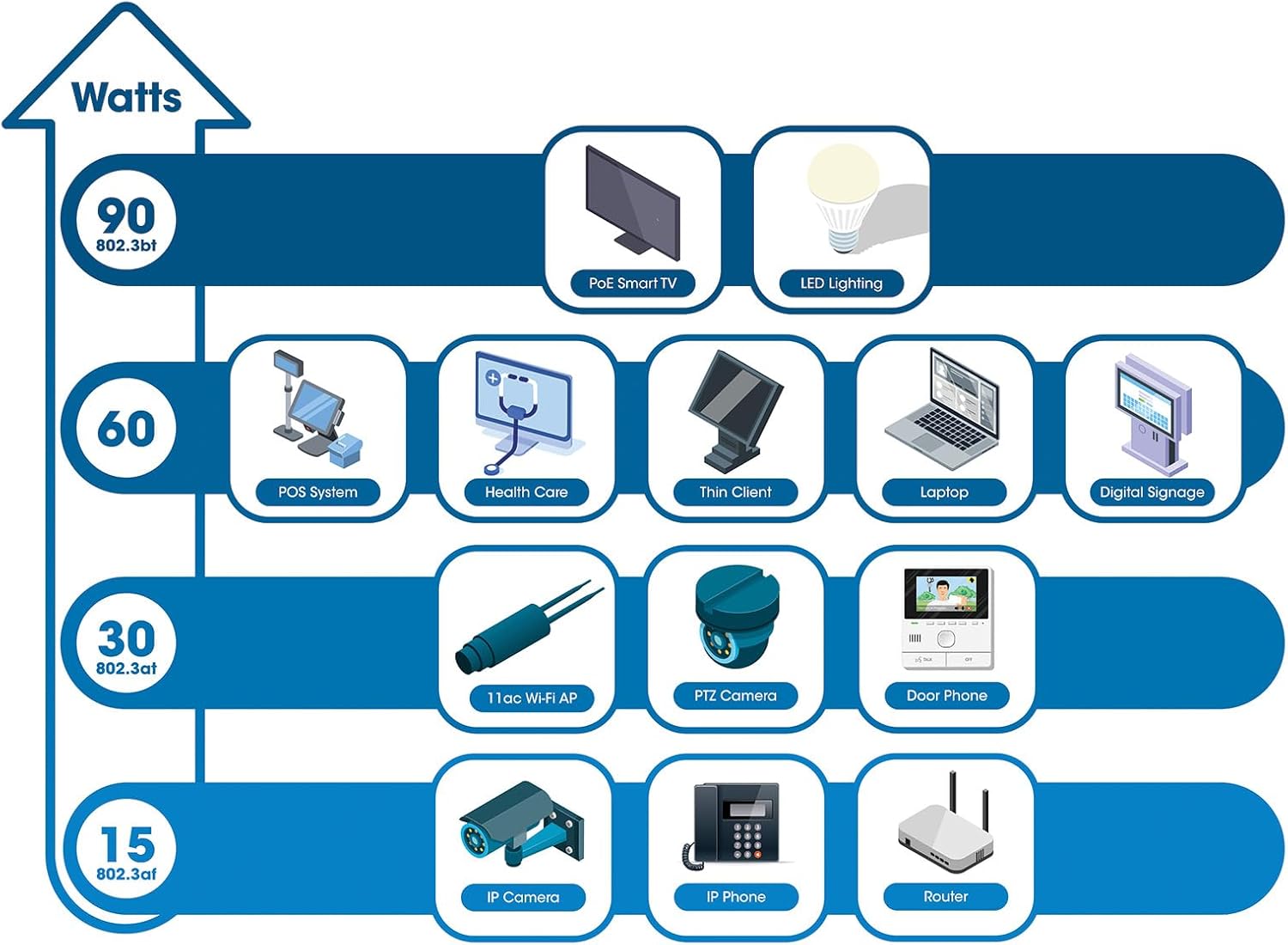
The switch provides up to 30 watts of power per port across its 48 PoE+ ports, with a total power budget of 850 watts. This allows for seamless integration of various PoE devices without the need for separate power adapters.
6.3 PoE Scheduling
The switch supports PoE scheduling, allowing administrators to define specific times for powering on, powering off, or rebooting connected PoE devices. This feature can optimize power consumption and enhance network security.


6.4 Self-Healing Functionality (PDM)
The Powered Device Monitor (PDM) feature enables the switch to proactively monitor the status of connected PoE devices. If a device becomes unresponsive, the PDM can automatically restart the PoE port to restore functionality, minimizing downtime and maintaining network integrity.
6.5 إدارة السحابة
The switch supports cloud management capabilities, allowing for remote configuration, monitoring, and troubleshooting of the device from a centralized platform. Refer to the cloud management documentation for setup and usage details.
7. الصيانة
7.1 تحديثات البرامج الثابتة
Regularly check the Intellinet Network Solutions website for the latest firmware updates. Applying firmware updates can improve performance, add new features, and address security vulnerabilities. Follow the instructions provided with the firmware update package carefully.
7.2 التنظيف
To clean the switch, power it off and disconnect all cables. Use a soft, dry cloth to wipe the exterior. Do not use liquid or aerosol cleaners. Ensure ventilation openings are free from dust and debris.
7.3 الاعتبارات البيئية
Ensure the switch operates within its specified temperature and humidity ranges. Avoid placing the switch in direct sunlight, near heat sources, or in areas with high dust accumulation.
8. استكشاف الأخطاء وإصلاحها
This section addresses common issues you might encounter with the switch.
8.1 لا يوجد طاقة
- Verify the power cable is securely connected to both the switch and a working electrical outlet.
- تأكد من أن مفتاح الطاقة الموجود على اللوحة الخلفية في وضع التشغيل.
- اختبر مأخذ الطاقة بجهاز آخر للتأكد من أنه يعمل.
8.2 لا يوجد رابط على المنفذ
- تحقق من توصيل كابل الإيثرنت من كلا الطرفين. تأكد من توصيله بإحكام.
- تأكد من عدم تلف الكابل. جرب كابلًا آخر.
- تأكد من تشغيل الجهاز المتصل وعمله بشكل صحيح.
- تحقق من حالة المنفذ في واجهة إدارة المحول.
8.3 جهاز PoE لا يتلقى الطاقة
- Confirm the connected device is a PoE-compatible device.
- تحقق من حالة LED الخاصة بـ PoE للمنفذ المحدد.
- Verify the total PoE power budget (850W) is not exceeded by all connected devices.
- Utilize the Powered Device Monitor (PDM) feature to automatically restart the port if the device is unresponsive.
- Check PoE settings in the switch's management interface.
9. المواصفات
| ميزة | مواصفة |
|---|---|
| رقم الموديل | 562041 |
| ماركة | حلول الشبكة الداخلية |
| عدد المنافذ | 54 (48 x Gigabit PoE+, 6 x 10G SFP+) |
| نوع الواجهة | PoE، SFP |
| الحد الأقصى للطاقة (ميزانية PoE) | 850 واط |
| معدل نقل البيانات | 10 Gigabits Per Second (SFP+ uplinks) |
| وزن العنصر | 6.2 كيلوجرام (13.64 رطل) |
| أبعاد المنتج (الطول × العرض × الارتفاع) | 13.78 × 17.32 × 1.73 بوصة |
| تصنيف درجة الحرارة العليا | 104 درجة فهرنهايت (40 درجة مئوية) |
| تصنيف درجة حرارة أقل | 32 درجة فهرنهايت (0 درجة مئوية) |
| الأجهزة المتوافقة | Desktop, Router, PoE devices (IP cameras, VoIP phones, WAPs) |
| المكونات المضمنة | 19" rackmount brackets, Instructions, Rubber feet, power cable |
| رمز المنتج الموحد | 766623562041 |
10. الضمان والدعم
10.1 معلومات الضمان
This Intellinet Network Solutions product is covered by a ضمان الشركة المصنعة لمدة 3 سنواتيرجى الاحتفاظ بإيصال الشراء للمطالبة بالضمان. يغطي الضمان عيوب المواد والتصنيع في ظل الاستخدام العادي.
10.2 الدعم الفني
For technical assistance, product documentation, or to register your product, please visit the official Intellinet Network Solutions website or contact their customer support. Contact information can typically be found on the manufacturer's webالموقع أو في عبوة المنتج.