
مقدمة
Thank you for choosing the VOLT PLUS TECH Portable Bluetooth Earbuds. These earbuds are designed to provide a high-quality audio experience with advanced features such as noise cancellation, an intuitive LED display, and a portable charging case with an integrated power bank. This manual will guide you through the setup, operation, and maintenance of your new earbuds to ensure optimal performance and longevity.
ماذا يوجد في الصندوق
يرجى التحقق من محتويات الحزمة للتأكد من وجود جميع العناصر:
- Portable Bluetooth Earbuds (Left and Right)
- Portable Charging/Storage Case with Power Bank
- كابل شحن USB-C
- دليل المستخدم
- Two (2) pairs of different sized earbud tips (small, large)
المنتج انتهىview والميزات
The VOLT PLUS TECH earbuds offer a range of features designed for convenience and superior audio quality:
- اتصال بلوتوث 5.0: يضمن اتصالاً لاسلكياً مستقراً وفعالاً.
- CVC 8.0 Intelligent Noise Reduction: Reduces ambient noise for clear calls and immersive music.
- تصنيف IPX4 للماء: Protects against splashes and sweat, suitable for sports (charging case is not waterproof).
- 2000mAh Charging Case: Provides extended battery life for earbuds, offering up to 24 hours of use.
- شاشة LED ذكية: Clearly shows the battery level of the charging case and earbuds.
- ضوابط اللمس: Easy management of music playback, calls, and voice assistant.

Image: The portable Bluetooth earbuds with their charging case open, displaying the earbuds inside and the digital battery indicator.

Image: The portable Bluetooth earbuds positioned next to their closed charging case, showcasinج- التصميم المدمج.

الصورة: لقطة مقربة view of the charging case's LED digital display, clearly showing the battery percentage.
الإعداد والاقتران
Follow these steps for initial setup and pairing with your device:
- تشغيل الطاقة: Remove both earbuds from the charging case. They will automatically power on. Alternatively, press and hold the touch panel on both earbuds for 3 seconds until a blue indicator light flashes.
- الاقتران التلقائي: After powering on, you will hear voice prompts, and both earbuds will flash blue and red indicators alternatively. Wait until both earbuds pair with each other. Once paired, the left earbud will continue to flash blue and red alternatively.
- الاتصال بالجهاز: You will hear a voice prompt 'pairing', indicating the earbuds are ready to pair with your mobile device. Turn on the Bluetooth function on your mobile device and search for "JS25" in the list of available devices.
- الاتصال النهائي: Select "JS25" to pair and connect. Once successfully connected, the earbuds will prompt "Connected".
- إعادة الاتصال التلقائي: Once your device and earbuds are successfully connected, your earbuds will auto-connect to the previously paired device when they are turned on and Bluetooth is enabled on your device.
- استكشاف أخطاء الاقتران وإصلاحها: If you cannot pair the earbuds, place them back in the charging case and repeat the previous steps.

Image: A visual guide illustrating the quick pairing process for the earbuds, from removal from case to successful connection.

Image: Depiction of the earbuds automatically connecting to a smartphone upon removal from the charging case.
تعليمات التشغيل
عناصر التحكم باللمس
تتميز سماعات الأذن بعناصر تحكم لمسية بديهية لمختلف الوظائف:
- تشغيل/إيقاف مؤقت: ضغطة واحدة على أي سماعة أذن.
- الأغنية التالية: اضغط مرتين على سماعة الأذن اليمنى.
- الأغنية السابقة: اضغط مرتين على سماعة الأذن اليسرى.
- الرد/إنهاء المكالمة: اضغط مرة واحدة على أي سماعة أذن أثناء المكالمة الواردة.
- رفض المكالمة: اضغط مع الاستمرار على أي سماعة أذن لمدة ثانيتين أثناء المكالمة الواردة.
- تنشيط مساعد الصوت: اضغط ثلاث مرات على أي سماعة أذن.
- ضبط مستوى الصوت: Specific instructions for volume adjustment are not detailed in the provided information, but typically involve a long press or multiple taps on a specific earbud. Refer to the quick start guide for precise gestures.
شحن سماعات الأذن والعلبة
The charging case acts as a power bank for your earbuds and can also charge your mobile phone.
- شحن سماعات الأذن: Place the earbuds into the charging case. They will automatically begin charging. The LED display on the case will show the charging status.
- علبة الشحن: Connect the USB-C charging cable to the charging port on the case and to a power source. The LED display will indicate the charging progress of the case.
- وظيفة بنك الطاقة: The 2000mAh battery in the charging case can provide emergency power to your mobile phone via its USB-C output port.

Image: The earbuds resting in their charging case, with text overlays indicating features like fingerprint touch control, intelligent digital display, and HD calling.
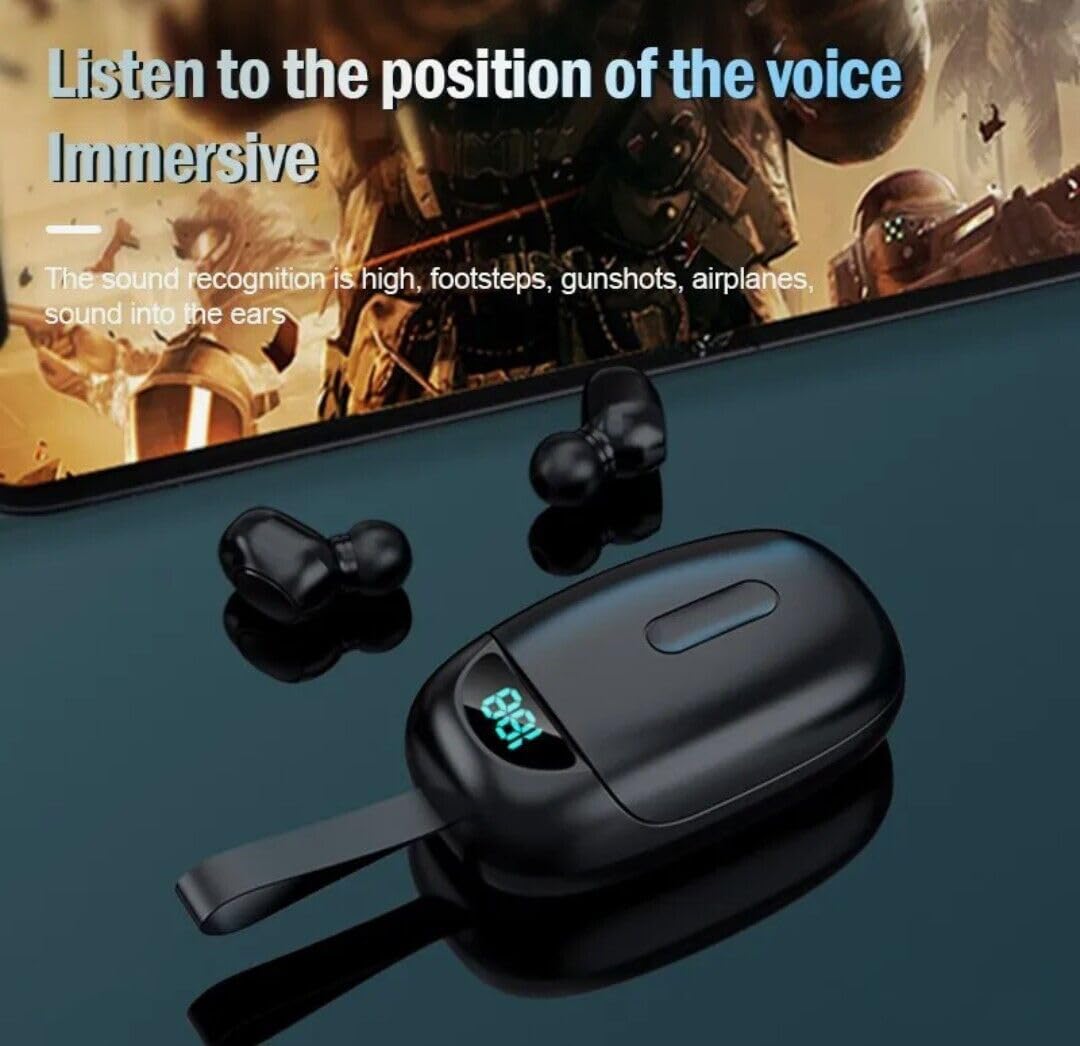
Image: The earbuds positioned near a smartphone displaying a game, illustrating their capability to deliver immersive audio for an enhanced listening experience.
صيانة
لضمان طول عمر سماعات الأذن وأدائها الأمثل، اتبع إرشادات الصيانة التالية:
- تنظيف: نظّف سماعات الأذن وعلبة الشحن بانتظام بقطعة قماش ناعمة وجافة وخالية من الوبر. لا تستخدم منظفات أو مذيبات كاشطة.
- نصائح حول سماعات الأذن: Remove and clean the earbud tips periodically to prevent wax buildup. You can gently wash them with water and mild soap, then dry them completely before reattaching.
- منافذ الشحن: تأكد من أن نقاط اتصال الشحن الموجودة على سماعات الأذن وداخل العلبة نظيفة وخالية من الحطام.
- تخزين: عندما لا تكون قيد الاستخدام، قم بتخزين سماعات الأذن في علبة الشحن الخاصة بها لحمايتها والحفاظ عليها مشحونة.
- التعرض للماء: While the earbuds are IPX4 waterproof, the charging case is not. Avoid exposing the charging case to water or excessive moisture.
- درجة حرارة: تجنب تعريض المنتج لدرجات حرارة قصوى (ساخنة أو باردة) لأن ذلك قد يؤدي إلى تلف البطارية والمكونات الداخلية.
استكشاف الأخطاء وإصلاحها
إذا واجهت أي مشاكل مع سماعات الأذن الخاصة بك، فراجع المشاكل والحلول الشائعة التالية:
| مشكلة | السبب المحتمل | حل |
|---|---|---|
| سماعات الأذن لا تعمل | Low battery; Not removed from case correctly | Charge the earbuds; Ensure earbuds are fully removed from the charging case. |
| سماعات الأذن غير مقترنة بالجهاز | Bluetooth off; Earbuds not in pairing mode; Previously paired device interfering | Ensure Bluetooth is enabled on your device; Place earbuds back in case, then remove to re-enter pairing mode; Forget "JS25" from your device's Bluetooth list and re-pair. |
| تعمل سماعة أذن واحدة فقط | Earbuds not paired to each other; Low battery on one earbud | Place both earbuds back in the case, close, then reopen to force re-pairing; Charge both earbuds fully. |
| جودة صوت رديئة أو انقطاعات | Distance from device; Interference; Low battery | Move closer to your device; Avoid strong electromagnetic interference; Charge earbuds fully. |
| Charging case LED not lighting up | Charging cable issue; Power source issue; Case fully charged | Try a different USB-C cable; Use a different power adapter/port; The case might be fully charged. |
تحديد
Detailed technical specifications for the VOLT PLUS TECH Portable Bluetooth Earbuds Model TG01:
| ميزة | مواصفة |
|---|---|
| اسم الموديل | تي جي 01 |
| تكنولوجيا الاتصال | بلوتوث 5.0 |
| تكنولوجيا الاتصالات اللاسلكية | بلوتوث |
| التحكم في الضوضاء | إلغاء الضوضاء النشط (CVC 8.0) |
| مستوى مقاومة الماء | IPX4 (سماعات الأذن فقط) |
| مقبس سماعات الرأس | منفذ USB-C (لعلبة الشحن) |
| استجابة التردد | 48000 كيلو هرتز |
| مقاومة | 25.94 أوم |
| طريقة التحكم | يلمس |
| الأجهزة المتوافقة | ZTE Axon 20 and other Bluetooth-enabled devices |
| مادة | Aluminum, Hi Strength Plastic, Metal |
| وزن العنصر | 4 أونصة |
| أبعاد المنتج | 1 × 1.7 × 1.5 بوصة |
| الشركة المصنعة | فولت بلس تك |
| لون | أسود |
الضمان والدعم
VOLT PLUS TECH products are manufactured to the highest quality standards. For specific warranty information and customer support, please refer to the warranty card included with your purchase or visit the official VOLT PLUS TECH webالموقع. احتفظ بإيصال الشراء الخاص بك كإثبات للشراء في حالة وجود أي مطالبات بالضمان.
If you require further assistance or have questions not covered in this manual, please contact VOLT PLUS TECH customer support.