
1. مقدمة ومعلومات السلامة
This manual provides essential instructions for the installation, operation, and maintenance of your GAMEMAX GX-850 80 Plus Gold Fully Modular Power Supply. Please read this manual thoroughly before installation and retain it for future reference.
1.1 تحذيرات هامة للسلامة
- خطر الصدمة الكهربائية: Power supplies contain high voltage components. Do not open the power supply unit. There are no user-serviceable parts inside. Opening the unit will void the warranty.
- التأريض السليم: Ensure your computer system is properly grounded to prevent electrical hazards.
- فصل الطاقة: افصل دائمًا سلك الطاقة المترددة من مقبس الحائط قبل تركيب أو إزالة أو صيانة وحدة التزويد بالطاقة أو أي مكونات أخرى للكمبيوتر.
- تهوية: تأكد من وجود تهوية كافية حول مصدر الطاقة. لا تسد أي فتحات تهوية.
- Moisture and Temperature: Do not operate the power supply in high humidity or high-temperature environments. Keep it away from water and heat sources.
- التثبيت الاحترافي: If you are unsure about any installation steps, seek assistance from a qualified technician.
2. محتويات العبوة
Verify that all items are present in your GAMEMAX GX-850 package:
- GAMEMAX GX-850 80 Plus Gold Fully Modular Power Supply
- Modular Cable Set (including ATX 24-pin, CPU 8-pin, PCIe 6+2-pin, SATA, Peripheral 4-pin cables)
- سلك الطاقة المتردد
- مسامير التثبيت
- دليل المستخدم (هذا المستند)
3. انتهى المنتجview
The GAMEMAX GX-850 is an 850-watt 80 Plus Gold certified fully modular power supply designed for desktop computers. It features an LLC and DC-DC circuit design for high efficiency and stable power delivery, along with an ultra-quiet FDB (Fluid Dynamic Bearing) fan for optimal cooling and low noise.
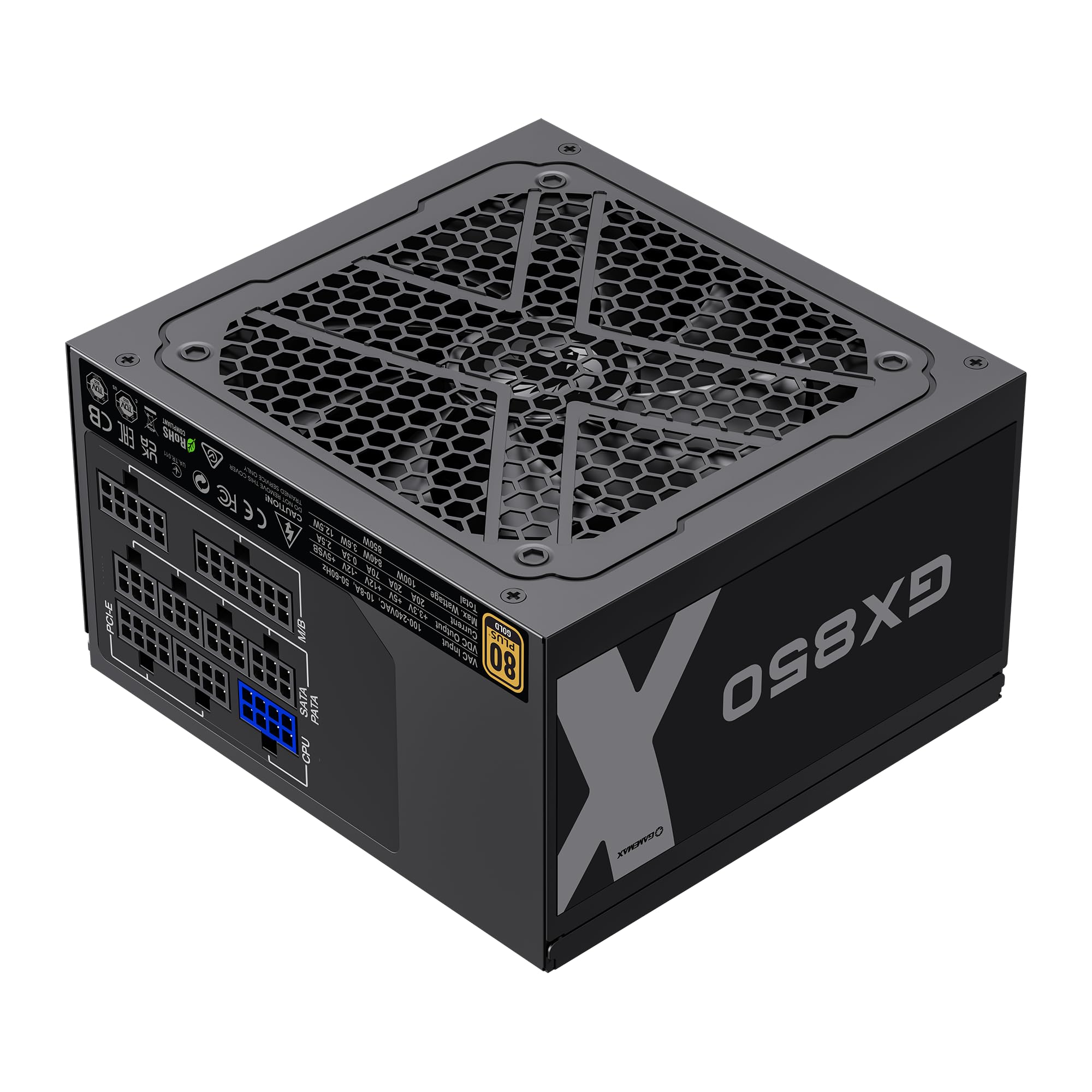
Image: The GAMEMAX GX-850 80 Plus Gold Fully Modular Power Supply, showcasing its black finish and modular design.
3.1 الميزات الرئيسية
- حاصل على شهادة 80 بلس الذهبية: Ensures high power efficiency, reducing heat and operating costs.
- LLC+DC-DC Circuit: Advanced circuit design for stable voltage output and improved efficiency.
- تصميم وحدات بالكامل: Allows for custom cable management, reducing clutter and improving airflow.
- FDB Fan: Ultra-quiet temperature-controlled Fluid Dynamic Bearing fan for silent operation and extended lifespan.
- 105℃ Mainstream Capacitor: High-quality capacitors ensure long life and smooth power output.
- الحماية الشاملة: Features SIX levels of protection: Over Temperature Protection (OTP), Over Current Protection (OCP), Short Circuit Protection (SCP), Over Voltagحماية (OVP) ، تحت المجلدtage Protection (UVP), and Over Power Protection (OPP).
4. الإعداد والتثبيت
Follow these steps to properly install your GAMEMAX GX-850 power supply into your computer system.
4.1 خطوات التثبيت
- حضّر نظامك: تأكد من إيقاف تشغيل جهاز الكمبيوتر تمامًا وفصله عن مقبس الحائط. افتح غطاء جهاز الكمبيوتر.
- إزالة وحدة PSU القديمة (إن وجدت): افصل جميع الكابلات من مصدر الطاقة القديم وأخرجه من العلبة.
- تركيب وحدة تزويد الطاقة الجديدة: Carefully place the GAMEMAX GX-850 into the power supply bay of your computer case. Secure it with the provided mounting screws. Ensure the fan is facing the correct direction for optimal airflow (typically facing down if your case has a bottom vent, or up if it's a top-mounted PSU).
- توصيل الكابلات المعيارية: Identify the necessary cables for your components. Connect the modular cables to the corresponding ports on the power supply first, then route them to your components.
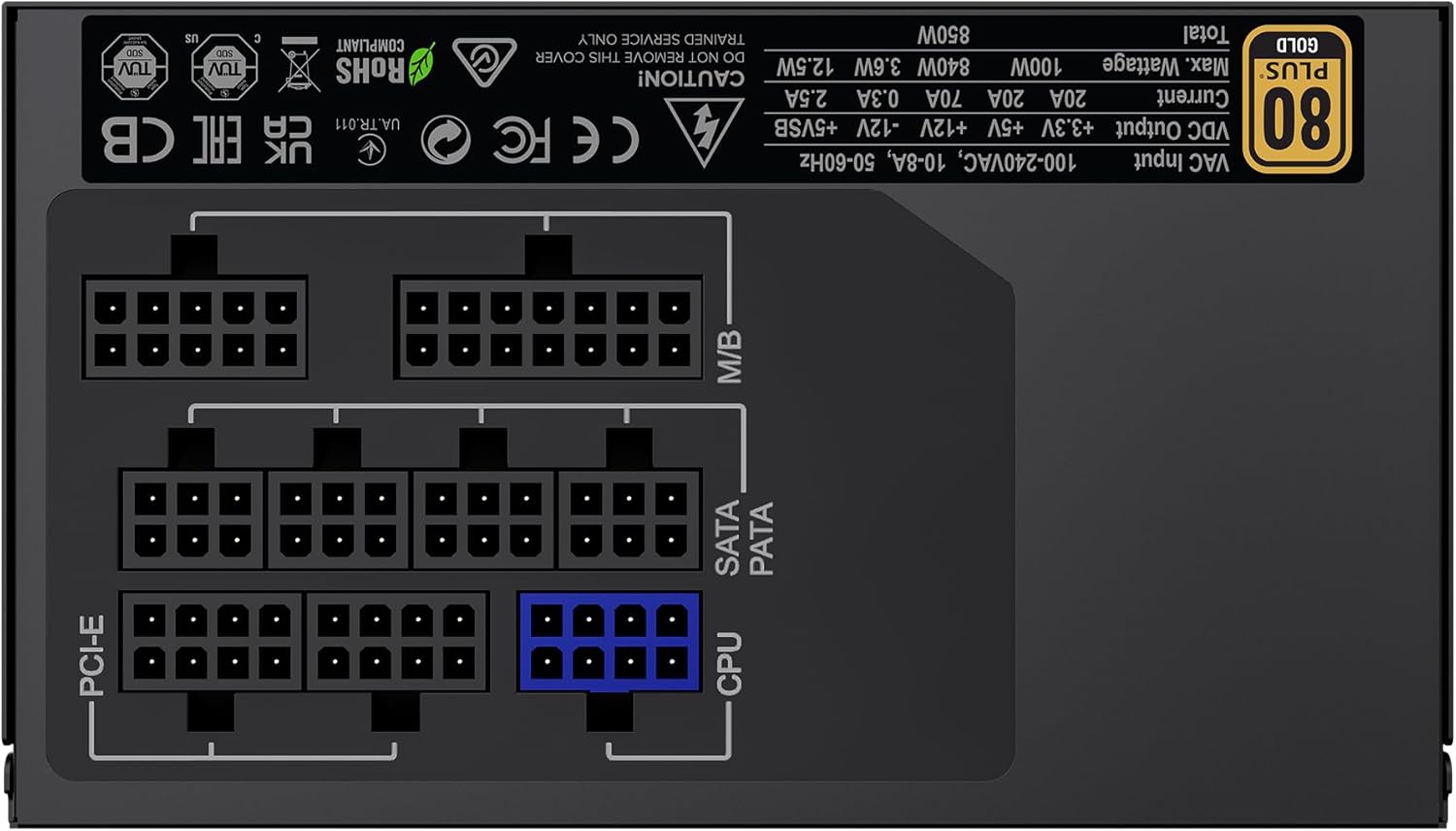
الصورة: الخلفية view of the GAMEMAX GX-850 showing the fully modular cable connection ports for PCI-e, M/B (Motherboard), SATA/PATA, and CPU cables.
- Motherboard (M/B): قم بتوصيل كابل ATX ذو 24 سنًا باللوحة الأم.
- وحدة المعالجة المركزية: Connect the 8-pin (or 4+4-pin) CPU power cable to the CPU power connector on your motherboard.
- Graphics Cards (PCI-e): Connect the 6+2-pin PCIe power cables to your graphics card(s). Use separate cables for each connector if your GPU requires multiple.
- Storage Devices (SATA): قم بتوصيل كابلات الطاقة SATA بمحركات الأقراص SSD ومحركات الأقراص الصلبة ومحركات الأقراص الضوئية.
- Peripherals (PATA/Molex): Connect peripheral power cables to any other devices requiring them (e.g., fan controllers, older drives).
- إدارة الكابلات: قم بترتيب الكابلات بشكل أنيق لتحسين تدفق الهواء والمظهر الجمالي.
- أغلق الغطاء وقم بتوصيل مصدر الطاقة: Close your computer case. Connect the AC power cord to the power supply and then to a grounded wall outlet.
5. تعليمات التشغيل
After successful installation, follow these steps to operate your system.
- مفتاح التشغيل: تأكد من أن مفتاح الطاقة الموجود في الجزء الخلفي من مصدر الطاقة في وضع التشغيل (I).
- تشغيل النظام: Press the power button on your computer case to turn on the system.
- System Power Off: To turn off your system, use the operating system's shutdown procedure. For a hard shutdown, hold the case power button for several seconds. For complete power disconnection, switch the PSU's power switch to 'OFF' (O) and unplug the AC cord.
6. الصيانة
تساعد الصيانة المنتظمة على ضمان طول عمر وأداء مصدر الطاقة الخاص بك على النحو الأمثل.
- تنظيف الغبار: Periodically clean the power supply's fan and ventilation grilles using compressed air to prevent dust buildup, which can impede cooling. Ensure the system is powered off and unplugged before cleaning.
- فحص الكابل: Occasionally check all modular cable connections to ensure they are securely seated.
- الظروف البيئية: Maintain a clean, dry, and well-ventilated environment for your computer.
7. استكشاف الأخطاء وإصلاحها
إذا واجهت مشكلات مع مصدر الطاقة لديك، فراجع خطوات استكشاف الأخطاء وإصلاحها الشائعة التالية:
- لا يوجد طاقة:
- Ensure the AC power cord is securely plugged into both the wall outlet and the power supply.
- تأكد من أن مفتاح الطاقة الموجود في الجزء الخلفي من وحدة تزويد الطاقة في وضع التشغيل (I).
- Verify that the 24-pin ATX and 8-pin CPU power cables are correctly and firmly connected to the motherboard.
- اختبر منفذ الحائط بجهاز آخر للتأكد من وجود الطاقة فيه.
- عدم استقرار النظام/الإغلاق العشوائي:
- Ensure all modular cables are fully seated at both the PSU and component ends.
- تأكد من التهوية الجيدة وتأكد من دوران مروحة وحدة إمداد الطاقة. قد يؤدي ارتفاع درجة الحرارة إلى توقف الجهاز عن العمل.
- If you have recently added new components, ensure your 850W power supply is sufficient for the total system wattage.
- المروحة لا تدور:
- The GX-850 features a temperature-controlled fan. It may not spin at low loads or temperatures. This is normal operation.
- If the fan does not spin under load and the PSU feels hot, ensure there are no obstructions and consider contacting support.
If problems persist after performing these steps, contact GAMEMAX customer support or your retailer for further assistance.
8. المواصفات
Detailed technical specifications for the GAMEMAX GX-850 80 Plus Gold Power Supply:
| ميزة | مواصفة |
|---|---|
| اسم الموديل | GX-850 Modular |
| ماركة | جيم ماكس |
| انتاج واتtage | 850 واط |
| عامل الشكل | ايه تي اكس |
| شهادة الكفاءة | 80 بلس الذهب |
| تصميم مزود الطاقة | وحدات كاملة |
| طريقة التبريد | Air (FDB Fan) |
| عدد المعجبين | 1 |
| الحد الأدنى لحجم الإدخالtage | 115 فولت |
| الحد الأقصى لحجم الإدخالtage | 240 فولت (تيار متردد) |
| تصنيف درجة الحرارة العليا | 105 Degrees Celsius (Capacitors) |
| الأجهزة المتوافقة | كمبيوتر مكتبي |
| أنواع الموصلات | ATX, PCI-e, SATA |
9. الضمان والدعم
GAMEMAX products are manufactured to high-quality standards. For warranty information, please refer to the warranty card included with your product or visit the official GAMEMAX webقد تختلف شروط الضمان حسب المنطقة والتاجر.
For technical support or further inquiries, please contact GAMEMAX customer service through their official webالموقع أو معلومات الاتصال التي يقدمها بائع التجزئة الخاص بك.