
1. المقدمة
شكرا لك على الشراءasing the Soundmaster MCD5600 Stereo System. This versatile audio system combines classic and modern audio technologies, including a record player, DAB+ and FM radio, double cassette deck, CD player, USB playback, and Bluetooth connectivity. It also features a digitization function to convert your analog media to MP3 files on a USB drive. This manual provides essential information for safe operation, setup, and maintenance of your device. Please read it thoroughly before use and retain it for future reference.
2. تعليمات السلامة
- مصدر الطاقة: تأكد من أن مصدر الطاقة يطابق المجلدtage specified on the unit. Disconnect from the power outlet during lightning storms or when unused for long periods.
- تهوية: Do not block any ventilation openings. Allow adequate space around the unit for proper airflow to prevent overheating.
- الماء والرطوبة: لا تعرض الجهاز للمطر أو الرطوبة أو التقطير أو الرش. لا تضع أشياء مملوءة بالسوائل، مثل المزهريات، على الجهاز.
- حرارة: احتفظ بالوحدة بعيدًا عن مصادر الحرارة مثل المشعات أو فتحات التدفئة أو المواقد أو الأجهزة الأخرى (بما في ذلك ampالمُضخِّمات) التي تنتج الحرارة.
- تنظيف: تنظيف فقط بقطعة قماش جافة. لا تستخدم المنظفات أو منظفات يتم رشها السائل.
- الخدمة: لا تحاول خدمة هذا المنتج بنفسك. قم بإحالة جميع أعمال الصيانة إلى أفراد الخدمة المؤهلين.
- الموقع: ضع الوحدة على سطح ثابت ومستوٍ لمنع سقوطها.
3. محتويات العبوة
يرجى التأكد من وجود جميع العناصر عند فتح العبوة:
- Soundmaster MCD5600 Main Unit
- مكبران صوت خارجيان
- جهاز التحكم عن بعد
- دليل التعليمات (هذا المستند)
- هوائي FM/DAB+
- كابل الطاقة
4. انتهى المنتجview
Familiarize yourself with the main components and controls of your stereo system.
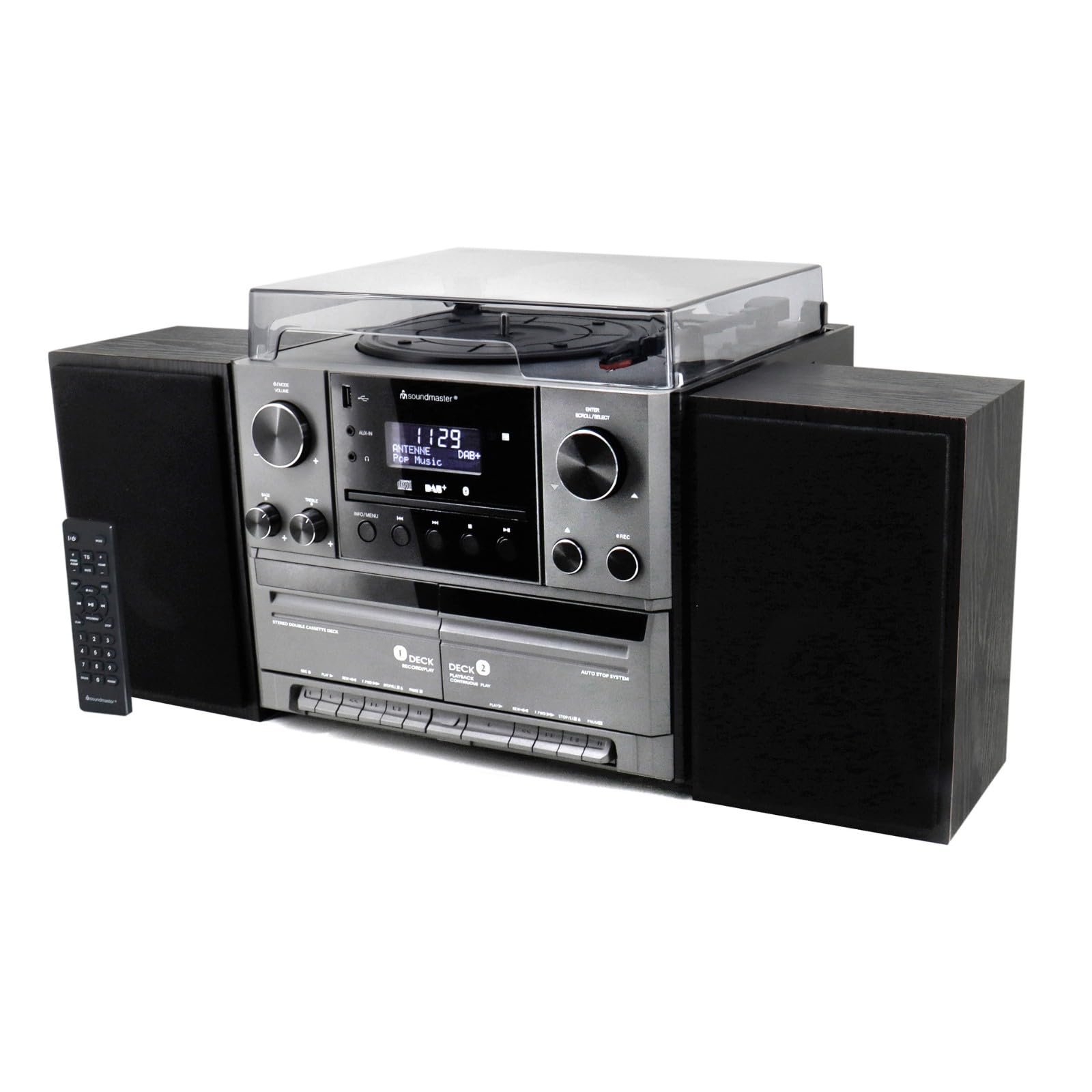
الشكل 4.1: أمام view of the Soundmaster MCD5600 stereo system, showing the main unit flanked by two speakers, with the remote control positioned to the left. The display, control knobs, and various media inputs are visible.

الشكل 4.2: أمام view of the Soundmaster MCD5600 stereo system with the CD tray open and a cassette tape inserted into one of the two cassette decks. This image highlights the multi-media capabilities of the unit.
5. الإعداد
5.1 توصيل مكبرات الصوت
Connect the included speakers to the speaker terminals on the rear of the main unit. Ensure correct polarity (red to red, black to black) for optimal sound quality. Place speakers equidistant from the listening position for the best stereo effect.
5.2 اتصال الهوائي
Connect the supplied 75 Ohm antenna to the FM/DAB+ antenna input on the rear panel. Extend the antenna fully and position it for the best possible radio reception.
5.3 توصيل الطاقة
Plug the power cable into the AC inlet on the rear of the unit, then connect the other end to a standard wall outlet.
6. تعليمات التشغيل
6.1 الضوابط العامة
- زر الطاقة: اضغط لتشغيل أو إيقاف تشغيل الوحدة.
- مقبض الصوت: Rotate to adjust the overall sound volume.
- زر المصدر/الوظيفة: Press repeatedly to cycle through available audio sources (CD, Phono, Tape, FM, DAB+, Bluetooth, USB).
- عرض: يعرض الوضع الحالي، ومعلومات المسار، وتردد الراديو، والوقت.
تشغيل مشغل الأقراص المضغوطة 6.2
- اضغط على CD زر المصدر.
- اضغط على فتح/إغلاق زر لفتح علبة الأقراص المضغوطة.
- Place a CD (CD/CD-MP3/CD-R/CD-RW/WMA compatible) with the label side up into the tray.
- يضعط فتح/إغلاق again to close the tray. The unit will read the disc.
- يضعط تشغيل/إيقاف مؤقت لبدء التشغيل أو إيقافه مؤقتًا.
- يستخدم التقديم/الترجيع أزرار للتنقل بين المسارات.
- ال برنامج و يكرر functions allow for customized playback sequences and continuous repetition.
6.3 Record Player Operation
- اضغط على فونو زر المصدر.
- Select the appropriate speed (33, 45, or 78 RPM) using the speed selector switch based on your record type.
- Place a record on the turntable platter. For 45 RPM singles, use the included adapter.
- Carefully lift the tonearm using the cueing lever and position it over the desired track on the record.
- Lower the tonearm gently onto the record. Playback will begin automatically.
- في نهاية التسجيل، ارفع ذراع التشغيل وأعده إلى مكانه.
6.4 تشغيل مشغل الكاسيت
The unit features two cassette decks: Deck 1 (Record/Play) and Deck 2 (Continuous Play).
- اضغط على الشريط زر المصدر.
- اضغط على توقف / إخراج button on the desired deck to open the cassette door.
- Insert a cassette tape with the open edge facing upwards. Close the door.
- يضعط يلعب لبدء التشغيل.
- يستخدم التقديم السريع و إعادة الأزرار للتنقل عبر الشريط.
- To record, ensure Deck 1 is selected, insert a blank tape, select your desired input source (e.g., Phono, CD, Radio), and press the سِجِلّ زر.
6.5 Radio (FM/DAB+) Operation
- اضغط على FM or داب+ زر المصدر.
- For FM radio, use the ضبط knob or buttons to manually tune or auto-scan for stations.
- For DAB+ radio, the unit will automatically scan for available digital stations. Use the التمرير / التحديد knob to browse and select stations.
- To save a station as a preset, refer to the specific instructions in the full manual for your model.
6.6 تشغيل بلوتوث
- اضغط على بلوتوث source button. The display will show "PAIRING" or similar.
- قم بتفعيل البلوتوث على جهازك الخارجي (الهاتف الذكي، الجهاز اللوحي، إلخ).
- بحث عن "MCD5600" (or similar device name) in your device's Bluetooth settings and select it to pair.
- Once paired, you can play audio from your device through the stereo system.
6.7 تشغيل USB
- قم بإدخال محرك أقراص فلاش USB في منفذ USB الموجود على اللوحة الأمامية.
- اضغط على USB زر المصدر.
- The unit will read the contents of the USB drive. Use the navigation buttons to browse folders and select MP3 fileللتشغيل.
6.8 Digitization (Encoding)
The MCD5600 allows you to convert audio from vinyl records, cassette tapes, or radio broadcasts directly to MP3 fileعلى محرك أقراص USB متصل.
- أدخل محرك أقراص فلاش USB في منفذ USB.
- Select the desired audio source (Phono, Tape, FM, DAB+).
- Start playback of your chosen source (e.g., start a record, play a cassette, tune to a radio station).
- اضغط على سِجِلّ button on the main unit. The display will indicate recording is in progress.
- يضعط قف when you wish to end the recording. The audio will be saved as an MP3 file على محرك أقراص USB الخاص بك.
7. الصيانة
- تنظيف الوحدة: Wipe the exterior surfaces with a soft, dry, lint-free cloth. Do not use abrasive cleaners or solvents.
- Record Player Stylus: Periodically check the stylus for dust and debris. Clean gently with a soft brush designed for styli, brushing from back to front. Replace the stylus if sound quality deteriorates significantly.
- Cassette Heads: After extended use, clean the cassette heads, pinch rollers, and capstans with a cotton swab lightly dampمخفف بالكحول الأيزوبروبيل.
- عدسة القرص المضغوط: Avoid touching the CD lens. If cleaning is necessary, use a specialized CD lens cleaner disc.
8. استكشاف الأخطاء وإصلاحها
| مشكلة | السبب المحتمل | حل |
|---|---|---|
| لا يوجد طاقة | كابل الطاقة غير موصول؛ مأخذ الطاقة معطل | تحقق من توصيل كابل الطاقة؛ جرب منفذًا كهربائيًا مختلفًا. |
| لا يوجد صوت | مستوى الصوت منخفض جدًا؛ تم اختيار مصدر غير صحيح؛ السماعات غير متصلة | Increase volume; Select correct source; Check speaker connections |
| يتعطل القرص المضغوط أو لا يعمل | CD dirty or scratched; CD inserted incorrectly | Clean CD; Insert CD label-side up |
| استقبال الراديو ضعيف | الهوائي غير ممتد أو غير مثبت في الوضع الصحيح | Extend and reposition antenna; Try auto-scan for DAB+ |
| فشل اقتران البلوتوث | Device too far; Bluetooth not enabled on external device | Move device closer; Ensure Bluetooth is enabled and in pairing mode |
9. المواصفات
- رقم الموديل: MCD5600SW
- ماركة: مدير الصوت
- لون: أسود
- مشغل أقراص ليزرية: CD, CD-MP3, CD-R, CD-RW, WMA compatible; Program/Repeat functions
- Record Player: 33/45/78 RPM speeds
- سطح السفينة كاسيت: Double cassette (Deck 1: Record/Play, Deck 2: Continuous Play)
- راديو: FM-PLL with preset stations, DAB+ Digital Radio (75 Ohm antenna connection)
- الاتصال: منفذ USB، بلوتوث
- المميزات الخاصة: Digitization (CD, cassette, radio to USB-MP3 encoding)
10. معلومات الضمان
This Soundmaster MCD5600 Stereo System comes with a manufacturer's warranty. Spare parts availability is guaranteed for 1 year from the date of purchase. For detailed warranty terms and conditions, please refer to the warranty card included with your product or contact your retailer. Keep your proof of purchase for any warranty claims.
11. الدعم
If you encounter any issues not covered in the troubleshooting section or require further assistance, please contact your retailer or the Soundmaster customer support. Contact details can typically be found on the manufacturer's webالموقع أو في عبوة منتجك.