
مقدمة
This manual provides detailed instructions for the GAMFAMI TERIOS Wireless Controller. Please read this manual carefully before using the product to ensure proper operation and to maximize your gaming experience. This controller is designed for use with PlayStation 4, PS4 Pro, and PS4 Slim consoles.
مميزات المنتج
- عصا التحكم ذات التأثير القاعة: Equipped with Hall joysticks to prevent drift and ensure a longer lifespan with smooth, precise control.
- برمجة الماكرو: Two programmable back buttons (M1, M2) allow mapping of various inputs (X, O, Triangle, Square, Up, Down, Left, Right, L3, R3, L1, R1, L2, R2) for enhanced gameplay.
- الربط اللاسلكي: Enjoy a seamless wireless gaming experience with Bluetooth technology.
- Dual Shock Vibration: Enhanced dual shock motors provide immersive haptic feedback for a realistic gaming experience.
- وظيفة التربو: Activate the Turbo feature for rapid, repeated button presses, offering a competitive advantage.
- بطارية طويلة الأمد: Features a 1000mAh rechargeable battery for extended play sessions.
- تصميم مريح: Lightweight and durable ABS construction with textured grips for comfortable handling.
- Built-in Speaker & 3.5mm Audio Jack: Provides high-quality audio directly from the controller and supports headset connection.
محتويات الحزمة
يرجى التحقق من محتويات العبوة عند فتح الصندوق:
- GAMFAMI TERIOS Wireless Controller
- كابل شحن USB
- دليل التعليمات
تخطيط تحكم
Familiarize yourself with the buttons and features of your GAMFAMI TERIOS Wireless Controller.
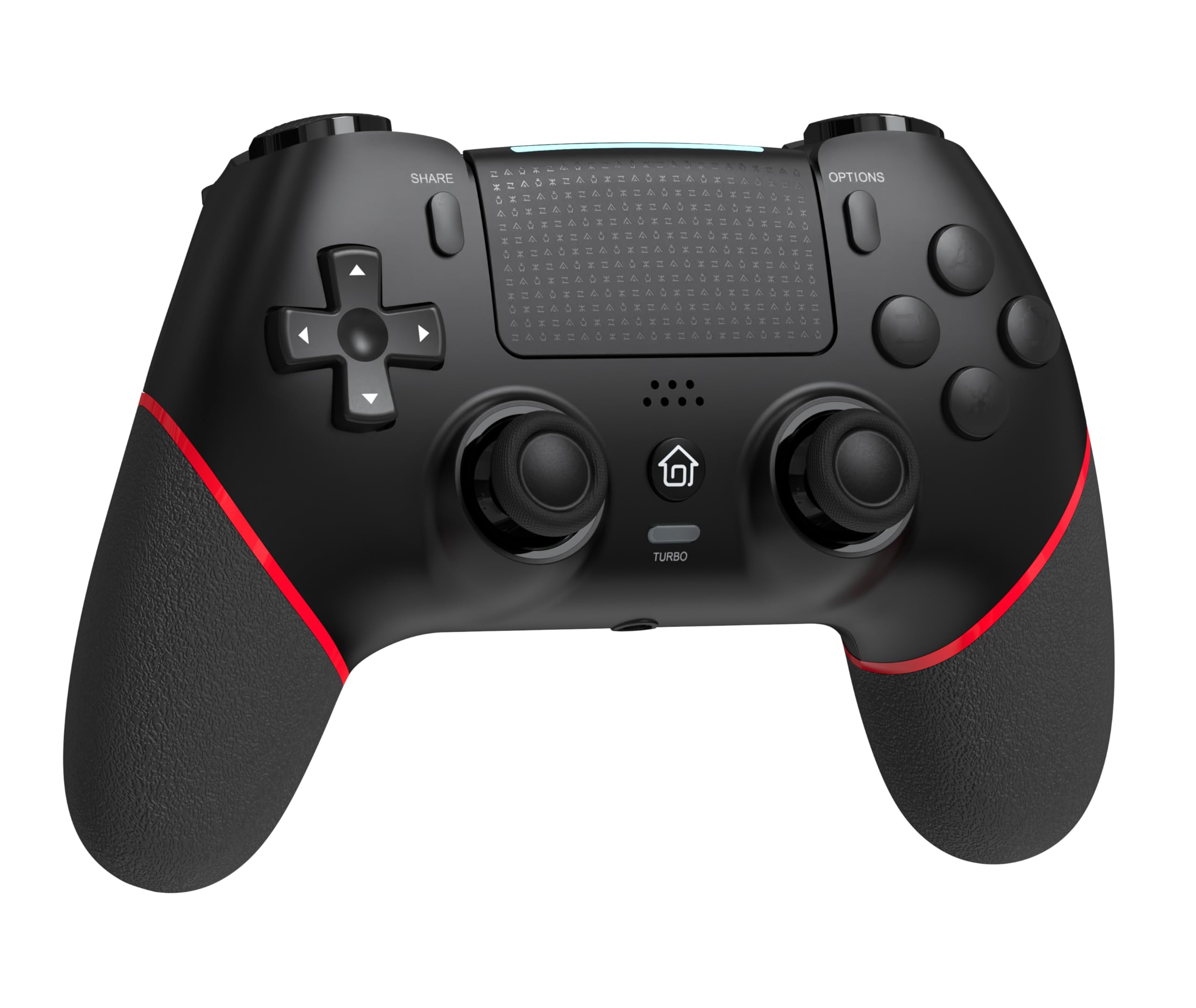
أمام view of the GAMFAMI TERIOS Wireless Controller, showing the joysticks, D-pad, action buttons, Share, Options, Home, and Turbo buttons, and the touchpad.
- لوحة الاتجاهات (D-Pad): للمدخلات الاتجاهية.
- أزرار الحركة (المثلث، الدائرة، الصليب، المربع): Standard PlayStation action buttons.
- العصي التناظرية اليسرى/اليمنى: For precise movement and camera control. Features Hall Effect technology.
- زر المشاركة: For sharing gameplay content.
- زر الخيارات: For in-game menus and options.
- PS Button (Home Button): To access the PS4 system menu.
- أزرار L1/R1: أزرار الكتف.
- أزرار L2/R2: مشغلات تناظرية.
- لوحة اللمس: Multi-touch input area.
- أزرار M1/M2: أزرار خلفية قابلة للبرمجة.
- زر توربو: تفعيل/إلغاء تفعيل وظيفة التوربو.
- مقبس سماعة الرأس 3.5 ملم: For connecting a compatible headset.
- منفذ USB-C: للشحن والاتصال السلكي.

خلف view of the controller, highlighting the M1 and M2 programmable buttons and product information.
الإعداد والاتصال
Pairing with PS4/PS4 Pro/PS4 Slim
- تأكد من تشغيل جهاز PS4 الخاص بك.
- Connect the controller to your PS4 console using the included USB charging cable.
- Press the PS button on the controller. The light bar will flash, indicating it is pairing.
- Once the light bar turns solid, the controller is successfully paired and ready for use.
- You can now disconnect the USB cable for wireless play.
Reconnecting to PS4
After initial pairing, simply press the PS button on the controller to reconnect wirelessly to your PS4 console.
تعليمات التشغيل
باستخدام وظيفة توربو
- اضغط مع الاستمرار على توربيني زر.
- بينما يحمل توربيني, press the action button (e.g., Cross, Circle, Square, Triangle, L1, R1, L2, R2) you wish to apply the turbo function to.
- Release both buttons. The selected action button will now rapidly repeat its input when held down.
- لتعطيل خاصية التيربو لزر معين، كرر العملية: اضغط باستمرار توربيني and press the turbo-enabled action button.
- To disable turbo for all buttons, press and hold the توربيني اضغط على الزر لمدة 5 ثوان.
Macro Programming (M1/M2 Buttons)
The M1 and M2 buttons on the back of the controller can be programmed to replicate other button inputs.
- اضغط مع الاستمرار على يشارك الزر و M1 or M2 button simultaneously for 3 seconds until the light bar flashes rapidly. This indicates macro programming mode.
- Press the button(s) you wish to map to M1 or M2 (e.g., X, O, Triangle, Square, Up, Down, Left, Right, L3, R3, L1, R1, L2, R2). You can map a single button or a sequence of buttons.
- اضغط على M1 or M2 button again to save the macro. The light bar will stop flashing rapidly and return to its normal state.
- To clear a macro, repeat step 1, then press the M1 or M2 button twice without pressing any other buttons.

Illustration of the advanced buttons and their programming capabilities.
الشحن وإدارة البطارية
The controller is equipped with a 1000mAh rechargeable battery.
شحن وحدة التحكم
- Connect the included USB charging cable to the USB-C port on the controller.
- Connect the other end of the cable to a USB port on your PS4 console (when powered on or in rest mode) or a compatible USB wall adapter (5V/1A recommended).
- The light bar on the controller will slowly pulse orange while charging.
- Once fully charged, the light bar will turn off.
مؤشر مستوى البطارية
The controller's light bar will indicate battery status. A low battery will cause the light bar to flash red. It is recommended to charge the controller when this occurs.
صيانة
- تنظيف: استخدم قطعة قماش ناعمة وجافة لتنظيف وحدة التحكم. لا تستخدم مواد كيميائية قاسية أو مواد كاشطة.
- تخزين: قم بتخزين وحدة التحكم في مكان بارد وجاف بعيدًا عن أشعة الشمس المباشرة ودرجات الحرارة القصوى.
- تجنب القطرات: حماية وحدة التحكم من السقوط والصدمات، والتي قد تؤدي إلى تلف المكونات الداخلية.
استكشاف الأخطاء وإصلاحها
| مشكلة | حل |
|---|---|
| لا يتم توصيل/إقران وحدة التحكم. |
|
| Controller experiences input lag or disconnection. |
|
| Joysticks exhibit drift. |

Illustration of Hall Effect joystick technology, designed to prevent drift. |
| لا يقوم جهاز التحكم بالشحن. |
|
تحديد
| اسم الموديل | تيريوس |
| ماركة | GAMFAMI |
| الأجهزة المتوافقة | PS4, PS4 Pro, PS4 Slim |
| نوع وحدة التحكم | لوحة الألعاب |
| تكنولوجيا الاتصال | بلوتوث (لاسلكي) |
| مصدر الطاقة | تعمل بالبطارية |
| سعة البطارية | 1000 مللي أمبير |
| وزن العنصر | 0.37 كيلوغرام |
| لون | اسود احمر |
الضمان والدعم
For warranty information and technical support, please refer to the documentation included with your purchase or visit the official GAMFAMI webالموقع. احتفظ بإيصال الشراء الخاص بك كإثبات للشراء في حالة وجود أي مطالبات بالضمان.
For further assistance, please contact GAMFAMI customer service through their official channels.